







An Hours Tracker can make a big difference when tracking employee hours starts becoming harder to manage. A small team may be easy to track with spreadsheets, emails, or manual notes, but once employees work different schedules, take PTO, work remotely, arrive late, leave early, or need overtime tracking, the process can quickly become confusing.

An hours tracker app helps businesses record work hours, attendance, breaks, overtime, and time off in one organized system. Instead of guessing who worked when, who was absent, or how many hours should be included in payroll, managers and HR teams can rely on clear records to make better decisions.
For small businesses, remote teams, hybrid companies, agencies, service teams, and growing organizations, an hours tracker app can improve visibility, reduce manual errors, and make workforce management easier.
In this guide, we will explain what an hours tracker app is, how it works, what features to look for, and how it can help you manage work hours, attendance, and PTO more accurately.
What Is an Hours Tracker App?
An hours tracker app is a digital tool that helps employees record the time they spend working. Depending on the system, employees may clock in and out, start a timer, enter hours manually, track project time, or record attendance from a mobile or desktop app.
A good hours tracker app does more than count hours. It helps businesses understand:
- When employees start and finish work
- How many hours each employee worked
- Whether employees were late or absent
- How much overtime was worked
- Which hours are billable or non billable
- How PTO, sick leave, and unpaid leave affect attendance
- Whether schedules match actual working time
This makes it useful for HR, managers, payroll teams, business owners, and employees themselves.
Why Businesses Need an Hours Tracker App
Manual hour tracking can work for a short time, but it often creates problems as the team grows. Employees may forget to update spreadsheets. Managers may approve hours without enough visibility. HR may spend too much time checking leave balances, attendance records, and payroll reports.
An hours tracker app helps solve these problems by creating one clear source of truth.
Better Accuracy
Manual time tracking often depends on memory. If employees write their hours at the end of the day or week, mistakes can happen. A digital hours tracker app helps record work time closer to when it happens, which makes the data more reliable.
Easier Payroll Preparation
Payroll depends on accurate work hours, overtime, unpaid leave, and attendance records. If these details are scattered across spreadsheets, emails, calendars, and chat messages, payroll can take longer and become more error prone.
An hours tracker app keeps work hours and attendance records organized, making payroll preparation easier.
Clear Attendance Visibility
Managers need to know who is working, who is absent, who is late, and who is on leave. Without a clear system, teams may become understaffed or confused about availability.
An hours tracker app gives managers better visibility into employee attendance and daily coverage.
PTO and Work Hours in One Place
Work hours and PTO are closely connected. If an employee is not working because they are on vacation, sick leave, or unpaid leave, that absence should be reflected in attendance records.
When PTO tracking is separate from attendance tracking, HR may need to compare multiple systems manually. A better approach is to connect work hours, attendance, and PTO in one system.
Better Planning for Managers
Managers can use tracked hours to understand workload, staffing needs, overtime patterns, and team availability. This helps them plan schedules, approve leave requests, and avoid coverage problems.
What an Hours Tracker App Should Track
A useful hours tracker app should support more than basic clock in clock out records. It should help businesses track the full picture of employee time.
| Time Tracking Area | Why It Matters |
|---|---|
| Work hours | Shows how much time employees actually worked |
| Clock-in and clock-out times | Helps track attendance and punctuality |
| Breaks | Keeps daily records more accurate |
| Overtime | Supports payroll and workload management |
| PTO | Explains approved time away from work |
| Sick leave | Helps HR separate illness-related absences |
| Unpaid leave | Prevents payroll confusion |
| Remote work hours | Supports distributed and hybrid teams |
| Project or task hours | Helps agencies and service teams track productivity |
| Attendance status | Shows who is present, absent, late, or on leave |
Hours Tracker App vs Manual Time Tracking
Many teams start with spreadsheets because they are free and familiar. But spreadsheets become harder to manage when multiple employees, managers, schedules, and leave types are involved.
| Manual Time Tracking | Hours Tracker App |
|---|---|
| Employees enter hours manually in spreadsheets | Employees track time digitally |
| HR checks records by hand | Reports can be generated faster |
| PTO may be tracked separately | PTO can be connected to attendance |
| Overtime calculations may be manual | Overtime visibility is easier |
| Errors are harder to find | Records are more organized |
| Managers may lack real-time visibility | Managers can see attendance faster |
| Hard to scale as the team grows | Easier to manage growing teams |
Manual tracking may seem simple at first, but it often creates hidden costs. HR spends more time checking records. Managers spend more time following up. Employees ask more questions about balances, hours, and approvals.
An hours tracker app reduces this friction by keeping time records clearer and easier to access.
How an Hours Tracker App Supports Attendance Management
Attendance management is not only about knowing who showed up. It is about understanding employee availability and making sure the team has enough coverage.
An hours tracker app can help track:
- Present employees
- Late arrivals
- Early departures
- Missed clock ins
- Absences
- Approved PTO
- Sick leave
- Unpaid leave
- Overtime
- Work from home days
This is especially useful for businesses with fixed schedules, flexible hours, rotating shifts, or hybrid teams.
For example, if an employee is absent, the system should make it clear whether they are on approved PTO, sick leave, unpaid leave, or simply missing without a recorded reason. This helps managers respond correctly and keeps HR records clean.
Why PTO Tracking Should Be Connected to Work Hours
PTO and work hours should not be managed as separate worlds. When an employee takes time off, it affects attendance, schedules, payroll, team capacity, and reporting.
If PTO is tracked in one place and work hours are tracked somewhere else, HR may need to manually compare both records. This can lead to mistakes such as:
- Deducting PTO incorrectly
- Counting approved leave as an absence
- Forgetting to update schedules
- Including unpaid leave in paid hours
- Missing overlapping leave requests
- Preparing inaccurate payroll reports
A better system connects PTO with attendance and work-hour records.
For example, if an employee has approved vacation from Monday to Wednesday, managers should see that absence in the team calendar. HR should see the leave type. Payroll should know whether the time is paid or unpaid. The employee should see the updated PTO balance.
This is where tools like Day Off can help. Day Off helps teams manage leave requests, PTO balances, approvals, and shared calendars, making it easier to keep time off organized alongside employee availability.
Key Features to Look for in an Hours Tracker App
Not every hours tracker app is built the same way. Some focus only on timers. Others focus on attendance, payroll, scheduling, or project tracking. Before choosing one, businesses should look for features that match their workflow.
Easy Clock In and Clock Out
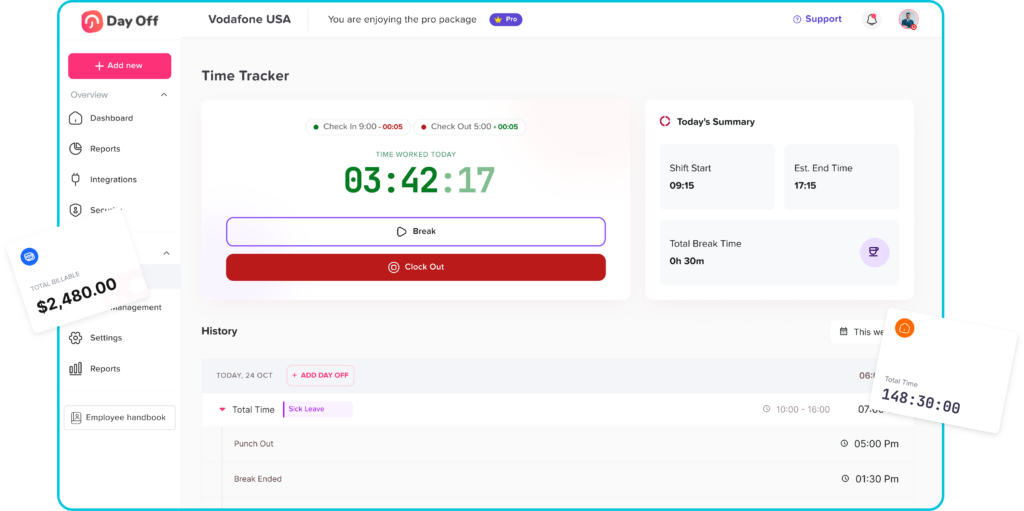
Employees should be able to record work time quickly. If the process is too complicated, adoption will be low. A good hours tracker app should make clocking in and out simple from desktop or mobile.
This is useful for in office teams, remote workers, field employees, and hybrid teams.
Manual Time Entry When Needed
Not every business wants strict real time tracking. Some teams prefer employees to enter hours manually at the end of the day. A good system should allow manual entries while keeping approval controls in place.
Manual entries are useful when employees forget to start a timer, work offline, or need to correct a record.
Attendance Reports
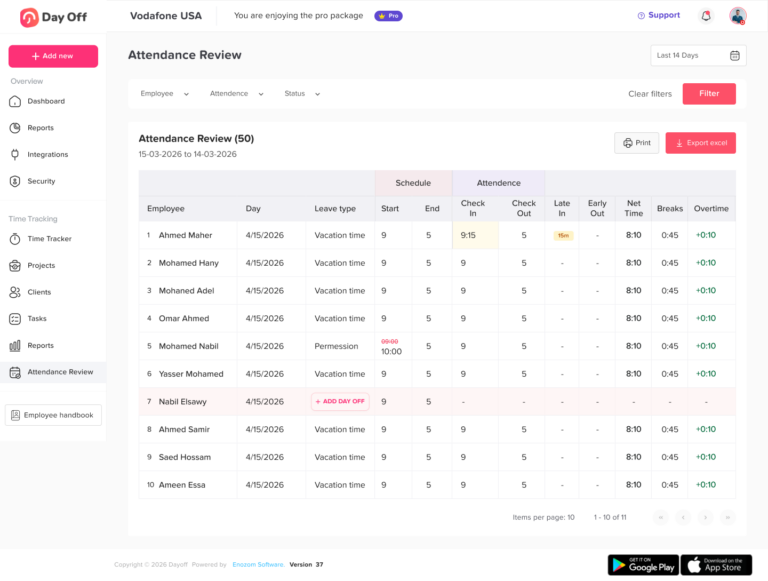
Managers and HR teams should be able to view attendance reports without building them manually. Reports may include total hours worked, late arrivals, absences, overtime, and time off.
Reports help businesses identify patterns and prepare records for payroll or management review.
PTO and Leave Management
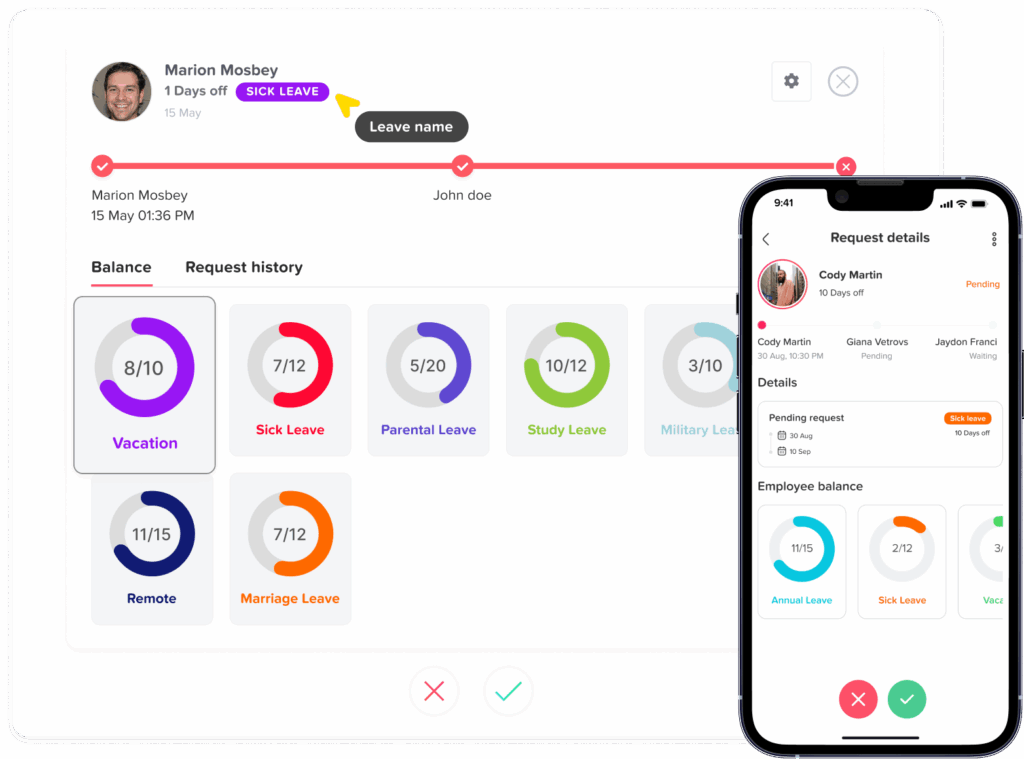
An hours tracker app becomes more useful when it connects with PTO tracking. Employees should be able to request time off, check balances, and view approved leave. Managers should be able to approve or reject requests based on team availability.
Leave types may include vacation, sick leave, unpaid leave, personal leave, maternity leave, paternity leave, or custom leave types.
Shared Team Calendar
A shared calendar helps everyone understand availability. Managers can see who is working and who is away. Employees can plan requests with better visibility. HR can avoid scheduling confusion.
This is especially useful for teams where overlapping leave can affect operations.
Overtime Tracking
Overtime can become expensive if it is not monitored. An hours tracker app should help managers see when employees work beyond scheduled hours.
This helps with payroll accuracy, workload planning, and early detection of burnout risks.
Break Tracking
Break tracking may be important for companies that need accurate daily records. Employees can record lunch breaks or rest breaks so total working time is calculated more clearly.
Approval Workflows
Time entries, overtime, and PTO requests may need manager approval. Approval workflows help keep records accurate and prevent unauthorized changes.
For example, employees may submit time entries, and managers can review them before payroll.
Mobile Access
Many teams do not work only from a desk. Mobile access is useful for field workers, remote employees, shift workers, and managers who need to approve requests quickly.
A mobile-friendly hours tracker app helps employees record time without waiting until they are back at a computer.
Integrations
Integrations can save time by connecting the hours tracker app with other tools. Useful integrations may include:
- Slack
- Microsoft Teams
- Google Calendar
- Outlook Calendar
- Payroll tools
- HR systems
- Project management platforms
For example, when PTO is approved, the employee’s absence can appear on a shared calendar. This improves visibility without manual updates.
Best Practices for Using an Hours Tracker App
Buying an app is not enough. To get the best results, businesses should set clear rules and make the process easy for employees.
Define What Must Be Tracked
Decide whether employees need to track clock-in and clock-out times, total hours, project hours, breaks, overtime, or PTO. Avoid tracking unnecessary details that do not support a business need.
Create a Clear Time Tracking Policy
Employees should know when to clock in, when to clock out, how to report breaks, how to fix mistakes, and who approves time entries.
A clear policy prevents confusion and reduces disputes.
Connect PTO With Attendance
Approved PTO should be visible in attendance records and team calendars. This prevents approved leave from being mistaken for an unplanned absence.
Review Reports Regularly
Do not wait until payroll day to check records. Managers should review attendance, overtime, and missing entries regularly.
Train Employees
Even simple tools need a short onboarding process. Employees should understand how to use the app, where to check balances, and how to submit corrections.
Keep the System Simple
A complicated process can reduce adoption. The easier it is to track hours, request PTO, and review records, the more likely employees are to use the system correctly.
How Day Off Helps with PTO and Employee Availability
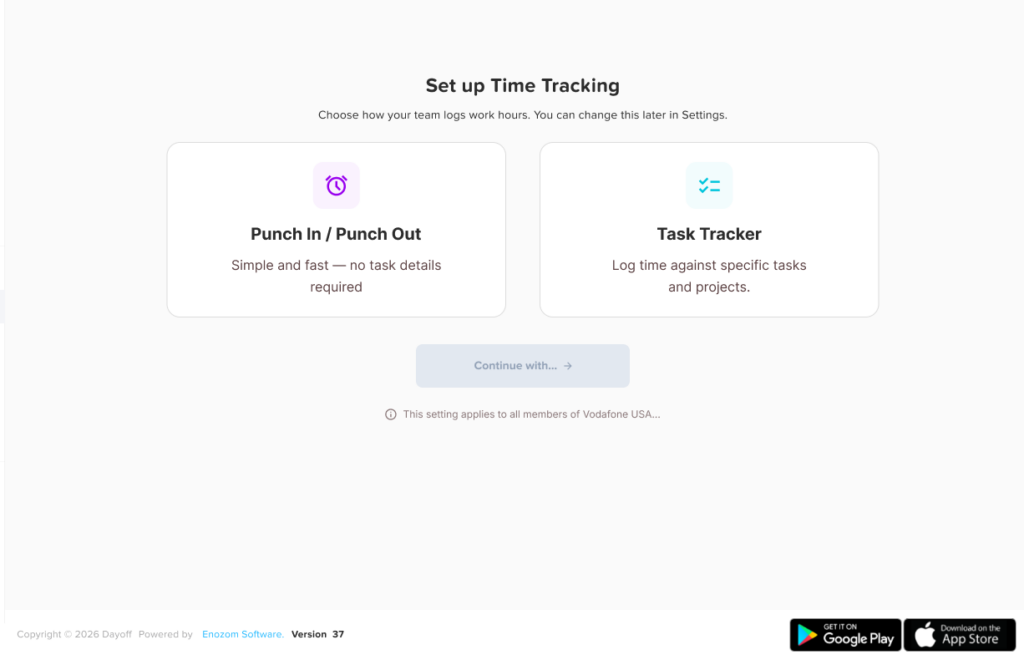
While an hours tracker app helps record work time, PTO management is just as important for accurate attendance and workforce planning. Day Off helps teams manage leave requests, PTO balances, approval workflows, and team calendars in one place.
With Day Off, employees can request time off, managers can review availability before approving requests, and HR can keep leave records organized. Approved leave can be visible on shared calendars, helping teams avoid confusion around employee availability.
Day Off can support businesses that want better control over vacation leave, sick leave, unpaid leave, public holidays, team calendars, and approval workflows.
For companies that are tracking work hours, attendance, and PTO, using a dedicated leave management system like Day Off can make the process clearer and easier to manage.
How to Implement an Hours Tracker App Successfully
A smooth rollout helps employees and managers use the app correctly from the beginning.
Step 1: Review Your Current Process
Start by identifying how your team currently tracks hours, attendance, and PTO. Look for problems such as missing entries, payroll mistakes, unclear approvals, or scattered leave requests.
Step 2: Decide What You Need
List the features your business needs. This may include clock-in and clock-out, PTO tracking, attendance reports, overtime tracking, approvals, mobile access, or calendar integrations.
Step 3: Set Clear Rules
Create simple rules for how employees should track hours, request leave, report absences, and correct mistakes.
Step 4: Train Managers First
Managers should understand how to review entries, approve requests, check availability, and use reports before employees start using the system.
Step 5: Launch with a Small Group
If possible, test the system with one team first. This helps you find questions or process issues before rolling it out to the full company.
Step 6: Review and Improve
After the first few weeks, review how the system is working. Check whether employees are using it correctly, whether reports are useful, and whether managers need any adjustments.
Signs Your Business Needs an Hours Tracker App
You may need an hours tracker app if:
- Employees submit hours late
- PTO requests are handled by email or chat
- Managers do not know who is available
- HR manually updates leave balances
- Payroll preparation takes too long
- Overtime is hard to monitor
- Attendance records are scattered
- Employees often ask about PTO balances
- Team calendars are not updated
- You rely heavily on spreadsheets
- Remote or hybrid work is difficult to track
If several of these problems sound familiar, a digital hours tracker app can help your team move away from manual tracking.
FAQ
What is an hours tracker app?
An hours tracker app is a digital tool that helps employees record work hours, attendance, breaks, overtime, and sometimes project time. It helps managers and HR teams keep accurate records.
Why is an hours tracker app important?
It helps businesses reduce manual errors, improve payroll accuracy, monitor attendance, track overtime, and understand employee availability.
Can an hours tracker app track PTO?
Some hours tracker apps include PTO tracking, while others need to connect with a leave management system. PTO tracking is important because approved time off affects attendance and payroll.
Is an hours tracker app useful for remote teams?
Yes. Remote and hybrid teams can use an hours tracker app to record work hours, manage availability, and create clearer communication around schedules and time off.
What features should I look for in an hours tracker app?
Look for clock-in and clock-out, manual time entries, attendance reports, PTO tracking, approval workflows, overtime tracking, mobile access, and calendar integrations.
How does PTO affect work hours?
When an employee takes approved PTO, they are not working but may still be paid depending on company policy. Tracking PTO separately helps avoid payroll and attendance mistakes.
Can small businesses use an hours tracker app?
Yes. Small businesses can benefit from an hours tracker app because it reduces manual work, keeps records organized, and helps managers plan schedules more clearly.
What is the difference between attendance tracking and hours tracking?
Hours tracking records how much time employees worked. Attendance tracking shows whether employees were present, absent, late, or on leave. Many businesses need both.
How can Day Off help with time off tracking?
Day Off helps businesses manage PTO requests, leave balances, approval workflows, and shared calendars. This helps teams keep employee time off organized and visible.
Is an hours tracker app better than spreadsheets?
For growing teams, yes. Spreadsheets can work for very small teams, but an hours tracker app is usually easier to manage, more accurate, and better for reporting.
Final Thoughts
An hours tracker app is more than a tool for counting work hours. It helps businesses manage attendance, PTO, overtime, employee availability, and payroll records with more accuracy and less manual effort.
The best system should be simple for employees, useful for managers, and reliable for HR. It should help your team understand who is working, who is away, how many hours were worked, and how time off affects schedules and payroll.
For growing businesses, connecting work hours with PTO and attendance is one of the best ways to reduce confusion and improve daily workforce management.
If your team still depends on spreadsheets, email requests, or manual updates, it may be time to move to a better system. A clear hours tracker app, combined with organized PTO management through a tool like Day Off, can help your business save time, reduce errors, and keep employee records easier to manage.