







An employee requests five vacation days. Their manager approves the request in the PTO app, the absence appears in Google Calendar, payroll receives 40 paid-leave hours, and the HRIS displays the employee’s remaining balance.
A week later, the employee cancels two of those days.
The PTO app restores 16 hours. The calendar removes the events. Payroll, however, has already processed the full 40 hours, and the HRIS still shows the old balance.
Which record is correct?
This is the problem a clear HR system source of truth is designed to solve.
Many companies try to choose one platform as the master system for everything. They assume the HRIS should control every employee record, payroll should control anything related to pay, or the PTO app should control every absence-related field.

In practice, no single system should usually own every piece of HR data.
A more reliable approach is to assign ownership by field and process:
- The HRIS owns the employee’s identity and employment relationship.
- The PTO app owns leave rules, requests, approvals, and balance calculations.
- The timekeeping system owns actual hours worked.
- The payroll platform owns finalized wage and tax results.
- Calendars and collaboration tools display synchronized information but do not become official HR records.
This article explains how to build that model, decide which platform controls each field, resolve conflicts, and create a clear path from an employee’s leave request to their final paycheck.
The Core Rule: One Field, One Owner
A source of truth is the system whose value is considered authoritative when the same information appears in several places.
For example, an employee’s department may appear in:
- The HRIS
- Payroll
- The PTO app
- The company directory
- Slack
- Reporting dashboards
That does not mean all six systems should have equal authority to change it.
The organization should choose one owner. If the HRIS owns the employee’s department, the other systems receive and display that value. When the department changes, HR updates it in the HRIS and the integration distributes the new information.
The same principle applies to PTO.
If the PTO app calculates accruals, processes requests, restores cancelled leave, and records manual adjustments, it should normally own the employee’s PTO balance. Payroll may receive the approved number of paid hours, but it should not independently recalculate the balance unless payroll is intentionally responsible for the entire leave calculation.
A reliable data model follows one simple rule:
Each important field or transaction should have one authoritative owner, even when several systems display a copy.
Why One Master HR System Is Usually Not Enough
Companies often refer to the HRIS as their “single source of truth.” That description can be useful for employee master data, but it becomes misleading when applied to every HR process.
An HRIS may be excellent at maintaining:
- Employee names
- Hire dates
- Departments
- Positions
- Locations
- Managers
- Employment classifications
- Termination dates
It may not be the best platform for calculating:
- Weekly or biweekly PTO accruals
- Carryover expiry
- Negative balances
- Requests that cross reset dates
- Multi-level approvals
- Partial-day deductions
- Rotating-shift leave
- PTO payout values
- Overtime
- Tax withholding
Similarly, payroll may calculate wages correctly without offering the detailed approval history, team calendar, policy assignment, or future-balance visibility required for leave management.
The goal should not be to force every process into one platform. The goal should be to make specialized systems work together without competing over the same data.
The Recommended Source-of-Truth Map
The following model works for many organizations, although the exact ownership may change depending on where calculations are performed.
| Data or Process | Recommended Owner | Reason |
|---|---|---|
| Employee ID | HRIS | Provides one stable identifier across the employment lifecycle |
| Legal and preferred name | HRIS | HR controls verified employee identity information |
| Hire and termination dates | HRIS | These dates affect eligibility, service, access, and final processing |
| Employment status | HRIS | Determines whether the employee is active, inactive, or separated |
| Department, team, and manager | HRIS | Organizational structure should originate in one place |
| Work location | HRIS | May affect leave rules, holidays, payroll, and legal requirements |
| Work schedule | Scheduling or timekeeping system | Reflects expected working days and hours |
| Time punches and breaks | Timekeeping system | Records actual attendance and hours worked |
| PTO policy assignment | PTO app | Determines which leave rules apply |
| Leave entitlement and accrual | PTO app | Created by the assigned leave policy |
| PTO requests and approvals | PTO app | Preserves the complete request lifecycle |
| Current PTO balance | PTO app | Reflects accruals, usage, adjustments, carryover, and expiry |
| FMLA and medical documentation | Restricted leave record | Requires controlled access and confidentiality |
| Pay rate and wage calculations | Payroll | Used to calculate employee compensation |
| Taxes and payroll deductions | Payroll | Payroll is authoritative for the processed result |
| Gross and net pay | Payroll | Represents what the employee was actually paid |
| Shared calendar event | Derived from the PTO app | Provides visibility but is not the official leave record |
This is a field-level source-of-truth model. The HRIS may remain the central employee platform, but it is not expected to perform calculations that belong in another specialized system.
Start With the Employee Record
Every connected HR workflow begins with a reliable employee identity.
The employee should have one stable identifier that is shared across the HRIS, PTO platform, payroll system, time tracker, and reporting tools.
Names and email addresses are not reliable enough to serve as the only matching field because they can change. Employees may:
- Change their legal name
- Use a preferred name
- Receive a new company email
- Transfer to another business entity
- Return after termination
- Have the same name as another employee
A stable employee ID helps the systems recognize that the same person is involved even when other profile details change.
Where should the employee ID originate?
The employee ID should normally be created in the HRIS because the HRIS manages the employee’s complete lifecycle from hire through termination or rehire.
Once created, the ID should be sent to the other systems and retained in every related transaction.
A PTO request, for example, should be connected to:
- The employee ID
- A unique request ID
- A leave type
- A policy
- Approval records
- A balance transaction
- A payroll export where applicable
Without these identifiers, resolving duplicate or missing records becomes much more difficult.
The HRIS Owns Who the Employee Is
The HRIS should generally be the source of truth for core employee information.
This includes:
- Employee ID
- Legal name
- Preferred name
- Hire date
- Termination date
- Department
- Job title
- Work location
- Employment classification
- Manager
- Active or inactive status
These fields describe the employment relationship and often determine how other platforms should behave.
Example: An employee changes location
Suppose an employee transfers from the company’s New York office to its California office.
That one change may affect:
- The leave policy
- The statutory sick leave setup
- The holiday calendar
- Payroll taxation
- Approval routing
- Benefits eligibility
- Reporting groups
The location change should begin in the HRIS. The PTO app and payroll platform then receive the new location and apply the appropriate downstream rules.
The receiving systems should not independently maintain conflicting location values.
The PTO App Owns Why and When the Employee Is Away
A dedicated PTO application should generally own the complete leave-management process.
This includes:
- Leave types
- Eligibility
- Annual allowances
- Accrual frequencies
- Waiting periods
- Carryover
- Balance expiry
- Accrual caps
- Negative balances
- Blackout dates
- Request notice periods
- Approval workflows
- Request status
- Balance deductions
- Cancellations
- Manual adjustments
The PTO app should be able to explain not only the employee’s current balance but also how that balance was calculated.
A PTO balance is the outcome of multiple transactions:
Opening balance + accruals + grants + restored leave + approved adjustments − used leave − expired leave = current balance
A system that stores only the final number without preserving the transactions behind it is not a strong system of record.
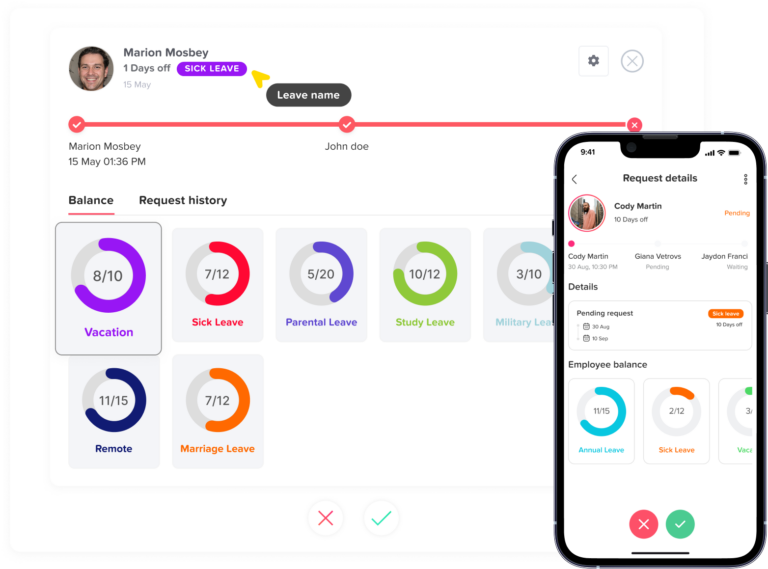
Example: A cancelled request
An employee has 80 vacation hours and submits a request for 16 hours.
After approval:
80 − 16 = 64 hours
The employee later cancels the request.
The PTO app should:
- Change the request status.
- Restore the 16 hours.
- Return the balance to 80 hours.
- Record who cancelled the request and when.
- Notify connected payroll, attendance, and calendar systems.
The app should preserve the original approval and cancellation rather than deleting the request as though it never existed.
Payroll Owns What the Employee Was Paid
Payroll should normally be the source of truth for finalized compensation.
It owns:
- Pay rates
- Regular wages
- Overtime
- Bonuses
- Commissions
- Payroll deductions
- Tax withholding
- Gross pay
- Net pay
- Payroll corrections
- Final payments
The PTO app may tell payroll that an employee has eight approved vacation hours. Payroll then determines how those hours affect the employee’s pay.
The PTO system owns the approved leave transaction. Payroll owns the wage result.
Federal recordkeeping requirements allow employers to use different systems and timekeeping methods, provided the required records are complete and accurate. Covered employers generally must preserve payroll records for at least three years and records used to calculate wages, such as timecards and work schedules, for at least two years.
The IRS also requires employers to retain employment tax records for at least four years. These records include wage payments, employment dates, tax deposits, withholding certificates, and certain records related to payments during sickness or injury.
These requirements do not force employers to use one software product. They do require the company to maintain accurate, accessible records across its chosen systems.
The Timekeeping System Owns What the Employee Worked
PTO records and work records should be connected, but they are not the same.
The timekeeping system should normally own:
- Clock-in time
- Clock-out time
- Break records
- Worked hours
- Late arrivals
- Early departures
- Overtime inputs
- Missed-punch corrections
The PTO app owns the approved absence. The timekeeping system owns the attendance record.
Example
An employee is scheduled for eight hours and has four hours of approved PTO in the afternoon.
The final day may contain:
- Four hours actually worked
- Four approved PTO hours
- Eight total paid hours
The timekeeping system confirms the four worked hours. The PTO application confirms the four leave hours. Payroll combines the approved inputs and produces the wage result.
No single source should silently replace the others.
Calendars Are Displays, Not HR Records
Google Calendar, Outlook, Slack, and Microsoft Teams are useful for showing team availability.
They may display:
- Approved absence dates
- General “out of office” status
- Upcoming holidays
- Request notifications
- Daily team availability
They should not become the authoritative record for:
- PTO balances
- Policy eligibility
- Approval history
- Supporting documents
- Payroll deductions
- Leave cancellations
A manager manually deleting a calendar event should not restore an employee’s PTO. Similarly, manually creating an “out of office” event should not create an approved leave request.
Calendar and collaboration records should be regenerated from the PTO app when synchronization problems occur.
Follow the Leave Transaction From Request to Pay
The easiest way to understand system ownership is to follow one request through the complete process.
Stage 1: The employee record is created
HR creates the employee in the HRIS.
The HRIS provides:
- Employee ID
- Hire date
- Location
- Department
- Manager
- Employment status
These details are sent to the PTO app and payroll.
Stage 2: The PTO policy is assigned
The PTO app uses the employee’s location, classification, team, or other approved criteria to assign the appropriate policy.
The policy determines:
- Annual entitlement
- Accrual schedule
- Waiting period
- Carryover
- Approval route
- Negative balance limit
- Request rules
Stage 3: The employee requests leave
The employee submits the dates, leave type, and any required information through the PTO app.
The system calculates the requested amount using the employee’s work schedule and current balance.
Stage 4: The manager approves the request
The PTO app records:
- Approver
- Approval date
- Request dates
- Duration
- Leave type
- Balance before approval
- Deduction
- Balance after approval
Stage 5: Connected tools receive the result
The approved request may be sent to:
- Payroll
- Timekeeping
- Google or Outlook Calendar
- Slack
- Microsoft Teams
- Workforce-planning reports
These systems receive the result. They do not become the owner of the request.
Stage 6: Payroll processes the absence
Payroll applies the appropriate:
- Leave code
- Paid or unpaid status
- Pay rate
- Deductions
- Taxes
Payroll then records what the employee was paid.
Stage 7: The systems reconcile
The PTO app should show the approved balance deduction. Payroll should show the corresponding paid or unpaid hours.
If the numbers differ, HR and payroll should investigate the transaction rather than manually changing both totals until they appear to match.
What Happens When Systems Disagree?
Conflicting records should be resolved according to documented ownership, not according to which value is higher, lower, or most convenient.
| Conflict | Likely Source of Truth | What to Review |
|---|---|---|
| HRIS shows one manager and PTO app shows another | HRIS | Reporting-line effective date and failed synchronization |
| PTO app shows 72 hours and payroll shows 64 | Depends on who calculates accruals | Duplicate deduction, missing cancellation, outdated export, or manual adjustment |
| HRIS and payroll show different termination dates | HRIS for employment date | Whether payroll is showing the payment date instead |
| Calendar shows leave but PTO app does not | PTO app | Manual calendar event or outdated synchronized event |
| PTO request is approved but timekeeping shows absence without leave | PTO app and timekeeping | Missing integration or incorrect employee ID |
| Payroll paid PTO but the balance was not reduced | PTO app | Missing import or payroll transaction entered outside the normal process |
| PTO balance changed without a request | PTO app | Accrual, expiry, carryover, policy reassignment, or manual adjustment |
Correct the source, not every copy
Suppose the manager is wrong in the PTO app because an integration failed.
The long-term solution is not to change the manager manually in the PTO app and leave the HRIS unchanged. The company should:
- Verify the correct manager in the HRIS.
- Confirm the effective date.
- Repair or rerun the synchronization.
- Remove any unnecessary local override.
- Review requests routed during the error period.
Fixing only the receiving system creates another conflict the next time the integration runs.
When Payroll Can Own the PTO Balance
A dedicated PTO application does not always have to own the balance.
Payroll may be the source of truth when it performs the complete calculation, including:
- Accrual generation
- Leave usage
- Carryover
- Expiration
- Balance adjustments
- Employee statements
In that setup, the PTO app may function mainly as a request and approval interface.
The important question is:
Which system performs the calculation and preserves the transaction history?
If payroll calculates and stores every balance transaction, payroll may own the balance.
If the PTO app performs those functions and sends only approved paid-leave hours to payroll, the PTO app should own the balance.
The company should not allow both platforms to calculate the same balance independently.
Avoid the Double-Deduction Problem
One of the most common integration failures occurs when two systems treat the same request as a new balance transaction.
For example:
- The employee requests eight hours.
- The PTO app deducts eight hours after approval.
- Payroll imports the eight-hour transaction.
- Payroll sends the transaction back to the PTO app.
- The PTO app deducts another eight hours.
The employee loses 16 hours for one absence.
This can be prevented by using:
- Unique request IDs
- Unique payroll transaction IDs
- Clear transaction types
- Processing confirmations
- Duplicate detection
- Idempotent integrations
An idempotent integration can receive the same transaction more than once without applying it repeatedly.
If request PTO-1048 has already been processed, receiving it again should update or confirm the existing record rather than create another deduction.
Effective Dates Matter as Much as the Values
HR information often changes on a future date.
Examples include:
- Promotion effective September 1
- Location transfer effective October 1
- Part-time schedule effective November 15
- Termination effective December 31
- New PTO policy effective January 1
The integration should preserve:
- The date the change was entered
- The date the change becomes effective
Without effective dates, a future change can alter the wrong balance period.
Example: Full-time to part-time change
An employee’s classification changes on October 15.
The HRIS should send:
- Old classification
- New classification
- Effective date
The PTO app can then apply the approved policy rule from October 15 without silently recalculating leave earned before that date.
The same principle applies to manager, schedule, location, and seniority changes.
New Hires: Where the Data Journey Begins
A reliable new-hire workflow should begin in the HRIS.
- HR creates the employee.
- The HRIS assigns an employee ID.
- HR enters the hire date, manager, department, location, and classification.
- The record is sent to the PTO app.
- The PTO app assigns the correct leave policy and holiday calendar.
- Payroll receives the employee record.
- The scheduling system receives the expected work pattern.
- Access begins on the approved date.
- HR verifies the opening balance or first accrual.
The account-creation date should not automatically become the employee’s hire date or accrual date.
The PTO app should apply the actual policy rules, including any waiting period or first-accrual date.
Transfers: When One Employee Record Changes Several Systems
An employee transfer can trigger multiple downstream changes.
Department transfer
The HRIS updates the department and manager.
The PTO app updates:
- Approval routing
- Team calendar
- Reporting group
Location transfer
The HRIS updates the location.
The PTO app may update:
- Leave policy
- Holiday calendar
- Statutory leave configuration
Payroll may need to review:
- Tax withholding
- Wage requirements
- Pay frequency
Schedule transfer
The scheduling system updates the employee’s work pattern.
The PTO app uses the new schedule to calculate future leave deductions.
Historical requests should not be rewritten unless HR approves a documented correction.
Terminations: The Most Important Ownership Test
Termination is where unclear data ownership can cause final-pay and recordkeeping errors.
A reliable termination workflow should separate the responsibilities.
HRIS responsibilities
The HRIS owns:
- Termination date
- Employment status
- Reason category where recorded
- Rehire eligibility where used
PTO app responsibilities
The PTO app owns:
- Accrual stop date under the policy
- Future request review
- Final available balance
- Unused leave history
- Negative balance
- Payout-eligible balance where configured
Payroll responsibilities
Payroll owns:
- Final wage calculation
- Approved PTO payout
- Deductions where lawful
- Taxes
- Final payment record
The employee should usually be deactivated rather than deleted from the leave system when deletion would remove request, balance, or approval history.
Federal and tax recordkeeping periods also make preservation important. Payroll records generally must be retained for at least three years under the FLSA, and employment tax records generally must be retained for at least four years under IRS guidance.
Medical and Protected Leave Need Separate Controls
Ordinary vacation records may be visible to managers for staffing purposes. Medical information requires more restricted handling.
A company may need to store:
- Leave dates
- FMLA eligibility notices
- Designation notices
- Medical certifications
- Accommodation documents
- Benefit-payment records
- Intermittent-leave usage
These records should not automatically be synchronized to every connected platform.
Payroll may need to know that an absence is paid or unpaid. A manager may need to know when the employee is unavailable. A calendar may need to show a general absence.
None of those systems necessarily needs the employee’s diagnosis or complete medical certification.
The company should use the minimum information necessary for each purpose and keep confidential medical records in appropriately restricted storage.
Build a Data Contract Between the Systems
A data contract is a written agreement describing how information moves between platforms.
It should define:
- Field name
- Business meaning
- Source system
- Receiving system
- Data format
- Effective-date rules
- Update frequency
- Required identifiers
- Error handling
- Correction process
- Retention responsibility
Example
Field: Manager ID
Owner: HRIS
Receiver: PTO app
Direction: One way
Update trigger: Approved reporting-line change
Effective-date rule: Apply on the stated effective date
Correction rule: Correct in HRIS and resynchronize
Local editing: Restricted
A data contract prevents technical teams and HR teams from interpreting the same field differently.
One-Way and Two-Way Integrations
Not every integration should be fully bidirectional.
One-way synchronization
One system sends a field to another.
Example: HRIS sends work location to the PTO app.
The PTO app should not send an independently edited location back.
Controlled two-way communication
Both systems exchange information, but they do not have equal ownership of every field.
Example:
- PTO app sends approved leave hours to payroll.
- Payroll returns a processing confirmation.
- Payroll does not recalculate or overwrite the employee’s PTO balance.
- The PTO app does not overwrite finalized wages.
This is safer than unrestricted two-way synchronization.
A Practical Implementation Plan
Organizations do not need to replace every HR platform to establish clear data ownership.
They can begin by documenting what already exists.
Phase 1: Map the systems
List every platform containing employee information:
- HRIS
- Payroll
- PTO software
- Timekeeping
- Scheduling
- Benefits
- Calendars
- Slack or Microsoft Teams
- Reporting tools
- Spreadsheets
Phase 2: Inventory shared fields
Identify fields that appear in more than one platform:
- Employee ID
- Name
- Manager
- Department
- Location
- Schedule
- Leave balance
- Approval status
- Pay code
- Termination date
Phase 3: Assign one owner
For every field, identify:
- Source system
- Business owner
- Technical owner
- Authorized editors
Phase 4: Document the direction
Record whether the field moves:
- HRIS to PTO
- PTO to payroll
- Scheduling to PTO
- PTO to calendars
- Payroll back to PTO as a confirmation
Phase 5: Restrict conflicting edits
Users should not be able to permanently change synchronized fields in receiving systems without an approved exception process.
Phase 6: Test real employee scenarios
Test more than the initial employee import.
Use scenarios such as:
- New hire
- Manager change
- Location transfer
- Full-time to part-time change
- Approved PTO
- Cancelled PTO
- Retroactive request
- Schedule change
- Termination
- Rehire
Phase 7: Reconcile before payroll
Compare approved leave against payroll inputs before the payroll period closes.
Phase 8: Monitor failures
Every rejected or failed transaction should have:
- Error reason
- Assigned owner
- Date detected
- Resolution status
- Retry history
Source-of-Truth Implementation Checklist
| Area | Questions to Resolve |
|---|---|
| Identity | Is one stable employee ID used in every system? |
| HR master data | Where are hire dates, managers, departments, and locations changed? |
| Schedules | Which platform controls expected working days and hours? |
| Leave policies | Which system applies eligibility, accrual, carryover, and expiry rules? |
| Requests | Where is the official approval and cancellation history stored? |
| Balances | Which system calculates the official current PTO balance? |
| Attendance | Which system owns punches, breaks, and worked hours? |
| Payroll | Which system owns wages, taxes, deductions, and net pay? |
| Protected leave | Where are confidential records stored? |
| Synchronization | Does every shared field have a documented direction? |
| Effective dates | Can future changes be entered without applying them early? |
| Duplicates | Can the same transaction be received safely more than once? |
| Corrections | Are errors corrected in the source system? |
| Failures | Is there a visible queue for rejected transactions? |
| Reconciliation | Are PTO, timekeeping, and payroll compared regularly? |
| Access | Are editing, approval, export, and document permissions separated? |
| Retention | Can the company preserve required records after termination? |
| Ownership | Is there a named business and technical owner for each domain? |
How Day Off Fits Into This Model
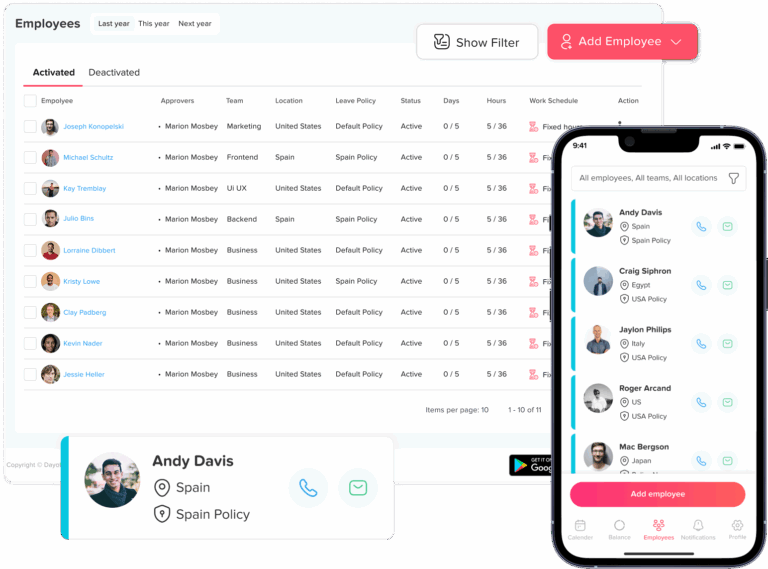
Day Off can operate as the source of truth for employee leave management.
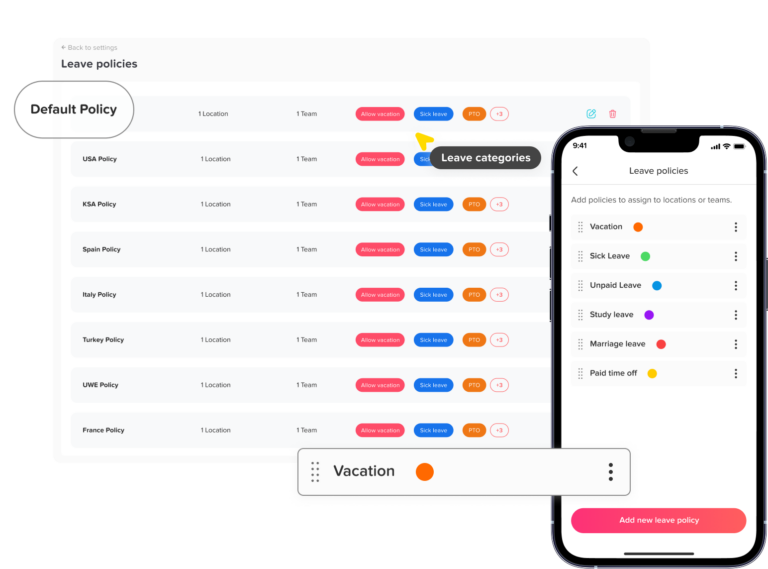
The platform can centralize:
- Leave policies
- Custom leave types
- Employee balances
- Accruals
- Carryover
- Requests
- Approval workflows
- Request changes
- Team availability
- Leave reports
Day Off’s official API documentation states that organizations can access and manage employee records, leave requests, and balances programmatically, helping them synchronize leave information with other tools.
Its reporting and request-management features also provide details such as request types, duration, dates, status, employee balances, used leave, policy assignments, and upcoming accrual information.
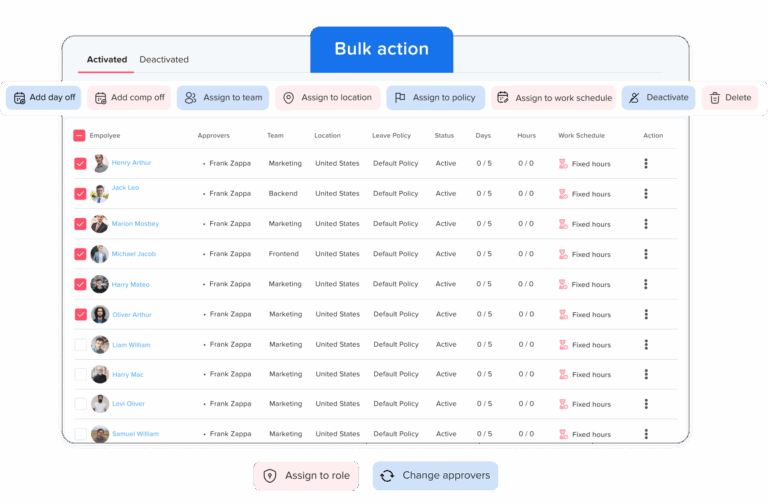
A common Day Off integration model would be:
- HRIS sends employee identity, manager, team, location, and status to Day Off.
- Day Off applies the appropriate leave policy.
- Employees submit PTO requests in Day Off or through an available integration.
- Managers approve or reject requests.
- Day Off updates the employee’s balance.
- Approved leave is shared with calendars, attendance, or payroll tools.
- Payroll processes the resulting paid or unpaid hours.
- Payroll returns a processing confirmation where required.
- Day Off remains authoritative for the leave request and balance.
- Payroll remains authoritative for the wage result.
Day Off should not replace the HRIS as the owner of legal employee identity or replace payroll as the owner of tax and net-pay records.
Its role is to own and organize the leave-management domain.
Frequently Asked Questions About HRIS, Payroll, and PTO Systems
What is a source of truth in HR?
A source of truth is the system that contains the authoritative value for a specific type of employee information.
For example, a company may treat:
- The HRIS as the source of truth for employee identity and employment status
- The PTO app as the source of truth for leave requests and balances
- The timekeeping system as the source of truth for hours worked
- Payroll as the source of truth for wages, deductions, taxes, and net pay
The purpose is to prevent several platforms from independently changing the same information.
Should HRIS or payroll be the source of truth?
It depends on the data being reviewed.
The HRIS should normally be the source of truth for employee master data, including:
- Employee ID
- Legal name
- Hire date
- Department
- Manager
- Work location
- Employment classification
- Employment status
Payroll should normally be the source of truth for:
- Pay rates
- Gross wages
- Tax withholding
- Payroll deductions
- Net pay
- Final payroll results
An HRIS manages the broader employee lifecycle, while payroll focuses on compensation and payroll compliance.
Is an HRIS the same as payroll software?
No. An HRIS and payroll system may share employee information, but they serve different purposes.
An HRIS is primarily used to manage employee records and HR processes such as onboarding, job changes, organizational structure, benefits, documents, and time off.
Payroll software calculates wages, deductions, taxes, and employee payments.
Some platforms combine HRIS and payroll features, but the company should still define which module owns each field and calculation.
Can payroll software be used as an HRIS?
Basic payroll software may store employee names, contact details, pay rates, and tax information. This may be sufficient for a very small company with simple HR requirements.
As the company grows, payroll may not provide enough support for:
- Organizational changes
- Employee documents
- Multiple leave policies
- Advanced approval workflows
- Performance management
- Benefits administration
- Detailed employee reporting
- Custom access permissions
The decision should be based on the company’s processes rather than the number of tools it wants to avoid.
Can a company have more than one source of truth?
Yes. Most companies need more than one source of truth because HR, leave, timekeeping, benefits, and payroll are separate data areas.
The company should not have two authoritative systems for the same field. However, it can have different authoritative systems for different fields.
For example:
- HRIS owns the employee’s manager.
- Scheduling software owns the employee’s shifts.
- The PTO app owns the leave balance.
- Payroll owns the final wage payment.
This is often called a field-level or domain-level source-of-truth model.
Which system should store PTO balances?
The system that calculates and preserves the PTO transactions should normally own the official balance.
A dedicated PTO app should usually own the balance when it manages:
- Annual entitlements
- Accruals
- Carryover
- Expiration
- Approved requests
- Request cancellations
- Negative balances
- Manual adjustments
- Balance resets
Payroll may own the PTO balance when payroll performs all of these calculations and maintains the complete leave history.
The same balance should not be calculated independently in both systems.
Why is an employee’s PTO balance different in payroll and the HR system?
A PTO balance may differ because of:
- A request that was imported twice
- A cancelled request that was restored in only one system
- A missing accrual
- An outdated payroll export
- A manual adjustment
- A carryover or expiration transaction
- An incorrect policy assignment
- A failed integration
- Different effective dates
- Payroll displaying processed leave rather than the current available balance
HR should compare the transactions behind each total instead of manually replacing one balance with the other.
Which system should own the employee’s hire date?
The HRIS should normally own the official hire date.
The hire date may affect:
- PTO eligibility
- Waiting periods
- Accrual start dates
- Seniority
- Benefits
- Probation
- Service awards
- Reporting
Connected PTO and payroll systems should receive the hire date from the HRIS rather than maintaining separate versions.
Which system should own the employee’s manager?
The HRIS should normally own the official reporting relationship.
The PTO app should receive that manager assignment and use it to route leave requests. When the employee changes manager, HR should update the HRIS first and allow the integration to update the approval workflow.
A permanent manager correction should not be made only in the PTO app unless the company has deliberately assigned ownership there.
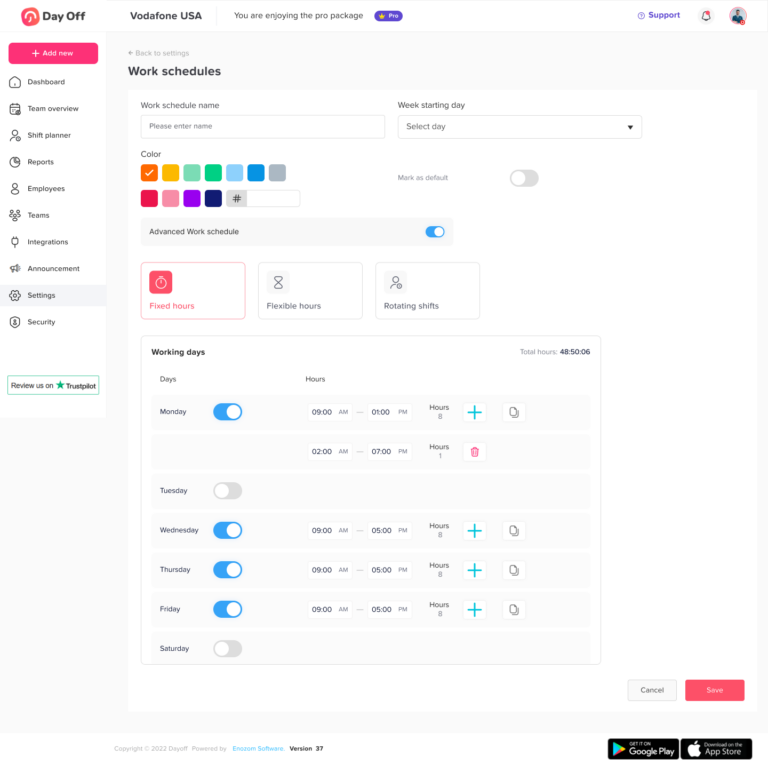
Which system should own employee work schedules?
A scheduling or timekeeping platform should usually own variable, rotating, or shift-based schedules.
The HRIS may be sufficient for simple fixed schedules, such as Monday through Friday.
The PTO app should receive the schedule required to calculate:
- Working days
- Full-day leave hours
- Partial-day deductions
- Nonscheduled days
- Overnight shifts
Only one system should be allowed to make authoritative schedule changes.
Should approved PTO come from the HRIS or PTO app?
Approved PTO should come from the system that manages the complete request and approval process.
When a PTO app records the request, approval, leave type, dates, duration, and balance deduction, it should be the source of truth for the approved absence.
The HRIS, payroll, calendars, and timekeeping systems may receive the approved transaction, but they should not create separate competing versions of it.
Should a PTO app integrate with payroll?
Yes, when the integration reduces manual data entry and sends accurate approved leave information to payroll.
A PTO-to-payroll integration may send:
- Employee ID
- Request ID
- Leave type
- Payroll leave code
- Approved hours
- Paid or unpaid status
- Request dates
- Cancellation or correction status
Day Off’s API provides access to employee records, leave requests, and balances so leave information can be synchronized with other business systems.
Should HRIS and payroll integrations be one-way or two-way?
The best approach depends on the field.
Employee master data may flow one way:
HRIS → payroll
Leave transactions may use controlled two-way communication:
PTO app → payroll → processing confirmation
Two-way communication should not allow both systems to overwrite the same field freely. One system should remain the owner, while the other confirms processing or reports an error.
How often should HRIS, payroll, and PTO systems sync?
The frequency should match the business process.
Possible schedules include:
- Near real time for new hires, terminations, and approved requests
- Daily for employee-profile changes
- Before every payroll run for approved paid and unpaid leave
- On demand for urgent corrections
- Monthly or quarterly for full balance reconciliation
Critical changes, such as terminations or cancelled leave that has already reached payroll, should not wait for an infrequent batch synchronization.
What should HR do when HRIS and payroll records do not match?
HR should first identify which system owns the disputed field.
The recommended process is:
- Confirm the authoritative system.
- Review the employee ID.
- Check the effective date.
- Compare the transaction history.
- Identify any failed or duplicate synchronization.
- Correct the authoritative source.
- Resend or synchronize the corrected value.
- Preserve the original and corrected records.
Changing both systems independently can hide the original cause and allow the mismatch to return.
Where should an HR data error be corrected?
An error should normally be corrected in the system that owns the field.
Examples include:
- Incorrect manager: correct the HRIS
- Incorrect work shift: correct the scheduling system
- Incorrect PTO deduction: correct the PTO app
- Incorrect tax withholding: correct payroll
The receiving systems should then be updated through the normal integration or an approved correction process.
How can companies prevent PTO from being deducted twice?
Each leave transaction should have a unique request ID.
The receiving system should recognize when that transaction has already been processed. Resending the same request should confirm or update the existing record rather than create another deduction.
Companies should also distinguish among:
- New requests
- Updated requests
- Cancellations
- Payroll confirmations
- Balance adjustments
Payroll should not send an approved leave transaction back to the PTO app as though it were a second new request.
Is Google Calendar or Outlook a PTO system of record?
No. A shared calendar can display that an employee is unavailable, but it usually does not preserve:
- Leave eligibility
- Employee balances
- Approval history
- Accrual calculations
- Carryover
- Request changes
- Payroll treatment
- Supporting documents
If a calendar event and the PTO app disagree, the approved request in the PTO app should normally control.
Can Slack or Microsoft Teams be the source of truth for PTO?
Slack and Microsoft Teams can provide convenient ways to submit requests, receive notifications, or view team availability.
They should not normally become the authoritative leave record. The request should still be recorded in the connected PTO system, where the policy, approval, and balance calculation are maintained.
Where should FMLA and medical leave documents be stored?
Medical certifications and related FMLA documents should be kept as confidential medical records, separate from ordinary personnel files.
They should not be broadly synchronized to payroll notes, shared calendars, manager dashboards, Slack, or Microsoft Teams.
Managers and connected systems should receive only the information necessary for scheduling, pay, benefits, or leave administration.
Should payroll store the reason an employee is on leave?
Payroll usually needs to know:
- Whether the absence is paid or unpaid
- The number of hours
- The correct payroll code
- The applicable pay period
It does not always need the employee’s detailed medical condition or personal reason.
Sensitive information should be limited according to role and business need.
What happens when PTO is cancelled after payroll has processed it?
The company may need two connected corrections:
- The PTO app restores the employee’s leave balance.
- Payroll corrects the wage or leave-code transaction if necessary.
The original request, approval, payroll processing, cancellation, and correction should remain visible in the audit history.
Restoring the PTO balance alone does not automatically correct a closed payroll period.
Which system should calculate unused PTO at termination?
The PTO app should normally calculate the employee’s final unused balance when it owns accruals, usage, carryover, expiration, and adjustments.
Payroll should then apply the approved payout rules, pay rate, deductions, and taxes.
The HRIS should provide the official termination date, which may determine when accrual stops and which requests need to be reviewed.
What employee records should be kept after termination?
Employers should preserve the records required for payroll, wage calculations, leave administration, taxes, audits, disputes, and possible rehire calculations.
Under federal wage rules, payroll records generally should be retained for at least three years, while records used to calculate wages generally should be retained for two years. State and other federal requirements may require longer retention.
Deactivating an employee is often safer than deleting the entire record when deletion would remove required history.
Can a spreadsheet be the source of truth for HR or PTO?
A spreadsheet may work temporarily for a small organization with simple policies.
However, the company needs controls for:
- File ownership
- Access permissions
- Version history
- Formula protection
- Backups
- Manual adjustments
- Employee matching
- Request approvals
- Audit history
As the workforce, number of locations, or leave rules grow, a dedicated PTO or HR system is usually easier to maintain consistently.
How often should a company review its HR source-of-truth model?
The model should be reviewed at least annually and whenever the company:
- Changes HRIS or payroll providers
- Introduces a PTO app
- Adds a new integration
- Opens a new location
- Changes leave policies
- Acquires another company
- Introduces time tracking
- Changes employee identifiers
- Experiences repeated data conflicts
The review should confirm that every important field still has one business owner, one technical owner, and one authoritative system.
Conclusion
An HRIS, payroll platform, and PTO app should not all compete to control the same employee data. Each system should own the information it is best designed to manage.
The HRIS should usually be the source of truth for employee identity, status, manager, department, location, and employment dates. The PTO app should manage leave policies, requests, approvals, accruals, carryover, and balances. Timekeeping software should record actual hours worked, while payroll should remain authoritative for wages, deductions, taxes, and final payments.
When these responsibilities are clearly defined, companies can reduce duplicate records, incorrect balances, payroll errors, and failed integrations. Every important field should have one owner, one correction process, and a documented direction for synchronization.
Day Off can serve as the source of truth for leave management while sharing approved absence data with HRIS, payroll, calendar, and collaboration tools. The most reliable setup is not one system doing everything, but a connected HR environment where every platform has a clear role.
Related reading: Time-Off API: How to Connect PTO With HR, Payroll and Calendar Tools