


Day Off Knowledge Base
-
Employees
- Can I request leave for past dates?
- How can I check my leave balance?
- How can I check the status of my request?
- How do I change my password?
- How do I check public holidays and weekends?
- How do I update my personal information?
- How do I upload or update my profile picture?
- How do I view my leave history?
Print
How can I check my leave balance?
Keeping track of your leave balance helps you understand how many days you have available for each leave type, allowing you to plan your time off more effectively and avoid any surprises when submitting requests.
To check your leave balance on the web:
- Go to “My requests”
From your dashboard, click on My requests. This section is your central hub for managing leave, where you can view all your requests as well as access important information about your available balances. - View your leave balances
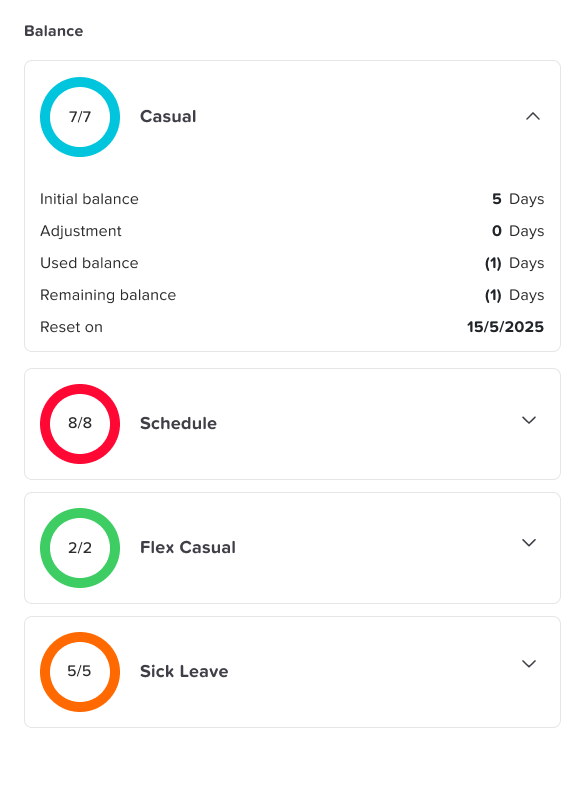
On the right-hand side of the screen, you’ll find a summary of your leave balances organized by leave type (such as vacation, sick leave, etc.). This section provides a quick and clear overview of how many days you currently have available for each category.
- Understand your balance at a glance
Each leave type displays its remaining balance, helping you quickly assess whether you have enough days available before submitting a new request. This is especially useful when planning upcoming time off. - Click on a leave type for detailed information
Select any leave type to open a more detailed view. Here, you can see a breakdown of your balance, including used days, remaining balance, and any accruals or adjustments. This helps you better understand how your balance is calculated and updated over time.
To check your leave balance on mobile:
- Open the main menu
From the bottom of the screen, tap on the menu icon to open the main navigation menu. This gives you access to all key sections of the app, including your leave information. - Go to “Balance”
Tap on Balance to open the section dedicated to your leave balances. This page is designed to give you a clear and organized view of all your leave types.
- View your leave balances
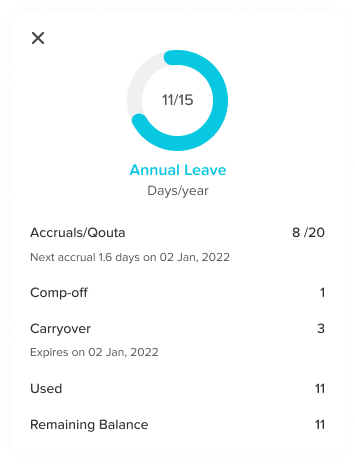
You’ll see a list of all your leave types along with the available balance for each one. This allows you to quickly check how many days you have left without needing to navigate through multiple screens. - Tap on a leave type for more details
Select any leave type to view a detailed breakdown. This includes information such as how many days you’ve used, any pending requests, and how your balance has changed over time.
If you have any questions about your leave balance or notice anything that doesn’t look correct, please reach out to your HR administrator for assistance.
Regularly checking your leave balance helps you stay informed, avoid unexpected issues when submitting requests, and plan your time off with confidence.
On this page