





-
Requests
- Can employees edit or delete an approved request?
- Can employees edit/delete a pending request?
- How can an admin edit/delete a request of an employee?
- How can I add a day off request for an employee?
- How can I request a half day?
- How can I request comp/time off?
- How can I request hourly leave?
- How do I submit a leave request?
- What is a comp off request?
Want to submit a leave request in Day Off? It is quick and simple, whether you’re using the web or mobile app.
Steps to Submit a Request
To request time off:
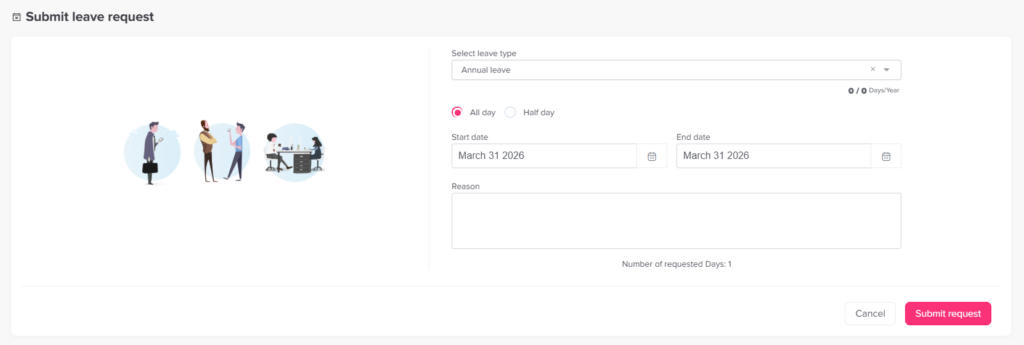
- Open the Day Off web app
- Click “+ Add new” at the top of the left-hand menu
- Click on “Request day off”
- Select the leave type (e.g., vacation, sick leave)
- Choose the start and end date
- Add a reason (optional)
- Click Submit Request
What Happens Next
- Your request is sent to the assigned approver(s)
- It goes through the approval workflow (Step 1 → Step 2, if configured)
- You’ll receive a notification once it’s approved or rejected
If the leave type auto approval, the request will be accepted instantly.
Web & Mobile
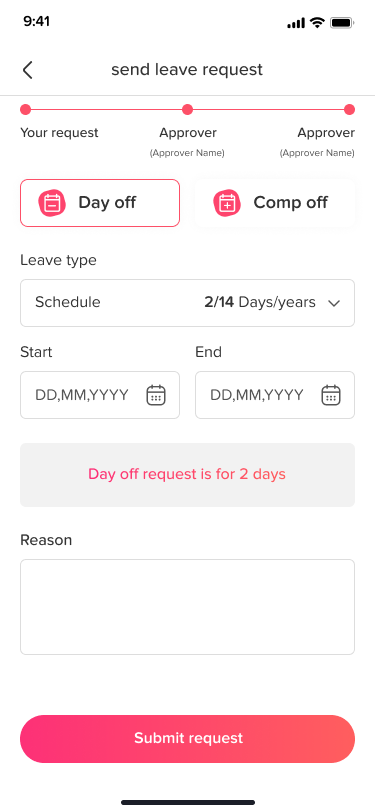
- You can submit requests from both the web version and mobile app
- The process is the same and fully synced


Tips Before You Submit a Leave Request
- Check your leave balance first, so you know how many days you have left.
- Look at the company calendar to see if teammates are already away.
- Pick the correct leave type, such as vacation or sick leave.
- Add a short reason when it helps your approver decide faster.
- Submit as early as you can, especially for longer trips.
After You Send It
Once your request is on its way, you can follow its progress at any time. Planning ahead also makes things easier for everyone. Your manager can plan team coverage, and you can enjoy your time off without worry.
Frequently Asked Questions
Is adding a reason required? No. The reason field is optional, but a short note can help your approver.
Why can’t I submit my request? Your leave policy may require a notice period. In that case, you need to request time off far enough in advance. Learn more about notice periods for leave requests.
Can I use my phone? Yes. The process is the same on the mobile app, and everything stays in sync.