







Managing employee leave should not feel like solving a puzzle every week. Time Off Tracking helps businesses organize PTO, vacation days, sick leave, personal leave, unpaid leave, and other absences in one clear system. Instead of relying on scattered emails, spreadsheets, chat messages, or manual calendars, companies can use time off tracking software to keep requests, approvals, balances, and schedules accurate and easy to manage.

For small teams, manual tracking may seem manageable at first. A manager can approve a vacation request in an email, update a spreadsheet, and remind payroll later. But as the team grows, this process becomes harder to control. Employees need to know how much leave they have left. Managers need to avoid overlapping absences. HR needs clean records. Business owners need visibility into staffing and productivity.
That is where the right time off tracking software makes a real difference.
The best solution does more than record who is away. It creates a smooth leave management process from request to approval, helps prevent confusion, supports company policies, and gives everyone better visibility. But with many tools available, how do you know which features actually matter?
This guide explains what to look for in time off tracking software, which features are essential, and how to choose a system that fits your team today and can grow with your business later.
What Is Time Off Tracking Software?
Time off tracking software is a digital tool that helps companies manage employee leave requests, approvals, balances, calendars, policies, and reports. It replaces manual methods such as spreadsheets, paper forms, emails, and chat based approvals.
A good system helps teams answer important questions quickly:
- Who is off today?
- How many PTO days does an employee have left?
- Has this leave request been approved?
- Will this absence affect team coverage?
- Which manager needs to review the request?
- How much sick leave, vacation leave, or unpaid leave has been used?
- Are leave records ready for payroll or HR review?
Instead of keeping this information in different places, time off tracking software centralizes it so employees, managers, and HR teams can work from the same accurate source.
Why Time Off Tracking Matters for Modern Teams
Time off is not just an HR task. It affects scheduling, payroll, employee experience, team coverage, workload planning, and company culture.
When leave tracking is unclear, problems start to appear:
- Employees are unsure how much PTO they have available.
- Managers approve overlapping requests without realizing it.
- HR spends too much time fixing missing or incorrect records.
- Payroll may receive incomplete absence data.
- Teams become understaffed during busy periods.
- Employees lose trust when leave balances feel inaccurate.
Clear time off tracking helps prevent these issues. It gives employees confidence, helps managers plan ahead, and allows HR to manage leave fairly and consistently.
For growing teams, the right software can turn leave management from a stressful admin task into a simple, organized workflow.
Key Features to Look for in Time Off Tracking Software
Not every time off tracking tool offers the same value. Some tools only provide a basic calendar. Others include advanced policies, approval workflows, reports, integrations, and mobile access.
Here are the most important features to look for.
Easy Leave Request Process
The first feature to review is how simple it is for employees to request time off.
Employees should not need to send emails, message managers, or search through a complicated system just to request a vacation day. A good time off tracking tool should make the process fast and clear.
Look for software that allows employees to:
- Select the type of leave they want to request.
- Choose full-day, half-day, or multi-day leave.
- Add a reason or note if needed.
- See their available balance before submitting.
- Submit the request from desktop or mobile.
- Receive confirmation once the request is sent.
The easier the request process is, the more likely employees will use the system correctly. This reduces missed requests, informal approvals, and last-minute confusion.
Clear Approval Workflows
Approvals are one of the most important parts of leave management. If the approval process is unclear, requests can get delayed, forgotten, or approved by the wrong person.
A strong time off tracking system should let companies define approval workflows based on their structure.
For example:
- A team member submits a request to their direct manager.
- A department manager reviews leave for their team.
- HR has final visibility or override access.
- Some leave types may require special approval.
- Larger companies may use two-level approval workflows.
Approval workflows help keep the process consistent and fair. They also create a clear record of who approved each request and when.
This is especially helpful for companies with multiple teams, locations, or departments.
Real Time Leave Balances
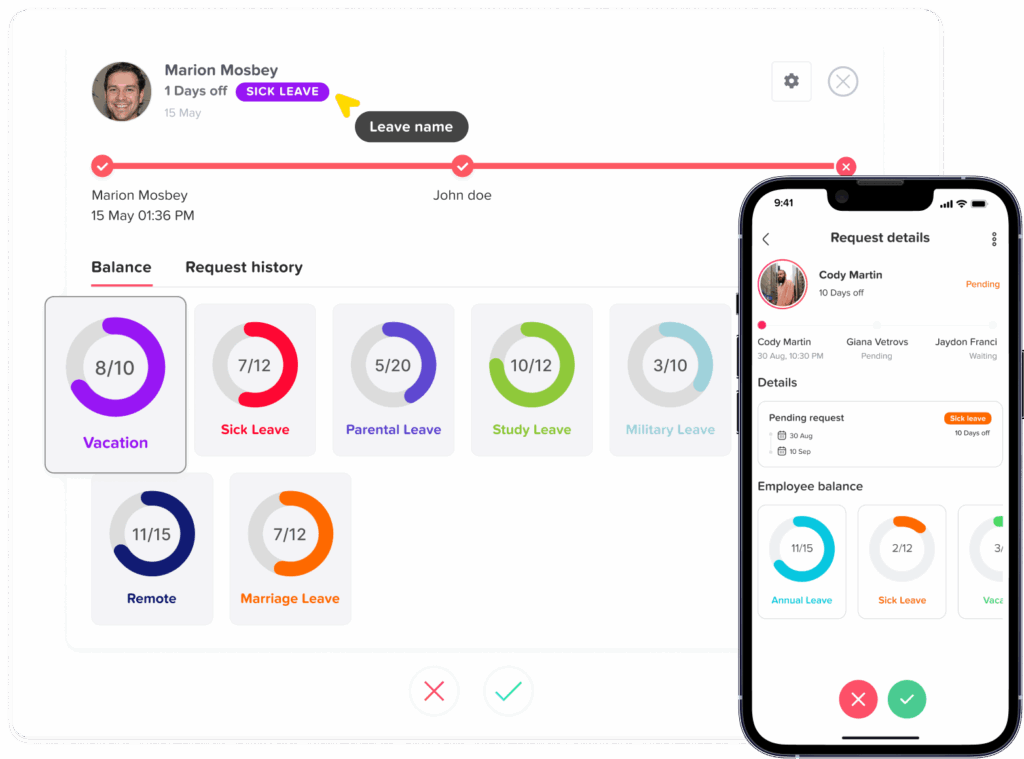
Employees should always know how much leave they have available. Without real-time balances, they may request more time than they have or constantly ask HR for updates.
Good time off tracking software should automatically update leave balances after requests are approved or used.
It should show:
- Available PTO balance
- Used leave
- Pending requests
- Remaining leave
- Carryover leave
- Leave by type, such as vacation, sick, unpaid, or personal leave
Real-time balances improve transparency. Employees can plan better, managers can review requests faster, and HR does not need to manually calculate every update.
Custom Leave Types
Every company handles time off differently. Some businesses only track vacation and sick leave. Others need multiple categories, such as:
- Annual leave
- Sick leave
- Personal leave
- Unpaid leave
- Maternity leave
- Paternity leave
- Bereavement leave
- Study leave
- Compensatory leave
- Floating holidays
- Half day leave
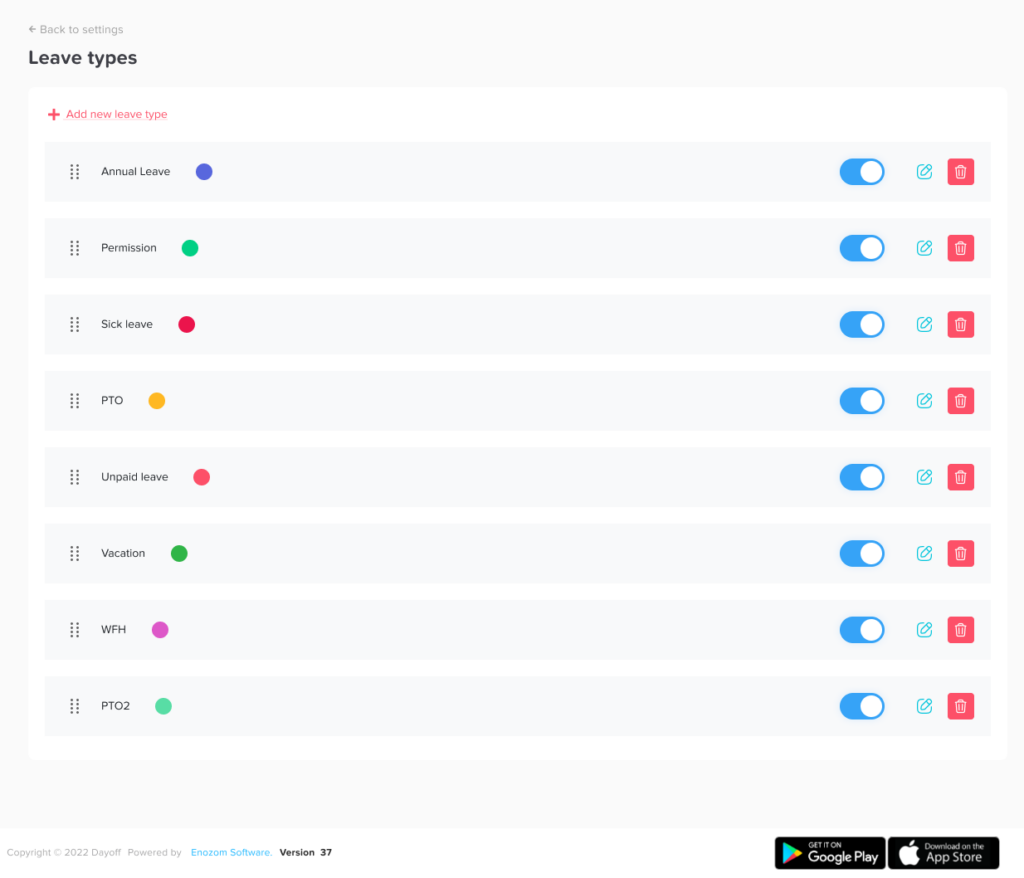
Your software should allow you to create and customize leave types based on your company policy.
This matters because not all leave should be handled the same way. Sick leave may not require the same approval rules as vacation leave. Unpaid leave may need to be reported differently. Maternity or paternity leave may follow separate policies.
Custom leave types help make your time off tracking more accurate and easier to manage.
Shared Team Calendar
A shared leave calendar is one of the most useful features in time off tracking software.
Managers need to see who is away before approving new requests. Employees may also need visibility into team availability so they can plan around important dates.
A shared calendar helps teams avoid:
- Too many people off at the same time
- Scheduling meetings when key employees are away
- Understaffing during peak business periods
- Confusion about approved absences
- Last minute coverage issues
The calendar should be simple, visual, and easy to filter by team, department, location, or leave type.
For example, a manager should be able to quickly check if two support agents are already off before approving another request. HR should be able to see company wide leave trends. Employees should be able to view relevant team absences without needing access to private details.
Policy Management and Accrual Rules
Time off policies can become complex, especially when companies offer different rules for different employees.
Your software should support flexible leave policies, including:
- Annual PTO allowance
- Monthly or yearly accruals
- Carryover rules
- Maximum balance limits
- Probation period rules
- Leave expiry dates
- Different policies by team, location, or role
- Custom reset dates
- Employee anniversary-based resets
This is important because a spreadsheet may not handle policy rules accurately as your company grows.
For example, full-time employees may receive 20 days of PTO per year, while part-time employees accrue leave based on hours worked. Employees in different countries or states may follow different leave requirements. Some companies allow unused leave to carry over, while others reset balances at the start of the year.
A strong time off tracking system should reduce manual calculations and help keep policies consistent.
Mobile Access
Employees do not always request time off while sitting at a desk. Field workers, retail employees, restaurant staff, healthcare teams, and remote employees may need to request leave from their phones.
Mobile access allows employees to:
- Request time off anytime
- Check leave balances
- View approval status
- Receive notifications
- See upcoming absences
- Contact managers if needed
For managers, mobile access makes it easier to approve or reject requests quickly instead of delaying decisions until they are back at a computer.
A time off tracking tool should be convenient for the way your team actually works.
Integrations With Work Tools
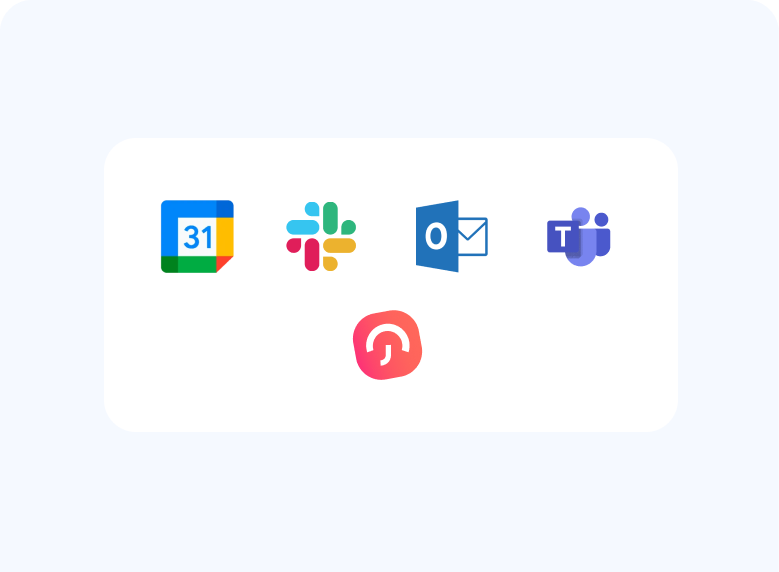
The best time off tracking software connects with the tools your team already uses.
Helpful integrations may include:
- Slack
- Microsoft Teams
- Google Calendar
- Outlook Calendar
Calendar integrations are especially valuable because approved leave can appear automatically in the team calendar. Communication integrations also make the request and approval process smoother.
For example, if your team works in Slack or Microsoft Teams every day, employees may prefer to submit or receive leave updates there. If managers rely on Google Calendar or Outlook, approved absences should sync automatically so they can plan meetings and coverage more easily.
Reports and Export Options
Time off data becomes more valuable when you can review it clearly.
A strong system should include reports that show:
- Leave used by employee
- Leave used by department
- Remaining balances
- Leave trends
- Absence frequency
- Pending requests
- Approved leave history
- Sick leave usage
- Unpaid leave records
- Monthly or yearly summaries
Reports help HR and managers identify patterns and make better decisions.
For example, if one department often has overlapping leave requests, managers may need better coverage planning. If sick leave spikes during certain months, HR may need to review workload, wellness, or staffing needs.
Export options are also useful for payroll, audits, or internal records. Look for tools that allow exporting data in common formats such as CSV or Excel.
Role Based Permissions
Not everyone should have the same level of access to employee leave data.
Good time off tracking software should include role based permissions, such as:
- Employees can view their own balances and requests.
- Managers can review requests for their team.
- HR can manage policies and reports.
- Admins can configure company settings.
- Payroll users can access approved leave records.
Permissions protect sensitive information and keep the system organized.
This is especially important for companies with multiple managers, branches, or departments. A manager may need to view their own team’s leave but not the entire company’s records.
Holiday and Company Calendar Support
Public holidays and company holidays affect leave balances and request calculations. If an employee requests vacation during a week that includes a public holiday, the system should calculate the leave days correctly.
Look for software that supports:
- Public holiday calendars
- Custom company holidays
- Regional holiday rules
- Multiple country or location calendars
- Holiday exclusions from PTO calculations
- Company wide days off
This feature is valuable for companies with employees in different locations. It prevents incorrect deductions and helps employees understand how holidays affect their time off.
Support for Different Teams and Locations
As businesses grow, leave tracking becomes more complex. A company may have different teams, departments, branches, countries, or work schedules.
A strong time off tracking tool should allow you to organize employees by:
- Team
- Department
- Location
- Role
- Policy group
- Manager
This makes it easier to apply the right policies, view relevant calendars, and generate useful reports.
For example, a retail business may need to track leave by store location. A remote company may need different holiday calendars by country. A restaurant group may need managers to approve leave for specific branches.
Simple Employee Self Service
Employee self service is one of the biggest benefits of time off tracking software.
Instead of asking HR basic questions, employees can find answers themselves.
They should be able to check:
- How many days they have left
- Which requests are pending
- Which requests were approved
- Upcoming leave dates
- Company holidays
- Leave policy details
- Team availability, when allowed
This saves time for HR and gives employees more confidence in the process.
A self service system also improves the employee experience because people do not have to wait for manual updates.
Clean User Experience
A software tool may have many features, but if it is hard to use, employees will avoid it.
The best time off tracking software should be:
- Easy to navigate
- Visually clear
- Fast to use
- Simple for managers
- Friendly for employees
- Organized for HR
- Easy to set up
- Clear on desktop and mobile
Before choosing a tool, test the experience from three perspectives:
- Employee: Is requesting time off simple?
- Manager: Is approving requests fast and clear?
- HR/Admin: Are policies, calendars, and reports easy to manage?
A clean user experience increases adoption and reduces training time.
Feature Checklist for Time Off Tracking Software
| Feature | Why It Matters | What to Look For |
|---|---|---|
| Leave requests | Makes PTO requests easier to manage | Simple request form, notes, half-day options |
| Approval workflows | Keeps approvals consistent | Manager approval, HR visibility, multi-level approval |
| Leave balances | Improves transparency | Real-time available, used, pending, and remaining balances |
| Shared calendar | Prevents staffing gaps | Team, department, and location views |
| Custom policies | Supports company rules | Accruals, carryover, reset dates, leave limits |
| Notifications | Reduces delays | Email, app, Slack, or Teams alerts |
| Reports | Helps HR review leave trends | Usage, balances, history, exports |
| Integrations | Connects with daily tools | Calendar, Slack, Teams, payroll, HR tools |
Manual Tracking vs Time Off Tracking Software
| Area | Manual Tracking | Time Off Tracking Software |
|---|---|---|
| Requests | Sent by email, chat, or paper | Submitted in one system |
| Approvals | Can be missed or delayed | Routed to the right manager |
| Balances | Manually calculated | Updated automatically |
| Calendar visibility | Often limited or outdated | Shared and real-time |
| Reports | Time-consuming to prepare | Generated quickly |
| Accuracy | Higher risk of errors | More consistent records |
| Employee access | Employees must ask HR | Employees can check balances themselves |
| Scalability | Harder as the team grows | Easier to manage across teams |
Advanced Features That Add Extra Value
Once the basics are covered, some advanced features can make leave management even better.
Look for tools that offer:
- Two level approvals: Useful when both managers and HR need to review requests.
- Blockout dates: Prevents employees from requesting leave during critical business periods.
- Custom leave reset rules: Helps companies reset leave balances by calendar year, specific month, or employee anniversary.
- Multiple leave policies: Useful for full time, part time, remote, contract, or location based employees.
- Audit history: Shows changes made to requests, balances, or policies.
- Single Sign On: Allows employees to log in securely with company accounts.
- API access: Helps connect leave data with internal systems.
- Custom domains: Creates a branded experience for employees.
- Multi language support: Helpful for international teams.
These features may not be necessary for every company at the beginning, but they become valuable as your leave process becomes more structured.
How Time Off Tracking Improves Employee Experience
Time off tracking software is not only for HR. It also improves how employees feel about requesting and managing their leave.
Employees want a process that is fair, clear, and easy. They do not want to wonder whether their request was seen, whether their balance is correct, or whether their manager forgot to respond.
A good system helps employees by giving them:
- Clear leave balances
- Faster approval updates
- Easy mobile access
- Better visibility into upcoming time off
- A simple request process
- Fewer back and forth messages
- More confidence in company leave policies
When employees trust the leave process, they are more likely to plan time off responsibly. This supports better work life balance and reduces frustration.
When Should a Business Move From Spreadsheets to Software?
A spreadsheet may be enough when a company has only a few employees and a very simple leave policy. But once leave tracking becomes repetitive or confusing, it is time to consider software.
You may need time off tracking software if:
- Employees often ask HR about their leave balances.
- Managers forget to approve requests.
- PTO records are spread across emails and spreadsheets.
- Leave balances are calculated manually.
- Employees work in different teams or locations.
- Overlapping leave creates staffing problems.
- Payroll needs more accurate absence records.
- Your company has multiple leave policies.
- HR spends too much time updating records.
- Employees do not have a clear way to request time off.
The earlier a company organizes its leave process, the easier it becomes to scale.
Software Selection Checklist
| Question | Why It Matters |
|---|---|
| Can employees request leave easily? | Improves adoption and reduces manual requests |
| Are balances updated automatically? | Prevents confusion and calculation errors |
| Can managers see team availability? | Helps avoid overlapping absences |
| Does it support custom leave policies? | Allows the system to match company rules |
| Can it handle different employee groups? | Useful for teams, locations, and departments |
| Does it integrate with calendars or communication tools? | Keeps absence information visible |
| Are reports easy to export? | Supports HR, payroll, and planning |
| Is it simple to use? | Reduces training time and increases consistency |
Where Day Off Fits Into Time Off Tracking
Day Off is an example of a modern time off tracking solution designed to make PTO and leave management easier for teams. It helps companies manage leave requests, approvals, balances, shared calendars, policies, and reports in one place.
For teams that want to move away from spreadsheets, Day Off can help simplify daily leave operations by giving employees a clear way to request time off and giving managers better visibility into availability.
It is especially useful for businesses that need:
- Easy PTO requests
- Clear leave balances
- Shared leave calendars
- Custom leave types
- Approval workflows
- Team and location visibility
- Reports and exports
- Integrations with tools such as Slack, Microsoft Teams, Google Calendar, and Outlook Calendar
Using a tool like Day Off allows HR teams and managers to spend less time chasing updates and more time planning work effectively.
FAQ
What is time off tracking?
Time off tracking is the process of recording, managing, and reviewing employee absences, including PTO, vacation, sick leave, unpaid leave, personal leave, and other types of time away from work.
Why is time off tracking important?
Time off tracking is important because it helps companies maintain accurate leave records, avoid scheduling conflicts, manage employee availability, and give employees clear visibility into their leave balances.
What is the best way to track employee time off?
The best way to track employee time off is to use dedicated time off tracking software that includes leave requests, approval workflows, real-time balances, shared calendars, custom policies, and reports.
Can small businesses use time off tracking software?
Yes. Small businesses can benefit from time off tracking software because it reduces manual work, improves accuracy, and creates a clear process before the team grows larger.
What features should time off tracking software include?
Time off tracking software should include easy leave requests, approval workflows, real-time balances, custom leave types, shared calendars, policy management, notifications, reports, mobile access, and integrations.
How does time off tracking software help managers?
It helps managers see who is available, review requests faster, avoid overlapping absences, and plan team coverage more effectively.
Is time off tracking software better than spreadsheets?
For growing teams, yes. Spreadsheets can work temporarily, but software is more reliable because it automates balances, centralizes requests, improves visibility, and reduces manual errors.
Conclusion
Choosing the right time off tracking software can make leave management easier, clearer, and more reliable for everyone in the company. The best tool should not only track absences, but also support leave requests, approvals, balances, policies, calendars, reports, and integrations.
For employees, it creates transparency. Managers, meanwhile, can plan better. For HR, it reduces manual work and keeps records organized. Overall, the business can prevent scheduling issues and manage its workforce better.
If your company is still using spreadsheets, emails, or chat messages to manage PTO, it may be time to switch to a dedicated solution. A reliable tool like Day Off can help simplify time off tracking, improve visibility, and create a smoother leave management experience for your whole team.