







A Mobile Clock In App gives employees a convenient way to record when they begin work, finish work, and take breaks using a smartphone. Instead of relying on paper attendance sheets, physical punch clocks, spreadsheets, or daily messages, businesses can maintain organized digital records of employee hours from almost any approved workplace.

Mobile time tracking is especially useful for organizations with remote employees, field workers, hybrid teams, multiple offices, rotating shifts, and employees who move between job sites. However, using an app successfully requires more than adding a clock in button. Employers must establish clear attendance policies, record actual hours worked, manage missed punches fairly, protect employee information, and review attendance records before they are used for payroll.
This guide explains how a Mobile Clock In App works, which features matter most, how it supports employee attendance, and what businesses should consider before implementing one.
What Is a Mobile Clock In App?
A Mobile Clock In App is a digital attendance and time tracking tool that allows employees to record work activity from a smartphone or tablet.
Depending on the software and company policy, employees may be able to use the app to:
- Clock in at the beginning of a shift
- Clock out at the end of a shift
- Start and end meal breaks
- Record paid rest periods
- View scheduled working hours
- Submit a missed punch correction
- Add notes or daily tasks
- Review previous attendance entries
- Request vacation or other leave
- Check PTO balances
- Receive reminders and schedule notifications
The app records a timestamp for each attendance action. Some systems may also record the employee’s assigned shift, device, work location, attendance method, or any changes made after the original entry.
The goal is not simply to monitor when an employee presses a button. A useful system creates a reliable record of scheduled hours, actual hours, breaks, approved absences, late arrivals, overtime, and corrections.
How Does a Mobile Clock In App Work?
The process normally begins when an employer creates employee accounts and assigns work schedules.
An employee then signs in through the mobile application and selects the appropriate attendance action. For example, the employee may tap Clock In at 8:58 a.m., begin a meal break at 12:30 p.m., return at 1:00 p.m., and clock out at 5:05 p.m.
The system stores these events and calculates the employee’s work duration according to the company’s configured rules.
A typical process includes five stages:
- Schedule assignment: The employee receives a fixed, flexible, rotating, or shift based schedule.
- Time entry: The employee clocks in, records breaks, and clocks out.
- Automatic calculation: The app calculates worked hours, break time, late time, and possible overtime.
- Manager review: A manager checks missing entries, unusual records, and employee corrections.
- Reporting or payroll preparation: Approved attendance data is exported or transferred for payroll processing.
The software should preserve enough information to show what originally happened, what was later changed, who made the change, and why the correction was required.
Why Businesses Use Mobile Attendance Tracking
Traditional timekeeping methods often work until the team becomes larger, more distributed, or more operationally complex.
A paper attendance sheet may not show whether the information was entered at the correct time. A spreadsheet may contain formulas but still depend on manual entry. A physical time clock may work for one location but may not support employees working remotely or visiting customer sites.
A mobile attendance system makes time recording available wherever employees are authorized to work.
Easier Time Recording
Employees already carry smartphones during much of the workday. A mobile app removes the need to locate a physical clock, open a shared spreadsheet, or send a manager a message whenever a shift begins.
The faster and clearer the process is, the more likely employees are to follow it consistently.
Better Attendance Visibility
Managers can review attendance activity without collecting information from separate branches or teams.
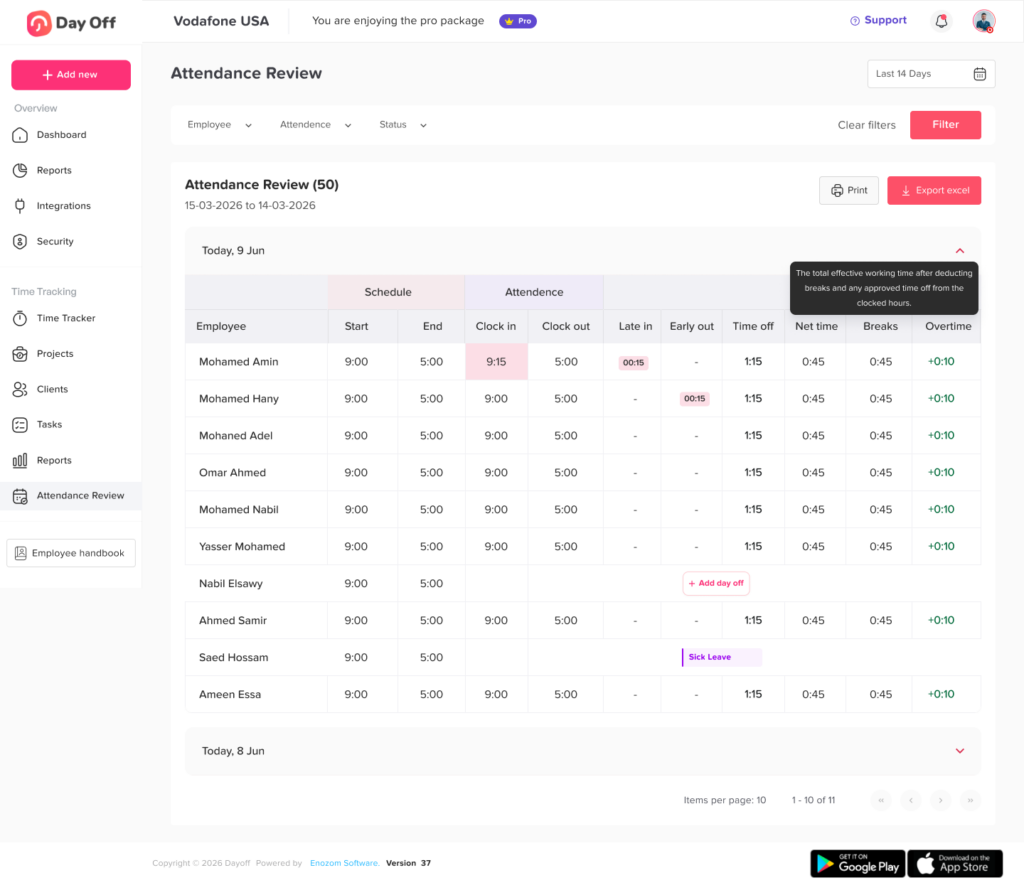
A well organized dashboard may show:
- Who is currently clocked in
- Who has finished work
- Who has not recorded an expected Mobile Clock In App
- Who arrived after the scheduled start time
- Who is on approved leave
- Which attendance records require correction
This helps managers identify problems while the details are still recent.
Less Manual Administration
Without a centralized system, HR or payroll staff may need to collect attendance information from emails, chat messages, paper forms, and spreadsheets.
A Mobile Clock In App stores attendance events in one place. This does not eliminate the need for review, but it can reduce repetitive data collection and manual calculation.
More Consistent Records
Digital timestamps provide a consistent structure for recording time. Each entry can include the date, employee, attendance action, and recorded time.
Consistency makes it easier to compare actual attendance with employee schedules and approved leave.
Improved Payroll Preparation
Payroll teams need reliable information about hours worked, paid leave, unpaid leave, breaks, overtime, and corrections.
A mobile timekeeping system can organize these records before payroll is processed. However, employers should still review exceptions and confirm that attendance rules match applicable wage and hour requirements.
Mobile Time Tracking vs. Manual Attendance
| Area | Manual Attendance Process | Mobile Clock In App |
|---|---|---|
| Clock in method | Paper sheet, spreadsheet, message, or physical clock | Employee records time from an approved mobile device |
| Remote access | Often difficult or inconsistent | Available to authorized remote and field employees |
| Calculations | Hours and overtime may be calculated manually | Work duration can be calculated automatically |
| Missed punches | Often discovered during payroll | Can be flagged for review |
| Corrections | May replace the original entry | Can preserve original and revised information |
| Manager visibility | Information may arrive at the end of the week | Attendance can be reviewed throughout the day |
| Leave records | Frequently stored separately | May be connected with PTO and absence records |
| Reporting | Requires manual filtering and formulas | Reports can be generated from centralized records |
| Audit history | Often limited | Changes may include user, date, reason, and approval |
| Multi location use | Requires separate files or systems | Teams and locations can use one centralized platform |
Important Features of a Mobile Clock In App
Not every time tracking app provides the same level of control. Businesses should evaluate the complete attendance process rather than selecting software based only on the ability to Mobile Clock In App.
Simple Mobile Clock In App and Clock Out
The core actions should be easy to find and use. Employees should be able to understand whether they are currently clocked in, on a break, or clocked out.
A complicated interface can lead to duplicate entries, missing records, and incorrect attendance statuses.
Break Tracking
The application should support the types of breaks used by the organization, including meal periods and other authorized breaks.
Under general U.S. federal guidance, short rest periods of approximately 20 minutes or less are generally treated as compensable work time. Bona fide meal periods are generally not considered work time when the employee is completely relieved of duties, typically for at least 30 minutes. State or local requirements may provide additional protections, so employers should configure break policies based on the rules that apply to their workforce.
The app should not automatically deduct a meal period when the employee may have continued working. Employees also need a clear process for reporting an interrupted or missed meal break.
Employee Work Schedules
Attendance records become more useful when they can be compared with the employee’s expected schedule.
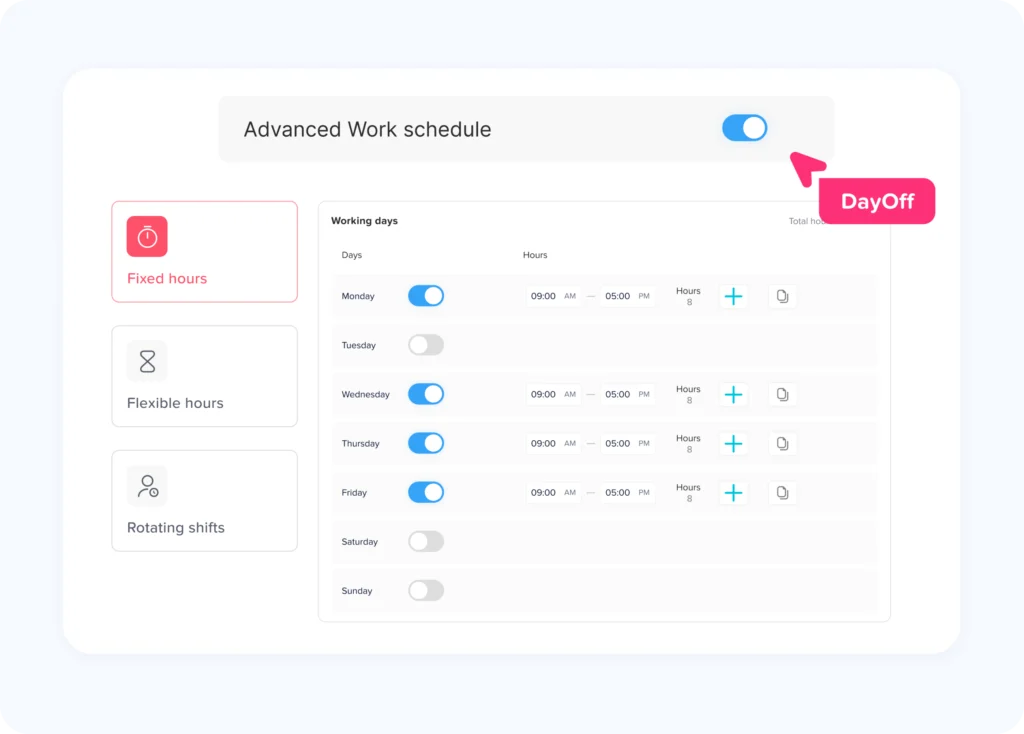
The system should support relevant schedule types, such as:
- Fixed working hours
- Flexible schedules
- Rotating schedules
- Overnight shifts
- Part time schedules
- Split shifts
- Location specific schedules
- Different schedules by weekday
Schedules can help identify late arrivals, early departures, missed shifts, and work beyond scheduled hours. However, the schedule itself should not replace a record of the hours the employee actually worked.
Accurate Timestamps
Each attendance action should include a reliable date and time.
For U.S. employers covered by the Fair Labor Standards Act, required records generally include the hours worked each day and the total hours worked each workweek. When an employee works longer or shorter than the scheduled period, the employer must record the actual hours worked rather than relying solely on the schedule.
Missed Punch Corrections
Employees sometimes forget to clock in or out. A good app should provide a structured correction process rather than encouraging managers to guess the missing time.
A correction workflow may include:
- The original scheduled shift
- The missing attendance action
- The employee’s proposed time
- A reason for the correction
- Supporting notes
- Manager approval
- The original record
- The revised record
- The date and person making the change
Corrections should be completed promptly while the employee and manager can still verify what happened.
Attendance Alerts
Notifications can help employees and managers address incomplete records.
Useful alerts may include:
- Scheduled shift about to begin
- Mobile Clock In App not recorded
- Clock out missing
- Break exceeds the expected duration
- Employee remains clocked in unusually long
- Correction request awaiting approval
- Employee approaching an overtime threshold
Alerts should support the attendance process without becoming excessive or intrusive.
Overtime Tracking
The system should calculate work hours by the correct workweek, pay period, employee classification, and applicable policy.
Under the U.S. Fair Labor Standards Act, covered nonexempt employees generally must receive overtime pay at no less than one and one half times their regular rate for hours worked beyond 40 in a workweek. The FLSA does not generally require overtime merely because work occurs on a weekend or holiday, although state law, collective bargaining agreements, or employer policies may provide more generous rules.
Software can identify possible overtime, but employers remain responsible for correctly applying employee classifications, regular rate calculations, local requirements, and company policies.
Offline Mobile Clock In App Support
Field employees may work in places with weak or unavailable internet access.
An offline capable app can record an attendance event locally and synchronize it when connectivity returns. The record should clearly distinguish the original event time from the later synchronization time.
Employers should test how offline entries, duplicate records, time zone changes, and device clock changes are handled.
Location Controls
Some mobile attendance apps offer GPS confirmation or geofencing.
A geofence creates a virtual boundary around an approved workplace. The employee may be able to Mobile Clock In App only when the device is within that area.
Location features may help businesses confirm that a clock in occurred near a branch, office, warehouse, customer site, or project location. However, location data should be used carefully.
The Federal Trade Commission has repeatedly described precise geolocation as sensitive information because it can reveal a person’s movements and visits to sensitive places. Businesses should collect only data that is necessary for a legitimate purpose, limit access, explain how it is used, and avoid retaining it longer than required.
A workplace attendance policy should explain:
- Whether location is collected
- When location is collected
- Whether tracking occurs only during clock in and clockout
- Who can view the data
- Why the information is needed
- How long it is retained
- How employees report inaccurate location results
- Whether an alternative method is available
Role Based Access
Employees, managers, HR staff, payroll specialists, and administrators do not need the same access.
An employee may need to see only their own schedule and records. A manager may need access to direct reports. Payroll may need approved work hours but not unrelated employee information.
Limiting access reduces unnecessary exposure of employee data. The FTC recommends collecting only necessary data and applying least privilege access so that people can use only the information needed for their role.
Audit Logs
Attendance records can affect wages, payroll corrections, and employee disputes. The app should maintain an audit history for important changes.
An audit log may show:
- Original attendance time
- Revised attendance time
- Employee submitting the correction
- Manager approving the change
- Reason for the adjustment
- Date and time of the change
- Whether the record had already been approved
- Whether the change occurred after payroll closed
Audit history helps the company investigate errors without losing the original information.
Payroll Exports and Integrations
Attendance reports should be easy to review before data reaches payroll.
Useful export fields may include:
- Employee name or identification number
- Work date
- Clock in clock out times
- Break duration
- Regular hours
- Overtime hours
- Paid leave
- Unpaid leave
- Attendance corrections
- Manager approval status
An integration should also explain which system is the source of truth. For example, the timekeeping system may calculate hours, while the payroll system applies wage rates, taxes, deductions, and final payroll rules.
PTO and Absence Tracking
Attendance and leave should not be treated as unrelated subjects.
When an employee does not clock in, the reason may be:
- Approved vacation
- Sick leave
- Public holiday
- Unpaid leave
- Scheduled day off
- Business closure
- Missed attendance entry
- Unreported absence
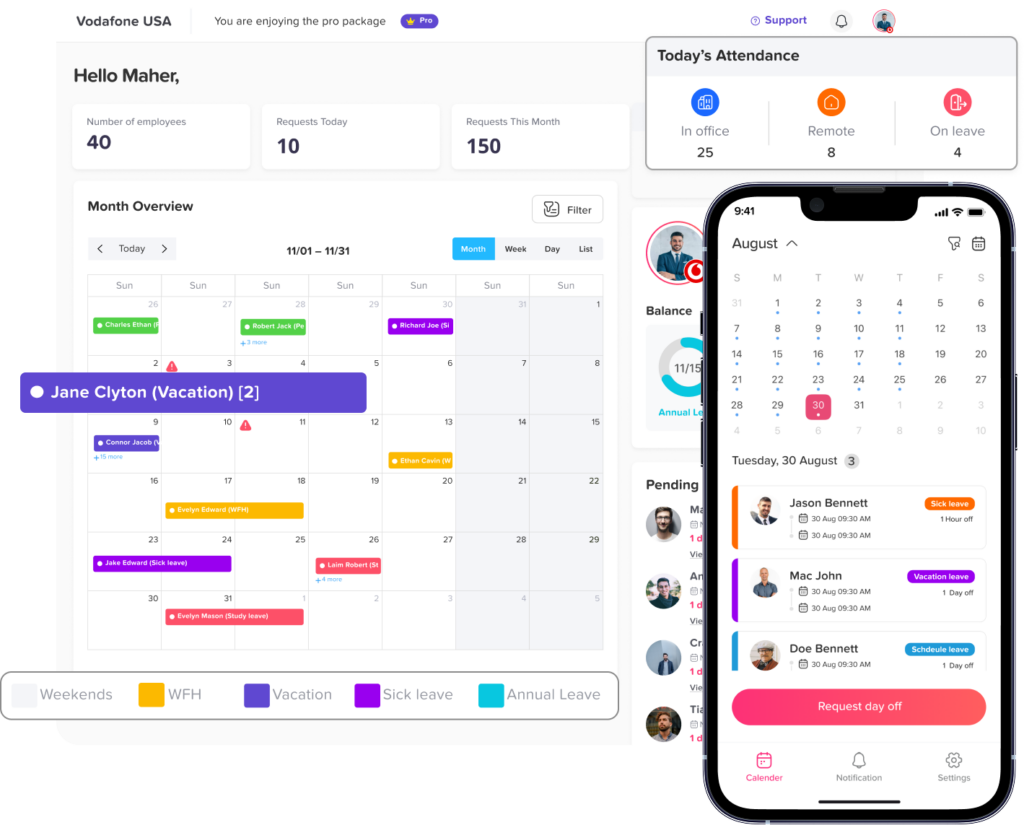
Connecting attendance with PTO records gives managers a clearer explanation for missing work activity. It also reduces the risk of treating approved leave as an attendance violation.
Who Benefits Most from a Mobile Clock In App?
Mobile attendance tracking can support many types of organizations, but it is particularly useful for teams that do not work around one physical time clock.
Remote and Hybrid Teams
Remote employees need a consistent way to record work time without being present at a central office.
The policy should define expected working hours, time zones, break recording, overtime approval, and the treatment of work performed outside the normal schedule.
Employers should not assume that unapproved work is automatically unpaid. U.S. Department of Labor guidance explains that when an employer knows or has reason to believe that work is being performed, the time generally must be counted as hours worked. Employers may enforce scheduling and overtime policies, but they still need to address time that was actually worked.
Field Service Employees
Technicians, installers, maintenance teams, inspectors, healthcare workers, and service representatives may begin work at customer locations.
A mobile app allows them to record time without returning to an office. Businesses should clearly define whether travel between job sites, waiting time, and preparatory activities are recorded.
Construction and Project Teams
Employees may move between temporary work sites throughout the week.
Project or task tracking can help businesses allocate employee hours to the correct site, customer, or cost category. Location controls may also be useful, provided they are accurate, proportionate, and explained to employees.
Restaurants, Retail Stores, and Hospitality
Shift based businesses often need to track attendance, breaks, late arrivals, shift coverage, and overtime.
Mobile clock in can provide flexibility, but employers should prevent one employee from recording time for another employee and should maintain a manager controlled correction process.
Small Businesses
Small businesses may not have a dedicated HR or payroll department. A centralized app can reduce the number of spreadsheets and manual calculations required each pay period.
The software should remain simple enough for daily use while providing enough records for payroll review and attendance management.
Multi Location Companies
A company with several offices, branches, or stores may need different schedules, managers, time zones, public holidays, and attendance rules.
The system should allow records to be reviewed by the appropriate manager without giving every manager access to the entire company.
Example Mobile Attendance Workflow
| Stage | Employee Action | Manager or HR Action | Record Created |
|---|---|---|---|
| Before shift | Reviews assigned schedule | Confirms staffing coverage | Published schedule |
| Shift start | Clocks in through mobile app | Reviews missing or late entries | Clock-in timestamp |
| During shift | Records meal break or task change | Monitors unusual attendance activity | Break or task record |
| Shift end | Clocks out | Checks incomplete shifts | Clock out timestamp |
| Correction | Submits missing-punch request | Reviews evidence and approves or rejects | Correction request and audit log |
| Pre-payroll | Reviews personal timesheet | Resolves exceptions and approves records | Approved attendance sheet |
| Payroll | No routine action | Exports approved hours | Payroll ready report |
| Post-payroll | Reports any discovered error | Documents and processes correction | Adjustment record |
How a Mobile Clock In App Supports Accurate Payroll
Attendance software does not run payroll by itself unless it includes payroll functionality. Its primary contribution is creating an organized record of time.
Before sending data to payroll, the business should review:
- Missing clock ins and clock outs
- Duplicate entries
- Unusually long shifts
- Break exceptions
- Work outside scheduled hours
- Overtime
- Approved paid leave
- Approved unpaid leave
- Holidays
- Manual changes
- Closed period corrections
- Employee disputes
For covered U.S. employers, payroll records generally must be retained for at least three years, while records used to calculate wages such as time cards and work schedules, generally must be retained for at least two years. Different federal, state, local, contractual, or industry requirements may require longer retention.
Employers should create a written retention policy that identifies which records are kept, where they are stored, who can access them, and how they are securely deleted when retention is no longer required.
How to Implement Mobile Time Tracking Successfully
Buying an app is only the beginning. Successful implementation depends on policy design, configuration, employee communication, and consistent review.
Step 1: Define What Must Be Recorded
Decide whether employees need to record:
- Shift start and end
- Meal periods
- Paid breaks
- Travel between work sites
- Training time
- Meetings
- On call activity
- Daily tasks
- Project or customer time
- Remote work
- Overtime
- PTO and other absences
The answer may vary by employee group.
Step 2: Create a Written Timekeeping Policy
The policy should explain:
- Who must use the app
- Which device may be used
- When employees must clock in and out
- Whether clocking in early is permitted
- How breaks are recorded
- How missed punches are corrected
- Whether location information is collected
- How overtime is approved
- How employees report technical problems
- Who reviews records
- When timesheets become final
- How payroll errors are corrected
The policy should also state that employees must record all time actually worked.
Step 3: Configure Work Schedules
Set schedules that reflect actual working arrangements. Avoid assigning a standard schedule to every employee when teams operate differently.
Review:
- Start and end times
- Break expectations
- Weekends
- Overnight shifts
- Time zones
- Flexible hour windows
- Rotating schedules
- Part time arrangements
- Public holidays
Step 4: Assign Permissions
Give each user only the access needed for their role.
For example:
- Employees view and correct their own records.
- Team leaders review assigned employees.
- HR manages policies and company wide reports.
- Payroll accesses approved payroll related information.
- Administrators manage security and configuration.
Step 5: Protect Employee Accounts
Mobile attendance records may contain employee identity, schedule, location, and payroll related information.
Multi factor authentication adds a second verification factor beyond a password. NIST recommends MFA as an important security improvement and advises businesses to consider stronger, phishing resistant methods for sensitive systems and privileged users.
Businesses should also remove access promptly when an employee leaves or changes roles.
Step 6: Test the Complete Workflow
Test more than a normal clock in.
The pilot should include:
- Missing punches
- Overnight shifts
- Offline attendance
- Time zone differences
- Meal break exceptions
- Overtime
- PTO on a scheduled workday
- Location errors
- Manager corrections
- Payroll exports
- Employee termination
- Lost or replaced devices
Step 7: Train Employees and Managers
Employees should understand exactly how to record time and report mistakes.
Managers need additional training on:
- Reviewing exceptions
- Approving corrections
- Avoiding unauthorized edits
- Responding to off the clock work
- Handling break issues
- Protecting employee data
- Finalizing records before payroll
Step 8: Audit Records Regularly
Attendance audits should look for patterns, not only individual errors.
Repeated missing punches may indicate poor training, confusing schedules, technical problems, or deliberate misuse. Repeated manager edits may indicate that employees cannot correct records properly or that managers are changing time without sufficient documentation.
Mobile Time Tracking Implementation Checklist
| Policy or Setup Area | Question to Answer | Recommended Control |
|---|---|---|
| Employee coverage | Which employees must record time? | Define groups by role and classification |
| Clock-in rules | When and where may employees clock in? | Publish clear time and location rules |
| Breaks | Which breaks must be recorded? | Configure break types and exception reporting |
| Overtime | How is additional work approved? | Add alerts and manager review |
| Missed punches | How are mistakes corrected? | Require a reason and approval |
| Location data | Is GPS or geofencing necessary? | Collect only necessary location information |
| Permissions | Who may view or edit records? | Use role based access |
| Security | How are accounts protected? | Use MFA and prompt access removal |
| Payroll | Which records are transferred? | Export only reviewed and approved time |
| Retention | How long are records kept? | Create a written retention schedule |
| Employee disputes | How can an employee challenge a record? | Provide a documented review process |
| Auditing | Which patterns are reviewed? | Audit edits, overtime, breaks, and exceptions |
Common Mobile Clock In Mistakes
Treating the Schedule as the Actual Record
A schedule shows when an employee was expected to work. It does not necessarily prove when the employee actually worked.
Attendance records should reflect actual start times, end times, breaks, and additional work.
Automatically Removing Unapproved Overtime
An employer may discipline an employee for violating an overtime approval policy, subject to applicable law and policy. However, removing time that was actually worked can create wage-and-hour problems.
The better process is to pay correctly, document the policy violation separately, and address repeated unauthorized work through management procedures.
Automatically Deducting Every Meal Break
An automatic deduction may create inaccurate records when an employee worked through lunch, answered calls, assisted customers, or was interrupted.
Employees need an easy way to report that the meal period was not fully taken.
Collecting Location Continuously
A company may need to verify where an employee clocks in, but that does not always require continuous location tracking.
Collecting location only at the attendance action may be more proportionate than tracking the employee’s movements throughout the day. The final approach should reflect the legitimate business purpose and applicable privacy law.
Allowing Managers to Edit Records Without Explanation
Unexplained changes weaken the reliability of attendance records.
Every material correction should include a reason, user, timestamp, and preserved original value.
Ignoring Technical Problems
A dead battery, app outage, weak internet connection, incorrect device time, or disabled location permission can prevent a valid clock in.
The policy should include an alternative reporting method so employees can report working time without waiting until payroll.
Making Employees Use Personal Devices Without a Policy
Bring your own device arrangements can raise questions about data use, security, reimbursement, privacy, and access after employment ends.
Employers should review local requirements and establish a clear mobile device policy before requiring employees to use personal phones.
Keeping Attendance and PTO in Separate Systems
When leave and attendance are disconnected, a manager may see a missing clock in without knowing that the employee has approved vacation.
Connecting both records creates a clearer view of employee availability and reduces unnecessary corrections.
How Day Off Supports Mobile Time and Attendance Tracking
Day Off combines attendance tracking with leave and PTO management in one platform.
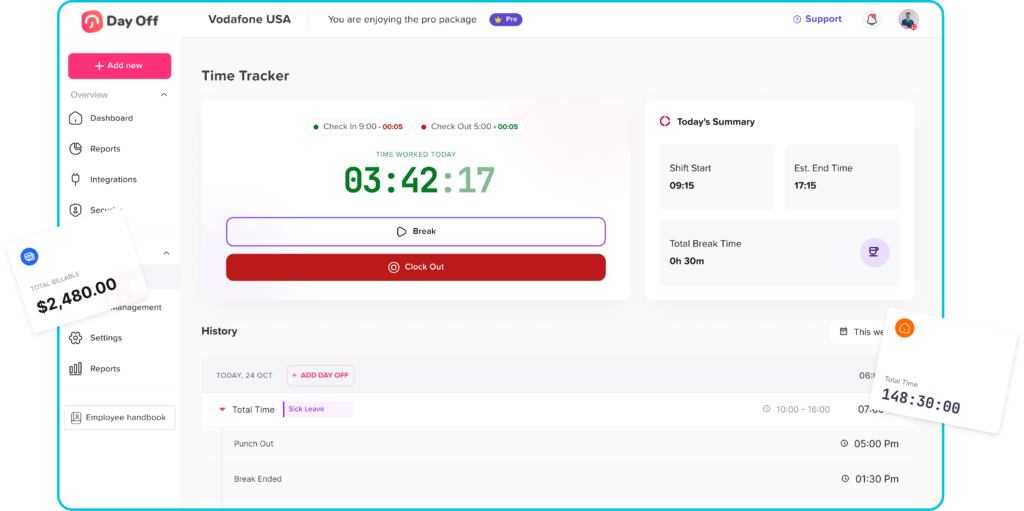
Employees can use Day Off as a Mobile Clock In App to punch in, punch out, and record daily tasks. Managers can monitor attendance, worked hours, late arrivals, missing punches, overtime, approved leave, and absences from a connected system.
Day Off also supports:
- Fixed, flexible, and rotating work schedules
- Employee punch in and punch out records
- Daily task and work logs
- Late-time and overtime calculations
- Attendance sheets for payroll preparation
- PTO requests and leave balances
- Shared employee availability
- Web, iOS, and Android access
- Attendance and absence reporting
Because attendance is connected with leave management, managers can understand whether an employee is working, absent, or away on approved leave instead of checking separate tools. Day Off also allows attendance sheets to be exported with punch times, total worked hours, late time, overtime, and absence information.
Software can support accurate administration, but every organization remains responsible for configuring its policies correctly and following the employment, payroll, privacy, and recordkeeping rules that apply to its workforce.
How to Choose the Best Mobile Clock In App
Before selecting a provider, test the software using the real situations your team experiences.
Ask the following questions:
- Can employees clock in within a few seconds?
- Does the app work on both iOS and Android?
- Is web access also available?
- Can it support fixed, flexible, and rotating schedules?
- Does it record breaks?
- Can employees submit corrections?
- Does it preserve an audit history?
- Can managers approve records before payroll?
- Can it track PTO and attendance together?
- Does it handle multiple locations and time zones?
- Are offline entries supported?
- Can location collection be limited?
- Are role based permissions available?
- Does it offer multi factor authentication?
- Can data be exported in a payroll friendly format?
- What happens when an employee leaves the company?
- How are records backed up and retained?
- Is customer support available during implementation?
A free trial or limited pilot can reveal workflow problems before the system is introduced to the entire organization.
Frequently Asked Questions
What is a Mobile Clock In App?
A Mobile Clock In App is a time and attendance tool that allows employees to record the beginning and end of work using a smartphone or tablet. It may also track breaks, schedules, overtime, tasks, PTO, and attendance corrections.
Can employees clock in from their phones?
Yes. Employees can clock in from a phone when the company enables mobile attendance and the employee has an authorized account. The organization may also apply device, network, or location rules.
Is a mobile clock in app suitable for remote employees?
Yes. It can give remote employees a consistent way to record working hours. Employers should also define schedules, time zones, breaks, availability, overtime approval, and off the clock work.
Can a mobile time clock track GPS location?
Some apps can record location at clock in and clock out or require employees to be inside a geofence. Employers should collect only necessary location information, explain the purpose, restrict access, and comply with applicable privacy and employment requirements.
Does a mobile time clock calculate overtime?
Many applications can identify hours that exceed a configured threshold. Final overtime treatment depends on applicable law, employee classification, the defined workweek, regular rate rules, contracts, and company policy.
What happens when an employee forgets to clock out?
The employee should submit a correction with the actual end time and a reason. A manager should review the request, preserve the original record, and approve or reject the correction before payroll.
Can employers edit employee time records?
Employers may need to correct inaccurate records, but edits should reflect the time actually worked. A reliable system should preserve the original record, revised value, reason, person making the change, and approval history.
Is a scheduled shift enough for payroll?
No. A scheduled shift shows expected hours, while payroll should be based on accurate records of time actually worked, together with applicable paid leave and payroll rules.
Should employees clock in before starting work?
Employees should clock in according to the company’s written policy and before beginning compensable work. Required preparatory or closing activities may need to be recorded depending on the circumstances and applicable law.
Can a mobile clock in app prevent time theft?
It can reduce certain risks by using individual accounts, timestamps, audit logs, location controls, and manager review. No software completely eliminates misuse, so businesses still need clear policies and regular audits.
Does a mobile attendance app replace payroll software?
Not necessarily. Attendance software usually records and calculates employee time, while payroll software applies wage rates, taxes, deductions, benefits, and payment rules. The two systems may be integrated.
Is mobile attendance tracking legal?
Mobile time tracking is widely used, but requirements vary by country, state, industry, collective agreement, device policy, and the type of data collected. Employers should review applicable wage, privacy, employee monitoring, reimbursement, consent, and record retention requirements.
What information should a mobile time clock record?
A reliable attendance record may include the employee, work date, clock in time, clock out time, breaks, total worked hours, assigned schedule, corrections, approval status, and applicable absence information.
Can salaried employees use a Mobile Clock In App?
Yes. Salaried employees may use it for attendance, project tracking, staffing, leave coordination, or internal reporting. Employers should configure the system according to the employee’s classification and the legitimate reason for tracking time.
Can one app manage employee hours and PTO?
Yes. An integrated system can track worked hours, approved vacation, sick leave, unpaid leave, public holidays, and other absences. This gives managers a clearer view of employee availability and improves payroll preparation.
Conclusion
A Mobile Clock In App provides a practical way to track employee hours and attendance across offices, homes, customer locations, and job sites. It can replace scattered time sheets with structured clock in records, break entries, corrections, approvals, overtime calculations, and payroll ready reports.
The greatest value comes from connecting the technology to a clear process. Employees need simple instructions, managers need reliable review tools, payroll teams need approved records, and the organization needs appropriate security and privacy controls.
Businesses should choose an app that records actual work activity, preserves corrections, supports different schedules, connects attendance with PTO, limits unnecessary data collection, and gives employees a fair way to report mistakes.
When supported by clear policies and regular audits, mobile time tracking can reduce administrative work, improve attendance visibility, and help organizations maintain more accurate employee hour records.