







Managing employee time off becomes harder as a team grows. What starts as a simple vacation request can quickly turn into scattered emails, manual balance updates, missed approvals, and scheduling conflicts. PTO tracker software helps businesses manage employee leave, vacation days, sick leave, personal days, and other time off in one organized system instead of relying on spreadsheets or chat messages.

With the right system, employees can easily request time off, managers can review and approve requests faster, and HR teams can keep accurate records without spending hours on manual updates. It also gives everyone a clearer view of who is off, who is available, and how much PTO each employee has left.
In this article, we will explain what PTO tracker software is, why it matters, which features to look for, and how it can help companies manage employee leave and time off more efficiently.
Why Businesses Need PTO Tracker Software
Many companies start with simple leave tracking methods. They may use spreadsheets, shared calendars, email requests, or manual HR records. These methods can work for a short time, but they often become unreliable as the business grows.
Manual tracking can lead to several problems:
| Manual PTO Tracking Problem | How It Affects the Business |
|---|---|
| Leave requests are sent through emails or chats | Requests can be missed or forgotten |
| Balances are updated manually | Employees may receive incorrect PTO balances |
| Managers do not see all upcoming absences | Teams may become understaffed |
| HR tracks different leave types separately | Reports become harder to prepare |
| Employees ask HR for balance updates | HR spends more time on repetitive questions |
| Spreadsheets are edited by multiple people | Errors and outdated records become common |
| Leave policies are not applied consistently | Employees may feel the process is unfair |
PTO tracker software helps solve these problems by creating one central place for leave management. Everyone uses the same system, follows the same process, and works with the same updated information.
How PTO Tracker Software Works
A PTO tracker usually follows a simple workflow.
- First, HR or the company admin sets up the company’s leave policies. These policies may include annual vacation days, sick leave rules, accrual settings, carryover rules, public holidays, approval workflows, and employee groups.
- Next, employees log in to the system and submit time off requests. They choose the leave type, select the dates, add notes if needed, and submit the request.
- The manager or assigned approver receives a notification and reviews the request. Before making a decision, the manager can check the team calendar to see whether other employees are already off during the same period.
- Once the request is approved, the system updates the employee’s balance automatically and adds the absence to the shared calendar. HR can then view the record, export reports, or use the data for payroll and planning.
This process keeps everything organized and reduces the need for back and forth communication.
Key Benefits of Using PTO Tracker Software
More Accurate PTO Balances
One of the biggest benefits of PTO tracker software is balance accuracy. When balances are updated manually, mistakes can happen easily. An employee may have used more days than recorded, a carryover balance may be missed, or a sick leave request may be counted as vacation by mistake.
PTO tracker software reduces these errors by calculating balances automatically. When an employee submits a request and it is approved, the system deducts the correct amount from the correct leave type.
This gives employees confidence in their balances and helps HR avoid time consuming corrections.
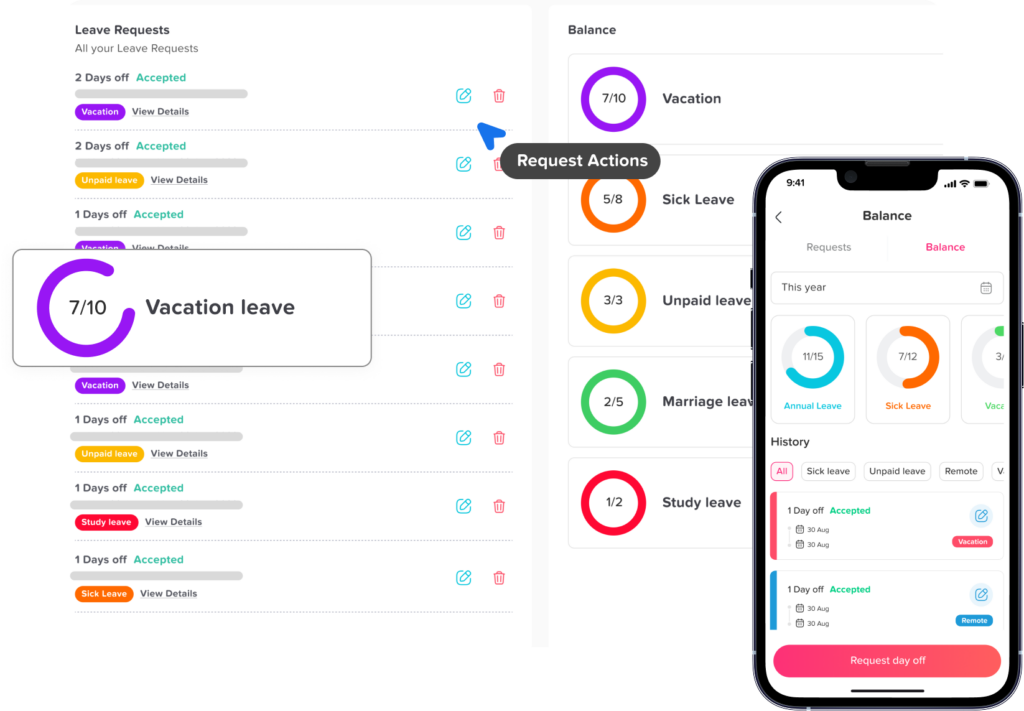
Easier Leave Requests for Employees
Employees should not have to send multiple messages just to request a day off. With PTO tracker software, they can submit leave requests in a few steps.
A clear employee self service experience allows employees to:
- Check available PTO balances
- Choose the right leave type
- Submit requests from desktop or mobile
- View request status
- See approved time off
- Plan future leave with more confidence
This improves the employee experience and reduces unnecessary HR questions.
Faster Approvals for Managers
Managers need a simple way to review leave requests without losing track of emails or chat messages. PTO tracker software sends requests directly to the right approver and keeps everything in one place.
Before approving, managers can check who else is already on leave, whether the team has enough coverage, and whether the request conflicts with important work periods.
This makes approvals faster, clearer, and more consistent.
Better Team Availability Planning
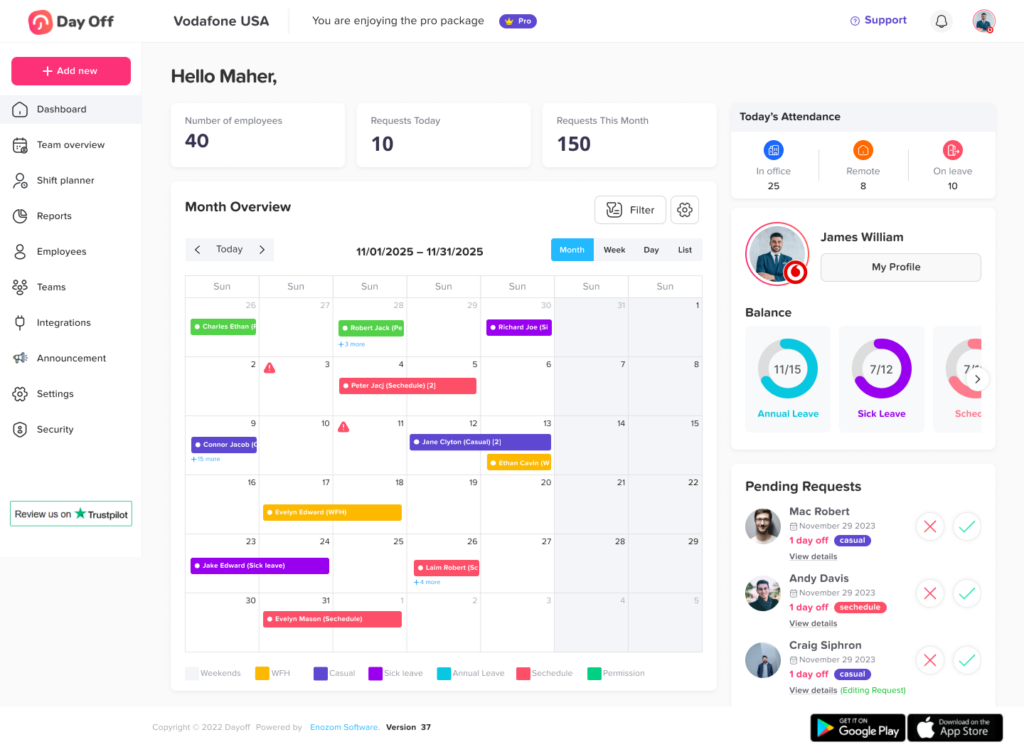
When managers do not know who is off, work planning becomes difficult. A shared leave calendar helps managers see employee availability at a glance.
This is especially important for teams that handle customer support, operations, sales, healthcare, field work, shift-based work, or project deadlines. If several employees request time off during the same week, managers can make better decisions before approving overlapping requests.
A team calendar also helps employees plan their vacations more responsibly because they can see busy periods and existing absences.
Less Manual Work for HR
HR teams often spend a lot of time answering the same questions:
“How many vacation days do I have left?”
“Was my request approved?”
“Can I take a half day?”
“Who is off next week?”
“How many sick days did this employee use?”
PTO tracker software reduces this repetitive work. Employees can check their own balances, managers can review requests directly, and HR can access reports when needed.
Instead of spending time updating spreadsheets, HR teams can focus on higher-value tasks such as policy improvement, employee support, workforce planning, and compliance preparation.
Clearer Leave Policies
Different employees may have different leave rules. For example, full-time employees may receive a different PTO allowance than part time employees. Employees in different countries or locations may follow different public holiday calendars. Some companies may allow carryover, while others may reset balances at the beginning of each year.
PTO tracker software helps companies apply these policies consistently. HR can set rules once, and the system follows them automatically.
This creates a fairer and more transparent leave process.
Important Features to Look for in PTO Tracker Software
Not all PTO tracker tools are the same. The right software should support your company’s leave policies, approval structure, and reporting needs.
Employee Self Service
Employees should be able to request time off, check balances, and view request status without depending on HR. Self-service saves time and creates a smoother experience.
Leave Types
A strong PTO tracker should allow companies to manage different types of leave, such as:
- Vacation leave
- Sick leave
- Personal leave
- Unpaid leave
- Maternity leave
- Paternity leave
- Bereavement leave
- Study leave
- Comp time
- Half-day leave
Having separate leave types helps companies keep accurate records and understand how employees use time off.
Automated Balance Tracking
The system should update balances automatically after requests are approved. It should also support different balance rules, including annual allowances, accruals, carryover, and resets.
Approval Workflows
Every company has its own approval structure. Some businesses need one manager approval, while others need two-level approval from a manager and HR.
Good PTO tracker software should allow flexible approval workflows based on company needs.
Shared Leave Calendar
A shared calendar gives managers and employees visibility into upcoming absences. This helps prevent overlapping leave, improves planning, and keeps teams informed.
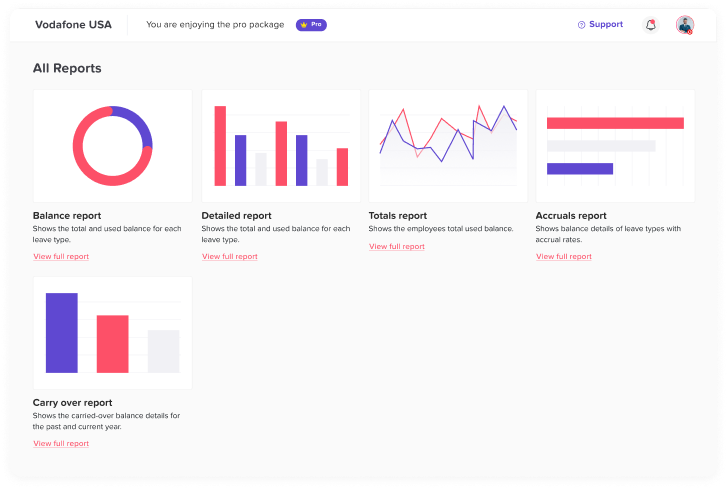
Reports and Exports
HR and management need reports for planning, payroll, recordkeeping, and policy review. Useful reports may include:
- Leave balance reports
- Leave usage reports
- Absence reports by employee
- Leave reports by department
- Leave type reports
- Monthly or yearly time off summaries
Mobile Access
Employees do not always request leave while sitting at a desk. Mobile access allows employees and managers to submit, approve, and review leave requests from anywhere.
This is especially useful for remote teams, field employees, shift workers, and companies with multiple locations.
Notifications
Automated notifications help keep the process moving. Employees should receive updates when their requests are approved or rejected. Managers should receive alerts when a new request needs review.
Notifications reduce delays and help prevent requests from being forgotten.
Integrations
PTO tracker software becomes even more useful when it connects with tools your team already uses. Calendar integrations, communication tools, and HR systems can help keep leave information visible across the business.
For example, approved leave can appear on a shared calendar so managers do not need to update schedules manually.
PTO Tracker Software vs Manual Leave Tracking
Many businesses delay switching to PTO tracker software because they believe spreadsheets are enough. But manual tracking often creates hidden costs.
| Manual Leave Tracking | PTO Tracker Software |
|---|---|
| Requests are handled through email or chat | Requests are submitted in one system |
| HR updates balances manually | Balances update automatically |
| Managers check availability manually | Shared calendars show team availability |
| Reports are built from spreadsheets | Reports can be generated faster |
| Errors are harder to detect | Records are clearer and more reliable |
| Employees ask HR for balance updates | Employees can check balances themselves |
| Hard to scale as the team grows | Easier to manage growing teams |
How PTO Tracker Software Helps Remote and Hybrid Teams
Remote and hybrid teams need a clear way to manage availability, especially when employees work from different locations, time zones, or schedules. Without a shared system, it can be difficult to know who is working, who is on leave, who has a flexible schedule, and who is unavailable.
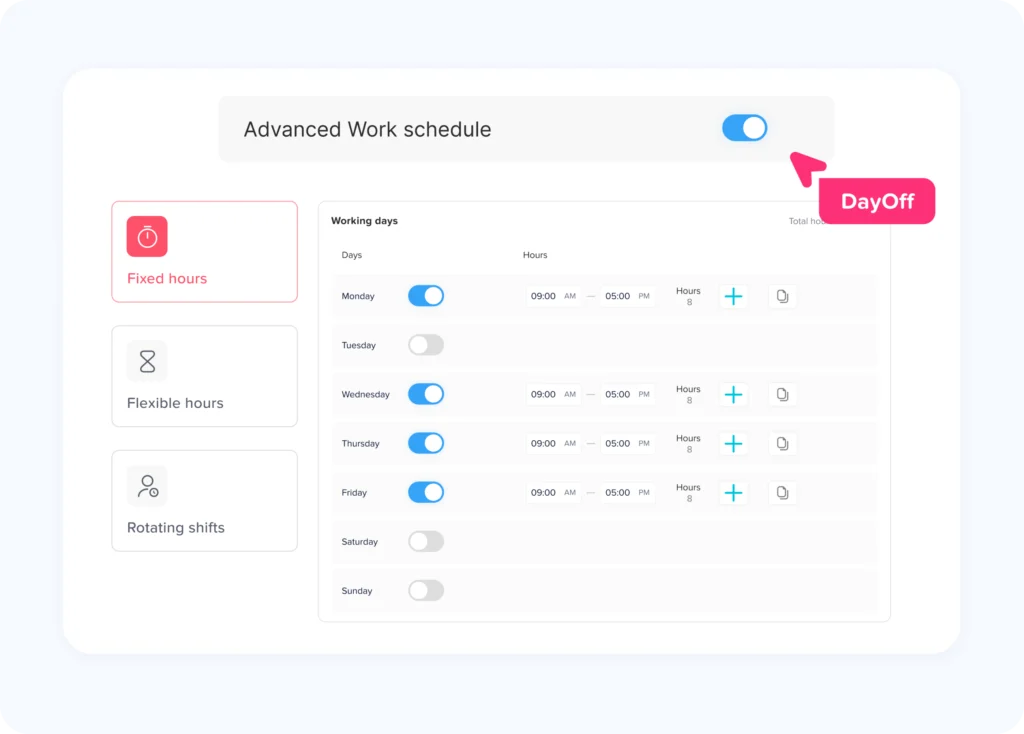
With Day Off, PTO tracker software becomes more than a leave management tool. Employees can request time off online, managers can approve requests from anywhere, and the team calendar keeps everyone updated. Day Off also supports work schedules, allowing companies to manage fixed hours, flexible hours, and rotating shifts alongside employee leave.
This gives managers a clearer view of both planned time off and regular work schedules, helping them avoid scheduling meetings with employees who are away or assigning urgent tasks to someone who is not available.
For remote, hybrid, and distributed teams, PTO tracking and work schedule management are not just HR tasks. They are essential parts of team coordination, planning, and daily operations.
How PTO Tracker Software Supports Better Workforce Planning
Leave tracking is closely connected to workforce planning. When managers can see upcoming absences, they can plan work more effectively.
For example, if several employees are taking vacation during the same week, a manager can adjust deadlines, assign backup coverage, or delay non-urgent tasks. If a department has frequent sick leave patterns, HR can review whether workloads, schedules, or policies need attention.
PTO tracker software gives managers useful data instead of scattered information. Over time, this helps businesses understand absence trends and make better staffing decisions.
Common Leave Policies a PTO Tracker Should Support
Every company has different rules for employee time off. A flexible PTO tracker should support the policies that match your business.
Common PTO policy settings include:
Fixed Annual Allowance
Employees receive a set number of days each year, such as 15 or 20 vacation days.
Accrual Based PTO
Employees earn time off gradually over time. For example, they may earn a certain number of hours or days each month.
Carryover Rules
Employees may be allowed to carry unused PTO into the next year. Some companies allow full carryover, while others set a limit.
Expiration Rules
Some companies allow carried-over leave to expire after a certain period.
Probation Rules
New employees may not be allowed to use PTO until they complete a probation period.
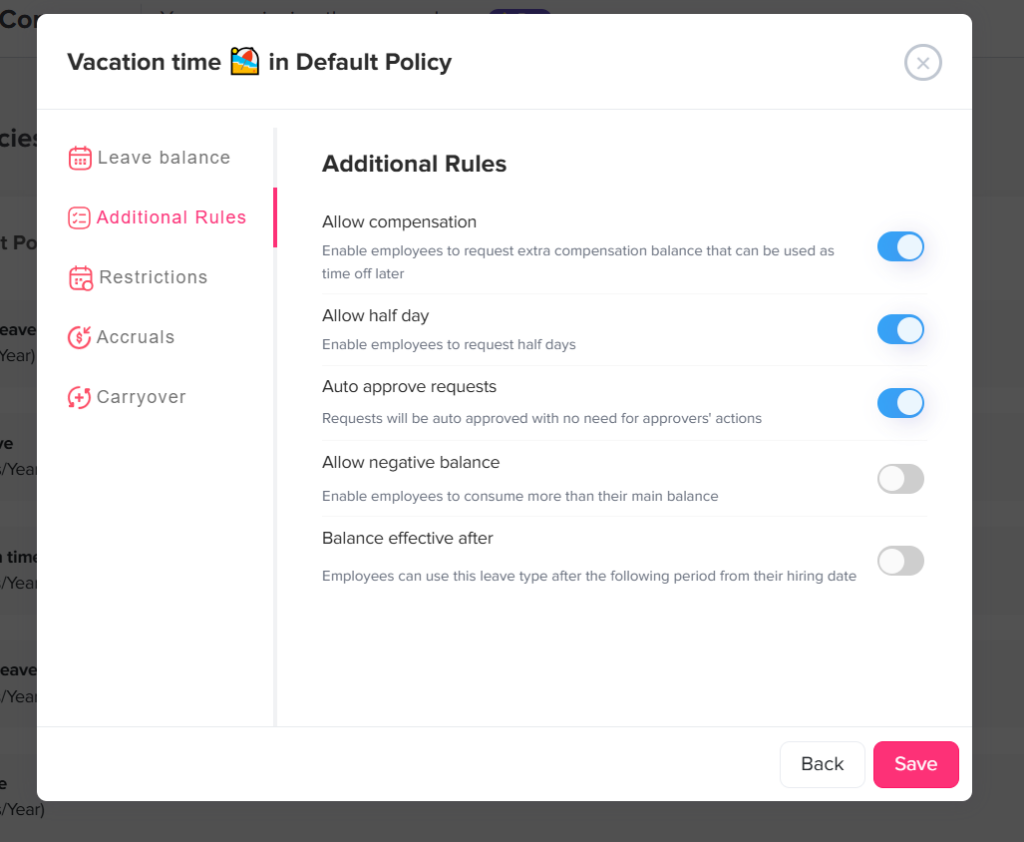
Half Day Requests
Employees may be allowed to request half days instead of full days.
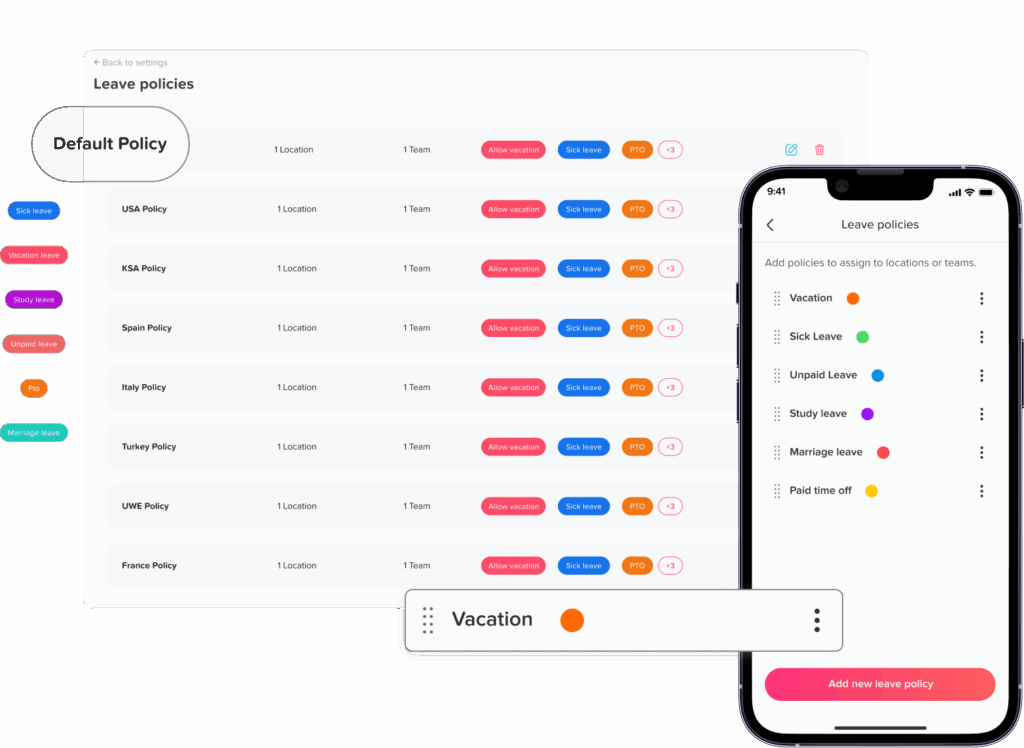
Different Policies by Location or Team
Employees in different countries, states, departments, or job types may need separate leave policies.
A good PTO tracker should be flexible enough to handle these differences without requiring manual workarounds.
How to Implement PTO Tracker Software Successfully
Introducing PTO tracker software does not have to be difficult. A clear rollout plan can help employees and managers adopt the system quickly.
Step 1: Review Your Current Leave Policies
Before setting up the software, review your existing leave policies. Confirm leave types, annual allowances, accrual rules, carryover limits, approval steps, and holiday calendars.
Step 2: Add Employees and Teams
Organize employees by department, location, team, or policy group. This helps ensure each employee follows the correct leave rules.
Step 3: Set Up Approval Workflows
Decide who should approve requests. Some employees may report to one manager, while others may need approval from both a manager and HR.
Step 4: Import Existing Balances
If employees already have PTO balances, add them to the system carefully. This helps avoid confusion during the transition.
Step 5: Train Managers and Employees
Give employees simple instructions on how to request leave and check balances. Show managers how to review requests and use the calendar.
Step 6: Use Reports Regularly
After the system is active, HR should review reports regularly to monitor leave usage, balances, and absence trends.
Why PTO Tracking Improves the Employee Experience
PTO tracking is not only about administration. It also affects how employees feel about the workplace.
When employees can easily request time off, check their balances, and understand the approval process, they feel more confident and informed. A transparent system reduces confusion and helps employees plan vacations, personal days, and family responsibilities.
Employees are also more likely to trust the process when leave rules are applied consistently. Instead of wondering whether a request was missed or whether their balance is correct, they can rely on the system.
A better PTO process supports a healthier workplace because employees can take time off without unnecessary stress.
How PTO Tracker Software Helps HR Make Better Decisions
HR teams need accurate leave data to understand how time off is used across the company. PTO tracker software provides records that can help answer important questions, such as:
- Which departments use the most PTO?
- Are employees using their vacation days?
- Are there frequent absence patterns?
- Are leave balances becoming too high?
- Do managers approve requests quickly?
- Are employees taking enough time off to rest?
These insights help HR improve policies, support managers, and create a more balanced workplace.
PTO Tracker Software and Compliance
Leave rules can vary depending on location, company policy, employment type, and local regulations. While PTO tracker software does not replace legal advice, it can help companies keep better records and apply internal policies more consistently.
Accurate records are useful when HR needs to review past leave usage, confirm balances, or respond to employee questions. A clear system also reduces the risk of inconsistent approvals or missing documentation.
Companies should always review their leave policies with qualified HR or legal professionals when needed, especially if they operate in multiple regions.
Example PTO Tracking Workflow
Here is a simple example of how PTO tracker software works in practice:
| Step | Action |
|---|---|
| 1 | Employee checks available PTO balance |
| 2 | Employee submits a vacation request |
| 3 | Manager receives a notification |
| 4 | Manager checks team availability |
| 5 | Manager approves or rejects the request |
| 6 | Employee receives an update |
| 7 | Approved leave appears on the calendar |
| 8 | PTO balance updates automatically |
| 9 | HR can view the record in reports |
What Makes a Good PTO Tracker Software?
A good PTO tracker should be simple, flexible, and reliable. It should make leave management easier for everyone involved.
The best PTO tracking software usually includes:
- Easy leave request submission
- Clear employee PTO balances
- Automated balance calculations
- Flexible leave policies
- Manager approval workflows
- Shared team calendars
- Notifications
- Reports and exports
- Mobile access
- Support for multiple teams or locations
- A user friendly interface
The goal is not just to track days off. The goal is to create a better leave management process for the whole company.
How Day Off Helps Teams Manage PTO and Time Off
Day Off is a PTO tracker software designed to help companies manage employee leave, vacation days, sick leave, absences, and time off in one simple system.
With Day Off, employees can request leave, managers can approve requests, and HR teams can track balances without relying on spreadsheets or scattered messages. The system helps companies organize leave policies, view team availability, manage approvals, and keep accurate records.
Day Off is available on web, iOS, and Android, making it easy for employees and managers to manage time off from anywhere.
For companies that want a clear and simple way to manage PTO, Day Off helps reduce manual work and improve visibility across the team.
FAQ
What is PTO tracker software?
PTO tracker software is a digital system that helps companies manage employee paid time off, vacation days, sick leave, personal leave, unpaid leave, and other absences. It allows employees to request leave, managers to approve requests, and HR teams to track balances and reports.
Why should companies use PTO tracker software?
Companies should use PTO tracker software to reduce manual work, avoid spreadsheet errors, improve leave visibility, speed up approvals, and give employees an easier way to request time off.
Can PTO tracker software manage different leave types?
Yes. A good PTO tracker can manage different leave types such as vacation, sick leave, personal leave, unpaid leave, maternity leave, paternity leave, half days, and more.
Does PTO tracker software update balances automatically?
Most PTO tracker software can update balances automatically when leave requests are approved. This helps reduce mistakes and keeps employee balances accurate.
Is PTO tracker software useful for small businesses?
Yes. Small businesses can use PTO tracker software to create a simple and organized leave process before manual tracking becomes difficult to manage.
Can managers see who is off?
Yes. PTO tracker software usually includes a shared leave calendar where managers can see approved and upcoming employee absences.
Can employees check their own PTO balances?
Yes. Employee self-service is one of the main benefits of PTO tracker software. Employees can usually check their available balances without asking HR.
Does PTO tracker software help remote teams?
Yes. Remote and hybrid teams benefit from PTO tracker software because it gives everyone a shared view of availability, even when employees work from different locations.
Conclusion
PTO tracker software is an important tool for companies that want to manage employee leave and time off more efficiently. It replaces manual spreadsheets, email requests, and scattered records with one organized system for employees, managers, and HR.
With the right PTO tracker, businesses can improve balance accuracy, speed up approvals, reduce HR workload, prevent scheduling conflicts, and give employees a better time off experience.
As teams grow and work becomes more flexible, managing leave manually becomes harder. PTO tracker software helps businesses stay organized, plan better, and create a clearer process for everyone.
For any company that wants to manage vacation days, sick leave, paid time off, and employee absences with less stress, a reliable PTO tracker is a smart and practical solution.