







Managing paid time off should be simple. Employees need an easy way to request time off, managers need a clear way to approve it, and HR teams need accurate records without spending hours updating spreadsheets. Yet for many companies, PTO tracking becomes more complicated than it needs to be.

Requests get buried in emails. Leave balances are updated manually. Managers approve time off without checking team availability. Employees keep asking how many days they have left. HR teams spend valuable time fixing mistakes that could have been avoided with a better process.
The good news is that PTO tracking does not have to be stressful, confusing, or time consuming. With the right system, companies can manage vacation days, sick leave, personal days, public holidays, approvals, and balances in one organized place.
What Is PTO Tracking?
PTO tracking is the process of managing employee paid time off. This includes recording how much leave each employee receives, how much they have used, how much remains, and when they are scheduled to be away from work.
PTO can include different types of leave, such as:
- Vacation days
- Sick leave
- Personal leave
- Annual leave
- Paid holidays
- Emergency leave
- Maternity or paternity leave
- Unpaid leave, depending on company policy
A good PTO tracking process helps companies keep time off organized, accurate, and easy to manage. It gives employees confidence that their balances are correct and gives managers visibility into team availability before approving requests.
Why PTO Tracking Often Feels Complicated
PTO tracking usually becomes complicated when companies rely on manual processes. A spreadsheet may work for a very small team at first, but as the business grows, the process becomes harder to control.
The most common problems include:
- Leave requests being sent through different channels
- Managers forgetting to approve or reject requests
- HR manually updating balances after every approval
- Employees asking HR for their remaining PTO balance
- Overlapping vacations causing coverage issues
- Different leave policies being applied inconsistently
- Reports taking too much time to prepare
- Mistakes in accruals, carryover, or reset dates
These problems are not always caused by poor management. In many cases, the process itself is simply too manual. When too many steps depend on emails, messages, spreadsheets, and memory, mistakes become more likely.
The Cost of Complicated PTO Tracking
Complicated PTO tracking affects more than HR administration. It can impact employees, managers, productivity, and overall team planning.
For employees, unclear PTO tracking can create frustration. They may not know how many days they have available, whether their request was received, or when it will be approved. This can make a simple time off request feel unnecessarily stressful.
For managers, poor visibility makes planning difficult. Without a clear calendar showing who is off and when, managers may approve overlapping requests by mistake or struggle to maintain coverage during busy periods.
For HR teams, manual tracking creates repetitive work. Instead of focusing on employee experience, policy improvement, hiring, onboarding, or culture, HR spends time checking balances, replying to questions, following up on approvals, and correcting records.
For the business, inaccurate PTO tracking can lead to scheduling problems, payroll errors, compliance risks, and lower employee satisfaction.
What Simple PTO Tracking Should Look Like
Simple PTO tracking is not about removing rules. It is about making the process clear, consistent, and easy for everyone to follow.
A simple PTO tracking process should allow employees to request leave in a few steps. Managers should be able to review requests quickly, check team availability, and approve or reject them with confidence. HR should be able to see accurate balances, reports, policies, and history without manual calculations.
An effective PTO tracking process should include:
- A clear request and approval workflow
- Accurate leave balances
- A shared team calendar
- Custom leave types
- Automated balance updates
- Easy access for employees and managers
- Reports for HR and leadership
- Support for different policies, locations, and teams
When these elements are managed in one place, PTO tracking becomes much easier.
Move Away From Spreadsheets
Spreadsheets are one of the most common ways companies start tracking PTO. They are familiar, flexible, and easy to set up. However, they can quickly become difficult to manage.
A spreadsheet requires someone to update every request, every approval, every balance change, and every policy adjustment manually. If one formula breaks or one request is missed, the entire record can become inaccurate.
Spreadsheets also do not provide a complete employee experience. Employees usually cannot request leave directly from the spreadsheet, managers do not receive structured approval notifications, and HR still has to communicate updates through email or chat.
Spreadsheets may be useful for simple records, but they are not ideal for growing teams that need reliable PTO management.
Keep Leave Requests in One Place
One major reason PTO tracking becomes complicated is that requests are scattered across different channels. An employee may send an email, another may send a chat message, and someone else may ask verbally during a meeting.
This makes it easy for requests to be missed or forgotten.
A better approach is to use one central place for all leave requests. When employees know exactly where to submit their time off, and managers know exactly where to review it, the process becomes much clearer.
Centralizing leave requests helps companies:
- Avoid lost or missed requests
- Keep a clear approval history
- Make the process fair and consistent
- Reduce back and forth communication
- Give HR better visibility
A simple request process saves time for everyone involved.
Automate PTO Balance Calculations
Manual PTO balance calculations are one of the biggest sources of errors. Every time an employee takes leave, the balance needs to be updated. If the company uses accruals, carryover rules, or different policies, the process becomes even more complex.
Automated PTO tracking removes much of this work. Once the company sets its policies, the system can calculate balances, deduct approved leave, and update records automatically.
This is especially useful when companies have:
- Different leave types
- Different employee policies
- Multiple teams or locations
- Accrual rules
- Carryover rules
- Anniversary based resets
- Fixed yearly reset dates
Automation helps HR teams avoid repetitive calculations and gives employees more confidence in the accuracy of their balances.
Give Employees Access to Their Own PTO Balances
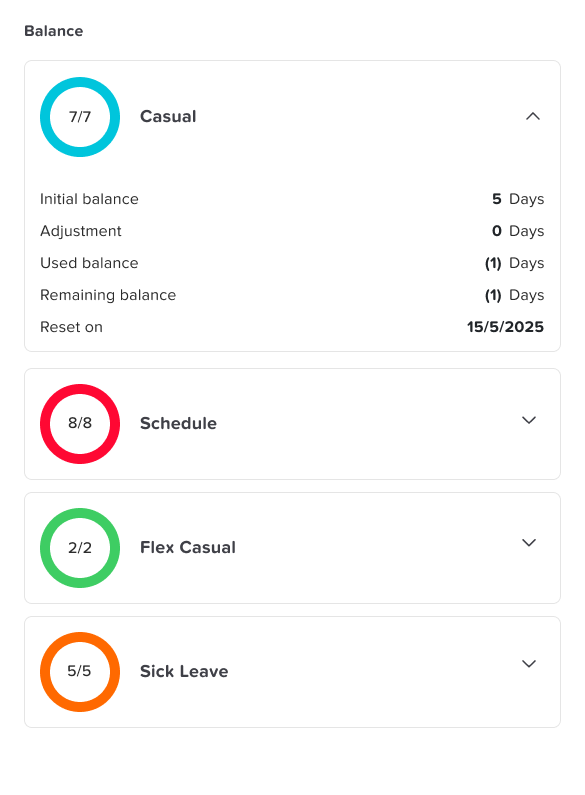
Employees should not have to ask HR every time they want to know how many days off they have left. When employees can check their own balances, they can plan their time off more responsibly.
Self-service access makes PTO tracking easier because employees can:
- View available leave balances
- Check approved and pending requests
- See company holidays
- Understand their remaining allowance
- Plan vacations before submitting requests
This reduces the number of routine questions HR receives and creates a better employee experience.
Make Approvals Clear and Fast
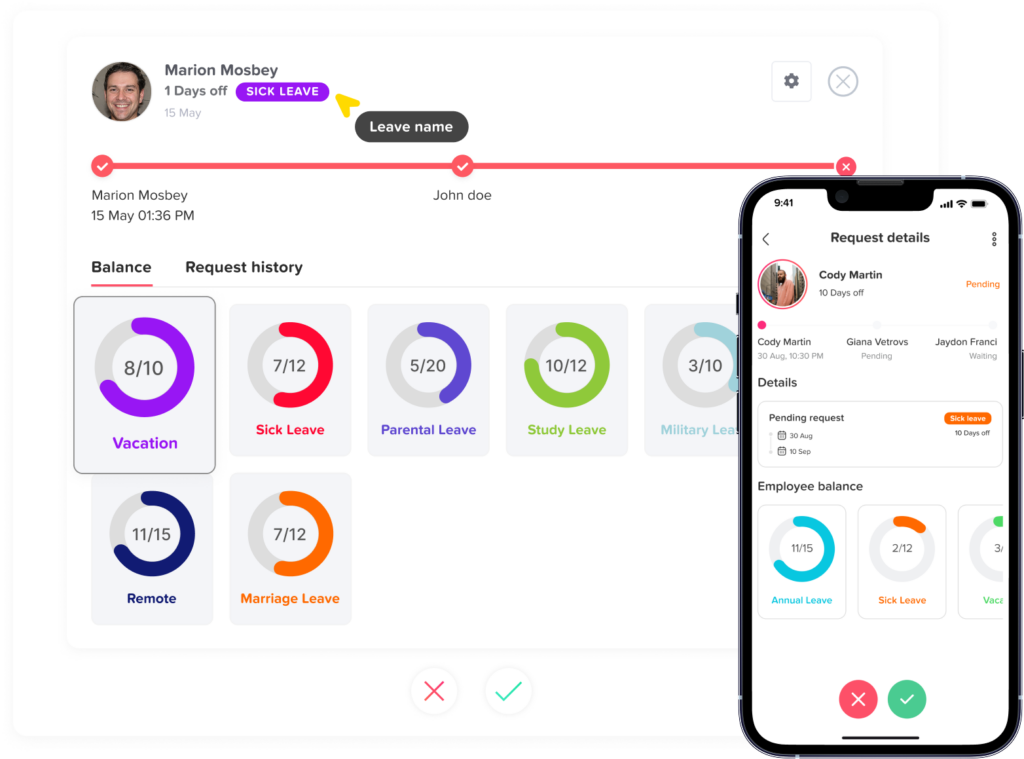
PTO approvals should not depend on long email threads or manual follow-ups. Managers need a clear way to see who requested time off, when they requested it, what type of leave they selected, and whether the team has enough coverage.
A clear approval workflow helps managers make better decisions. It also helps employees get faster responses instead of waiting without knowing the status of their request.
A good approval process should answer these questions:
- Who is requesting leave?
- What dates are requested?
- What type of leave is being used?
- Does the employee have enough balance?
- Is anyone else on the team already off?
- Has the request been approved or rejected?
- Who approved it?
When this information is available in one place, approvals become faster and more consistent.
Use a Shared Leave Calendar
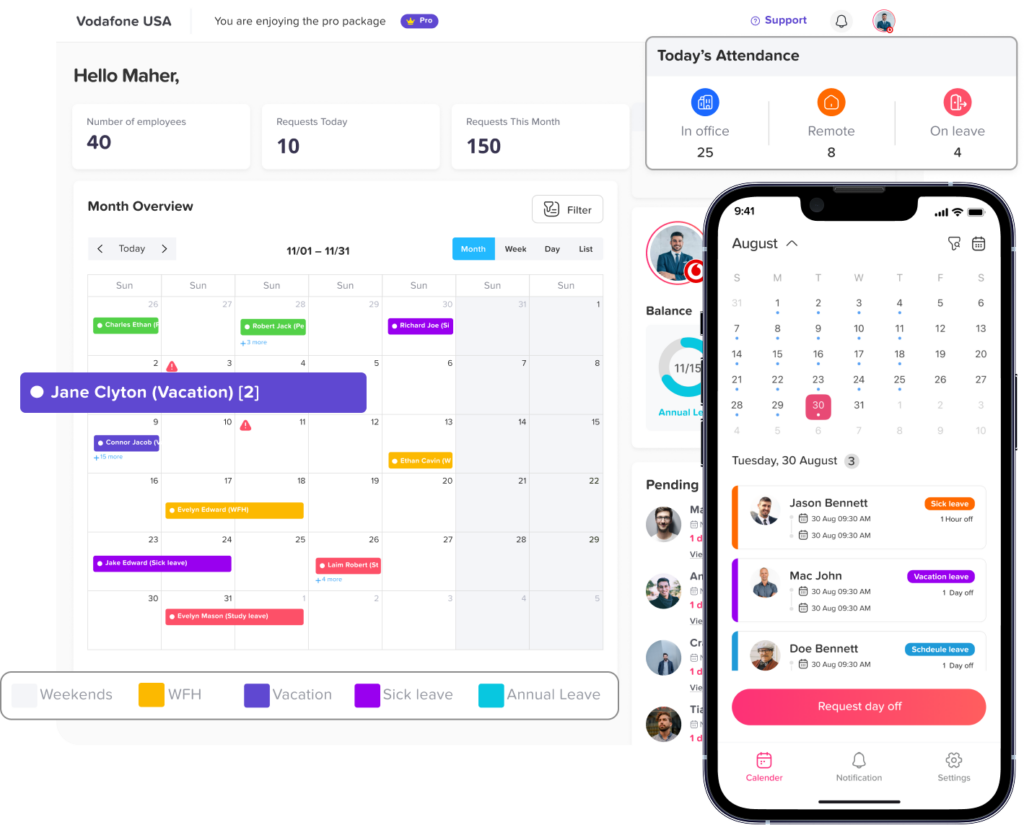
A shared leave calendar is one of the simplest ways to reduce PTO confusion. It gives managers and teams visibility into who is off, who is available, and when upcoming absences are scheduled.
This helps prevent overlapping leave problems and makes workforce planning easier.
A shared calendar is especially helpful for:
- Managers planning team workloads
- HR monitoring company wide absences
- Employees checking team availability before requesting leave
- Teams preparing for busy periods
- Companies with remote or distributed employees
When everyone has better visibility, fewer scheduling surprises happen.
Support Different Leave Policies
Not every employee follows the same leave policy. Some companies have different rules based on country, location, department, seniority, contract type, or work schedule.
Trying to manage all these differences manually can quickly become complicated.
A flexible PTO tracking system should support different policies without forcing HR to manage everything by hand. For example, one group of employees may have annual leave that resets at the beginning of the year, while another group may have leave that resets on their work anniversary.
Different leave policies may include:
- Different annual leave allowances
- Different sick leave rules
- Different accrual methods
- Different carryover limits
- Different reset dates
- Different approval workflows
- Different holiday calendars
The easier it is to apply the right policy to the right employee, the easier PTO tracking becomes.
Reduce Overlapping Time Off
Overlapping leave is not always a problem. In many cases, multiple employees can be off at the same time without affecting operations. The real issue is when overlapping time off causes poor coverage, missed deadlines, or pressure on the remaining team members.
Good PTO tracking helps managers see potential conflicts before approving requests. Instead of discovering the problem too late, managers can review the team calendar and make better decisions.
This helps companies maintain balance between employee flexibility and business needs.
Improve HR Reporting
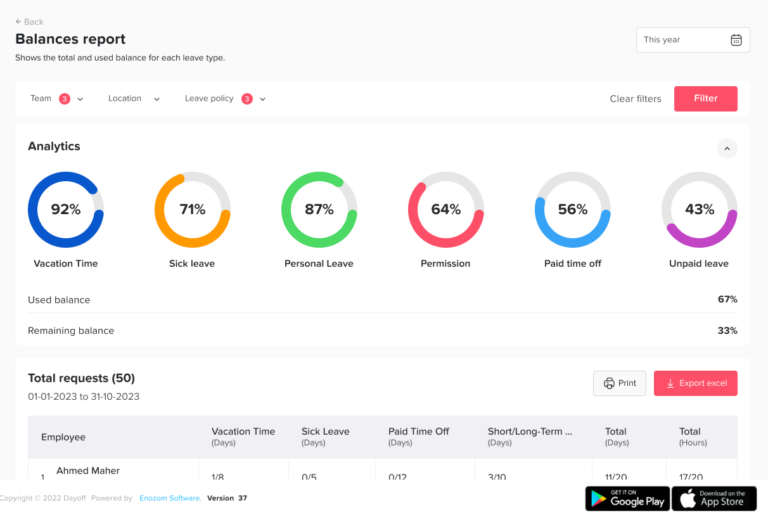
PTO reports are important for understanding absence patterns, remaining balances, used leave, and team availability. However, manual reporting can take a lot of time when records are spread across spreadsheets, emails, and calendars.
A simple PTO tracking system makes reporting easier by keeping data organized from the beginning.
Useful PTO reports may include:
- Leave balance reports
- Leave usage by employee
- Leave usage by department
- Leave types used
- Pending requests
- Approved requests
- Upcoming time off
- Absence trends
With better reporting, HR teams and company leaders can make more informed decisions.
Make PTO Tracking Easy for Remote and Hybrid Teams
Remote and hybrid work have made PTO visibility even more important. When employees are not always in the same office, managers need a reliable way to know who is working, who is off, and who is unavailable.
A digital PTO tracking system gives distributed teams one shared source of truth. Employees can request leave from anywhere, managers can approve requests online, and HR can keep records updated without relying on office based paperwork.
This creates a smoother process for modern teams, whether they work in the office, remotely, or across multiple locations.
How Day Off Simplifies PTO Tracking
Day Off helps companies manage PTO, vacation days, sick leave, and other types of leave without the confusion of manual tracking. It brings requests, approvals, balances, calendars, policies, and reports into one easy-to-use platform.
With Day Off, employees can submit leave requests from the mobile app or web platform. Managers can review and approve requests faster, while HR teams can manage policies, track balances, and access reports without updating spreadsheets manually.
Day Off helps simplify PTO tracking through features such as:
- Easy leave requests
- Manager approval workflows
- Automatic balance tracking
- Custom leave types
- Shared company calendar
- Team and location management
- Leave policies
- Public holiday management
- Reports and exports
- Mobile apps for iOS and Android
- Web access for HR, managers, and employees
Instead of chasing requests across emails and chats, companies can manage everything in one organized place.
Why Simpler PTO Tracking Benefits Everyone
A simple PTO tracking process benefits the entire company.
Employees get a better experience because they can request time off easily, check balances, and receive clearer updates.
Managers get better visibility because they can see who is away, review requests quickly, and plan team coverage more effectively.
HR teams save time because they no longer need to manually track every request, update every balance, or answer the same questions repeatedly.
Company leaders benefit from better reporting, fewer errors, and a more organized approach to workforce planning.
When PTO tracking is simple, everyone can focus less on administration and more on doing great work.
Signs Your Company Needs a Better PTO Tracking System
Your company may need a better PTO tracking process if:
- Employees often ask HR about their remaining balance
- Leave requests are sent through emails, chats, or verbal messages
- Managers forget to approve or reject requests
- PTO balances are updated manually
- Spreadsheets are becoming difficult to manage
- Employees take overlapping leave without enough visibility
- Reports take too long to prepare
- HR spends too much time fixing leave records
- Different policies are hard to manage
- Employees are unsure about the request process
If these problems sound familiar, it may be time to move to a dedicated PTO tracking system.
Best Practices for Simple PTO Tracking
To make PTO tracking easier, companies should focus on clarity, consistency, and automation.
Here are some best practices:
- Create a clear PTO policy that employees can understand
- Use one system for all leave requests
- Give employees access to their own balances
- Automate balance calculations where possible
- Use a shared calendar for better visibility
- Define approval workflows clearly
- Review leave reports regularly
- Keep policies updated as the company grows
- Make the process accessible through mobile and web
- Avoid relying only on spreadsheets and manual updates
The goal is not to make PTO rules complicated. The goal is to make time off easy to request, easy to approve, and easy to track.
FAQ
What does PTO tracking mean?
PTO tracking means managing and recording employee paid time off. It includes tracking how many days employees are entitled to, how many days they have used, how many days remain, and when they are scheduled to be away from work. PTO tracking helps companies keep vacation days, sick leave, personal leave, and other types of paid leave organized and accurate.
Why is PTO tracking important?
PTO tracking is important because it helps companies avoid confusion, scheduling problems, and inaccurate leave balances. When PTO is tracked properly, employees know how much time off they have, managers can plan team coverage, and HR teams can manage records without relying on manual updates.
What is the easiest way to track PTO?
The easiest way to track PTO is to use a dedicated PTO tracking system instead of spreadsheets, emails, or chat messages. A PTO tracking system keeps leave requests, approvals, balances, policies, calendars, and reports in one place, making the process easier for employees, managers, and HR teams.
Can PTO be tracked manually?
Yes, PTO can be tracked manually using spreadsheets, paper forms, emails, or shared calendars. However, manual PTO tracking can become difficult as the company grows. It often leads to missed requests, incorrect balances, delayed approvals, and more administrative work for HR.
What are the common problems with manual PTO tracking?
Common problems with manual PTO tracking include inaccurate leave balances, lost requests, slow approvals, overlapping vacations, unclear records, and time-consuming reports. Manual tracking also makes it harder for employees to check their own PTO balances and for managers to see team availability.
How can a PTO tracking system help HR teams?
A PTO tracking system helps HR teams by reducing repetitive manual work. Instead of updating spreadsheets, calculating balances, and answering the same PTO questions repeatedly, HR can manage requests, policies, balances, calendars, and reports from one central platform.
How does PTO tracking help employees?
PTO tracking helps employees by giving them a clear view of their available leave balance, pending requests, approved time off, and company holidays. This makes it easier for employees to plan vacations, request time off, and understand how much PTO they have remaining.
How does PTO tracking help managers?
PTO tracking helps managers review leave requests faster and make better decisions. Managers can see who is already off, check team availability, and approve or reject requests with more confidence. This helps reduce scheduling conflicts and keeps teams better organized.
What features should a PTO tracking system include?
A good PTO tracking system should include leave requests, approval workflows, automatic balance updates, custom leave types, shared calendars, employee self-service, reports, public holiday management, and support for different teams, locations, and policies.
Is PTO tracking useful for small businesses?
Yes, PTO tracking is useful for small businesses because it helps build a clear and organized leave process from the beginning. Even small teams can experience missed requests, balance errors, or scheduling conflicts when PTO is managed manually.
Can PTO tracking help prevent overlapping vacations?
Yes, PTO tracking can help prevent overlapping vacations by giving managers and employees visibility into who is already scheduled to be off. A shared leave calendar makes it easier to review team availability before approving new requests.
Why should companies use Day Off for PTO tracking?
Companies can use Day Off to simplify PTO tracking and reduce manual work. Day Off helps teams manage leave requests, approvals, balances, custom leave types, policies, holidays, calendars, and reports from one easy to use platform available on web, iOS, and Android.
Final Thoughts
PTO tracking does not have to be complicated. Most problems come from scattered requests, manual updates, unclear policies, and limited visibility. When companies replace these manual steps with a clear digital process, time off management becomes much easier.
A simple PTO tracking system helps employees understand their leave, helps managers plan better, and helps HR teams reduce repetitive work. It also creates a more transparent and organized experience for the entire company.
With Day Off, businesses can manage PTO in a simpler, smarter, and more reliable way. Whether your team is small, growing, remote, hybrid, or spread across multiple locations, Day Off helps keep leave management clear and easy from request to approval.