





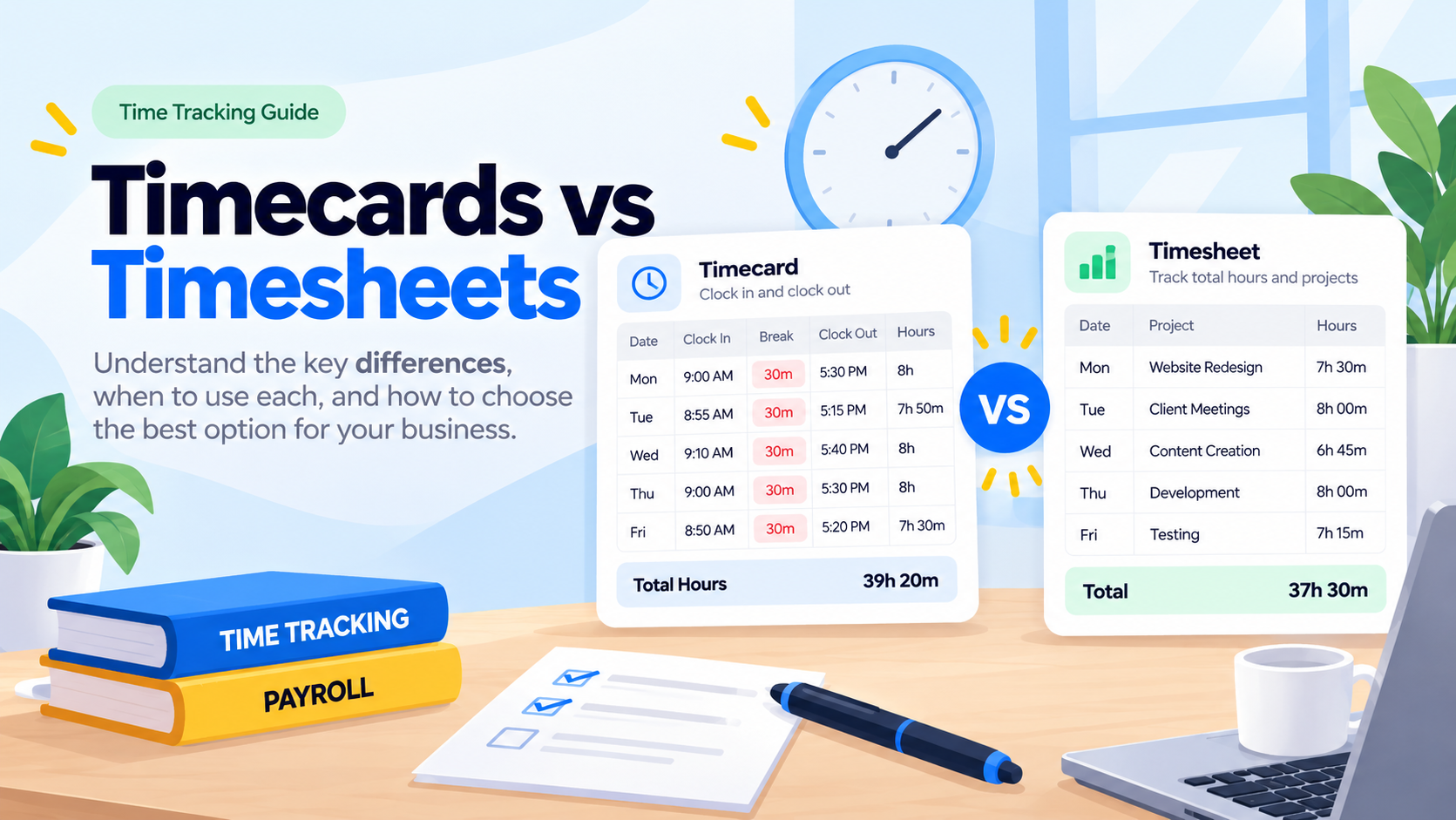
A timecard records when an employee starts and stops work, while a timesheet records how many hours an employee worked over a period, often with those hours assigned to projects, tasks, or clients.
That is the simplest way to understand the timecard vs timesheet difference. A timecard focuses on the actual start and end of the workday. In contrast, a timesheet focuses on the total time worked and, in many workplaces, how that time was spent.
The terms are often used interchangeably, especially now that digital time tracking software can create both records automatically. However, understanding the difference is useful when setting up payroll, tracking attendance, billing clients, calculating overtime, managing projects, or maintaining wage and hour records.

This guide explains what a timecard is, what a timesheet is, the difference between a timecard and timesheet, U.S. timekeeping requirements, and when businesses should use each one. You will also find a free timecard template and an explanation of how a system such as Day Off can connect clock-ins, timesheets, attendance, work schedules, PTO, projects, and reports.
What Is a Timecard?
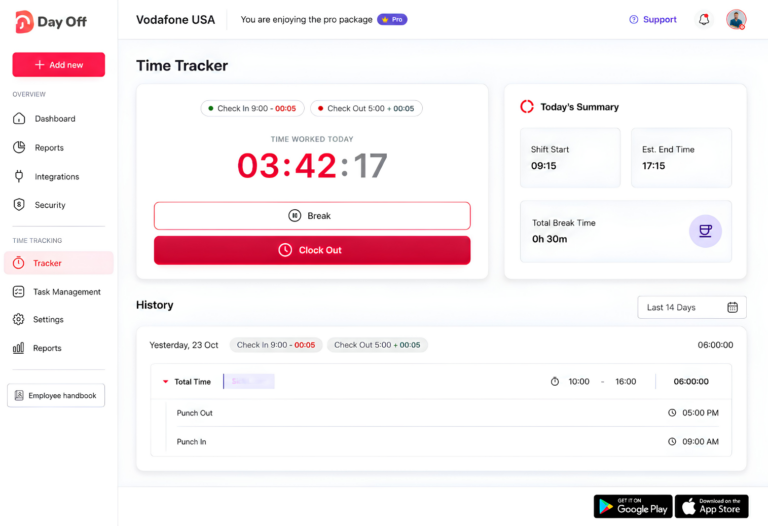
A timecard is a record of when an employee begins and ends work.
Traditional timecards were physical cards inserted into mechanical punch clocks. The machine then stamped the employee’s arrival and departure times onto the card.
Today, timecards are usually digital. Employees may clock in and clock out through a web or mobile system, computer, time clock, badge reader, or workforce management platform.
A typical employee timecard can contain:
Employee name or ID
Date
Scheduled working hours
Clock-in time
Clock-out time
Break start and end times
Total worked hours
Overtime
Notes or attendance exceptions
For example, an employee might have the following daily record:
- Clock in: 9:00 AM
- Break: 1:00 PM to 1:30 PM
- Clock out: 5:30 PM
- Worked time: 8 hours
Timecards are particularly useful for hourly and shift-based employees because they show when work actually happened, rather than simply recording a total number of hours.
Retail stores, restaurants, healthcare organizations, warehouses, manufacturing businesses, hospitality companies, and other shift-based workplaces commonly use timecards.
What Is a Timesheet?
A timesheet records the amount of time an employee works during a particular period.
Depending on the company, a timesheet may cover:
One day
One week
Two weeks
A pay period
One month
Rather than focusing only on clock-in and clock-out punches, a timesheet often organizes worked time by project, task, client, department, or activity.
A typical timesheet may include:
Employee name
Reporting period
Hours worked each day
Weekly or pay-period total
Project or client
Tasks
Billable or non-billable hours
PTO or leave
Holidays
Overtime
Manager approval
For example:
An employee could work eight hours in one day but record those hours as:
Client A project: 3 hours
Internal meeting: 1 hour
Website project: 3 hours
Administration: 1 hour
The employee still worked eight hours, but the timesheet explains where those eight hours went.
This makes timesheets particularly useful for agencies, consultants, professional services companies, remote teams, contractors, and organizations that need project costing or client billing.
Timecard vs Timesheet: What Is the Difference?
The main difference between a timecard and a timesheet is the type of information each record emphasizes.
| Area | Timecard | Timesheet |
|---|---|---|
| Main record | Start and end times | Total hours worked |
| Typical period | Day or shift | Week, pay period, or month |
| Main purpose | Attendance and payroll | Payroll, billing, projects, and reporting |
| Records | Clock-in, clock-out, breaks | Hours by day, project, client, or task |
| Best for | Hourly and shift workers | Project and knowledge-based teams |
| Created by | Punches or clock-in/out actions | Manual entries, timers, or timecard data |
| Helps answer | “When did this employee work?” | “How long did they work, and on what?” |
A useful way to remember the difference is:
Timecard = when someone worked.
Timesheet = how much someone worked and where the time went.
However, businesses do not always have to choose one.
Modern time tracking software can use clock-in and clock-out records as the raw attendance data and then automatically calculate those records into daily, weekly, or pay-period timesheets.
Timecard vs Time Sheet: Are They the Same Thing?
Not exactly, although the terms are commonly used as if they mean the same thing.
A traditional timecard is closely connected with a time clock. It records individual punches.
A timesheet is generally a broader record of hours.
In practice, the distinction has become less obvious because digital systems can combine attendance and timesheet functionality.
An employee might clock in at 9:00 AM and clock out at 5:30 PM. The software records those events as attendance data and then converts the worked duration into the employee’s daily or weekly time report.
As a result, one system can effectively create both the timecard and timesheet.
What Are Timecards Used For?
Timecards help businesses answer questions such as:
Did the employee report for work?
What time did they arrive?
What time did they leave?
Did they take a break?
Were they late?
Did they leave early?
How many hours did they work?
Did they work longer than scheduled?
These records can support attendance management, wage calculations, payroll preparation, overtime review, and workforce reporting.
When employee schedules are also stored in the system, companies can compare scheduled hours with actual hours instead of reviewing clock punches without context.
What Are Timesheets Used For?
Timesheets serve a broader set of purposes.
Companies may use timesheets for:
Payroll
Recorded hours can help determine regular hours, overtime hours, and other payroll inputs for hourly employees.
Client Billing
Agencies and professional service businesses often invoice clients based on time spent on a particular project.
Project Costing
Managers can compare the hours spent on a project with estimates or budgets.
Productivity Analysis
Timesheets can show how working time is distributed between projects and tasks.
Resource Planning
Managers can identify employees or teams spending unusually high amounts of time on certain activities.
Internal Reporting
Historical timesheet data can help organizations understand staffing requirements and workload patterns.
Do Employers Have to Keep Timecards or Timesheets?
Under the U.S. Fair Labor Standards Act (FLSA), covered employers must maintain certain records for non-exempt employees.
According to the U.S. Department of Labor, required records include information such as:
Employee identifying information
The time and day the employee’s workweek begins
Hours worked each day
Total hours worked each workweek
Basis on which wages are paid
Regular hourly rate
Straight-time earnings
Overtime earnings
Additions to or deductions from wages
Total wages paid
Pay date and pay period covered
The FLSA does not require employers to use a particular type of timecard, timesheet, time clock, or software.
The Department of Labor explains that employers may use any timekeeping method they choose, including a time clock, a timekeeper, or employees recording their own time, provided the records are complete and accurate.
That means a paper timecard, spreadsheet, digital timesheet, or automated time tracking system may be used if the employer’s records satisfy applicable requirements.
Employers should remember that federal rules are only one part of the picture. In addition, state and local wage and hour laws can impose additional requirements.
How Long Should Employers Keep Timecards and Timesheets?
Under federal FLSA recordkeeping rules, payroll records generally must be preserved for at least three years.
Records used to determine wages generally must be kept for at least two years. The Department of Labor specifically includes records such as:
Timecards
Work and time schedules
Wage rate tables
Piecework tickets
Records of additions to or deductions from wages
State requirements may require businesses to retain records for longer periods.
For that reason, companies should establish a formal record-retention policy based on the jurisdictions where they employ workers.
This article provides general information and should not be treated as legal advice.
Which Should You Use: Timecards or Timesheets?
Choosing between a timecard and a timesheet depends on what your business needs to measure. If your priority is knowing exactly when employees start and finish work, a timecard is usually the better option. If you need to understand how employees spend their working hours across projects, tasks, or clients, a timesheet provides more useful detail.
Many companies use both. Clock-in and clock-out records capture attendance, while timesheets organize those hours for payroll, reporting, project management, and client billing.
Hourly and Shift-Based Employees
For hourly employees, timecards or clock-in and clock-out records are usually the most practical choice.
They show the actual time an employee starts and finishes work, which helps businesses calculate worked hours and review attendance accurately.
Timecards are particularly useful for:
Retail employees
Restaurant staff
Warehouse workers
Healthcare teams
Manufacturing employees
Hospitality workers
Other shift-based teams
When employee schedules are also available, managers can compare scheduled hours with actual attendance and identify late arrivals, early departures, missing punches, or additional hours worked.
Retail, Restaurants, and Hospitality
Retail stores, restaurants, cafés, hotels, and other shift-based businesses often rely heavily on clock-in and clock-out records.
Managers need to know more than the total hours worked. They may also need to see:
When an employee arrived
When the employee left
Whether scheduled breaks were taken
Whether the employee worked beyond the scheduled shift
Whether there were missing clock-ins or clock-outs
For these workplaces, combining work schedules with digital timecards gives managers a clearer picture of daily attendance.
Agencies and Consultancies
Agencies, consultancies, and professional service firms often benefit more from project-based timesheets.
Instead of focusing primarily on when an employee arrived at work, these businesses often need to know:
How many hours were spent on a client
Which project consumed the most time
How much time was billable
How long specific tasks took
Whether a project stayed within its time budget
A timesheet organized by project, task, or client can make client billing and project profitability easier to manage.
Remote and Hybrid Teams
For remote and hybrid employees, traditional punch-based attendance may not always provide enough information.
A digital timesheet or task timer can show how working hours are distributed throughout the day, especially when employees work on multiple projects or clients.
Some remote teams may still use clock-in and clock-out tracking for attendance while also using task-based time tracking for project reporting.
Businesses With Mixed Workforces
Companies with office staff, hourly workers, remote employees, and project-based teams may need both timecards and timesheets.
For example:
Hourly employees can clock in and out.
Project teams can track time against tasks.
Managers can review total hours.
Payroll teams can use worked hours for payroll preparation.
Project managers can analyze time spent on clients and projects.
Using one system for both approaches can reduce duplicate data entry and make employee time records easier to review.
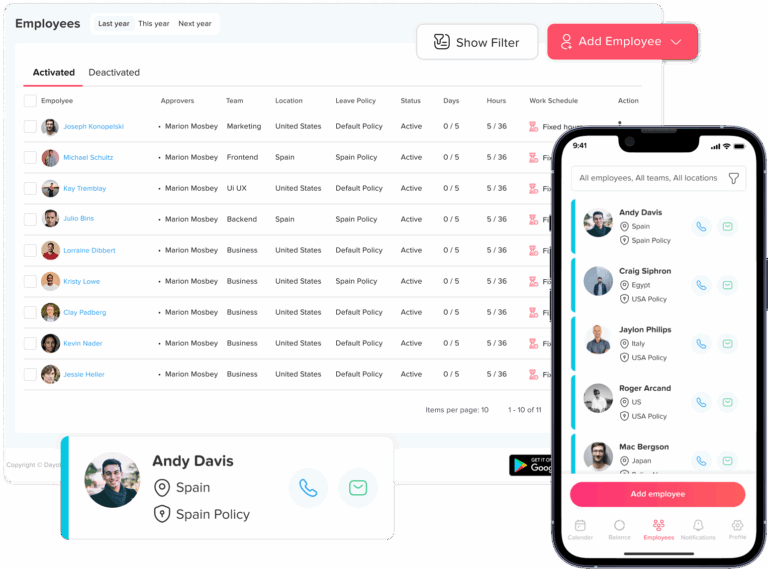
Free Timecard Template
A free timecard template can be a practical starting point for small teams that are not yet using dedicated time tracking software.
You can copy the template below into Excel, Google Sheets, Word, or another spreadsheet application and customize it for your company.
Employee Name: ____________________
Employee ID: ____________________
Department: ____________________
Week Starting: ____________________
| Date | Day | Clock In | Break Start | Break End | Clock Out | Total Hours | Notes |
|---|---|---|---|---|---|---|---|
| Monday | |||||||
| Tuesday | |||||||
| Wednesday | |||||||
| Thursday | |||||||
| Friday | |||||||
| Saturday | |||||||
| Sunday |
Weekly Total: __________
Overtime Hours: __________
Employee Signature: ____________________
Supervisor Signature: ____________________
A basic employee timecard like this can help small businesses record clock-in times, clock-out times, breaks, and total hours worked. As the team grows, however, manually maintaining these records can become more difficult.
How to Fill Out a Timecard Correctly
An accurate employee timecard should reflect the time actually worked rather than simply copying the employee’s scheduled hours.
Record the Actual Clock-In Time
Enter the time the employee actually begins working.
For example, if the employee is scheduled to start at 9:00 AM but begins work at 9:08 AM, the timecard should reflect the actual start time.
Accurate clock-in records help businesses understand attendance and calculate worked hours correctly.
Record Unpaid Breaks
Record unpaid breaks separately when they need to be excluded from worked time.
For example:
Break start: 1:00 PM
Break end: 1:30 PM
The employee took a 30-minute unpaid break, so that time would not be included in total worked hours.
Record the Actual Clock-Out Time
Enter the time the employee finishes working rather than automatically entering the scheduled end of the shift.
This is especially important when employees work additional time before or after their scheduled hours.
Calculate Total Worked Hours
To calculate daily working hours:
Clock-out time – Clock-in time – Unpaid breaks = Total worked hours
Example:
Clock in: 9:00 AM
Clock out: 5:30 PM
Elapsed time: 8.5 hours
Unpaid break: 30 minutes
Total worked time = 8 hours
Calculate the Weekly Total
Add the employee’s daily working hours to determine the total hours worked during the workweek.
This total can then be reviewed for payroll and overtime purposes.
For covered non-exempt employees in the United States, federal overtime generally applies after more than 40 hours worked in a workweek. In addition, state or local requirements may provide additional protections.
Review the Timecard Before Payroll
Before using timecard data for payroll, managers should check for:
Missing clock-ins
Missing clock-outs
Unusually long or short shifts
Incorrect break entries
Duplicate entries
Unexpected overtime
Reviewing these issues before payroll can help prevent avoidable corrections later.
Problems With Manual Timecards and Spreadsheets
A spreadsheet timecard can work for a small team, but manual employee time tracking becomes harder to manage as the number of employees and shifts increases.
The biggest challenges usually come from incomplete records, manual calculations, and disconnected systems.
Missing Clock-Ins and Clock-Outs
Employees occasionally forget to clock in or clock out.
With paper records or spreadsheets, managers may have to contact the employee and reconstruct the missing information later.
The longer the correction is delayed, the harder it may be to confirm the exact working time.
Manual Calculation Errors
Calculating working hours manually increases the risk of mistakes.
Common problems include:
Incorrect break deductions
Formula errors
Incorrect weekly totals
AM/PM mistakes
Decimal-hour conversion errors
Copying formulas into the wrong rows
Automated time tracking reduces the amount of manual calculation required.
Inconsistent Time Formats
One employee might record 5:30 PM, while another enters 17:30 or simply 5.5.
These inconsistencies can make spreadsheets harder to review and increase the chance of calculation errors.
Slow Timesheet Reviews
Managers may need to collect multiple files, review individual rows, identify missing information, and request corrections before payroll.
As the team grows, this review process can take significantly more time.
No Comparison With Work Schedules
A standalone spreadsheet may show that an employee worked seven hours, but it does not automatically explain whether seven hours was the expected amount.
Connecting employee timecards with work schedules makes it easier to identify:
Late arrivals
Early departures
Overtime
Short working days
Missing attendance
PTO Is Stored Separately
Employee time tracking becomes more complicated when attendance and PTO are managed in separate systems.
For example, an employee may show zero worked hours because they:
Were on approved vacation
Took sick leave
Had a partial-day absence
Were not scheduled to work
Forgot to clock in
Without connected PTO and attendance records, HR may have to investigate these situations manually.
Reporting Becomes Difficult
Spreadsheets may be suitable for recording daily hours, but analyzing several weeks or months of employee attendance can become difficult.
Managers may want to answer questions such as:
Who regularly works overtime?
Which employees frequently arrive late?
How many hours were spent on a project?
How much employee time was lost to absences?
Which teams worked the most hours?
A dedicated time tracking system can make this information easier to organize and review.
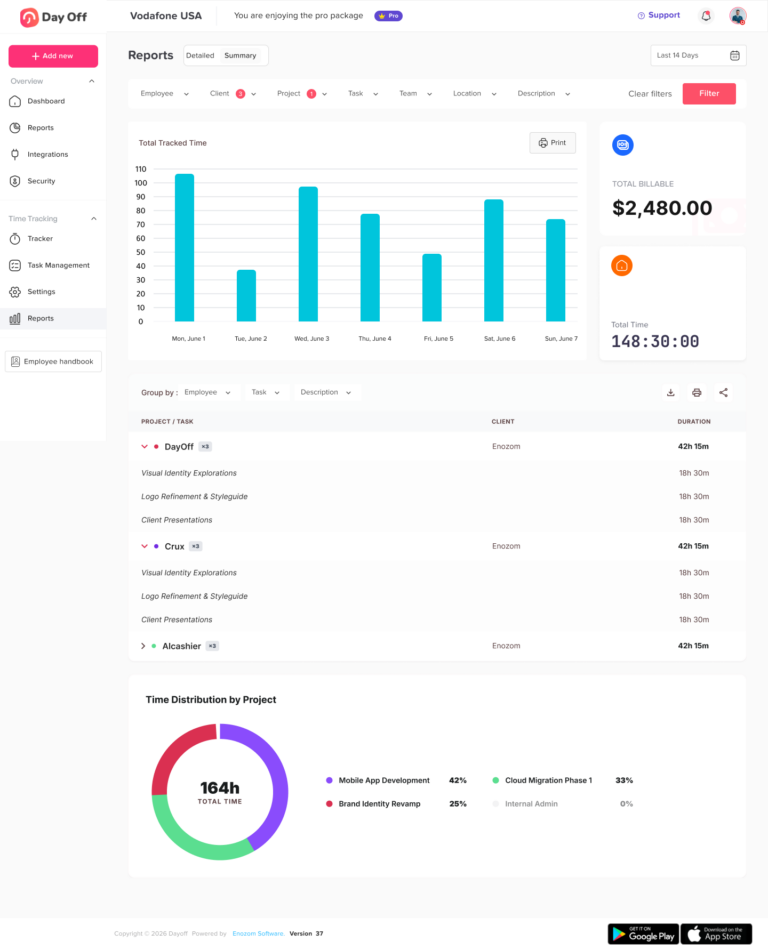
How Day Off Simplifies Timecards and Timesheets
Day Off combines employee time tracking, attendance, work schedules, and PTO management in one platform.
Instead of maintaining separate spreadsheets for clock-ins, employee timesheets, schedules, and leave records, businesses can review this information together.
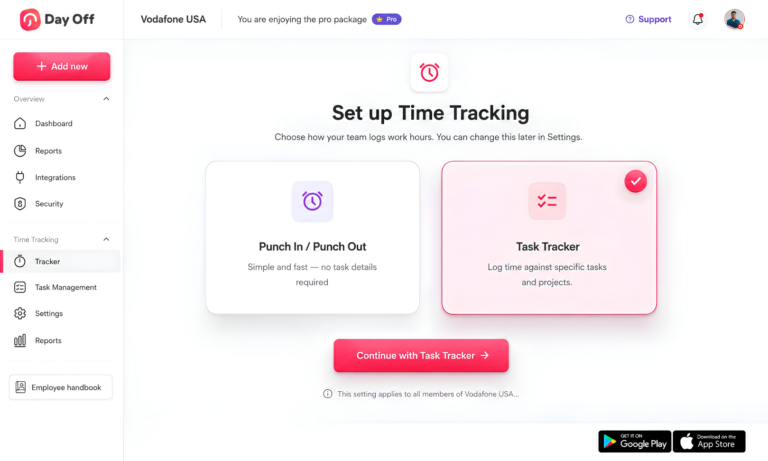
Day Off’s Pro + Time Tracker plan includes Clock In / Clock Out, Task Tracking, Projects, Tasks & Clients, Detailed Reports, Summary Reports, and Attendance Review.
Digital Clock In and Clock Out
Employees can use Clock In / Clock Out mode to record when their workday begins and ends.
This creates a digital attendance record without requiring employees or managers to complete paper timecards manually.
Clock-in and clock-out records can help managers understand:
When employees started work
When they finished
How long they worked
Whether they arrived late
Whether they left early
Whether attendance matched the employee’s schedule
Track Employee Breaks
Employees can also start and end breaks while using Clock In / Clock Out.
Break time can then be included when calculating the employee’s actual worked hours.
For example:
Clock in: 9:00 AM
Clock out: 5:30 PM
Breaks: 30 minutes
Worked time:
8 hours
Having breaks recorded alongside clock-in and clock-out information gives managers a clearer daily attendance record.

Task-Based Time Tracking
Not every team needs only attendance tracking.
Employees working on projects can use Task Tracking mode to record how long they spend on specific work.
This is useful for businesses that need to understand both:
When employees worked
What they worked on
Projects, Tasks, and Clients
Time entries can be organized around projects, tasks, and clients.
This can help managers analyze questions such as:
How many hours were spent on a project?
How long did a specific task take?
How much employee time was recorded for a client?
Which projects consumed the most working hours?
This makes Day Off useful for teams that need more than a basic employee time clock.
Review Time Tracking History
Tracked sessions can contain details such as:
Description
Project
Start time
End time
Duration
Billable status
This creates a more detailed history than a simple weekly spreadsheet containing only total hours.
Compare Scheduled Hours With Actual Attendance
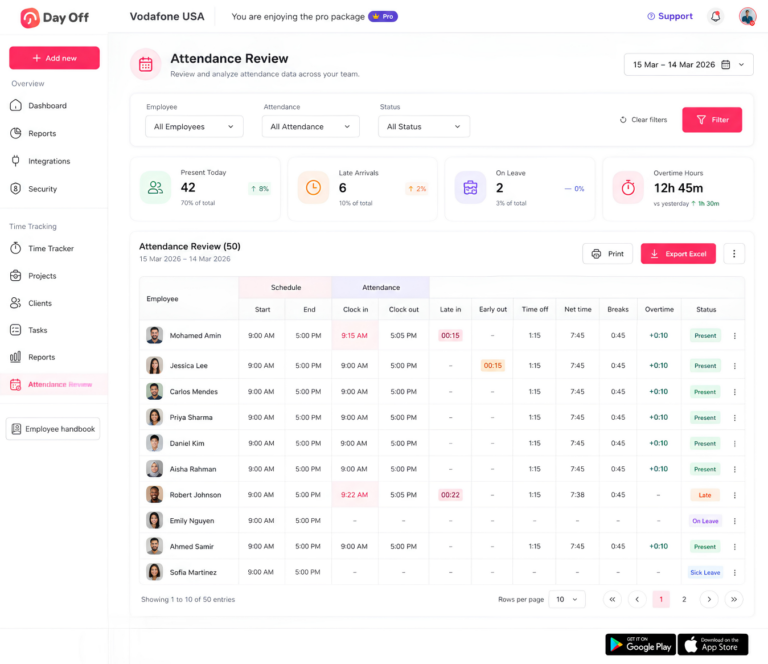
Day Off’s Attendance Review helps managers compare an employee’s work schedule with actual time records.
Managers can review information such as:
Scheduled start and end times
Clock-in time
Clock-out time
Late arrival
Early departure
Breaks
Approved time off
Overtime
Attendance status
This provides context that a traditional employee timecard may not show on its own.
For example, knowing that an employee worked seven hours does not tell a manager whether seven hours was correct. If the employee was scheduled for eight hours but had one hour of approved leave, seven worked hours may be exactly what was expected.
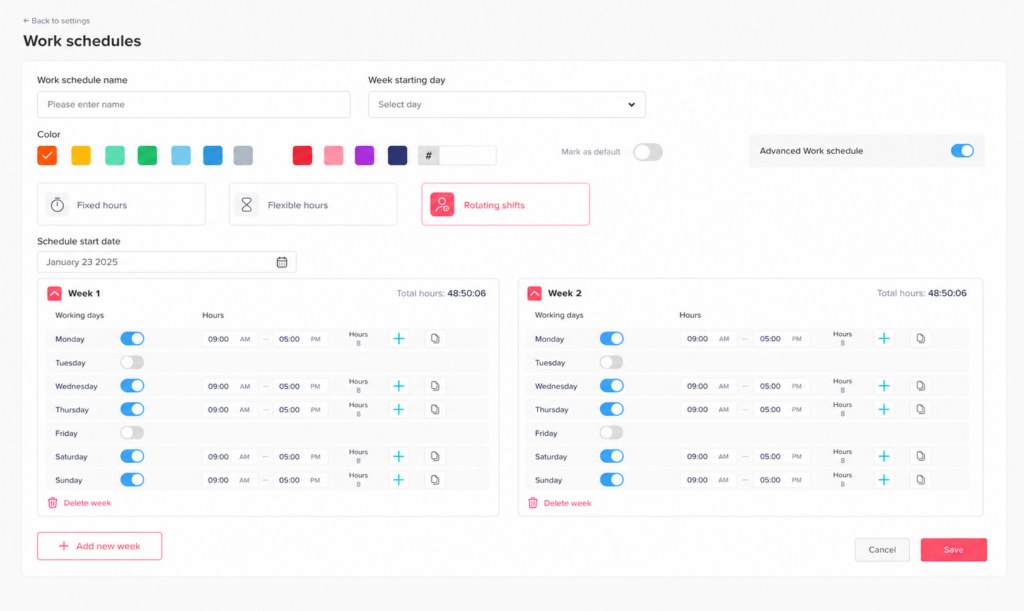
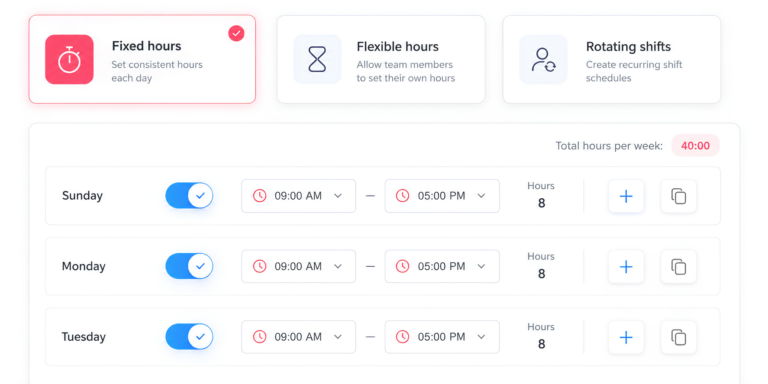
Flexible Employee Work Schedules
Day Off supports different work schedule configurations, including:
Fixed days
Fixed hours
Flexible hours
Rotating shifts
This allows attendance records to be reviewed against the schedule assigned to each employee rather than assuming everyone follows the same workday.
Connect PTO With Time Tracking
One of the most useful advantages of combining PTO and time tracking is having more context around employee attendance.
If an employee has fewer recorded working hours, managers can also review whether the employee had approved time off.
This helps distinguish between:
Approved PTO
Partial-day leave
Scheduled days off
Missing attendance
Actual absences
Instead of reconciling several systems manually, attendance and time-off information can be reviewed together.
Attendance and Time Tracking Reports
Day Off provides Detailed Reports, Summary Reports, and Attendance Review for reviewing employee time.
Attendance information can also be filtered and exported to Excel, giving managers useful records for internal reporting and payroll preparation.
Day Off Time Tracking Pricing
Businesses that want both PTO management and employee time tracking can use Day Off’s Pro + Time Tracker plan.
Current plans include:
| Plan | Price | Best For |
|---|---|---|
| Free | $0 | Leave management for teams of up to 10 employees |
| Pro | $2 per employee/month | Advanced PTO and leave management |
| Pro + Time Tracker | $3 per employee/month | PTO, attendance, and employee time tracking |
The Pro plan has a $20 monthly minimum, while Pro + Time Tracker has a $30 monthly minimum.
Annual billing saves 17%, and Day Off offers a 14-day free trial.
The Pro + Time Tracker plan includes:
Clock In / Clock Out
Task Tracking
Projects
Tasks
Clients
Detailed Reports
Summary Reports
Attendance Review
Businesses should check the Day Off pricing page for the latest plan information before subscribing.
Timecard vs Timesheet: Which Is Better?
There is no universal winner in the timecard vs timesheet comparison.
The better option depends on what your company needs to know about employee time.
Choose a timecard when you primarily need to know:
When employees started work
When employees finished
Whether they attended their scheduled shifts
How long they worked
Whether they arrived late or left early
Choose a timesheet when you primarily need to know:
How many hours employees worked
Which projects received those hours
How much time was spent on tasks
How many hours should be billed to clients
How employee time is distributed
For many businesses, the best solution is to use both.
A modern time tracking system can capture clock-in and clock-out activity and then organize those records into employee timesheets, reports, and attendance views without requiring employees to enter the same information twice.
Related reading: Weekly Timesheets: How to Track Employee Hours Without a Spreadsheet
Frequently Asked Questions About Timecards and Timesheets
What information should an employee timecard include?
A useful employee timecard typically includes the employee’s name, work date, clock-in time, clock-out time, break periods, and total hours worked. Businesses may also include overtime, notes, department information, or manager approval depending on their timekeeping process.
What is the best way to track employee hours accurately?
The best method depends on the size and needs of the business. Small teams may use spreadsheets or manual timecards, while growing companies often use digital time tracking software to record clock-ins, clock-outs, breaks, schedules, and worked hours automatically. Overall, the most important factor is that the records accurately reflect the time employees actually work.
How do you calculate hours worked from a timecard?
Start with the employee’s clock-out time, subtract the clock-in time, and then subtract any unpaid break time.
For example, if an employee works from 9:00 AM to 5:30 PM with a 30-minute unpaid break, the total worked time is 8 hours.
What is the difference between a timesheet and a time tracking system?
A timesheet is the record that shows an employee’s working hours over a specific period. A time tracking system is the tool used to capture, calculate, organize, and report those hours. Modern time tracking software can automatically generate timesheet data from clock-in and clock-out records or task timers.
Can employees edit their own timesheets?
Whether employees can edit timesheets depends on the company’s policy and the software being used. Some businesses allow employees to correct missing or incorrect entries before approval, while others require a manager or administrator to make changes. Therefore, a clear correction process helps maintain accurate time records.
What is a timesheet approval process?
A timesheet approval process is the review that takes place before employee hours are finalized for payroll, billing, or reporting. A manager or approver may check worked hours, missing punches, breaks, overtime, leave, and other exceptions before approving or rejecting the timesheet.
How should businesses handle missing clock-ins or clock-outs?
Businesses should have a consistent process for reporting and correcting missed punches. Employees should report the missing clock-in or clock-out as soon as possible, and the corrected entry should be based on accurate information rather than an estimate when possible. In addition, a documented missed-punch policy can make these situations easier to manage.
Can time tracking software track PTO and working hours together?
Yes. Some time tracking platforms combine attendance and PTO management, allowing managers to review worked hours alongside vacation, sick leave, partial-day leave, holidays, and other approved absences. This can make it easier to understand why an employee worked fewer hours on a particular day.
How can employers reduce timesheet errors?
Employers can reduce timesheet errors by using consistent time formats, recording hours as work happens, reviewing missing punches quickly, tracking breaks correctly, comparing attendance with work schedules, and reviewing timesheets before payroll. Automated time tracking can also reduce manual calculations and duplicate data entry.
What should businesses look for in time tracking software?
Businesses should choose time tracking software based on how their teams actually work. Useful features may include clock in and clock out, break tracking, employee timesheets, work schedules, PTO integration, overtime visibility, project and task tracking, attendance reporting, approval workflows, and report exports.
For businesses that want to manage both working time and employee leave, an integrated system such as Day Off can help keep attendance, schedules, PTO, time tracking, projects, and reporting connected instead of managing them across separate tools.
Conclusion
The timecard vs timesheet difference comes down to what your business needs to track. Timecards focus on clock-in, clock-out, and attendance, while timesheets show total hours and how that time was spent.
For teams that need both, Day Off connects time tracking with work schedules, breaks, PTO, projects, and attendance reports, making it easier to manage employee time in one place.