







The moment someone works on more than one project in a day, time tracking becomes much harder than simply recording when they started and stopped working.
A basic clock-in and clock-out system can tell you that someone worked eight hours, but it cannot tell you whether those eight hours went to Client A, Client B, an internal project, a team meeting, or a last-minute revision. Once employees are splitting their time across several projects, knowing where the hours went becomes just as important as knowing how many hours were worked.
The usual solutions often create another problem. Employees write down their hours in spreadsheets, try to remember what they worked on at the end of the day, leave notes in calendars, or keep several timers running at once. Instead of making time tracking easier, these methods turn it into another administrative task.

The goal of multi-project time tracking should be different.
You want enough detail to understand where time is going, calculate billable hours accurately, measure project costs, and plan team capacity, without making employees spend half their day managing the tracking system itself.
The best approach is to make tracking part of the normal workflow so that recording time takes only a few seconds and happens while the work is being done.
Why tracking time across multiple projects is difficult
Tracking time on a single project is relatively straightforward. An employee starts work, starts a timer, finishes the task, and stops the timer.
The situation changes when that same employee works on several projects during the day.
They might spend the morning preparing a report for Project A, move to a client call for Project B, spend an hour helping a colleague with Project C, return to Project A for revisions, and finish the afternoon answering emails related to Project B.
At the end of the day, they still have eight hours of work, but those hours are spread across several different activities.
Three common problems tend to appear.
Employees reconstruct their day afterward
The first problem is retroactive logging.
Someone reaches 5pm, opens the time tracker, and tries to remember what they worked on since breakfast. They might enter two hours for one project, three hours for another, and assume the remaining time went somewhere else.
The problem is that this creates an estimate rather than a record.
Small gaps are easy to forget, especially when the employee has switched between projects, attended meetings, answered messages, or handled unexpected requests throughout the day.
The more time that passes between the work and the entry, the harder it becomes to produce reliable project-level data.
Employees forget to switch timers
The second problem happens when employees do use timers but forget to switch them.
Someone starts a timer for Project A and then receives a message asking them to join a meeting about Project B. They attend the meeting, return to their desk, and continue working without noticing that the Project A timer is still running.
Now the system may show several hours against Project A even though some of that time actually belonged to Project B.
This is not necessarily an employee discipline problem. It is often a workflow problem.
If switching between projects is inconvenient, people will eventually forget to do it.
Project-level tracking isn’t detailed enough
The third problem is a lack of useful detail.
Knowing that a team spent 80 hours on a client project is helpful, but it doesn’t tell you what those 80 hours were spent doing.
Maybe 30 hours went into production work, 15 hours went into meetings, 20 hours went into revisions, and 15 hours went into project management.
Those numbers tell a very different story.
Without task-level information, it becomes difficult to understand which parts of a project consume the most time, where estimates are going wrong, or whether a project is actually profitable.
The goal isn’t more tracking, it’s better tracking
The answer to poor time data is not necessarily to ask employees to record more information.
In fact, adding more fields, more forms, and more manual steps can make the problem worse.
The better approach is to make the tracking process simple enough that employees can use it naturally throughout the day.
A good multi-project workflow should make four things easy:
- Starting work on a project
- Switching between projects
- Correcting mistakes
- Reviewing the results
If those four actions are quick, employees are much more likely to track their time consistently.
The core rule: one active timer, always tagged
One of the simplest and most effective rules for multi-project time tracking is:
One person should have one active timer, and that timer should always be connected to a project and task.
This creates a clear relationship between the work being performed and the time being recorded.
When an employee finishes working on Project A and moves to Project B, they stop or switch the timer before starting the next activity.
The important part is that the project is selected before or at the moment the work starts, rather than being reconstructed several hours later.
This also creates a useful transition point between tasks. Instead of mentally moving from one project to another while leaving the tracking system behind, the employee makes the project change explicit.
The process should be as simple as:
Project A → switch → Project B → switch → Project C
rather than:
Work all day → remember everything at 5pm → reconstruct the day.
A simple multi-project time-tracking workflow
The best system does not need to be complicated. A practical workflow can be built around a few simple steps.
Set up projects and tasks before work begins
Employees should not have to create a new project, client, or task every time they start working.
Projects and tasks should already be available in the system, with employees seeing the projects relevant to their role.
For example:
Client A
- Design
- Development
- Meetings
- Revisions
Client B
- Research
- Content
- Meetings
- Administration
When an employee starts working, selecting the appropriate project and task should be a matter of choosing from a list rather than entering information from scratch.
The less typing required, the more likely employees are to track time correctly.
Make switching projects almost effortless
People working across several projects will switch contexts frequently.
If switching takes five or six steps, employees will eventually stop doing it.
Ideally, moving from one project to another should take only a couple of clicks.
For example:
Stop Project A → select Project B → continue working
Or, even better, allow the employee to change the project on the active timer without losing the time already recorded.
The goal is to make accurate tracking faster than ignoring the tracker.
Tag time at the task level when useful
Project-level tracking tells you where time went.
Task-level tracking tells you why it took that long.
For example, instead of reporting:
Project A — 8 hours
you can see:
Project A — Design: 3 hours
Project A — Client meetings: 2 hours
Project A — Revisions: 2 hours
Project A — Project management: 1 hour
That information is much more useful for future planning.
It can show that a project is taking longer because of revisions, meetings, support requests, or another activity that wasn’t included in the original estimate.
Mark billable time immediately
If your company bills clients based on time, billability should be decided when the work is recorded rather than several weeks later.
Imagine an employee has tracked 40 hours across five projects.
At the end of the month, someone asks them which hours were billable.
Now the employee has to remember what they were doing weeks ago, which meetings were client-related, and which tasks were internal.
That is unnecessary work.
If billability is known when the timer starts, the information is captured at the right moment.
A simple billable / non-billable flag can make later reporting and invoicing much easier.
What about meetings?
Meetings are one of the easiest activities to misclassify in a multi-project environment.
A team member might attend:
- A client meeting
- An internal project meeting
- A sales call
- A company-wide meeting
- A training session
All of these are work, but they may belong to different projects or have different billing rules.
The solution is not to exclude meetings from time tracking.
Instead, create a consistent way to classify them.
For example:
Project A → Client Meeting → Billable
or
Internal → Weekly Team Meeting → Non-billable
This gives you a much more realistic picture of where working hours are going.
How to handle interruptions and unexpected work
Real workdays rarely follow a perfect schedule.
An employee may be working on Project A when a manager asks for help with Project B. A customer may call unexpectedly. A production issue may need immediate attention.
Your time-tracking process needs to handle these interruptions without forcing employees to create complicated manual entries.
A good system should make it easy to switch context and return to the original project afterward.
For example:
Project A → interruption on Project B → return to Project A
The employee should not have to remember the exact times later or create a complicated explanation for every interruption.
The easier the workflow is, the more accurate the resulting data will be.
Don’t try to eliminate every manual correction
Even with a well-designed tracking system, mistakes will happen.
Someone will occasionally start the wrong timer, forget to switch projects, or realize later that an entry was assigned to the wrong task.
A good system should allow employees to correct those mistakes without deleting useful information.
For example, if an employee accidentally tracks 45 minutes against Project A instead of Project B, they should be able to edit the entry and move it to the correct project.
This is better than forcing them to delete the original record and recreate everything.
The goal is accurate data, not a system that punishes small mistakes.
How much detail should employees track?
This is one of the most important decisions when setting up time tracking.
Too little detail makes the data almost useless.
Too much detail makes the system frustrating.
If employees have to choose between 50 different task categories every time they start a timer, they will spend too much time managing the tracker.
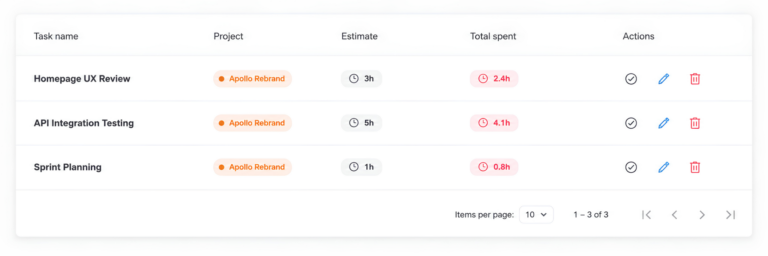
A good starting point is to track:
Person → Project → Task → Date → Time → Billable status
That is usually enough to answer most important questions without creating unnecessary administrative work.
You can add more detail later if there is a genuine business reason for it.
Use categories people can actually understand
Task names should be clear and consistent.
For example, categories such as:
- Development
- Design
- Research
- Client meeting
- Internal meeting
- Administration
- Support
- Revisions
are easier to understand than dozens of highly specific categories that employees rarely use consistently.
The simpler the structure, the more reliable the data tends to be.
How to review time data without creating more work
Tracking time is only useful if you actually use the information.
However, reviewing every employee’s timesheet in detail every day can create another administrative burden.
A weekly review is often a better starting point.
Look for obvious problems such as:
- Extremely long single entries
- Unusually high hours on one project
- Missing project assignments
- Too much unclassified time
- Unexpected non-billable work
- Large differences between estimated and actual hours
The purpose of the review isn’t to criticize employees.
It is to identify bad data while the work is still fresh enough to correct.
A weekly review also makes it easier to identify project problems early instead of discovering them at the end of the month when the information is much harder to act on.
Track time for planning, not just billing
Many companies start tracking time because they need accurate client invoices.
Billing is important, but it is only one reason to track project time.
Good time data can also answer questions such as:
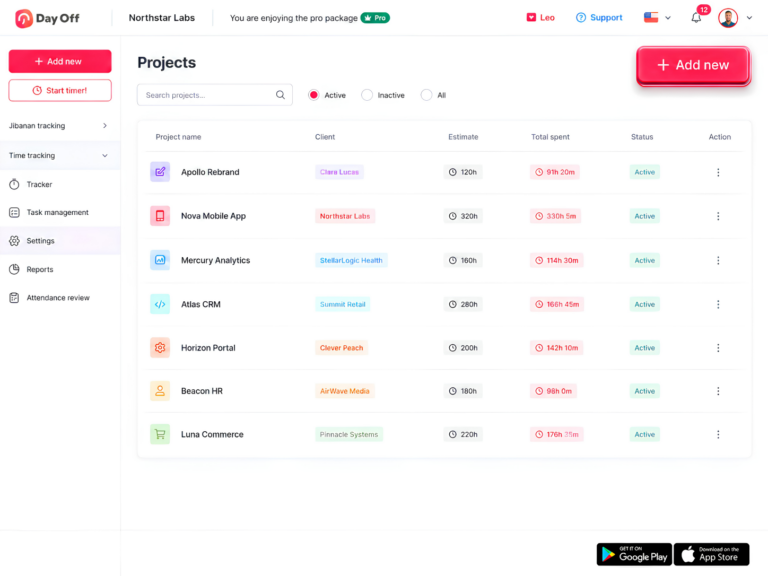
- Which projects are taking longer than expected?
- Which tasks consume the most team capacity?
- How much time are we spending on meetings?
- Which clients require the most support?
- Are our project estimates realistic?
- How much capacity does each employee actually have?
- How much work is being done that isn’t billable?
These insights can help improve future estimates, staffing decisions, pricing, and project planning.
Use time data to improve future estimates
One of the biggest benefits of multi-project time tracking is learning from previous projects.
Suppose a company estimates that a particular type of project will require 40 hours.
After completing ten similar projects, the time data shows that they actually take an average of 55 hours.
That is valuable information.
The problem may not be that employees are working too slowly. The original estimate may simply be unrealistic.
Task-level data can make the reason even clearer.
Perhaps the company consistently estimates:
- 15 hours of production
- 5 hours of meetings
- 5 hours of revisions
- 15 hours of management
but the actual average is:
- 15 hours of production
- 10 hours of meetings
- 15 hours of revisions
- 15 hours of management
Now the company knows exactly where the estimate is failing.
Avoid turning time tracking into surveillance
Employees are more likely to use a time tracker consistently when they understand why it exists.
If time tracking feels like a system for monitoring every minute of the workday, employees may become resistant or start entering inaccurate information simply to satisfy the system.
Instead, explain what the data is being used for.
For example, time tracking can help the company:
- Create better project estimates
- Understand workload
- Identify over-capacity teams
- Bill clients accurately
- Improve staffing decisions
- Reduce unnecessary administrative work
The objective should be to understand how work is distributed, not to make employees constantly prove that they are working.
How Day Off handles multi-project time tracking
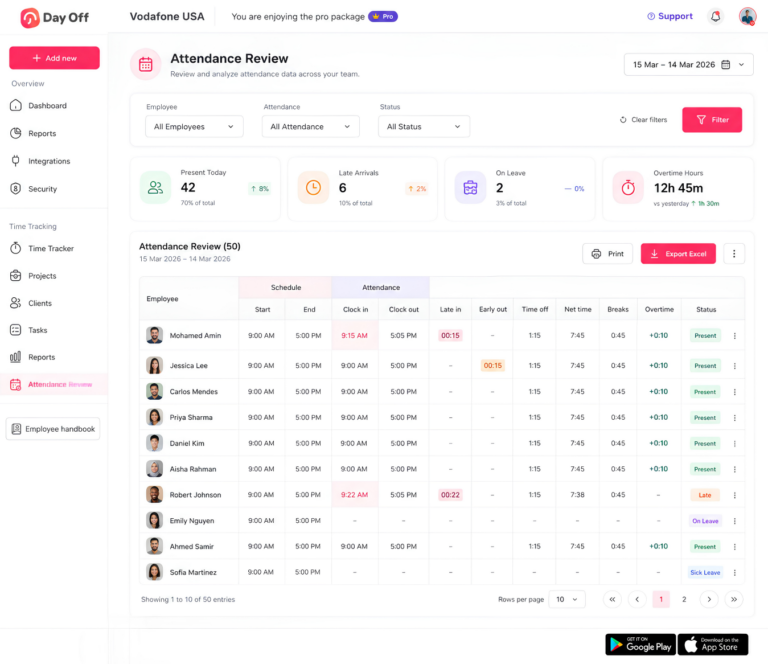
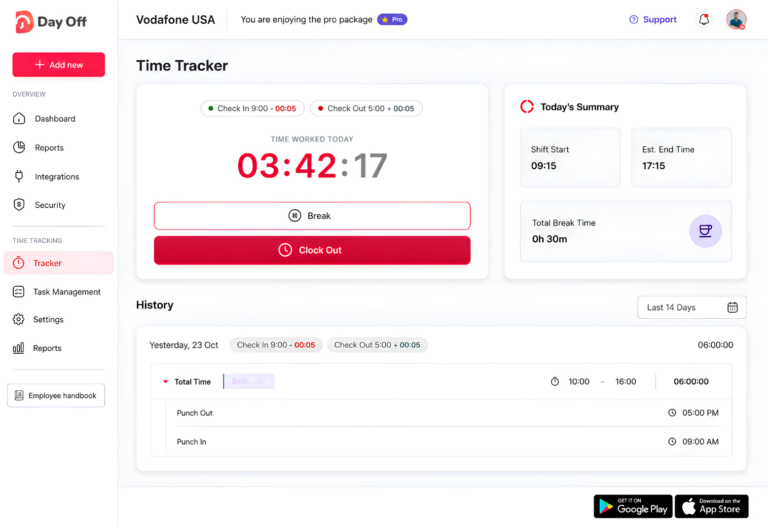
Day Off is designed to keep project time tracking simple while connecting it with the same employee-management environment used for leave and time off.
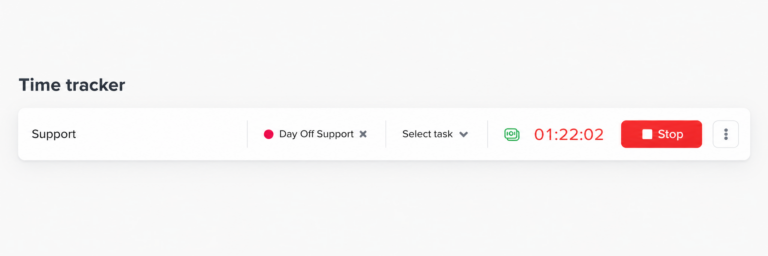
Start and stop timers against projects and tasks
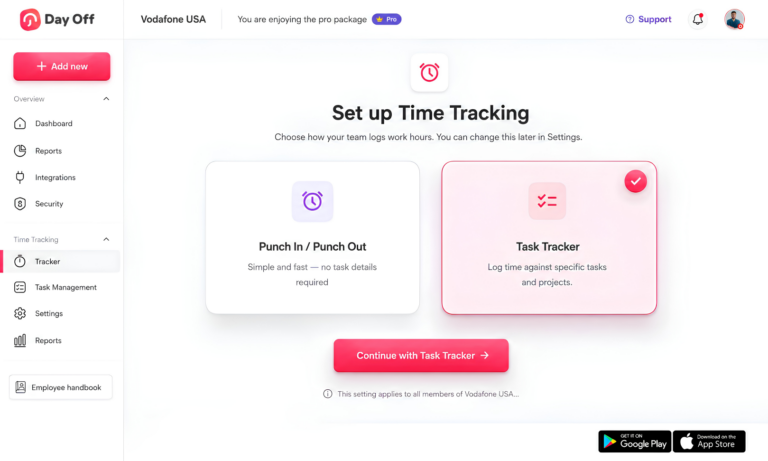
Employees can start a timer against a specific project and task instead of tracking time generally and trying to sort it out later.
Because assigned projects and tasks can be available in advance, employees can select what they are working on without creating new entries in the middle of a task.
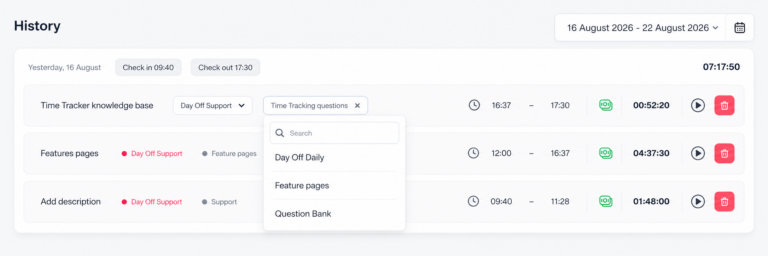
Switch or re-tag time without losing the entry
When an employee changes context, the active timer can be updated with the appropriate project, task, description, or billable status.
This makes corrections and project switches easier without requiring employees to delete useful time records and recreate them.
Record time retroactively when necessary
Live tracking is useful for most work, but not every activity can be tracked in real time.
An employee might finish an offline phone call, complete work without access to the system, or realize later that a short activity wasn’t recorded.
Those hours can still be logged afterward against the correct project and task.
The important distinction is that retroactive entries remain available for situations where they are genuinely needed rather than becoming the default way everyone records their day.
Mark billable time at the entry level
Time can be identified as billable or non-billable when it is recorded.
This means the company does not have to rely entirely on employees remembering the billing status of activities weeks later when preparing invoices or project reports.
Review time by employee and day
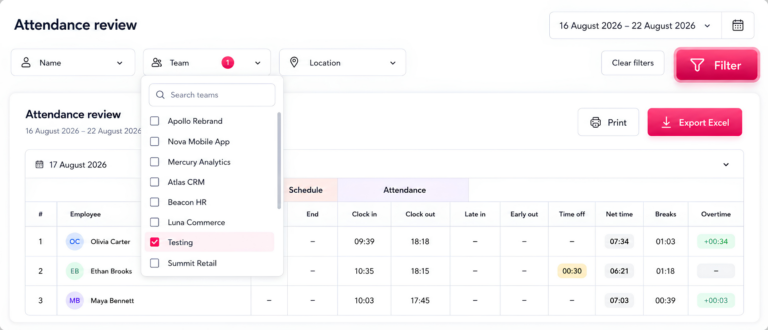
Employees and managers can review tracked time by day and see how individual entries add up to the daily total.
This provides more context than simply displaying that someone worked eight hours.
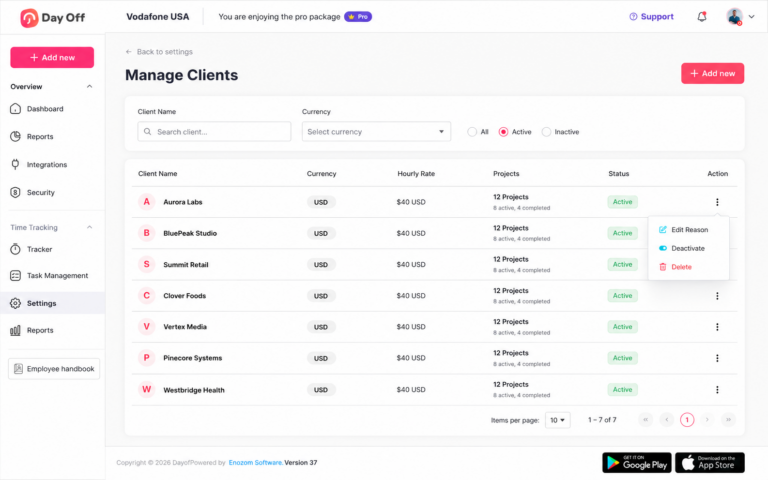
Report by project, employee, and task
Time reports can be grouped across multiple levels, allowing managers to understand both the overall project picture and the individual tasks behind it.
For example, a manager can look at how many hours a client project consumed across the entire team or examine how one employee’s working time was distributed across several assignments.
Connect time and leave in one system
Because time tracking and leave management are handled within the same platform, managers can see the relationship between working time and employee leave without maintaining separate spreadsheets.
A day away from work does not simply appear as an unexplained gap in a time report when the relevant leave record is already part of the same employee record.
Start and manage timers from tools employees already use
Integrations with tools such as Slack and Microsoft Teams can reduce the need to constantly open a separate application just to start or change a timer.
That small reduction in friction can make a meaningful difference to adoption, particularly for employees who move between projects frequently throughout the day.
A simple setup for teams getting started
If your company is introducing multi-project time tracking for the first time, don’t try to track everything immediately.
Start with a small, consistent structure.
Step 1: List your active projects
Create the projects that employees actually work on and remove unnecessary or duplicate entries.
Step 2: Create a small number of task categories
Start with broad categories such as production, meetings, revisions, support, and administration.
You can add more detail later if the reports show that it is necessary.
Step 3: Decide what is billable
Define clear rules for which activities count as billable and which do not.
Don’t leave employees guessing every time they start a timer.
Step 4: Establish the one-timer rule
Make it clear that employees should have one active timer at a time and that it should always be connected to the project they are currently working on.
Step 5: Make corrections easy
Give employees a simple way to edit incorrect entries so that small mistakes don’t become permanent reporting problems.
Step 6: Review the data weekly
Look for obvious inconsistencies and fix them while the information is still fresh.
Step 7: Use the data to improve planning
Once you have reliable data, use it to compare estimates with actual hours, understand workload, and improve future project planning.
The right system should disappear into the workflow
The best time-tracking system is not necessarily the one with the most features.
It is the one employees can use without constantly thinking about time tracking.
When switching from one project to another takes seconds, tasks are already available, billability can be selected immediately, and mistakes can be corrected easily, employees are far more likely to record their time consistently.
That gives managers better information without adding another layer of administrative work to everyone’s day.
FAQ
What’s the best way to track time across multiple projects?
Use one active timer per employee and connect it to a specific project and task before work begins. Make switching between projects quick and allow employees to correct mistakes easily so that accurate tracking becomes part of the normal workflow rather than an end-of-day administrative task.
How do I stop employees from forgetting to switch timers?
Make switching projects as quick as possible and avoid forcing employees to stop, delete, and recreate entries whenever their work changes. The easier it is to switch or re-tag a timer, the less likely employees are to leave the wrong project running.
Should employees track every task separately?
Not necessarily. The right level of detail depends on what the company needs to learn from the data. A simple structure such as project, task, time, employee, date, and billable status is often enough to provide useful information without making tracking unnecessarily complicated.
Should billable hours be tracked differently from regular hours?
The work can be tracked in the same system, but billability should ideally be marked when the time is recorded. This avoids relying on employees to remember weeks later which meetings, tasks, or client activities were billable.
How often should managers review time entries?
A weekly review is a good starting point because it catches obvious errors while employees can still remember what they worked on. Monthly reviews can be useful for broader reporting, but waiting an entire month to identify incorrect project allocations makes corrections more difficult.
What should time reports include?
At minimum, useful project time reports should show the employee, project, task, date, amount of time, and billable status. This gives managers enough information to understand both how much time was spent and where that time went.
Can time tracking and leave tracking work in the same system?
Yes. Combining time and leave information can give managers and HR teams a more complete view of employee availability and working time. It also reduces the need to reconcile separate spreadsheets or systems when reviewing attendance, capacity, or project hours.
Does multi-project time tracking slow employees down?
It can if the process is complicated. A system that requires employees to repeatedly fill out forms, create projects manually, or reconstruct their day will create unnecessary work. A simple timer with quick project switching and predefined tasks can make tracking take only a few seconds at a time.
Is manual timesheet entry still useful?
Yes, but it should usually be a backup rather than the primary method when real-time tracking is practical. Some activities cannot be tracked live, so employees should have a straightforward way to add time afterward without making retroactive logging the normal workflow.
Final takeaway
Tracking time across multiple projects does not have to mean adding more administrative work to the day.
The key is to build a system around the way people actually work: employees should be able to start a timer quickly, connect it to the right project and task, switch contexts without friction, mark billable work immediately, and correct mistakes without losing useful data.
The goal is not to record every second of the workday. It is to create reliable information about where your team’s time is going.
When that information is accurate, companies can do more than send better invoices. They can understand project costs, identify inefficient processes, improve estimates, balance workloads, plan capacity, and make better decisions about how work gets done.
The best multi-project time tracking system is therefore one that provides useful data without making time tracking itself feel like another project.