







Managing employee time is one of the most important responsibilities for HR teams, managers, and business owners. Every workday depends on knowing who is available, who is late, who is absent, who is working overtime, and who is on approved paid time off. When this information is clear, teams can plan better, payroll becomes more accurate, and employees have a smoother experience.
But when late arrivals, absences, and PTO are managed in different places, the process quickly becomes confusing.
One system may track employee clock-in and clock-out times. Another spreadsheet may track PTO balances. Leave requests may be sent through email. Absences may be reported in chat messages. Managers may approve time off verbally. HR may then need to collect all of this information manually before preparing reports or payroll.

This creates unnecessary work and increases the risk of mistakes.
That is why businesses need a better way to manage late arrivals, absences, and PTO in one place. A centralized system gives HR teams and managers a complete view of employee availability, attendance records, leave requests, and time off balances. Instead of switching between spreadsheets, emails, calendars, and attendance tools, companies can manage everything from one organized platform.
Day Off helps businesses do exactly that. With PTO tracking, leave management, absence tracking, work schedules, time attendance, punch in and punch out, late time, overtime, shared calendars, and reports, Day Off gives teams one place to manage employee time more clearly and efficiently.
In this article, we will explain why late arrivals, absences, and PTO should be managed together, what problems happen when they are tracked separately, and how companies can build a better employee time management process.
Why Managing Employee Time Is More Complex Than It Seems
At first, employee time management may sound simple. Employees come to work, request time off when needed, and HR keeps records. But in real workplaces, things are more complicated.
Employees may arrive late. Some may leave early. Others may work overtime. Some employees may be on vacation, sick leave, personal leave, unpaid leave, or public holidays. Remote and hybrid employees may work different schedules. Shift-based teams may rotate between morning, evening, and night shifts. Managers may need to approve leave while also making sure the team remains properly staffed.
This means HR teams need to manage several types of employee time data, including:
- Late arrivals
- Early departures
- Unplanned absences
- Approved PTO
- Sick leave
- Vacation leave
- Unpaid leave
- Half-day leave
- Work schedules
- Overtime
- Attendance records
- Payroll-related reports
- Team availability
When these records are stored separately, it becomes difficult to understand what is really happening. A missing clock-in may mean an employee forgot to punch in, arrived late, was absent, or was on approved leave. Without a connected system, HR needs to investigate manually.
A centralized employee time management system solves this by connecting attendance, absences, and PTO in one place.
What Are Late Arrivals?
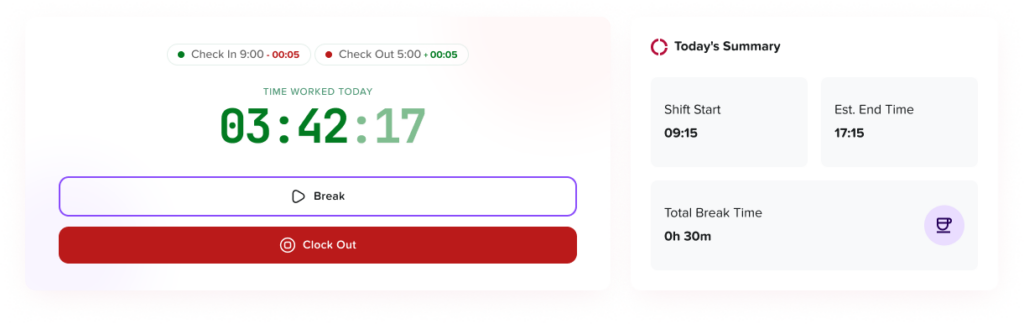
Late arrivals happen when employees start work after their scheduled start time. For example, if an employee is scheduled to start at 9:00 AM but clocks in at 9:20 AM, the system may record 20 minutes of late time.
Late arrivals may happen for many reasons, such as traffic, personal emergencies, transportation issues, illness, unclear schedules, or poor attendance habits. Occasional lateness may not be a major issue, but repeated late arrivals can affect productivity, team planning, customer service, and fairness.
To manage late arrivals properly, companies need clear work schedules and accurate attendance records. Without these, it is difficult to know whether an employee was truly late or simply working under a flexible schedule.
For example, an employee with fixed hours may be expected to start at 9:00 AM every day. However, an employee with flexible hours may only be required to complete 8 hours of work during the day. In this case, a 9:30 AM start may not be considered late.
This is why late arrival tracking should be connected to work schedules.
What Are Employee Absences?
Employee absence means an employee is not working when they are expected to be available. Absences can be planned or unplanned.
Planned absences include approved time off such as vacation leave, sick leave, personal leave, maternity leave, paternity leave, unpaid leave, or company holidays. These absences are expected and can be planned around.
Unplanned absences happen when an employee does not come to work without prior approval or notice. These can create problems for managers because they affect coverage, deadlines, and team workloads.
Absence tracking helps companies understand when employees are away, why they are away, and whether the absence was approved or unplanned.
A good absence management system should help HR teams answer questions such as:
- Was the employee on approved leave?
- Was the absence reported in advance?
- Should the absence be counted as PTO?
- Was it unpaid leave?
- Did the employee fail to clock in?
- Does this absence affect payroll?
- Is there a pattern of repeated absences?
When absence tracking is connected with PTO and attendance records, these questions become much easier to answer.
What Is PTO Tracking?
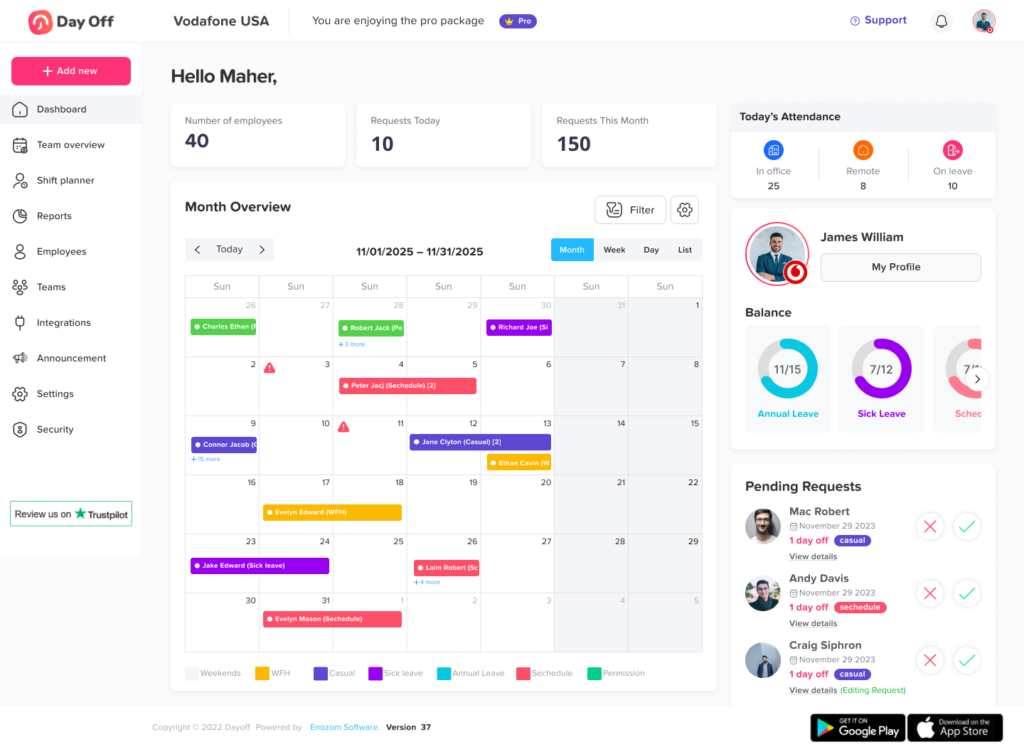
PTO tracking is the process of managing employee paid time off. It includes tracking leave requests, approvals, used days, remaining balances, and different leave types.
PTO can include:
- Vacation leave
- Sick leave
- Personal leave
- Paid holidays
- Half-day leave
- Compensatory time off
- Maternity leave
- Paternity leave
- Emergency leave
- Custom leave types
A PTO tracking system helps employees request time off, managers approve or reject requests, and HR teams maintain accurate leave balances.
Without a proper PTO tracker, companies often rely on spreadsheets, emails, paper forms, or chat messages. These manual methods can lead to outdated balances, missed requests, duplicate entries, and payroll confusion.
Why Late Arrivals, Absences, and PTO Should Be Managed Together
Late arrivals, absences, and PTO are all connected because they affect employee availability. If a manager wants to understand whether a team is fully staffed, they need to know who is working, who is late, who is away, and who is on approved leave.
When this information is separated, managers and HR teams only see part of the picture.
For example, an attendance system may show that an employee did not clock in. But without PTO data, HR may not know whether the employee is absent without notice or on approved vacation. A leave tracker may show an employee is on PTO, but without attendance data, HR may not know whether they worked extra hours before or after that leave. A spreadsheet may show PTO balances, but it may not show late arrivals or attendance patterns.
Managing everything in one place gives businesses a complete view of employee time.
The Problems with Managing Late Arrivals, Absences, and PTO Separately
Using different systems may seem manageable at first, especially for small teams. But as a company grows, disconnected systems create more work and more mistakes.
Here are the biggest problems businesses face when late arrivals, absences, and PTO are tracked separately.
HR Teams Waste Time Checking Multiple Sources
When attendance, absence, and PTO data are stored separately, HR teams need to check several places to understand one employee record.
They may need to review:
- Attendance sheets
- PTO spreadsheets
- Leave request emails
- Manager approvals
- Chat messages
- Shared calendars
- Payroll notes
- Manual reports
This takes time and creates delays. Instead of focusing on strategic HR work, HR teams spend hours confirming information and correcting records.
A centralized system reduces this work by keeping employee time data in one place.
Absences May Be Misclassified
A missing attendance record does not always mean an employee was absent without approval. They may have been on approved PTO, sick leave, unpaid leave, or a public holiday.
When systems are disconnected, absences may be misclassified. This can lead to inaccurate records and employee frustration.
For example, an employee may have an approved vacation day, but the attendance system marks them as absent because they did not clock in. HR then needs to manually correct the record.
When PTO and attendance work together, approved leave can be clearly reflected in attendance and absence records.
PTO Balances Can Become Inaccurate
Manual PTO tracking often causes balance errors. A leave request may be approved but not deducted from the balance. A half-day may be recorded as a full day. Sick leave may be deducted from the wrong leave type. Carryover days may not be calculated correctly.
When PTO tracking is disconnected from absence management, these errors become more common.
Accurate PTO balances are important because employees depend on them to plan time off. If balances are wrong, employees may lose trust in the system.
Payroll Mistakes Become More Likely
Payroll depends on accurate employee time records. If late arrivals, absences, PTO, unpaid leave, and overtime are tracked separately, payroll preparation becomes more difficult.
Payroll mistakes may include:
- Paying employees for unpaid absences
- Deducting PTO incorrectly
- Missing overtime
- Misclassifying sick leave
- Counting approved leave as absence
- Using outdated attendance records
- Incorrectly calculating late time
These mistakes can affect employee trust and create extra work for HR and finance teams.
A connected system helps reduce payroll errors by keeping attendance and leave data aligned.
Managers Lack Real-Time Visibility
Managers need to know who is available before assigning work, planning shifts, approving leave, or managing deadlines. If they cannot see late arrivals, absences, and PTO together, they may make decisions based on incomplete information.
This can lead to:
- Scheduling conflicts
- Coverage gaps
- Missed deadlines
- Overlapping leave approvals
- Overloaded employees
- Poor workforce planning
A centralized system gives managers better visibility into employee availability.
Employees Experience More Confusion
Employees want a simple process. They want to know how much PTO they have, how to request time off, whether their request was approved, and how their attendance is recorded.
When companies use separate systems, employees may need to ask HR for updates or use different tools for different tasks. This creates frustration and makes the process feel disorganized.
A single system improves the employee experience by making information easier to access.
Benefits of Managing Late Arrivals, Absences, and PTO in One Place
Centralizing employee time management helps companies reduce manual work, improve accuracy, and create better visibility for everyone.
Here are the main benefits.
A Complete View of Employee Availability
Employee availability is not only about attendance. It includes whether someone is on time, late, absent, on vacation, on sick leave, working overtime, or scheduled to be away.
When late arrivals, absences, and PTO are managed together, managers and HR teams can see the full picture.
They can quickly understand:
- Who is working today
- Who arrived late
- Who is absent
- Who is on approved PTO
- Who is on sick leave
- Who is working overtime
- Who has upcoming leave
- Who may need coverage
This helps teams operate more smoothly.
Better Accuracy in Attendance Records
When attendance data is connected with PTO and absence tracking, records become more accurate. Approved leave can be separated from unplanned absence. Late arrivals can be calculated based on assigned work schedules. Overtime can be recorded more clearly.
This reduces manual corrections and helps companies maintain cleaner records.
Faster Payroll Preparation
Payroll teams need accurate data about work hours, overtime, late time, PTO, and absences. A centralized system makes payroll preparation easier because all relevant information is easier to access and review.
Instead of collecting data from different tools, HR can generate attendance and leave reports from one platform.
Reduced HR Administrative Work
HR teams often spend too much time answering questions, updating spreadsheets, correcting attendance records, and checking leave balances manually.
A centralized system helps reduce repetitive tasks by automating and organizing employee time data.
This means HR can spend less time on manual tracking and more time on employee engagement, policy improvement, onboarding, and workforce planning.
Easier Leave Approvals
Managers can make better leave approval decisions when they have access to team availability, PTO balances, and attendance information.
Before approving a request, managers can check whether other employees are already on leave, whether the team has enough coverage, and whether the employee has enough PTO available.
This makes the approval process faster and more informed.
Improved Employee Trust
Employees trust the system more when their time records are accurate and transparent. If they can see their PTO balance, request leave easily, and understand their attendance records, they are less likely to feel confused or frustrated.
Transparency helps create a better employee experience.
Better Workforce Planning
Late arrivals, absences, and PTO all affect planning. When these records are connected, managers can plan workloads, shifts, and project deadlines more effectively.
For example, if several employees are scheduled for PTO during a busy week, managers can adjust staffing earlier. If one team has frequent late arrivals, managers can identify patterns and address them. If overtime is increasing, leaders can review workload balance.
This helps businesses make smarter decisions.
How to Manage Late Arrivals, Absences, and PTO in One Place
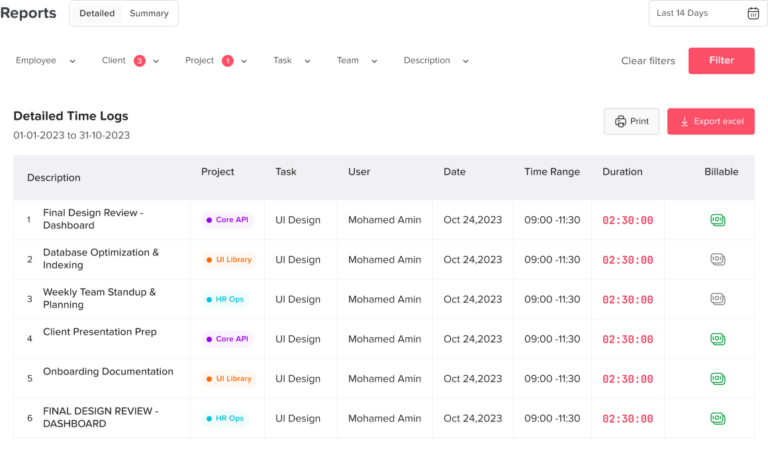
Managing employee time in one place requires the right process and the right tools. Here are the steps companies can follow.
Step 1: Define Clear Attendance and PTO Policies
Before using any system, companies need clear policies. Employees should understand when they are expected to work, how late arrivals are handled, how absences should be reported, and how PTO requests are approved.
A clear policy should explain:
- Work hours
- Flexible schedule rules
- Late arrival expectations
- Absence reporting process
- PTO request process
- Sick leave rules
- Unpaid leave rules
- Overtime rules
- Approval workflows
- Payroll impact
Clear policies reduce confusion and help employees know what to expect.
Step 2: Set Up Work Schedules
Late time and overtime cannot be calculated accurately without work schedules. A company needs to define when employees are expected to work.
Different employees may have different schedules, such as:
- Fixed hours
- Flexible hours
- Rotating shifts
- Part-time schedules
- Remote work schedules
- Hourly schedules
A good attendance management system should support different work schedule types so employees are tracked fairly based on their actual schedule.
Day Off supports work schedules, helping companies manage late time and overtime more accurately.
Step 3: Use Digital Punch In and Punch Out
A digital punch in and punch out system allows employees to record when they start and finish work. This creates a clear attendance record.
Digital attendance tracking is more accurate than paper timesheets or manual messages because it reduces missed entries and makes data easier to review.
With a time attendance system, companies can track:
- Clock-in time
- Clock-out time
- Total working hours
- Late arrivals
- Early departures
- Overtime
- Attendance history
This information becomes even more useful when connected with PTO and absence tracking.
Step 4: Centralize PTO Requests
Employees should request PTO through one system instead of sending requests through emails, chat messages, or paper forms.
A centralized PTO request process helps managers and HR teams track approvals, balances, and upcoming leave more accurately.
The system should allow employees to:
- View PTO balances
- Choose the leave type
- Submit a request
- Add notes if needed
- Check approval status
- View upcoming leave
- Review leave history
When PTO requests are centralized, HR teams no longer need to search through emails or manually update spreadsheets.
Step 5: Connect Absence Tracking with PTO
Absence tracking should be connected to PTO tracking. This helps companies identify whether an employee is away because of approved leave, sick leave, unpaid leave, or an unplanned absence.
For example, if an employee does not clock in, the system should help HR determine whether they were scheduled to be on leave. If the absence was approved, it should not be treated the same as an unplanned absence.
This connection reduces confusion and improves reporting accuracy.
Step 6: Monitor Late Arrivals and Attendance Patterns
Tracking late arrivals is not only about recording one late day. It is about understanding patterns.
Managers and HR teams should review whether late arrivals are occasional or repeated. They should also check whether certain schedules, teams, locations, or workloads are contributing to attendance issues.
Attendance reports can help identify trends such as:
- Frequent late arrivals
- Repeated early departures
- Unexpected absences
- High overtime
- Unusual attendance patterns
- Teams with coverage issues
This allows companies to address problems fairly and proactively.
Step 7: Generate Reports for HR and Payroll
Reports are essential for managing employee time. A good system should allow HR teams to generate reports that include attendance, PTO, absences, late time, and overtime.
Useful reports include:
- Daily attendance reports
- Monthly attendance reports
- PTO balance reports
- Leave usage reports
- Absence reports
- Late arrival reports
- Overtime reports
- Payroll-ready attendance sheets
- Team availability reports
These reports help HR teams prepare payroll, monitor trends, and make better decisions.
How Day Off Helps Manage Late Arrivals, Absences, and PTO in One Place
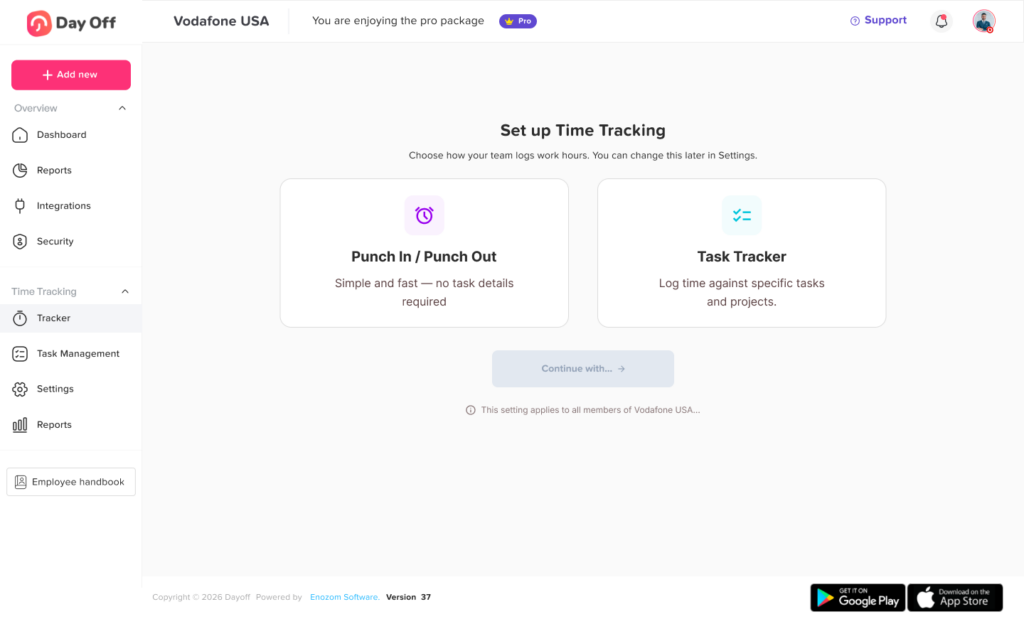
Day Off helps businesses manage employee time more efficiently by bringing PTO tracking, leave management, absence tracking, work schedules, and time attendance together.
Instead of using separate tools for attendance and PTO, companies can use Day Off to centralize employee availability and reduce manual work.
With Day Off, businesses can manage:
- PTO requests
- Leave approvals
- PTO balances
- Absence tracking
- Shared leave calendars
- Work schedules
- Punch in and punch out
- Late time
- Overtime
- Attendance records
- Attendance reports
- Payroll-ready attendance sheets
- Teams and locations
This makes Day Off a strong solution for businesses that want a clearer and more organized way to manage employee time.
Day Off for PTO Tracking
Day Off allows employees to request time off easily and helps HR teams track leave balances accurately. Employees can see their available PTO, submit requests, and follow approval status.
Managers can approve or reject requests from one place, while HR teams can maintain accurate records without relying on spreadsheets.
Day Off for Absence Tracking
Day Off helps companies track employee absences more clearly. Managers and HR teams can see who is away, why they are away, and whether the absence is connected to approved leave.
This helps reduce confusion between unplanned absence and approved PTO.
Day Off for Time Attendance
Day Off now supports time attendance features, helping businesses track employee working hours, punch in and punch out records, late arrivals, and overtime.
This helps companies connect attendance records with leave management and gain a better view of employee availability.
Day Off for Work Schedules
Work schedules are important for calculating late time and overtime correctly. Day Off supports work schedules so companies can manage different employee schedules more accurately.
This is useful for teams with fixed hours, flexible hours, or rotating shifts.
Day Off for Reports and Payroll Preparation
Day Off helps HR teams generate reports and extract attendance sheets that can support payroll preparation. By keeping attendance and PTO data in one place, companies can reduce manual calculations and improve reporting accuracy.
Best Practices for Managing Late Arrivals
Late arrivals should be managed fairly and consistently. The goal is not only to track lateness but to understand the reason behind it and maintain a productive workplace.
Here are some best practices:
- Set clear start times
- Define grace periods if applicable
- Use work schedules to calculate late time
- Track late arrivals consistently
- Review patterns instead of isolated cases
- Communicate expectations clearly
- Apply policies fairly
- Allow flexibility where appropriate
- Document repeated issues
- Use reports to support decisions
A good system helps companies manage late arrivals with accurate data instead of guesswork.
Best Practices for Managing Absences
Absence management should be clear, organized, and easy for employees to follow.
Best practices include:
- Create a clear absence reporting process
- Separate approved leave from unplanned absences
- Track different absence types
- Keep records centralized
- Use a shared calendar for visibility
- Monitor absence patterns
- Review reports regularly
- Communicate with employees professionally
- Connect absence records with PTO and attendance
- Avoid relying only on manual messages
Clear absence tracking helps managers plan coverage and helps HR maintain accurate records.
Best Practices for Managing PTO
PTO management should be transparent and simple.
Best practices include:
- Let employees view their PTO balances
- Use one system for leave requests
- Define approval workflows
- Track different leave types separately
- Update balances automatically
- Use a shared leave calendar
- Set clear carryover and accrual rules
- Review overlapping requests carefully
- Generate leave reports
- Encourage employees to plan time off early
A PTO tracker like Day Off helps companies follow these best practices more easily.
Managing Late Arrivals, Absences, and PTO for Remote Teams
Remote and hybrid teams need digital systems because employees may not work from the same location. Managers cannot rely on office visibility to know who is working or away.
For remote teams, a centralized system helps track:
- Online attendance
- Remote employee availability
- PTO requests
- Absences
- Work schedules
- Team calendars
- Late arrivals based on schedule
- Payroll-ready records
This helps remote teams stay organized without constant manual check-ins.
Managing Late Arrivals, Absences, and PTO for Small Businesses
Small businesses often begin with simple tools like spreadsheets or chat messages. But even small teams can face problems when PTO, attendance, and absences are not tracked clearly.
For small businesses, using one system can help:
- Save time
- Avoid payroll mistakes
- Improve employee trust
- Create a professional process
- Reduce manual calculations
- Track time off more accurately
- Manage attendance more clearly
Day Off is useful for small businesses because it is simple enough to use without creating unnecessary complexity.
Managing Late Arrivals, Absences, and PTO for Growing Companies
Growing companies need scalable systems. As the number of employees increases, manual tracking becomes harder.
A growing company may need to manage:
- More leave requests
- Multiple managers
- Different teams
- Different locations
- Different schedules
- More attendance records
- More payroll data
- More employee questions
A centralized platform like Day Off helps growing companies keep employee time management organized as the business expands.
Why Spreadsheets Are Not Enough
Spreadsheets are commonly used for attendance and PTO tracking, but they have serious limitations.
Spreadsheets can create problems such as:
- Outdated information
- Manual calculation errors
- Version control issues
- Missed leave requests
- Incorrect PTO balances
- No automatic attendance tracking
- No approval workflow
- No employee self-service
- Limited reporting
- No real-time visibility
As companies grow, spreadsheets become harder to maintain. A dedicated employee time management system gives businesses better accuracy, visibility, and control.
What to Look for in a System That Manages Late Arrivals, Absences, and PTO
When choosing a system, businesses should look for features that support both HR and employees.
Important features include:
- PTO tracking
- Leave requests
- Approval workflows
- PTO balance visibility
- Shared leave calendar
- Absence tracking
- Punch in and punch out
- Late time calculation
- Overtime tracking
- Work schedule management
- Attendance reports
- Payroll-ready exports
- Support for teams and locations
- Employee self-service
- Manager visibility
- Easy setup
- Scalability
The best solution should help businesses reduce manual work and manage employee availability from one place.
Frequently Asked Questions
What is the best way to manage late arrivals, absences, and PTO?
The best way to manage late arrivals, absences, and PTO is to use one centralized system that connects time attendance, absence tracking, leave requests, PTO balances, work schedules, and reports.
Why should PTO and attendance be managed together?
PTO and attendance should be managed together because they both affect employee availability. If an employee does not clock in, HR needs to know whether they are absent, late, or on approved leave.
Can Day Off help manage late arrivals?
Yes. Day Off supports time attendance and work schedules, helping companies track late arrivals and calculate late time more accurately.
Can Day Off help track employee absences?
Yes. Day Off helps businesses track absences and connect them with leave requests, PTO balances, and employee availability.
Does Day Off support PTO tracking?
Yes. Day Off helps companies manage PTO requests, approvals, balances, leave types, shared calendars, and reports.
Can Day Off help with payroll preparation?
Yes. Day Off helps companies extract attendance sheets and reports that can support payroll preparation by providing clearer attendance and leave records.
Why are spreadsheets not enough for managing PTO and attendance?
Spreadsheets require manual updates, are prone to errors, and do not provide real-time visibility, approval workflows, employee self-service, or automatic attendance tracking.
Is Day Off suitable for remote and hybrid teams?
Yes. Day Off is suitable for remote and hybrid teams because employees can manage leave and attendance digitally, while managers and HR teams can view employee availability in one place.
What features should a PTO and attendance system include?
A good system should include PTO tracking, leave requests, approval workflows, attendance tracking, punch in and punch out, work schedules, late time, overtime, absence tracking, reports, and payroll-ready exports.
Final Thoughts
Managing late arrivals, absences, and PTO in one place is one of the best ways to improve employee time management. When these processes are separated, HR teams spend more time checking records, managers lack visibility, employees experience confusion, and payroll errors become more likely.
A centralized system gives businesses a clearer view of employee availability. It helps teams understand who is working, who is late, who is absent, who is on approved leave, and who may need coverage.
Day Off helps companies bring PTO tracking, absence management, work schedules, and time attendance together in one platform. With features for leave requests, PTO balances, approvals, shared calendars, punch in and punch out, late time, overtime, reports, and payroll-ready attendance sheets, Day Off makes employee time management easier for HR teams, managers, and employees.
For businesses that want to move away from spreadsheets, reduce manual work, improve payroll accuracy, and manage employee availability more effectively, managing late arrivals, absences, and PTO in one place is the smarter approach.
Related reading: PTO Tracker App For Easy Leave And Vacation Management.