







A PTO tracker app helps businesses manage paid time off, vacation days, sick leave, personal leave, and other absences in one organized system. Instead of relying on scattered messages, manual calculations, and outdated spreadsheets, companies can use a digital tool to keep leave requests, approvals, balances, calendars, and reports clear and accessible.

For HR teams, managers, and employees, this creates a smoother way to manage time off. Employees know how much PTO they have available. Managers can see who is away before approving requests. HR can track leave policies accurately without spending hours updating records manually.
In this article, we will explain what a PTO tracker app is, why businesses need one, what features to look for, and how it helps make leave and vacation management easier for modern teams.
What Is a PTO Tracker App?
A PTO tracker app is a software tool that helps businesses manage employee paid time off. PTO can include vacation days, sick leave, personal days, public holidays, unpaid leave, parental leave, bereavement leave, and any other type of employee absence a company allows.
Instead of tracking leave manually, a PTO tracker app gives companies a centralized place where employees can submit requests, managers can approve or reject them, and HR can monitor balances and records.
A good PTO tracker app usually helps with:
- Submitting leave requests online
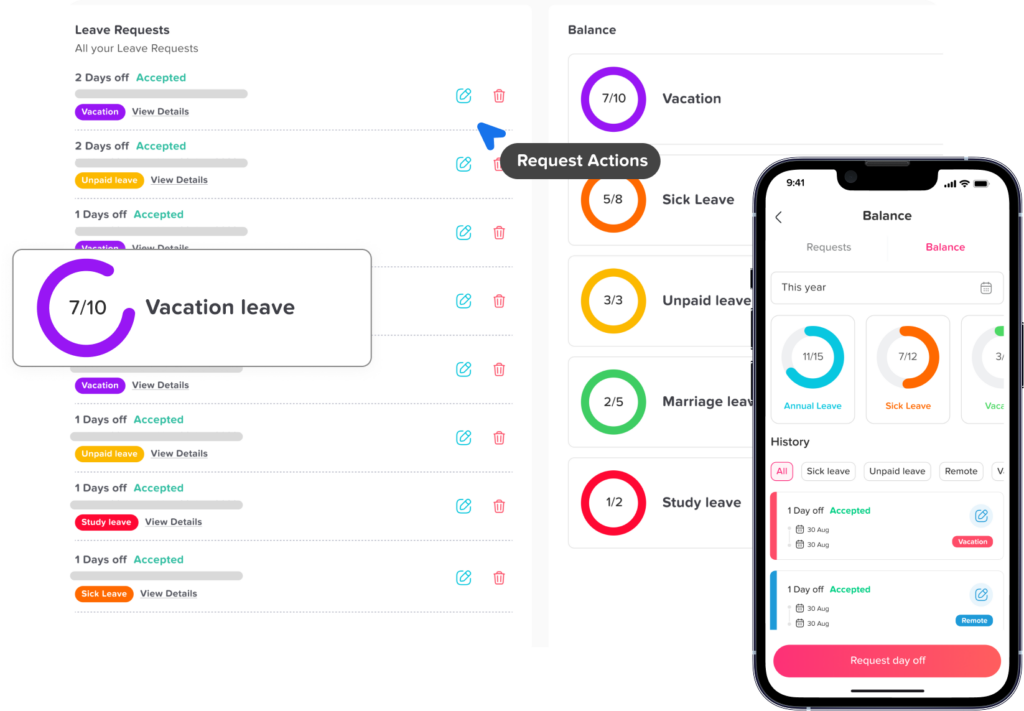
- Tracking vacation and sick leave balances
- Managing approval workflows
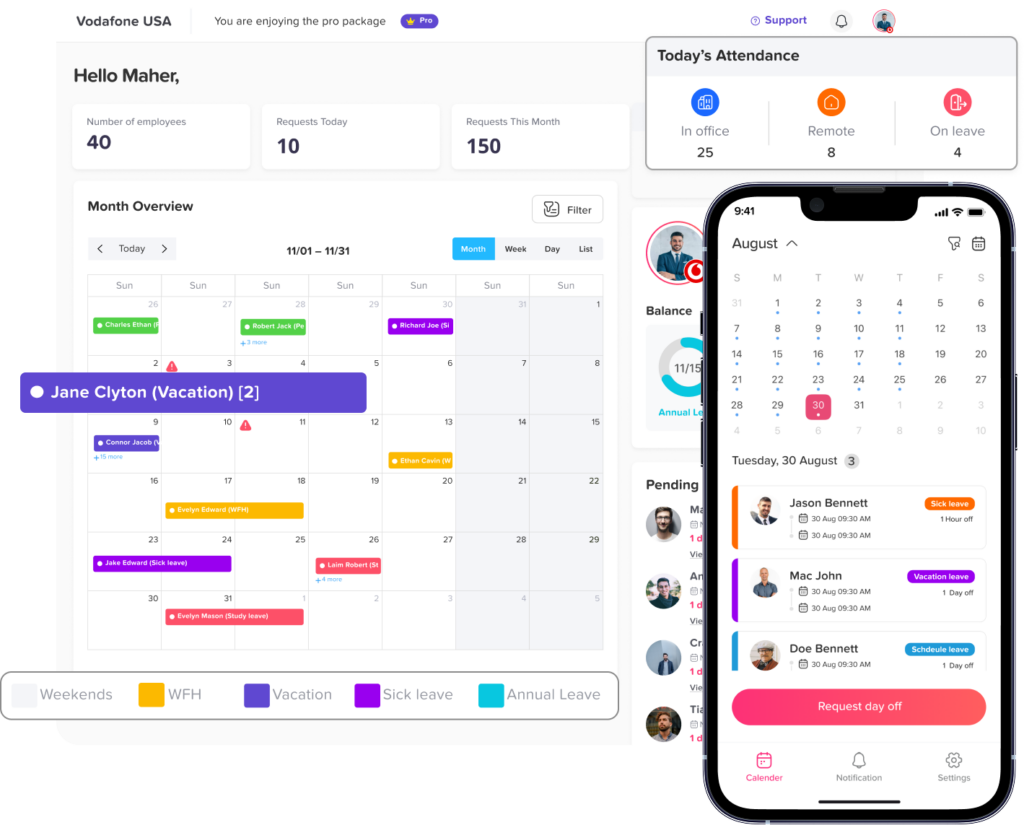
- Showing employee availability on a shared calendar
- Preventing overlapping leave requests
- Applying company leave policies
- Generating reports for HR and management
- Keeping a history of approved, rejected, and pending requests
The main goal is simple: make time off management easier, more accurate, and more transparent.
Why PTO Tracking Matters for Every Business
Paid time off is an important part of employee benefits. It helps employees rest, recover, handle personal responsibilities, and maintain a healthier work-life balance. But for businesses, PTO must also be managed carefully to protect team coverage, productivity, fairness, and payroll accuracy.
When PTO is not tracked properly, several problems can happen. Employees may take more leave than they have available. Managers may approve overlapping vacations without realizing it. HR may spend too much time answering balance questions. Payroll records may become inaccurate. Team schedules may be disrupted because no one has a clear view of who is working and who is away.
A PTO tracker app reduces these risks by creating one reliable source of truth for employee leave.
Manual PTO Tracking vs. PTO Tracker App
| Tracking Method | Common Problem | How a PTO Tracker App Helps |
|---|---|---|
| Spreadsheets | Easy to make mistakes or forget updates | Automates balance tracking and request records |
| Email requests | Requests can be missed or buried | Keeps all requests in one system |
| Chat messages | Approvals are informal and hard to track | Creates a clear approval history |
| Paper forms | Slow and difficult to organize | Makes requests digital and accessible |
| Verbal approvals | No reliable record | Stores every request and decision |
| Separate calendars | Availability becomes confusing | Shows leave on a shared calendar |
The Problems with Manual Leave and Vacation Management
Many businesses start with simple methods because they seem easy and inexpensive. A spreadsheet, shared calendar, or email thread may feel enough in the beginning. But over time, these tools often create more work for HR and managers.
PTO Balances Become Hard to Calculate
When employees earn PTO over time, balances can change every week, month, or pay period. If HR calculates this manually, mistakes are easy to make. One missed update can lead to incorrect balances, employee confusion, or unfair approvals.
A PTO tracker app can apply accrual rules automatically, helping HR keep balances accurate without constant manual edits.
Leave Requests Get Lost
Emails and chat messages are not designed for structured leave management. A manager may miss a request, forget to respond, or approve it without informing HR. This creates confusion for employees and makes it difficult to maintain accurate records.
With a PTO tracker app, every request goes through the same process. Employees submit requests in the app, managers receive notifications, and the system updates the status.
Overlapping Vacations Are Approved
Without a clear team calendar, managers may approve multiple employees from the same department for the same dates. This can leave the business understaffed during busy periods.
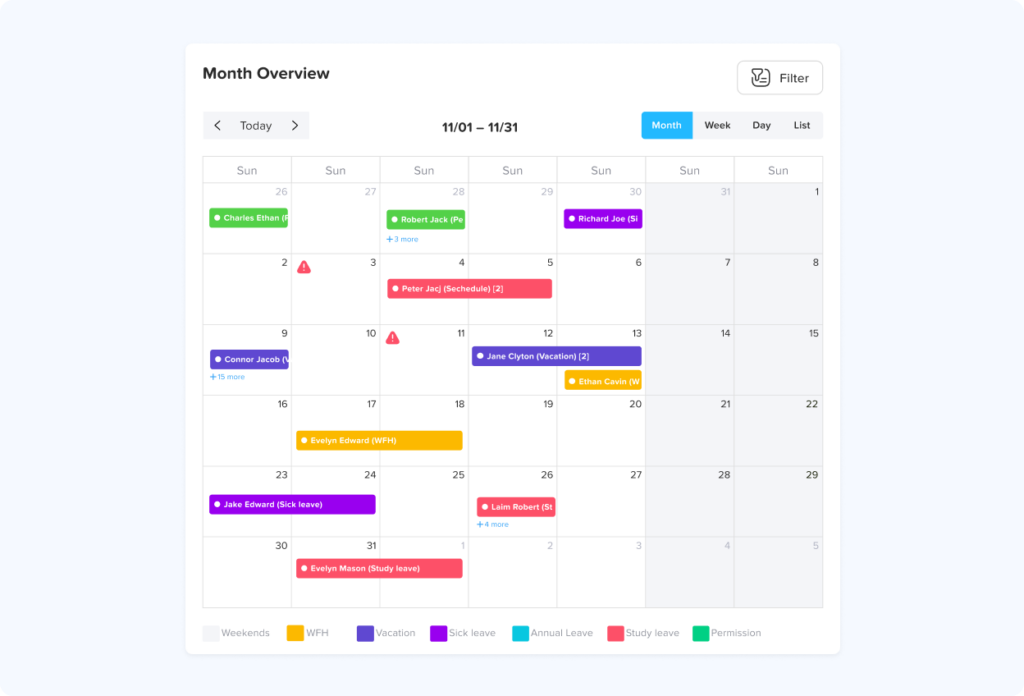
A shared leave calendar helps managers check availability before approving time off.
HR Spends Too Much Time on Repetitive Questions
Employees often ask questions like:
- How many vacation days do I have left?
- Was my request approved?
- Can I take leave next week?
- How many sick days have I used?
- Who is off today?
A PTO tracker app gives employees self service access to their balances and request status, reducing repeated questions to HR.
Reports Take Too Long to Prepare
When leave data is spread across spreadsheets, emails, and calendars, preparing reports becomes time consuming. HR may need to collect information manually before sharing it with leadership or payroll.
A digital PTO tracking system can generate reports faster and with fewer errors.
How a PTO Tracker App Makes Leave Management Easier
A PTO tracker app simplifies the entire time off process from request to approval to reporting. Instead of using separate tools, everyone follows one organized workflow.
Employees Can Submit Requests Easily
Employees do not need to send emails or message different managers. They can open the app, choose the leave type, select the dates, add a note if needed, and submit the request.
This makes the process clear and consistent for every employee.
Managers Can Approve Requests Faster
Managers can receive instant notifications when a request is submitted. They can review the employee’s requested dates, check the team calendar, and approve or reject the request.
This helps avoid delays and keeps employees informed.
HR Can Track Everything in One Place
HR teams can see all leave requests, employee balances, approval history, policies, and reports from one dashboard. This reduces manual work and improves record keeping.
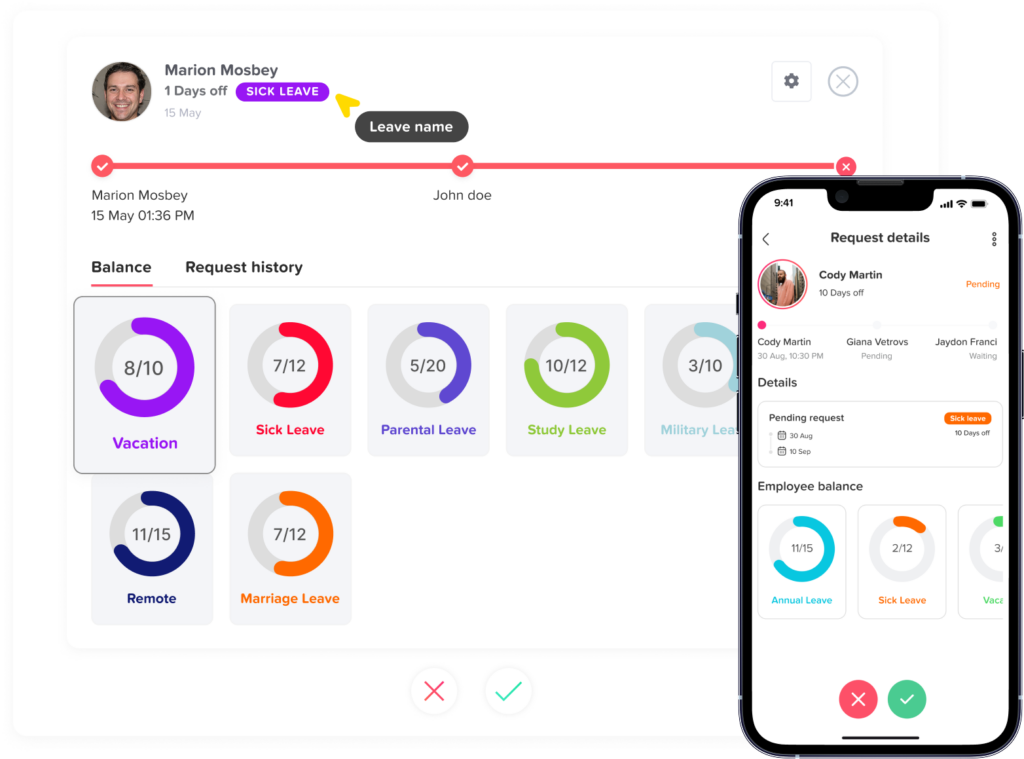
Employees Can See Their PTO Balance
Instead of asking HR, employees can check their available PTO balance directly in the app. This creates transparency and helps employees plan vacations more responsibly.
Teams Can See Who Is Away
A shared leave calendar gives managers and employees a clear view of upcoming absences. This helps with workload planning, meeting scheduling, shift coverage, and project timelines.
Key Features to Look for in a PTO Tracker App
Not every PTO tracker app offers the same level of flexibility. When choosing the right tool, businesses should look for features that support their team size, leave policies, approval structure, and reporting needs.
Easy Leave Request Submission
The app should make it simple for employees to request time off. A complicated process will discourage employees from using the system correctly.
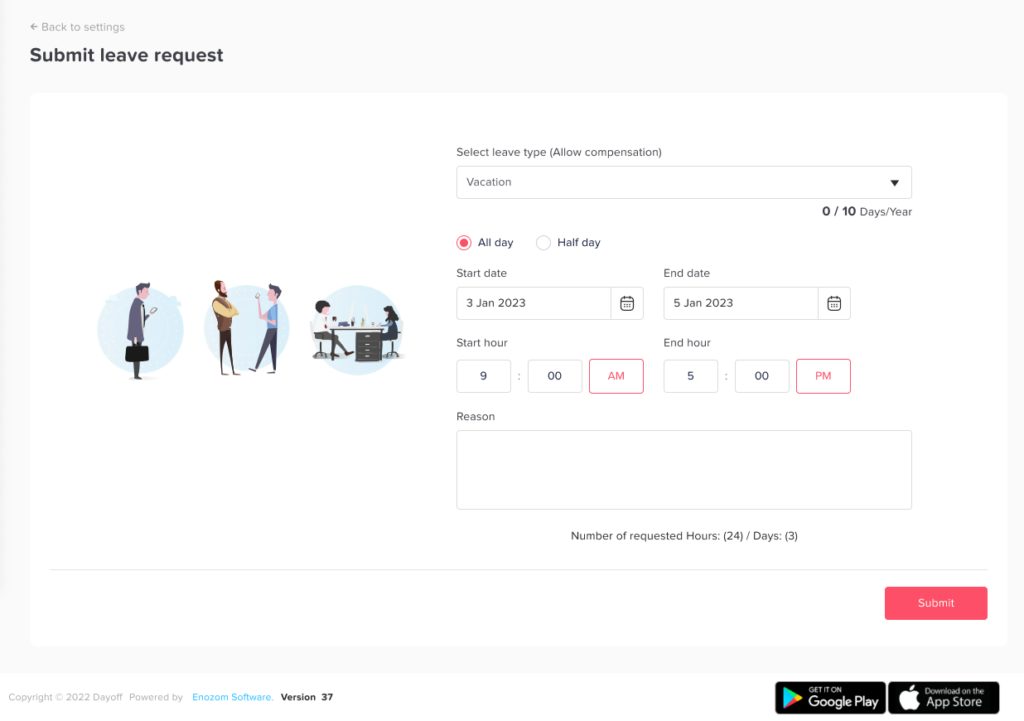
A good request form should include:
- Leave type
- Start date and end date
- Full day or half day option
- Optional notes
- Attachments if needed
- Request status
The easier the process is, the more consistent the records become.
Automated PTO Balance Tracking
One of the most useful features of a PTO tracker app is automatic balance calculation. The system should update balances when leave is approved and apply company rules for accruals, carryover, and resets.
This helps reduce errors and saves HR time.
Custom Leave Policies
Every business handles leave differently. Some companies offer annual vacation days. Others use monthly accruals. Some allow carryover, while others reset balances at the start of the year.
A strong PTO tracker app should allow companies to create custom policies for different employees, departments, locations, or leave types.
Approval Workflows
Some companies only require one manager approval. Others may need two-level approval, such as a direct manager first and HR second.
The app should support approval workflows that match the company’s internal process.
Shared Leave Calendar
A shared calendar is important for visibility. Managers should be able to see who is off, who has upcoming leave, and whether any dates may create coverage issues.
This is especially useful for remote teams, shift based teams, customer support teams, and small businesses where every absence affects operations.
Notifications and Reminders
Notifications help keep the process moving. Employees should know when their request is approved or rejected. Managers should know when a new request is waiting for review.
This reduces delays and prevents requests from being forgotten.
Leave Reports
Reports help HR and leadership understand absence trends. A PTO tracker app should provide clear reports that can be used for planning, payroll, compliance, and workforce management.
Useful reports include:
| Report Type | Why It Matters |
|---|---|
| Leave balance report | Shows remaining PTO for each employee |
| Leave usage report | Shows how much leave employees have used |
| Leave type report | Breaks down vacation, sick leave, unpaid leave, and other absences |
| Upcoming absence report | Helps managers plan around future time off |
| Department report | Shows absence patterns by team or location |
| Employee history report | Keeps a clear record of past requests and approvals |
Mobile Access
Employees and managers should be able to use the PTO tracker app from mobile devices. This is especially helpful for remote teams, field employees, managers who travel, and teams that do not work at desks all day.
Mobile access makes leave management faster and more convenient.
Integrations
A PTO tracker app becomes more useful when it connects with tools teams already use. Calendar integrations, communication tools, and HR systems can help keep everyone updated.
Useful integrations may include:
- Google Calendar
- Outlook Calendar
- Slack
- Microsoft Teams
Integrations reduce duplicate work and improve visibility across the company.
Benefits of Using a PTO Tracker App
A PTO tracker app is not only useful for HR. It benefits employees, managers, and the entire business.
For Employees
Employees get a clear and simple way to request time off. They can see their remaining PTO balance, track request status, and plan vacations with more confidence.
This reduces confusion and gives employees more control over their leave planning.
For Managers
Managers get better visibility into team availability. Before approving a request, they can check who else is off and make sure the team has enough coverage.
This helps prevent scheduling problems and last-minute staffing gaps.
For HR Teams
HR teams save time by reducing manual updates, repeated questions, and spreadsheet errors. They can manage leave policies, approvals, balances, and reports from one place.
This allows HR to focus on more strategic work instead of routine admin tasks.
For Business Owners
Business owners gain better control over workforce planning. They can understand absence patterns, reduce operational disruption, and keep leave records organized.
Clear PTO tracking also supports better decision making as the company grows.
How PTO Tracker Apps Improve Vacation Management
Vacation planning is one of the most common reasons employees use PTO. But vacation management can become challenging when multiple employees request the same dates, especially during holidays, summer months, school breaks, or busy business seasons.
A PTO tracker app improves vacation management by making the process more visible and structured.
Employees can check their available balance before requesting vacation. Managers can review upcoming absences before approving. HR can track vacation usage across the company. Everyone has access to accurate information.
This helps companies avoid common vacation management issues such as:
- Too many employees off at the same time
- Employees taking leave without enough balance
- Last minute vacation approvals
- Missing request records
- Confusion around public holidays
- Unclear team availability
With better visibility, businesses can support employee vacations while still protecting daily operations.
What Makes a Good PTO Tracker App Easy to Use?
Ease of use is one of the most important factors when choosing a PTO tracker app. If the system is difficult to understand, employees may avoid using it or make mistakes when submitting requests.
A good PTO tracker app should be simple, clean, and practical.
It Should Be Easy for Employees
Employees should be able to submit a request in a few steps. They should not need training just to ask for vacation or sick leave.
It Should Be Easy for Managers
Managers should be able to approve or reject requests quickly. They should also have enough information to make the right decision.
It Should Be Easy for HR
HR should be able to create policies, manage employees, adjust balances, and export reports without spending hours learning the system.
It Should Be Easy to Access
A modern PTO tracker app should be available on web and mobile, so employees and managers can use it wherever they are.
How to Choose the Best PTO Tracker App
Before choosing a PTO tracker app, businesses should understand their needs. The best app is not always the one with the longest feature list. It is the one that fits your company’s leave process and makes daily work easier.
Here are important questions to ask:
| Question | Why It Matters |
|---|---|
| How many employees will use the app? | Helps choose a tool that fits your team size |
| Do employees work in one location or multiple locations? | Affects policy and calendar needs |
| How many leave types do you offer? | Helps determine customization requirements |
| Do you use accruals or fixed annual balances? | Determines balance tracking needs |
| Do managers approve requests alone, or does HR approve too? | Helps choose the right approval workflow |
| Do you need mobile access? | Important for remote, hybrid, or field teams |
| Do you need calendar integrations? | Helps improve team visibility |
| Do you need reports for payroll or management? | Supports accurate records and decision-making |
Why Day Off Is a Helpful PTO Tracker App for Leave and Vacation Management
Day Off is a PTO tracker app designed to help teams manage leave requests, vacation days, PTO balances, and employee availability in one place. It helps businesses replace manual spreadsheets, scattered messages, and unclear approval processes with a more organized system.
With Day Off, employees can submit time-off requests easily, managers can approve requests quickly, and HR teams can track balances, leave policies, calendars, and reports more efficiently.
Day Off is useful for small businesses, growing teams, remote teams, hybrid workplaces, and companies that need a simple but reliable way to manage employee leave.
Key benefits include:
- Easy leave request submission
- PTO and vacation balance tracking
- Custom leave types and policies
- Approval workflows
- Shared leave calendar
- Reports and leave history
- Web and mobile access
- Better visibility for managers and HR
For teams that want to simplify leave management without adding unnecessary complexity, Day Off provides a practical way to keep PTO organized.
FAQs
What is a PTO tracker app?
A PTO tracker app is a digital tool that helps businesses manage paid time off, vacation days, sick leave, unpaid leave, and other employee absences. It allows employees to submit requests, managers to approve them, and HR teams to track balances and reports.
Why should businesses use a PTO tracker app?
Businesses should use a PTO tracker app to reduce manual work, prevent tracking errors, improve team visibility, and make leave requests easier to manage. It also helps employees understand their available PTO balance.
Can a PTO tracker app replace spreadsheets?
Yes. A PTO tracker app can replace spreadsheets by automating PTO balances, storing request history, showing leave calendars, and generating reports. This makes leave tracking more accurate and less time consuming.
Is a PTO tracker app useful for small businesses?
Yes. Small businesses can benefit from a PTO tracker app because even a few absences can affect daily operations. The app helps owners and managers see who is away, track balances, and approve requests more easily.
What features should a PTO tracker app include?
A good PTO tracker app should include leave request submission, PTO balance tracking, custom leave policies, approval workflows, shared calendars, notifications, reports, and mobile access.
How does a PTO tracker app help with vacation management?
A PTO tracker app helps with vacation management by showing available balances, tracking requests, preventing overlapping vacations, and giving managers a clear view of team availability before approving time off.
Can employees check their PTO balance in a PTO tracker app?
Yes. Most PTO tracker apps allow employees to check their remaining PTO balance, used leave, pending requests, and approved time off without asking HR.
Does a PTO tracker app help managers approve leave requests?
Yes. Managers can review requests, check team availability, and approve or reject leave directly in the app. This makes the approval process faster and more organized.
Can a PTO tracker app track different leave types?
Yes. A PTO tracker app can usually track vacation, sick leave, unpaid leave, personal leave, parental leave, public holidays, and custom leave types based on company policy.
Is Day Off a PTO tracker app?
Yes. Day Off is a PTO tracker app that helps businesses manage leave requests, PTO balances, vacation tracking, approvals, shared calendars, and employee availability from one easy-to-use platform.
Final Thoughts
A PTO tracker app helps businesses manage employee time off with more accuracy, visibility, and control. Instead of relying on spreadsheets, emails, paper forms, or scattered messages, companies can use one system to track leave requests, approvals, balances, calendars, and reports.
For employees, it makes requesting vacation and checking PTO balances easier. For managers, it improves team planning and helps prevent overlapping absences. For HR, it reduces manual work and keeps records organized.
As teams grow and work becomes more flexible, leave management needs to be clear and reliable. A PTO tracker app gives businesses the structure they need to manage time off smoothly while supporting employees’ need for rest, flexibility, and work life balance.
If your business still tracks PTO manually, moving to a PTO tracker app can save time, reduce errors, and make vacation management easier for everyone.
Related reading: From Salaried to Hourly: How PTO Balances and Accruals Change, How to Manage Late Arrivals, Absences, and PTO in One Place, PTO Tracking for Manufacturing Companies, Stop Chasing Leave Requests Across Emails And Chats, 10 Ideas: What You Can Do On Day Off Leave Tracking App, Best Practices for Absence Management in Hybrid Work Environments, Accrual vs Frontloaded PTO: Which Is Better for Your Team?.