







Accurate Clock In Clock Out rules help employers record working hours correctly, calculate pay, manage overtime, monitor attendance, and reduce disputes about when employees started or ended work. For employees, clear rules remove uncertainty about when to clock in, whether breaks should be recorded, what to do after a missed punch, and whether working outside scheduled hours is allowed.

A good clock in clock out policy should do more than tell employees to press a button at the beginning and end of a shift. It should explain what counts as working time, how breaks are handled, how early or late punches are treated, what happens when an employee forgets to record time, and how managers review corrections.
This guide explains the most important clock in clock out rules for employees, including U.S. federal timekeeping requirements, overtime, breaks, remote work, missed punches, and practical policy examples.
Important: This article provides general information, not legal advice. Federal rules are only part of the picture. State and local wage and hour laws may impose additional requirements.
What Are Clock In Clock Out Rules?
Clock in clock out rules are workplace policies that explain how employees should record the beginning and end of their working time.
A typical policy may require employees to record:
- When their shift begins
- When their shift ends
- The start of an unpaid meal period
- The end of an unpaid meal period
- Certain off site or remote working periods
- Corrections when a punch is missed
- Approved overtime or extra working time
The purpose is to create an accurate record of the hours employees actually work.
Under the Fair Labor Standards Act, or FLSA, covered employers must maintain certain records for covered, nonexempt employees, including the hours worked each day and total hours worked each workweek. The U.S. Department of Labor does not require employers to use a particular timekeeping system. Time clocks, electronic software, manual timesheets, and other methods may all be used as long as records are complete and accurate.
Related reading: FLSA Timekeeping Requirements: What Employers Must Record
Why Clock In Clock Out Rules Matter
Time records affect more than attendance.
They may directly influence:
- Regular wages
- Overtime calculations
- Payroll accuracy
- Break records
- Attendance reports
- Late arrival records
- Early departures
- Labor cost reporting
- Scheduling decisions
- Wage and hour compliance
Poor timekeeping can create problems even when the company has a formal work schedule.
For example, an employee may be scheduled from 9:00 a.m. to 5:00 p.m. but actually begin performing work at 8:50 a.m. If the employer knows or has reason to know that compensable work is being performed, simply recording the scheduled time may not accurately reflect the employee’s working time.
That is why employers should distinguish between an employee’s schedule and their actual hours worked.
Does Federal Law Require Employees to Clock In and Out?
Federal law does not require employees to use a physical time clock.
Instead, the FLSA requires covered employers to maintain accurate records of working hours for covered, nonexempt employees.
The Department of Labor specifically states that employers may choose their own timekeeping method. They can use a time clock, allow employees to record their own hours, use a timekeeper, or adopt another system, provided the records are complete and accurate.
For employees with fixed schedules, an employer may maintain the regular schedule and indicate that the employee followed it. However, if the employee actually works longer or shorter hours, the employer must record the actual hours worked.
This means the real legal concern is not whether employees physically “clock in.” It is whether working time is accurately captured.
What Time Records Must Employers Keep?
For covered, nonexempt employees, the Department of Labor identifies several records employers generally need to maintain, including:
- The time and day the employee’s workweek begins
- Hours worked each day
- Total hours worked each workweek
- Basis of pay
- Regular hourly rate where applicable
- Straight time earnings
- Overtime earnings
- Wage additions and deductions
- Total wages paid
- Pay date and applicable pay period
The FLSA does not prescribe a specific format for these records.
Timekeeping software can therefore be useful, but using software alone does not make records compliant. The recorded information still needs to accurately reflect working time.
Basic Clock In Clock Out Rules Employers Should Establish
| Rule | What the Policy Should Explain |
|---|---|
| Clock-in time | When employees should begin recording working time |
| Clock-out time | When the employee’s work has actually ended |
| Meal periods | Whether employees clock out and back in |
| Rest breaks | Whether they remain on the clock |
| Early punches | Whether employees may clock in before their shift |
| Late punches | How late arrivals are recorded |
| Overtime | Whether advance approval is required |
| Missed punches | How employees request corrections |
| Remote work | How off-site working time is recorded |
| Time edits | Who may modify records and how changes are documented |
Employees Should Clock In When Work Begins
The clock-in record should correspond to the beginning of compensable working time.
That sounds simple, but “work begins” is not always the same as “the scheduled shift begins.”
An employee may begin performing tasks before their scheduled starting time, such as:
- Opening business systems
- Responding to work messages
- Preparing equipment
- Reviewing assignments
- Serving customers
- Performing required setup
- Handling an urgent work request
Whether a particular activity is compensable depends on the facts and applicable law, but employers should not rely on a policy telling workers to ignore time that must legally be counted.
A good rule is therefore:
Employees should record all compensable work time accurately and should not perform off-the-clock work.
Employees Should Clock Out When Work Ends
In general, employees should clock out after they have finished their compensable duties, not before finishing them.
For example, an employee should not be required to clock out at 5:00 p.m. and then:
- Finish closing tasks
- Clean required equipment
- Complete required reports
- Respond to customers
- Finish mandatory end of day procedures
If those activities constitute compensable work, they generally need to be included in recorded working time.
A company may require employees to stop working at the end of their scheduled shift, but enforcing that scheduling policy is different from deleting or ignoring time that was actually worked.
Employees Should Not Work Off the Clock
“Off the clock work” occurs when an employee performs compensable work that is not recorded as working time.
Examples may include:
- Finishing tasks after clocking out
- Answering work emails before clocking in
- Performing required preparation before recording time
- Working during an unpaid lunch
- Completing tasks from home without recording the time
Employers should explicitly prohibit off the clock work and provide employees with a way to report any working time that was not captured.
The goal should be to prevent unauthorized work, not to prevent employees from reporting time they actually worked.
Can Employees Clock In Early?
Employers may establish reasonable rules about when employees are permitted to clock in.
For example:
Employees should not clock in more than five minutes before their scheduled starting time unless approved by a manager.
However, a distinction needs to be made between an early punch and early work.
The Department of Labor explains that early or late punching does not necessarily constitute working time when no work is actually performed.
For example:
An employee is scheduled at 9:00 a.m.
They clock in at 8:55 a.m. but sit in the break room without performing work until 9:00.
That situation is different from an employee who clocks in at 8:55 and immediately begins performing required duties.
Employers should therefore monitor actual working practices instead of relying only on punch timestamps.
Can Employees Clock Out Late?
The same principle applies at the end of a shift.
An employee may clock out a few minutes after their schedule ends because they:
- Were still working
- Were waiting in line to use the time clock
- Forgot to punch immediately
- Were talking with coworkers after finishing work
These situations should not automatically be treated the same.
If the employee was still performing compensable work, that time may need to be included.
If no work was being performed, the punch time itself does not necessarily mean every minute must be considered working time. The employer needs an accurate system that reflects what actually occurred.
Clocking In Early Does Not Automatically Mean Overtime
An early punch does not automatically create overtime.
Overtime under the federal FLSA is generally based on the employee’s total compensable hours in the workweek, not simply whether the employee arrived earlier than scheduled on one day.
For covered, nonexempt employees, federal overtime is generally due when the employee works more than 40 hours in a workweek, although state rules may impose additional requirements.
For example:
An employee normally works 40 hours.
They perform an additional 15 minutes of compensable work on four days.
Their weekly working time could increase by one hour.
That additional time should be accounted for when determining total workweek hours and whether overtime is due.
Can Employers Require Approval Before Overtime?
Employers can generally establish policies requiring employees to obtain authorization before working overtime.
For example:
Employees must receive supervisor approval before working beyond their scheduled shift.
However, an approval policy does not automatically eliminate the employer’s obligation to compensate working time that actually occurs.
If an employee works unauthorized overtime, the employer may address the policy violation through its normal management or disciplinary process, but wage obligations should be evaluated separately.
This distinction is important:
Unauthorized work can violate company policy while still being compensable time.
What Happens If an Employee Forgets to Clock In?
Missed punches are one of the most common timekeeping problems.
A good policy should explain exactly how employees correct them.
For example:
- Employee notices the missing clock in or clock out.
- Employee submits the correct time through the designated system.
- Employee provides a reason for the correction.
- Manager reviews the request.
- Approved correction becomes part of the time record.
Employers should avoid simply guessing the employee’s hours if the actual information can reasonably be obtained.
Frequent missed punches may be addressed separately as an attendance or policy issue.
However, failing to punch should not be used as a reason to withhold pay for time that the employee actually worked.
What If an Employee Clocks In Late?
If an employee arrives late, their time record should reflect the actual start of compensable work.
For example:
Scheduled start: 9:00 a.m.
Actual work start: 9:17 a.m.
The employer may document the late arrival under its attendance policy.
But the timekeeping record and attendance consequences are two separate matters.
A strong system allows employers to track:
- Scheduled start time
- Actual clock in
- Minutes late
- Attendance status
- Manager notes
That gives managers an accurate picture of both payroll hours and schedule adherence.
Should Employees Clock Out for Breaks?
It depends on the type of break.
Short Rest Breaks
Under federal guidance, short rest periods of approximately 20 minutes or less are generally treated as compensable working time.
Therefore, employers generally should not deduct these short breaks from working hours.
Meal Periods
Bona fide meal periods are treated differently.
The Department of Labor explains that bona fide meal periods, typically 30 minutes or more, generally do not need to be counted as working time when the employee is relieved from duty.
An employee may therefore be required to clock out for an unpaid lunch and clock back in afterward.
But simply labeling a period “lunch” does not automatically make it unpaid.
If employees are required to continue performing work during the meal period, employers should evaluate whether the time is compensable.
Example of Proper Break Tracking
Suppose an employee works:
9:00 a.m. to 5:30 p.m.
They take:
- One paid 15-minute morning break
- A 30-minute unpaid lunch
- One paid 15-minute afternoon break
The time record might look like:
| Event | Time |
|---|---|
| Clock in | 9:00 a.m. |
| Lunch start | 12:30 p.m. |
| Lunch end | 1:00 p.m. |
| Clock out | 5:30 p.m. |
The two short paid rest periods remain part of working time, while the qualifying unpaid lunch is excluded.
Total compensable time:
8 hours
Can Employers Automatically Deduct Lunch Breaks?
Some businesses use automatic meal deductions, such as automatically subtracting 30 minutes from every qualifying shift.
This system can create problems when employees occasionally work through lunch or take a shorter meal period.
For example:
An employee works continuously from 8:00 a.m. to 4:30 p.m.
The system automatically deducts 30 minutes even though the employee never received an uninterrupted meal break.
If the time should have been treated as compensable, the automatic deduction could result in an inaccurate record.
If employers use automatic meal deductions, employees should have an easy way to report interrupted, missed, or worked-through meal periods so their records can be corrected.
What Are the Rules for Time Clock Rounding?
Some employers round recorded time to a specific increment rather than paying according to exact punch times.
The Department of Labor has historically recognized rounding practices such as rounding to the nearest:
- Five minutes
- One tenth of an hour
- Quarter hour
However, the federal principle is that the practice must not result, over time, in employees losing compensation for all the time they actually worked.
For example, a rounding system should not consistently round:
8:53 a.m. → 9:00 a.m.
while also rounding:
5:07 p.m. → 5:00 p.m.
in a way that systematically benefits the employer.
Employers should also check state law before using rounding because state requirements may be more restrictive than federal rules.
Modern digital timekeeping systems can capture exact punches, so employers should evaluate whether rounding is necessary at all.
Should Employees Clock In From Their Phones?
Mobile clock-in can be useful for:
- Remote workers
- Field employees
- Construction teams
- Service businesses
- Employees moving between sites
- Hybrid teams
However, the same core rules still apply.
Employees should record when compensable work actually begins and ends.
A mobile timekeeping policy should also explain:
- Whether clock-in is permitted away from the workplace
- What device employees should use
- Whether location restrictions apply
- How connectivity problems are handled
- What employees should do if they cannot access the system
Employers should also consider privacy requirements before using location tracking or similar monitoring features.
Clock In Clock Out Rules for Remote Employees
Remote work can make timekeeping more difficult because a manager cannot physically see when an employee starts or stops working.
Nonexempt remote employees should therefore receive particularly clear instructions.
A remote timekeeping policy might require employees to:
- Clock in before beginning work.
- Clock out after ending work.
- Record unpaid meal periods.
- Record extra working time.
- Avoid performing work after clocking out.
- Report missed punches promptly.
- Obtain approval before working outside scheduled hours.
Employers should also train managers not to encourage unrecorded work through after hours requests.
For example, if a manager repeatedly sends assignments to a nonexempt employee after they have clocked out and expects immediate responses, the organization’s written schedule may not reflect actual working practices.
Should Salaried Employees Clock In Out?
Being paid a salary does not automatically mean an employee is exempt from overtime requirements.
This is an important distinction.
Some salaried employees are exempt, while others are nonexempt.
A salaried nonexempt employee may still need detailed time records because their working hours affect overtime calculations.
Employers may also choose to track exempt employees’ attendance or working time for operational purposes, such as:
- Project costing
- Attendance
- PTO administration
- Client billing
- Workforce planning
However, employers should understand the employee’s legal classification separately from their timekeeping method.
Clock In Clock Out Rules for Hourly Employees
For hourly, nonexempt employees, employers should generally focus on accurately recording all compensable working time.
A practical policy may require employees to:
- Clock in only for themselves.
- Record their actual starting time.
- Record unpaid meal periods.
- Clock back in when work resumes.
- Record the actual end of work.
- Report missed punches.
- Review time records before submission.
- Never perform work after clocking out.
- Never alter another employee’s record.
- Report system errors promptly.
These rules help create a reliable audit trail.
What Is Buddy Punching?
Buddy punching occurs when one employee records time for another employee.
Examples include:
- Employee A clocks Employee B in before Employee B arrives.
- One worker clocks out for another worker who already left.
- Employees share login credentials to create false time entries.
Buddy punching can make attendance and payroll records unreliable.
Employers can discourage it by:
- Requiring individual logins
- Prohibiting credential sharing
- Reviewing unusual punches
- Comparing scheduled and actual attendance
- Using role based permissions
- Maintaining a clear disciplinary policy
However, employers should ensure any technology used for identity verification complies with applicable privacy and biometric laws.
Are Managers Allowed to Edit Employee Time Records?
Managers sometimes need to correct time records.
Examples include:
- Missed clock outs
- Duplicate punches
- Incorrect break entries
- System errors
- Approved manual adjustments
The goal should be to preserve an accurate record.
A good timekeeping system should ideally show:
- Original entry
- Updated entry
- Person who changed it
- Date of modification
- Reason for change
Employers should never edit time records simply to reduce payable hours when employees actually worked those hours.
How Long Should Employers Keep Time Records?
The Department of Labor states that employers generally should retain payroll records for at least three years.
Records used to calculate wages, including time cards and work schedules, generally should be retained for two years under the FLSA’s recordkeeping rules.
State laws or other federal requirements can impose longer retention periods, so employers should review all applicable rules before deleting time records.
Scheduled Hours vs. Actual Hours Worked
One of the biggest timekeeping mistakes is assuming an employee’s scheduled hours always equal actual hours worked.
For example:
Scheduled shift: 8:00 a.m. to 4:00 p.m.
Recorded work: 7:54 a.m. to 4:11 p.m.
A payroll system should not automatically replace that record with exactly eight hours without determining what actually happened.
Perhaps the employee:
- Began working six minutes early
- Performed closing tasks after the shift
- Took an unpaid meal break
- Was simply present but not working
Accurate timekeeping requires identifying compensable time rather than assuming the schedule is always correct.
Clock In Records and Attendance Tracking Are Different
Although related, time tracking and attendance tracking serve different purposes.
Time tracking records how long employees worked.
Attendance tracking compares employee activity against their schedules.
Consider this example:
Scheduled start: 9:00 a.m.
Actual clock-in: 9:18 a.m.
Clock-out: 5:18 p.m.
The employee may still have recorded eight hours of work, depending on breaks, but they were also 18 minutes late.
A good system therefore tracks both:
- Hours worked
- Schedule adherence
This distinction is useful when evaluating lateness, absenteeism, overtime, and payroll.
How to Create a Good Clock In Clock Out Policy
A strong policy should be specific enough that employees understand exactly what is expected.
Step 1: Define Who Must Track Time
Identify:
- Hourly employees
- Salaried nonexempt employees
- Remote employees
- Temporary workers
- Other groups covered by the system
Step 2: Define the Official Timekeeping Method
State whether employees use:
- Web time tracker
- Mobile app
- Physical time clock
- Timesheet
- Another approved system
Step 3: Define When Employees Clock In
Explain whether employees should clock in:
- At the scheduled start
- When compensable work begins
- Within a permitted punch window
Make clear that employees should not perform unrecorded work.
Step 4: Establish Break Rules
Explain which breaks remain paid and which meal periods are recorded separately.
Step 5: Define Overtime Procedures
Explain when approval is required, while separately making clear that employees must report all hours actually worked.
Step 6: Create a Missed Punch Process
Employees should know how to correct missing or inaccurate records.
Step 7: Establish Review Procedures
Managers should review time entries for:
- Missing punches
- Unexpected overtime
- Long shifts
- Late arrivals
- Unusual breaks
- Schedule differences
Step 8: Document Corrections
Keep a history of changes wherever practical.
Sample Clock In Clock Out Policy
A simple policy could read:
Employees must accurately record all working time using the company’s approved timekeeping system. Employees should clock in when they begin performing work and clock out when their work ends. Employees must record unpaid meal periods where required and should not perform work while clocked out.
Employees may not record time for another employee or allow another employee to record time on their behalf. Any missed or incorrect punch should be reported promptly through the designated correction process.
Employees must obtain approval before working overtime or outside their scheduled hours when required by company policy. However, all time actually worked must still be reported accurately.
Repeated failure to follow the company’s timekeeping procedures may be addressed under the applicable attendance or disciplinary policy.
Employers should customize any policy according to their workplace and applicable federal, state, and local requirements.
How Day Off Helps With Clock In Clock Out Tracking
Managing working hours manually becomes increasingly difficult as teams grow, especially when companies also need to manage attendance, schedules, PTO, breaks, and overtime.
Day Off brings time tracking and leave management into the same system.
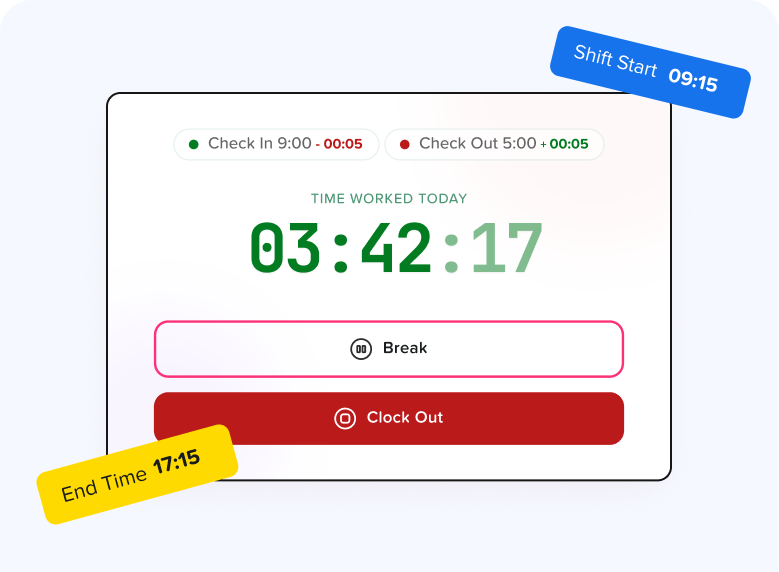
With the Pro + Time Tracker plan, businesses can use a Clock In/Clock Out mode to record employee working time.
Employees can start and end their work sessions through the web time tracker, while managers can review recorded attendance and working hours.
Day Off can also connect time tracking with employee schedules and leave records, making it easier to understand whether someone was:
- Working
- Late
- Absent
- On leave
- On a break
Break Tracking
Employees can start and end breaks from the time tracker.
This makes break activity visible in attendance records rather than relying on employees or managers to reconstruct breaks later.
Attendance Review
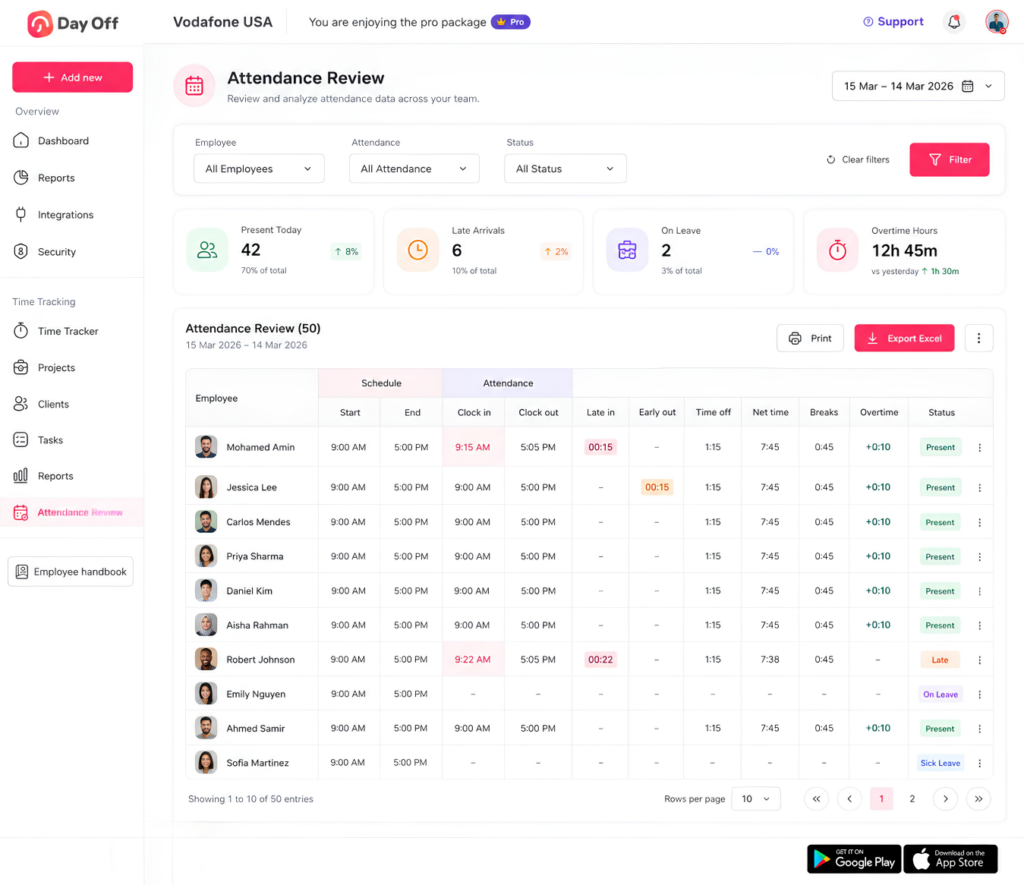
Managers can use Attendance Review to examine employees’ recorded attendance and working activity.
This can help identify issues such as:
- Late arrivals
- Absences
- Working time
- Break activity
- Overtime
- Missed attendance events
Work Schedules
Day Off also supports several work schedule structures, including:
- Fixed working days
- Fixed working hours
- Flexible hours
- Rotating shifts
Connecting schedules with recorded attendance can help managers compare what an employee was expected to work with what was actually recorded.
PTO and Attendance in One System
Time tracking becomes more useful when it is connected to leave.
For example, if an employee does not clock in because they are on approved PTO, managers should be able to distinguish that situation from an unexplained absence.
Day Off brings PTO requests, employee balances, schedules, attendance, and time tracking together, reducing the need to maintain separate spreadsheets or disconnected systems.
Best Practices for Managing Employee Clock-In and Clock-Out Records
Employers can improve the accuracy of their timekeeping process by following a few practical principles:
- Require employees to record actual working time.
- Prohibit off the clock work.
- Train managers on compensable time.
- Create clear meal and break rules.
- Provide an easy missed punch correction process.
- Review exceptions instead of changing records automatically.
- Keep payroll and attendance rules separate.
- Document manual changes.
- Review overtime before payroll closes.
- Maintain records for the required period.
- Review state and local requirements.
- Make timekeeping procedures accessible to employees.
The most effective policy is one that employees can actually follow consistently.
FAQ
Can an employer require employees to clock in and out?
Yes. Employers can generally require employees to use a timekeeping procedure as part of workplace policy. The FLSA does not require one particular timekeeping method, but covered employers must maintain accurate records for covered, nonexempt workers.
How early can an employee clock in?
Federal law does not establish a universal rule requiring employees to clock in a particular number of minutes before their shift. Employers can establish reasonable punch policies, but compensable work that actually occurs must be addressed appropriately.
Does an employer have to pay an employee who clocks in early?
Not necessarily merely because a punch occurred. The Department of Labor notes that an early or late punch is not working time when no work is performed. If the employee actually begins compensable work, the analysis is different.
Can employees work after they clock out?
Employees generally should not perform off-the-clock work. If compensable work is performed, it should be accurately reported and evaluated as working time.
Can an employer refuse to pay unauthorized overtime?
An employer may prohibit unauthorized overtime as a workplace rule, but it should not simply disregard compensable time that was actually worked. Policy enforcement and wage payment are separate issues.
Should employees clock out for a 15-minute break?
Under federal rules, short rest periods of around 20 minutes or less are generally counted as compensable working time.
Should employees clock out for lunch?
Employees may clock out for a bona fide unpaid meal period. Under federal guidance, such meal periods are typically 30 minutes or more and generally require the employee to be relieved from duties.
What happens if an employee forgets to clock out?
The employee should follow the company’s correction procedure. The employer should try to determine and record the employee’s actual working time rather than automatically using an arbitrary clock-out time.
Can managers change employee timecards?
Corrections may be necessary, but edits should reflect actual working time. Maintaining a record of who changed the entry, when, and why is a strong administrative practice.
Do remote employees need to track their hours?
Covered, nonexempt remote employees are still subject to applicable timekeeping and wage requirements. Employers should have procedures for accurately recording remote working time.
Conclusion
Clear Clock In Clock Out rules create a reliable connection between employee schedules, actual working hours, payroll, attendance, breaks, and overtime.
Employers should build policies around one central principle: time records should accurately reflect compensable work. That means employees should know when to clock in, when to clock out, how to record meal periods, how to report missed punches, and why off-the-clock work is prohibited.
Under the FLSA, employers are not required to use a specific type of time clock, but covered employers must maintain accurate wage and hour records for covered, nonexempt employees. The Department of Labor also distinguishes between an early or late punch and actual work, treats qualifying short rest periods as compensable, and generally permits bona fide meal periods to be excluded when applicable conditions are met.
For businesses managing multiple schedules, PTO, breaks, attendance, and working hours, software can make the process easier to review. Day Off combines Clock In/Clock Out tracking with schedules, Attendance Review, breaks, overtime visibility, PTO management, and employee leave records, giving managers a clearer picture of both attendance and time worked.
Related reading: Attendance Tracking For Small Businesses