





Day Off Knowledge Base
-
Balance reset
- Can I reset leave balances on anniversary dates instead of calendar /fisical year?
- Can I select a reset date for each leave type individually, for instance vacation to reset in January and sick leave to reset on the employee's anniversary?
- What is a leave balance reset?
- Will my leave balance automatically update after the reset?
Print
Yes, your leave balance will update automatically once the reset date is reached. The system takes care of everything in the background based on your company’s leave policy, so neither employees nor admins need to manually update anything.
How does the update happen?
When the reset date arrives (whether it’s based on a fixed month or your anniversary date), the system automatically performs several updates:
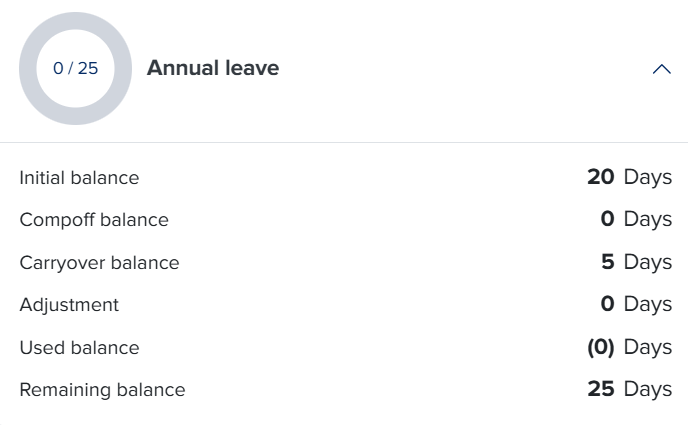
- Your leave balance is refreshed
The system resets your balance to match the new leave cycle. This could mean receiving a full new balance or starting fresh depending on your policy. - Carryover rules are applied
If your company allows carryover, any unused leave from the previous cycle will be transferred based on the rules (fully, partially, or not at all). If there is an expiry, it will also be applied automatically. - Your balance is recalculated based on the policy
The system ensures that your new balance follows the latest policy settings, including quotas, limits, and any recent updates made by admins. - A new leave cycle begins
Depending on your setup, you may either receive your leave balance immediately or start earning it gradually through accruals over time.
Do admins need to take any action?
No, the entire process is automatic. However, admins can still:
- Review employee balances after the reset to ensure everything looks correct
- Make adjustments if needed in special cases
- Update policies in advance to ensure the reset reflects the correct rules
On this page