





Day Off Knowledge Base
-
Billing
Print
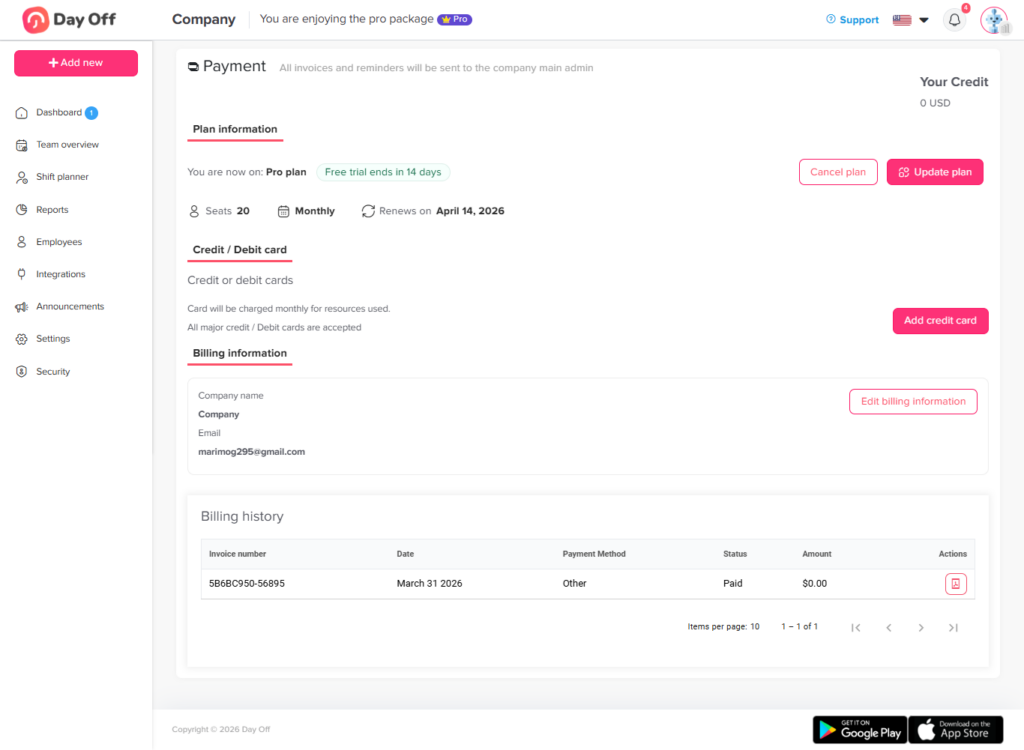
Admins can update subscriptions directly from the Billing page (click your profile picture in the top-right corner, then select Billing) by following these steps:
- Click Update plan.
- Select the Pro plan.
- You will be directed to the checkout page, which displays your current number of seats and your subscription type (yearly or monthly).
- Choose to update your billing cycle from yearly to monthly, or vice versa.
- Change the number of seats by typing the new amount.
- Click Update subscription.
What Happens Next:
Switching from Yearly to Monthly: You will receive a prorated credit for the unused time on your yearly plan. This credit will automatically be applied to your future monthly invoices.
Switching from Monthly to Yearly: You will be charged a prorated amount to cover the new annual subscription.
Increasing Seats: You will be charged a prorated amount for the additional seats for the remainder of the current billing cycle.
Decreasing Seats: You will receive a prorated credit for the removed seats for the remainder of the current billing cycle.
On this page