





Day Off Knowledge Base
-
Requests
- Can employees edit /delete an approved request?
- Can employees edit/delete a pending request?
- How can an admin edit/delete a request of an employee?
- How can I add a day off request for an employee?
- How can I request a half day?
- How can I request an hourly?
- How can I request comp/time off?
- How do I submit a leave request?
- what is comp off request?
Print
In Day Off, admins have full control and can directly edit or delete any employee’s request.
Steps to Edit or Delete a Request
To manage a request:
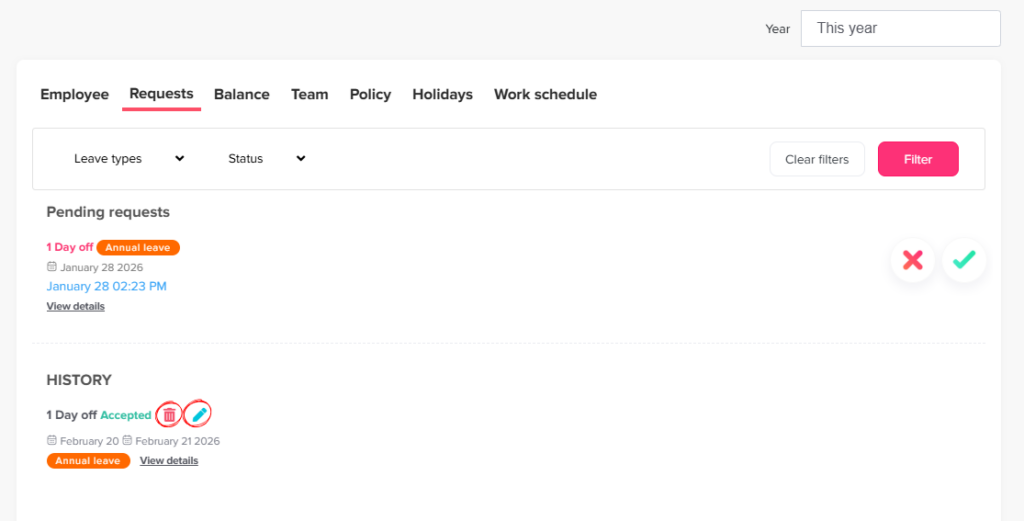
- Go to People → Employees
- Click on the employee’s name to view his profile
- Go to the Requests section
- Find request you want
- Click on Edit icon to modify details (dates, leave type, etc.) After editing click submit request
or - Click on Delete icon to remove the request
What Happens Next
- Changes made by admins are applied immediately
- No approval workflow is required
- Balances are updated automatically after the change
Admin Control
- Admins can manage all requests, regardless of status
- They can also force accept or reject pending requests
- This ensures issues can be resolved quickly without delays
On this page