







Managing employee vacations may sound simple when a company has only a few people. But as the team grows, tracking who is off, who is available, how much PTO each employee has used, and whether absences overlap can quickly become difficult. A vacation tracker helps HR teams manage PTO, leave requests, employee absences, approvals, and balances in one organized system instead of relying on spreadsheets, emails, paper forms, or scattered messages.

For HR departments, vacation tracking is not only about recording days off. It is about maintaining fair leave policies, keeping accurate records, supporting payroll, helping managers plan work, and giving employees a clear way to request time away from work. When vacation tracking is handled manually, mistakes can easily happen. Employees may have incorrect balances, managers may approve overlapping leave, and HR may spend too much time updating records by hand.
A modern vacation tracker gives HR teams better control, better visibility, and a smoother process for everyone involved.
What Is a Vacation Tracker?
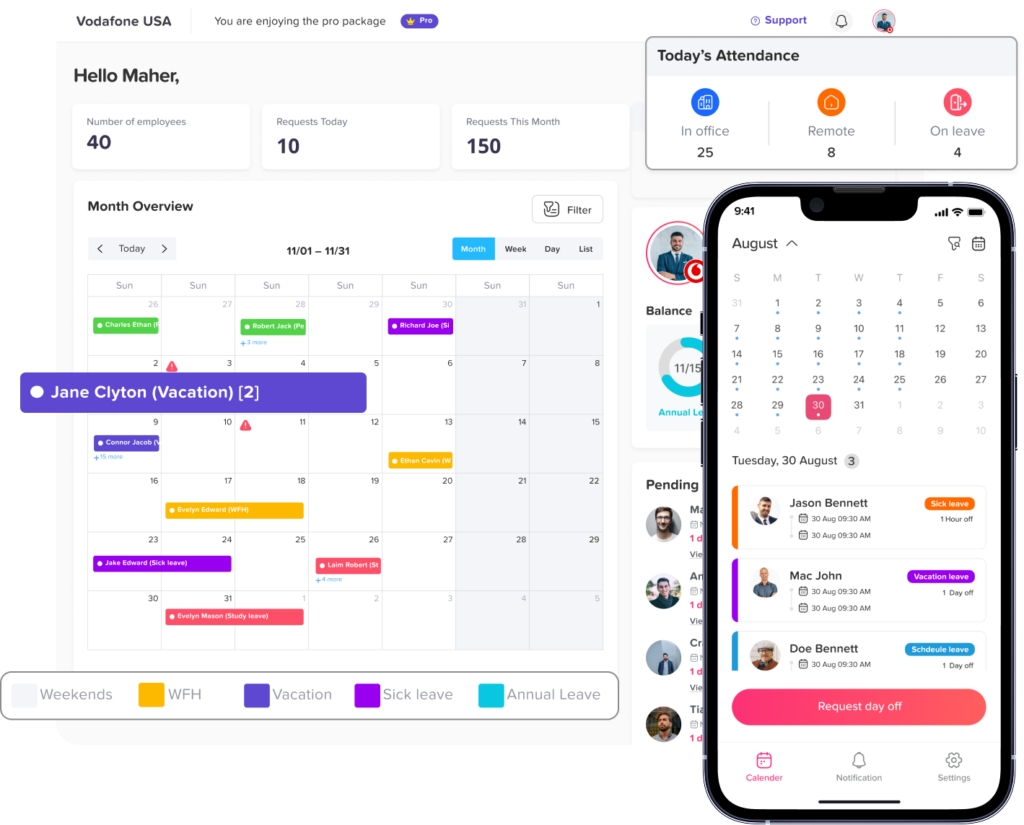
A vacation tracker is a digital tool used to manage employee time off. It helps HR teams, managers, and employees track vacation days, paid time off, sick leave, personal leave, unpaid leave, holidays, and other absence types.
Instead of sending leave requests through email or updating spreadsheets manually, employees can submit requests online. Managers can approve or reject them, and HR can monitor leave balances, policies, and team availability from one central place.
A vacation tracker usually helps businesses manage:
- Vacation requests
- PTO balances
- Sick leave
- Unpaid leave
- Public holidays
- Half day requests
- Custom leave types
- Approval workflows
- Team calendars
- Leave history
- Absence reports
For HR teams, this creates a clear and reliable system that reduces manual work and improves accuracy.
Why HR Teams Need a Vacation Tracker
HR teams are responsible for making sure leave is handled fairly, accurately, and according to company policy. Without a proper system, vacation tracking can become messy and time consuming.
Many companies start with simple methods such as spreadsheets, emails, or shared calendars. These methods may work for a small team at first, but they often create problems as the company grows.
Common problems with manual vacation tracking
| Manual Tracking Problem | How It Affects HR |
|---|---|
| Spreadsheets need constant updates | HR spends too much time editing records manually |
| Leave requests are sent by email | Requests can be missed, delayed, or lost |
| Balances are calculated manually | Employees may receive incorrect PTO balances |
| Managers do not see team availability clearly | Overlapping vacations may be approved |
| Leave policies are hard to apply consistently | Employees may be treated differently by mistake |
| Reports take too long to prepare | HR has less time for strategic work |
The Difference Between Vacation, PTO, Leave, and Absence
Before choosing a vacation tracker, HR teams should understand the difference between common time off terms.
Vacation
Vacation usually refers to planned time off for rest, travel, or personal enjoyment. It is often paid and may be part of an employee’s annual leave allowance.
PTO
PTO stands for paid time off. It can include vacation, personal days, sick leave, or any paid absence depending on the company policy.
Leave
Leave is a broader term that can include paid or unpaid time away from work. It may include vacation leave, sick leave, maternity leave, paternity leave, bereavement leave, unpaid leave, or other company specific leave types.
Absence
Absence refers to any time an employee is not working when they would normally be expected to work. It can be approved, such as vacation or sick leave, or unplanned, such as unexpected absence.
A good vacation tracker should help HR manage all these categories clearly.
Key Features HR Should Look for in a Vacation Tracker
Not all vacation tracking tools are the same. HR teams should look for a system that does more than simply record vacation days. The best vacation tracker should support company policies, approval workflows, employee visibility, reporting, and team planning.
Easy Leave Request Submission
Employees should be able to request time off quickly without sending emails or filling out paper forms. A vacation tracker should allow employees to choose the leave type, select dates, add notes if needed, and submit the request in a few simple steps.
This makes the process easier for employees and reduces the number of manual messages HR has to manage.
Clear Approval Workflow
A strong vacation tracker should make approvals simple for managers. When an employee submits a request, the right manager or approver should receive a notification. The manager can then approve or reject the request based on team availability, workload, and company policy.
For larger organizations, multiple approval levels may be needed. For example, a request may need approval from a direct manager first and then HR.
Automatic PTO Balance Tracking
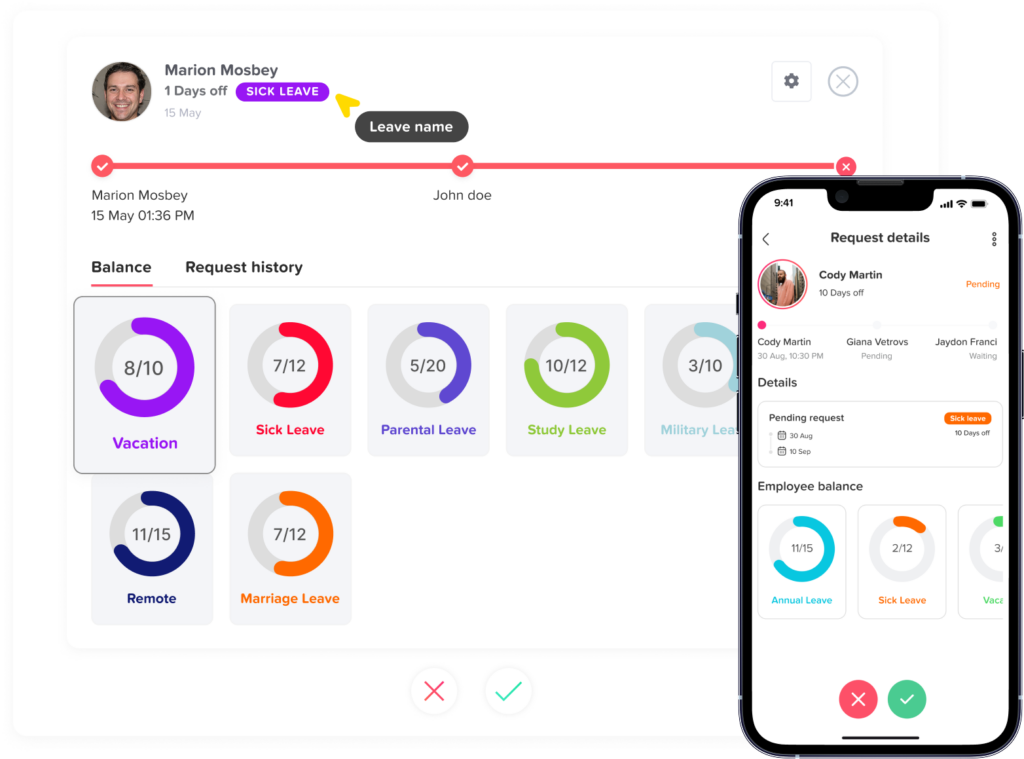
Manual balance calculations are one of the biggest sources of HR mistakes. A vacation tracker should automatically update leave balances when requests are approved.
This helps employees see how many days they have available and helps HR avoid errors caused by manual calculations.
Custom Leave Policies
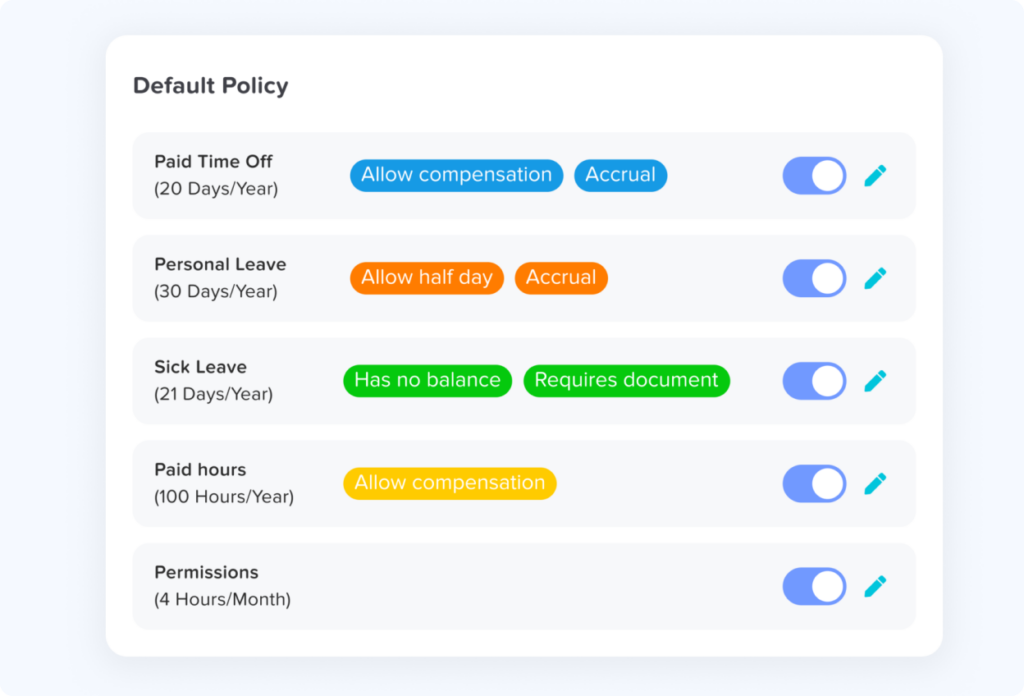
Every company has different leave rules. Some businesses offer annual vacation days. Others use monthly accruals, carryover rules, probation periods, or different policies based on location, team, or employee type.
A useful vacation tracker should allow HR to create custom policies that match the company’s real rules.
Examples of policy settings may include:
- Annual leave allowance
- Monthly or yearly accruals
- Carryover limits
- Leave expiration rules
- Different policies for full time and part time employees
- Location based holiday calendars
- Different leave types for different teams
Shared Leave Calendar
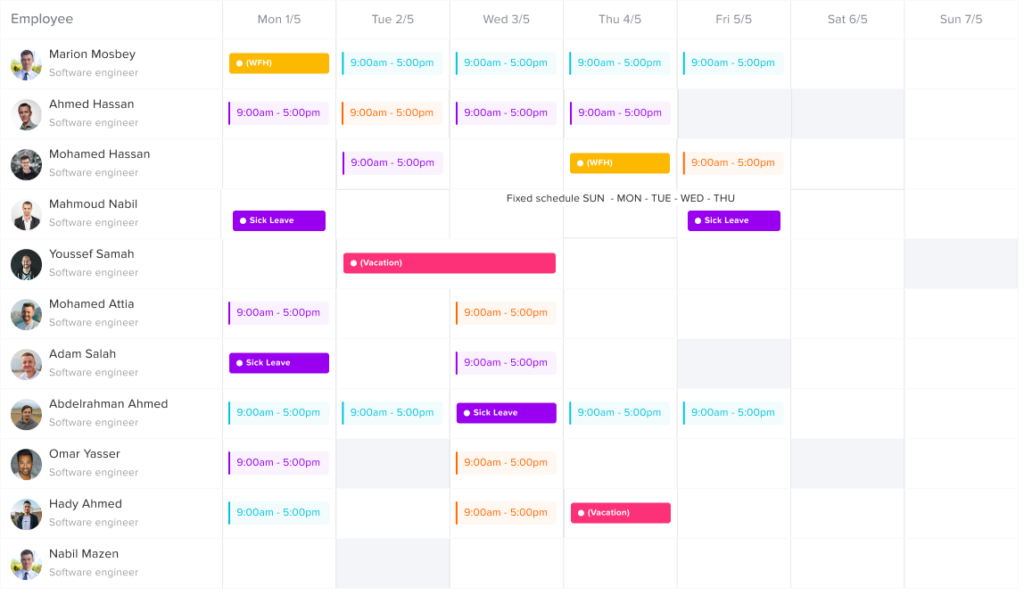
A shared leave calendar helps managers and HR see who is off and when. This is important for planning work, avoiding understaffing, and preventing too many employees from being away at the same time.
A calendar view is especially useful for teams that need continuous coverage, such as customer support, operations, healthcare, retail, restaurants, and project-based teams.
Absence History
HR needs accurate records of past leave requests and absences. A vacation tracker should store employee leave history so HR can review past requests, approval dates, leave types, and used balances.
This helps with audits, employee questions, internal reviews, and payroll preparation.
Reporting and Exporting
Reports help HR understand leave trends across the company. Instead of collecting data manually, HR should be able to generate reports on leave usage, remaining balances, upcoming absences, and absence patterns.
Useful reports include:
| Report Type | Why It Matters |
|---|---|
| Leave balance report | Shows remaining PTO for each employee |
| Leave usage report | Shows how much leave employees have used |
| Leave type report | Breaks down vacation, sick leave, unpaid leave, and other types |
| Upcoming absence report | Helps managers plan around future time off |
| Department report | Shows absence patterns by team or location |
| Employee history report | Keeps a clear record of past requests and approvals |
How a Vacation Tracker Improves HR Workflows
A vacation tracker improves the entire leave management process from request to approval to reporting.
It reduces manual work
HR no longer needs to update spreadsheets, calculate balances by hand, or search through emails to confirm whether a request was approved. The system keeps everything organized.
It improves accuracy
Automatic calculations reduce the risk of mistakes. Employees can see their available balance, and HR can trust that records are updated when leave is approved.
It speeds up approvals
Managers receive requests in one place and can respond faster. This helps employees plan their vacations earlier and reduces follow up messages.
It creates better visibility
HR and managers can see employee availability, upcoming time off, and overlapping requests. This helps teams avoid scheduling problems.
It supports fair leave management
When policies are built into the system, leave rules are applied consistently. This helps prevent confusion and improves trust between employees and HR.
Vacation Tracker for PTO Management
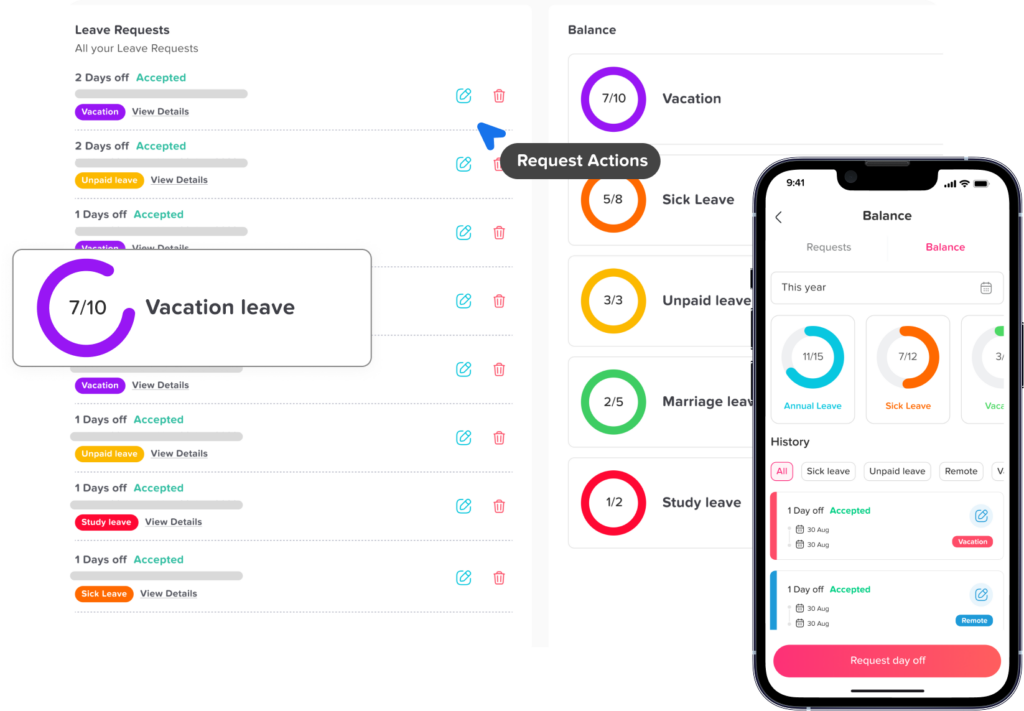
PTO tracking is one of the most important parts of vacation management. Employees want to know how much paid time off they have available, and HR needs accurate records to avoid disputes or payroll issues.
A vacation tracker helps HR manage PTO by:
- Showing available PTO balances
- Automatically deducting approved PTO
- Tracking used and remaining days
- Supporting accrual rules
- Managing carryover from one year to another
- Keeping a history of approved requests
This gives employees more transparency and reduces the number of balance-related questions HR receives.
Vacation Tracker for Leave Requests
Leave requests should not be scattered across emails, chat messages, paper forms, and verbal approvals. When requests are managed in different places, it becomes difficult to know what was approved, who approved it, and whether the employee has enough balance.
A vacation tracker gives every request a clear process.
A typical leave request process looks like this:
- The employee selects the leave type.
- The employee chooses the start and end dates.
- The employee submits the request.
- The manager receives a notification.
- The manager approves or rejects the request.
- The system updates the employee’s leave balance.
- The request appears on the leave calendar and in reports.
This workflow keeps everything organized and easy to review.
Vacation Tracker for Absence Management
Absence management is bigger than vacation tracking. HR teams also need to manage sick leave, emergency leave, unpaid leave, personal days, and other types of absence.
A vacation tracker helps HR separate planned and unplanned absences. This is important because not every absence should be treated the same way.
For example:
- Vacation is usually planned in advance.
- Sick leave may be unexpected.
- Unpaid leave may affect payroll.
- Public holidays may not reduce employee PTO balances.
- Half day leave may need different balance calculations.
By organizing these absence types properly, HR can maintain cleaner records and better understand employee availability.
Why Spreadsheets Are Not Enough for Vacation Tracking
Spreadsheets are common because they are simple and familiar. However, they become risky as teams grow.
The main problem with spreadsheets is that they depend on manual updates. If HR forgets to update a request, enters the wrong number, or shares an outdated version, the entire record can become inaccurate.
Spreadsheets also make it hard to manage approvals. A spreadsheet may show that someone is on vacation, but it may not show who approved the request, when it was approved, or whether the employee had enough balance at the time.
For small teams, spreadsheets may seem convenient. For growing teams, they often create more work than they save.
How a Vacation Tracker Helps Managers
A vacation tracker is not only useful for HR. Managers also benefit because they need to know who is available, who is away, and whether the team has enough coverage.
Managers can use a vacation tracker to:
- Review upcoming employee vacations
- Avoid approving overlapping leave
- Plan workloads in advance
- Check team availability
- Approve requests faster
- Reduce back and forth communication with HR
This is especially useful for teams with deadlines, shifts, customer service responsibilities, or project delivery schedules.
How a Vacation Tracker Helps Employees
Employees also benefit from a clear vacation tracking system. They do not need to ask HR how many days they have left or search through old emails to check request status.
With a vacation tracker, employees can:
- View their PTO balance
- Submit leave requests easily
- Check request status
- See approved time off
- Plan vacations with more confidence
- Understand company leave rules better
This improves the employee experience and makes time off management feel more transparent.
Why Day Off Is a Good Vacation Tracker for HR
Day Off helps companies manage vacation tracking, PTO, leave requests, approvals, employee balances, and team availability in one place. It is designed to make leave management easier for HR teams, managers, and employees.
With Day Off, businesses can organize employee leave, create custom policies, manage approvals, view shared calendars, and track leave balances without depending on manual spreadsheets or scattered messages.
Day Off is useful for small businesses, growing teams, remote teams, hybrid companies, and organizations that need a simple way to manage vacation, PTO, and absences.
FAQs
What is a vacation tracker?
A vacation tracker is a digital system that helps businesses manage employee vacation days, PTO, leave requests, absences, approvals, and leave balances in one organized place.
Why does HR need a vacation tracker?
HR needs a vacation tracker to reduce manual work, improve accuracy, manage PTO balances, track absences, apply leave policies fairly, and keep clear records of employee time off.
Can a vacation tracker manage PTO?
Yes. A vacation tracker can help manage PTO by tracking available balances, approved requests, used days, remaining days, accruals, and carryover rules.
Is a vacation tracker better than a spreadsheet?
Yes. A vacation tracker is usually better than a spreadsheet because it automates calculations, stores request history, manages approvals, updates balances, and gives HR better visibility.
Can employees request leave through a vacation tracker?
Yes. Most vacation trackers allow employees to submit leave requests online. Managers can then approve or reject the request, and the system updates the employee’s balance automatically.
Can a vacation tracker help prevent overlapping leave?
Yes. A vacation tracker with a shared leave calendar helps managers see who is already off before approving new requests. This reduces the risk of too many employees being away at the same time.
Is a vacation tracker useful for remote teams?
Yes. A vacation tracker is very useful for remote and hybrid teams because it gives everyone one clear place to view leave requests, approved vacations, and employee availability.
What should HR look for in a vacation tracker?
HR should look for easy leave requests, approval workflows, automatic PTO balance tracking, custom leave policies, shared calendars, absence history, reports, and support for different teams or locations.
Final Thoughts
A vacation tracker is an important tool for HR teams that want to manage PTO, leave, and absences more accurately. It helps replace manual spreadsheets, reduce approval delays, improve team visibility, and give employees a clearer way to request time off.
For HR, vacation tracking is not just an administrative task. It affects payroll, planning, employee satisfaction, workload distribution, and company organization. When leave is managed properly, employees can enjoy their time off with confidence, managers can plan work more effectively, and HR can spend less time fixing manual errors.
A reliable vacation tracker gives everyone the same clear view of time off. That makes leave management simpler, fairer, and easier to scale as the company grows.