







Managing employee time off should be simple. But for many teams, PTO tracking quickly becomes one of the most time consuming parts of HR and people management. What starts as a basic spreadsheet or a few email requests can soon turn into a confusing process filled with manual updates, missed approvals, inaccurate balances, overlapping vacations, and endless follow ups.
That is why more teams are moving away from manual leave tracking and choosing dedicated PTO tracking software like Day Off.

Day Off helps companies manage vacation days, sick leave, paid time off, remote work requests, personal days, and other leave types in one organized system. Instead of relying on scattered tools, teams can handle requests, approvals, balances, calendars, reports, and policies from one easy to use platform.
Whether a company has a small team, a growing workforce, multiple departments, or employees in different locations, Day Off gives everyone a clearer and easier way to manage time off.
The Problem with Traditional PTO Tracking
Many teams still track PTO using spreadsheets, emails, paper forms, shared calendars, or chat messages. These methods may seem simple at first, especially for small businesses. However, they usually become harder to manage as the team grows.
A spreadsheet can quickly become outdated. An email request can be missed. A manager may approve leave without seeing another employee’s overlapping vacation. HR may spend too much time answering questions about remaining balances. Employees may feel unsure about whether their time off was approved or how many days they still have available.
Manual PTO tracking often creates problems such as:
- Incorrect leave balances
- Delayed approvals
- Missed or forgotten requests
- Overlapping vacations
- Confusion around company policies
- Lack of visibility into team availability
- Extra administrative work for HR
- Difficulty generating reports
- Poor employee experience
These small issues can affect productivity, planning, and trust. When employees do not have a clear way to request and track time off, managers and HR teams spend more time solving avoidable problems.
Day Off was built to make PTO tracking easier, more accurate, and more transparent for everyone involved.
What Makes Day Off Different?
Day Off is designed specifically for leave management and PTO tracking. It is not just a spreadsheet replacement. It is a complete system that helps teams manage the entire time off process from request to approval to reporting.
Employees can submit leave requests easily. Managers can approve or reject requests quickly. HR teams can create leave policies, monitor balances, manage holidays, and generate reports without manual calculations.
Day Off brings all PTO related information into one place, including:
- Employee leave balances
- Time off requests
- Approval workflows
- Company holidays
- Leave policies
- Team calendars
- Departments and locations
- Reports and exports
- Mobile access
- Integrations with workplace tools
This gives every team member the visibility they need without depending on constant back-and-forth communication.
Easy PTO Requests for Employees
A good PTO tracking system should make life easier for employees, not more complicated. Day Off gives employees a simple way to request time off from the web, iOS, or Android.
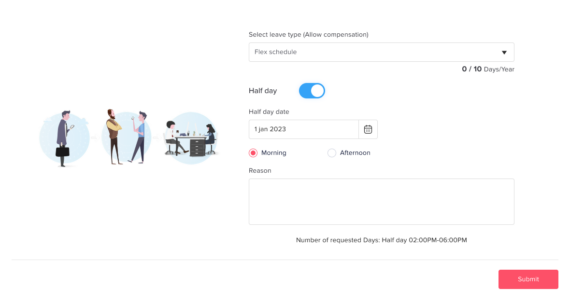
Instead of sending an email, messaging a manager, or filling out a manual form, employees can open Day Off, choose the leave type, select the dates, add a note if needed, and submit the request.
This makes the process faster and more consistent. Employees can also view their remaining balance before requesting time off, which reduces unnecessary questions for HR.
With Day Off, employees can clearly see:
- How many PTO days they have available
- Which requests are pending
- Which requests were approved
- Which requests were rejected
- Upcoming company holidays
- Team availability
- Their own time-off history
This level of transparency helps employees plan better and feel more confident when requesting leave.
Faster Approvals for Managers
Managers need a clear view before approving time off. They need to know who else is off, whether the team has enough coverage, and whether the employee has enough balance available.
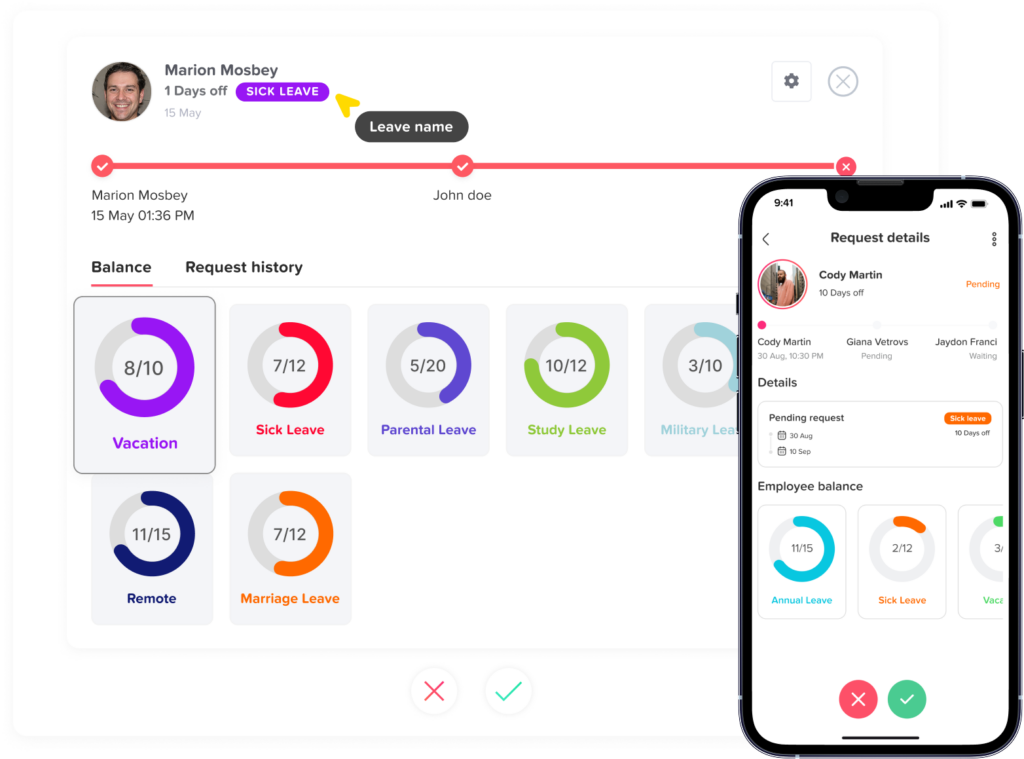
Day Off gives managers the information they need to make better approval decisions. Instead of checking spreadsheets, calendars, or messages, managers can review requests directly inside the platform.
When a request is submitted, the manager can approve or reject it with just a few clicks. They can also view important details such as the leave dates, leave type, employee balance, and team availability.
This helps managers avoid common problems like approving too many employees from the same team at the same time or missing important requests buried in emails.
For companies with more structured approval processes, Day Off also supports approval workflows that help make the process more organized and consistent.
Accurate Leave Balances Without Manual Calculations
One of the biggest challenges in PTO tracking is keeping leave balances accurate. When balances are managed manually, mistakes are easy to make. A formula may break. A request may not be recorded. Carryover days may be calculated incorrectly. Accrual rules may be forgotten.
Day Off helps reduce these issues by automatically tracking and updating leave balances based on company policies.
HR teams can define how leave is earned, used, carried over, or reset. Once the policy is set, Day Off helps apply those rules automatically, reducing the need for constant manual updates.
This is especially useful for teams with different types of leave, different employee groups, or more advanced PTO rules.
Accurate balances help everyone. Employees know how much time they can take. Managers can approve requests with confidence. HR teams can avoid disputes, confusion, and repetitive balance questions.
Custom Leave Types for Every Team
Not every company manages time off the same way. Some teams offer traditional vacation and sick leave. Others use a general PTO policy. Some companies also track unpaid leave, maternity leave, paternity leave, study leave, remote work, personal leave, or custom leave types.
Day Off gives companies the flexibility to create and manage different leave types based on their own needs.
This means teams are not forced into a one-size-fits-all system. They can build leave categories that reflect their actual policies and company culture.
Examples of leave types teams can manage in Day Off include:
- Vacation leave
- Paid time off
- Sick leave
- Personal leave
- Unpaid leave
- Maternity leave
- Paternity leave
- Bereavement leave
- Work-from-home requests
- Compensatory time off
- Custom leave types
This flexibility makes Day Off useful for many kinds of teams, from small businesses to larger organizations with more detailed HR policies.
Clear Leave Policies in One Place
A strong PTO process starts with clear policies. But even when companies have good leave policies, they can still be difficult to manage manually.
Day Off allows teams to organize their leave policies in one system. HR can define rules based on how the company handles PTO, accruals, carryovers, holidays, leave types, and employee groups.
This helps reduce confusion because employees and managers are working from the same source of truth.
Instead of asking HR to confirm every detail, employees can see their balances and request leave according to the rules already set in the system. Managers can review requests with more confidence because the policy logic is already built into the process.
A centralized policy setup saves time, improves consistency, and helps prevent misunderstandings.
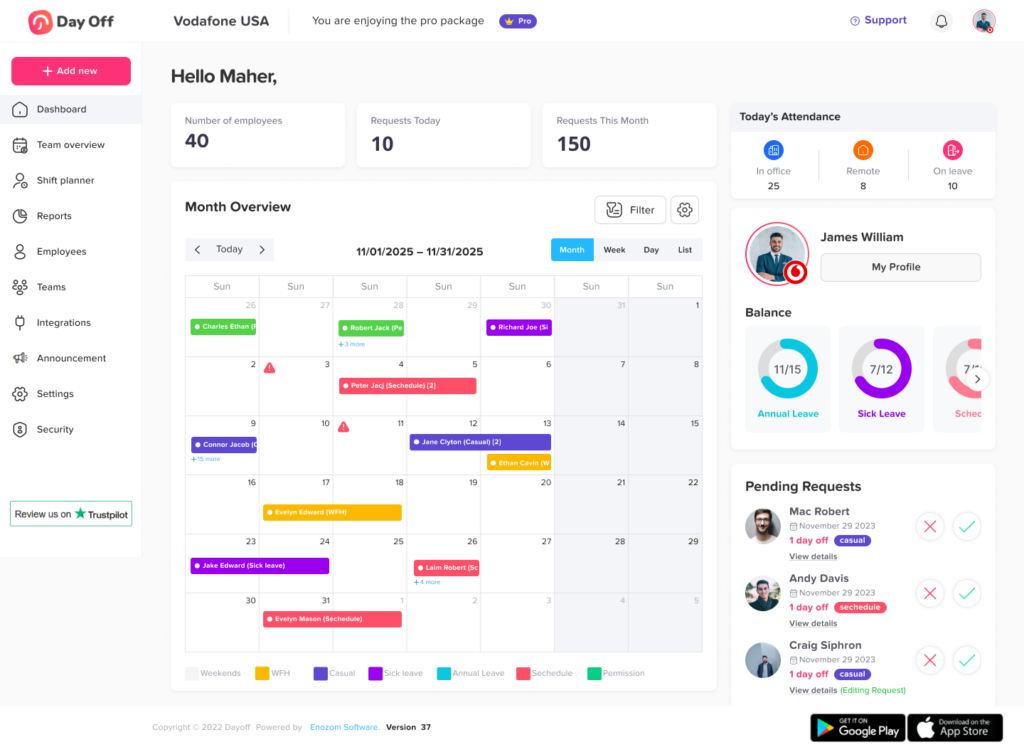
Better Visibility with a Shared Leave Calendar
One of the most useful features for any team is a shared leave calendar. Without a clear calendar, it is easy for managers to approve overlapping time off without realizing the impact on team coverage.
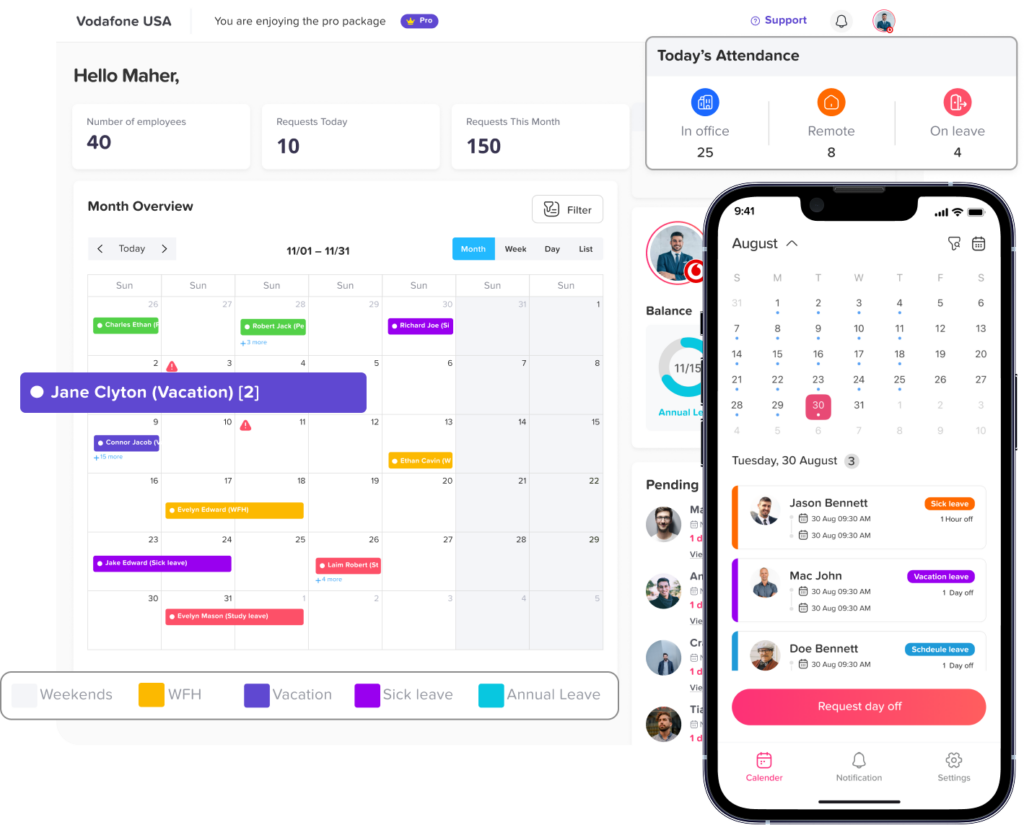
Day Off gives teams better visibility into who is off and when. Managers can check upcoming absences, approved leave, pending requests, and holidays in one place.
This helps with:
- Workforce planning
- Team coverage
- Project scheduling
- Avoiding overlapping vacations
- Managing busy seasons
- Reducing last-minute surprises
A shared leave calendar is especially valuable for teams that depend on collaboration, customer support, deadlines, or shift coverage. It gives managers the visibility they need to keep work moving while still supporting employee time off.
PTO Tracking for Remote and Hybrid Teams
Remote and hybrid work have made leave tracking more important than ever. When employees are working from different locations, managers cannot rely on office visibility to know who is available.
Day Off helps remote and hybrid teams stay aligned by making time-off information accessible from anywhere.
Employees can request leave from their phone or computer. Managers can approve requests even when they are not in the office. HR can monitor company-wide absences without collecting updates from different channels.
This makes Day Off a practical solution for modern teams that work across different cities, countries, schedules, or time zones.
When everyone can access the same leave information, remote work becomes easier to manage.
Mobile Access for On the Go Teams
Not every employee spends the entire day at a desk. Some employees work in the field, travel often, manage operations, or rely mainly on mobile devices.
Day Off is available on iOS, Android, and web, making PTO tracking accessible for different work styles.
Employees can submit leave requests from their phones. Managers can review and approve requests quickly. HR teams can manage time off without being limited to a desktop environment.
This mobile friendly experience makes Day Off convenient for companies with office employees, remote workers, field teams, distributed teams, and managers who need to respond quickly while on the move.
Reducing HR Workload
HR teams often spend a lot of time handling repetitive PTO related tasks. They answer balance questions, update spreadsheets, follow up on approvals, check policies, prepare reports, and correct mistakes.
Day Off helps reduce this workload by automating and organizing many of these tasks.
Instead of manually tracking every request, HR can rely on a system that keeps information updated. Instead of answering the same questions repeatedly, employees can check their own balances and request history. Instead of preparing reports from scratch, HR can generate the data they need more easily.
This gives HR more time to focus on higher value work, such as employee experience, policy improvement, compliance, engagement, and workforce planning.
A better PTO system does not just save time. It also helps HR operate more strategically.
Better Reporting and Decision Making
PTO tracking is not only about approving leave. It is also about understanding absence trends, employee availability, policy usage, and workforce patterns.
Day Off provides reports that help companies see important leave data more clearly.
HR teams and managers can use reports to understand:
- How much leave employees have used
- How much leave remains
- Which leave types are used most often
- Absence trends across teams
- Upcoming time off
- Employee leave history
- Department or location patterns
This information can support better planning and decision-making. For example, if many employees have unused PTO near the end of the year, managers can encourage healthier time-off planning. If certain periods are always busy, HR can adjust communication around leave requests.
Good reporting turns PTO tracking from a basic administrative task into a useful source of workforce insight.
A Better Employee Experience
Employee experience matters. Time off is an important part of work life balance, and employees should not have to struggle to understand or use their benefits.
When PTO tracking is confusing, employees may feel frustrated. They may not know how many days they have left. They may worry that their request was missed. They may need to chase managers for approval.
Day Off improves the experience by making the process clear and simple.
Employees can request leave easily, track request status, view their balance, and plan time off with more confidence. This creates a smoother and more transparent experience.
When employees feel that time off is handled fairly and efficiently, it supports a healthier workplace culture.
Fair and Consistent Leave Management
Consistency is important in leave management. Employees should feel that requests are handled fairly and according to company policy.
Manual processes can sometimes lead to inconsistent decisions. One manager may approve requests quickly, while another may delay them. Some requests may be tracked carefully, while others may be missed. Policies may be applied differently across teams.
Day Off helps companies create a more consistent process.
By using defined leave types, approval workflows, balances, and policies, teams can reduce confusion and apply rules more fairly. Managers have the same information available when reviewing requests, and HR can maintain better oversight.
This helps build trust between employees, managers, and HR.
Helping Teams Avoid Overlapping Leave
Overlapping leave can create real business problems, especially when several employees from the same team are off at the same time. It can affect customer support, operations, project deadlines, and team productivity.
Day Off helps managers see team availability before approving requests. With a clear calendar and request visibility, managers can make better decisions and avoid preventable coverage issues.
This does not mean employees cannot take leave at the same time. It means managers can approve leave with a better understanding of team capacity.
For growing teams, this visibility becomes essential. The more employees a company has, the harder it becomes to manage overlapping absences manually.
Supporting Different Teams, Locations, and Departments
Every company is structured differently. Some have one small team. Others have multiple departments, office locations, remote employees, or country-specific policies.
Day Off supports flexible team management, making it easier to organize employees based on company structure.
Teams can manage employees by department, location, policy, or role. This allows companies to apply different rules when needed and keep PTO tracking organized as they grow.
For example, a company may have different holiday calendars for different locations, different leave policies for full-time and part-time employees, or different approval workflows for different teams.
Day Off gives companies the flexibility to manage these differences without creating separate spreadsheets or disconnected processes.
Integrations That Fit the Way Teams Work
Modern teams use many tools every day. PTO tracking becomes more useful when it connects with the tools employees already use.
Day Off supports integrations that help teams keep leave information visible across their work environment. This can include tools such as Slack, Microsoft Teams, Google Calendar, and Outlook Calendar.
These integrations help improve communication and reduce the chance that approved leave goes unnoticed.
For example, calendar integrations can help teams see approved time off alongside meetings and work schedules. Communication integrations can help notify managers or team members about leave updates.
This keeps PTO information connected to daily workflows instead of isolated in a separate system.
Why Small Teams Choose Day Off
Small teams often start with manual PTO tracking because it feels manageable. But even small teams can run into problems when requests are tracked through messages, emails, or spreadsheets.
For small businesses, Day Off provides a simple and affordable way to create a professional PTO process early.
Small teams choose Day Off because it helps them:
- Save time on manual tracking
- Avoid spreadsheet errors
- Create a clear approval process
- Give employees visibility into balances
- Keep leave records organized
- Build better HR habits from the start
By setting up a proper PTO tracking system early, small teams can avoid bigger problems later as they grow.
Why Growing Teams Choose Day Off
As companies grow, PTO tracking becomes more complex. More employees means more requests, more policies, more approvals, more holidays, and more chances for mistakes.
Growing teams need a system that can scale with them.
Day Off helps growing companies manage more employees without creating more administrative work. HR teams can organize policies, managers can approve requests faster, and employees can use self-service features to check their own information.
This makes Day Off especially useful for companies that are expanding and need a leave management process that is more reliable than spreadsheets.
Why Managers Choose Day Off
Managers are responsible for keeping work on track while also supporting employee time off. That can be difficult without clear visibility.
Day Off helps managers make better decisions by showing them who is off, who has requested leave, and whether the team has enough coverage.
Managers choose Day Off because it helps them:
- Review requests faster
- Avoid overlapping absences
- Plan team capacity
- Reduce approval delays
- Stay informed about upcoming leave
- Support employees with less confusion
Instead of searching through emails or asking HR for balance updates, managers can access the information they need directly.
Why HR Teams Choose Day Off
For HR teams, PTO tracking is often one of the most repetitive administrative responsibilities. Day Off helps HR move away from manual work and toward a more organized, automated process.
HR teams choose Day Off because it helps them:
- Manage leave policies in one place
- Track balances accurately
- Reduce manual data entry
- Generate useful reports
- Support employees with self-service tools
- Improve policy consistency
- Save time on repetitive questions
- Maintain better leave records
This makes Day Off a valuable tool for HR teams that want to simplify operations and improve employee experience at the same time.
Day Off Makes PTO Tracking Simple Without Losing Flexibility
Some HR systems feel too complicated for everyday use. Others are too basic and cannot support real company policies. Day Off offers a balance between simplicity and flexibility.
It is easy enough for employees and managers to use without long training. At the same time, it gives HR teams the tools they need to manage different leave types, policies, teams, locations, approvals, and reports.
This balance is one of the main reasons teams choose Day Off.
A PTO tracking system should not create more work. It should make the process easier. Day Off does that by giving each user what they need:
- Employees get a simple request experience
- Managers get clear approval tools
- HR gets policy control and reporting
- Companies get better visibility and organization
Final Thoughts
Teams choose Day Off for PTO tracking because it solves a real workplace problem in a simple and effective way.
It replaces manual spreadsheets, scattered messages, and confusing approval processes with one organized platform for employees, managers, and HR teams.
Employees can request time off easily. Managers can approve requests with better visibility. HR teams can manage policies, balances, reports, and records without constant manual work. Companies can plan ahead and create a more transparent time-off process.
For small teams, Day Off provides structure from the beginning. For growing teams, it offers flexibility and scalability. For HR teams, it reduces repetitive work. For employees, it creates a better and clearer PTO experience.
That is why teams choose Day Off for PTO tracking: it makes leave management easier, more accurate, and more organized for everyone.