







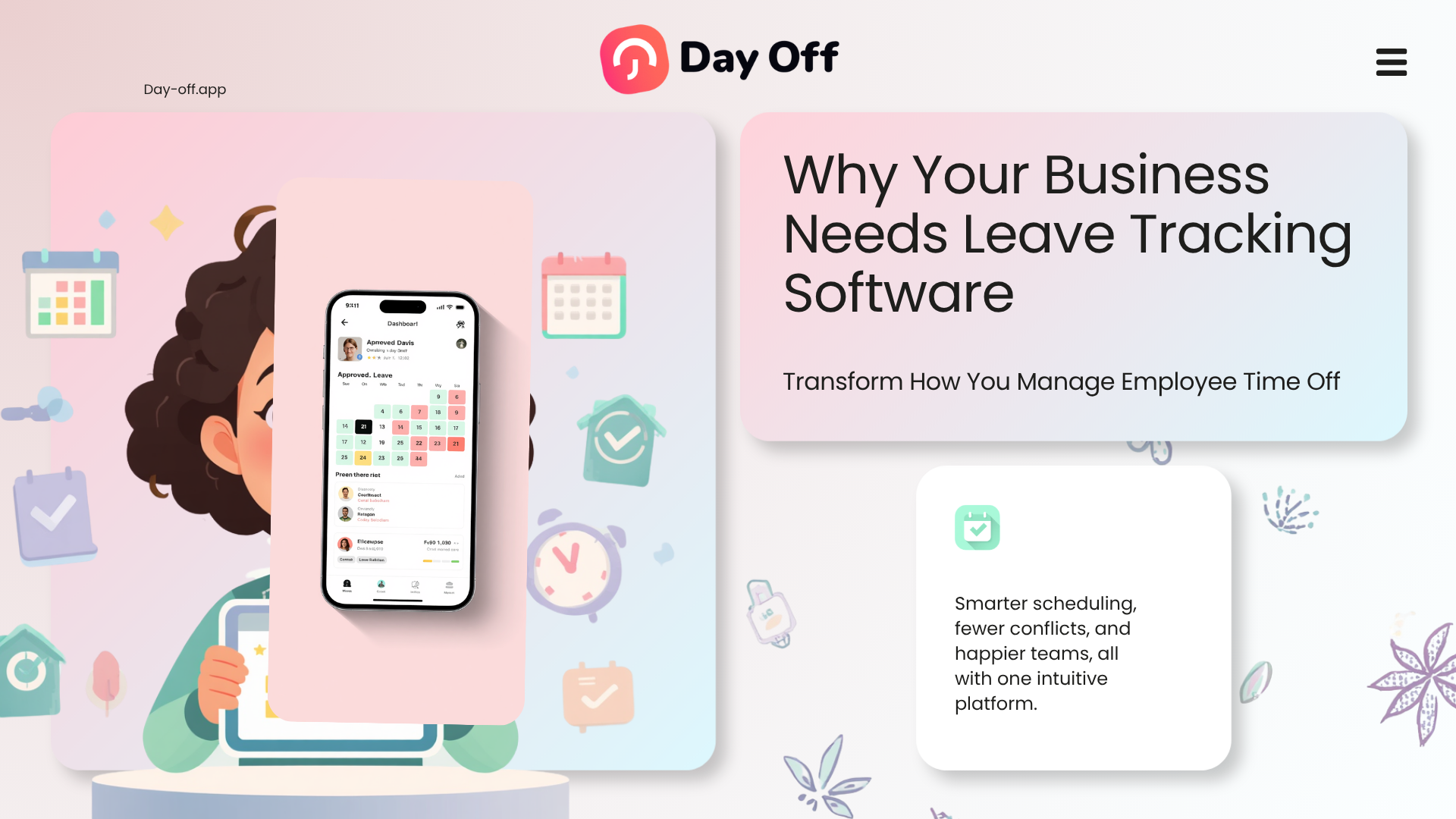
Managing employee time off may seem simple when a business has only a few employees, but without leave tracking software, the process can quickly become difficult to control. A manager receives a request, checks the calendar, approves it, and updates the balance manually. But as the team grows, requests start coming from different channels, leave balances become harder to calculate, holidays are missed, overlapping absences cause staffing issues, and HR spends too much time answering the same questions.

Leave tracking software helps businesses manage employee time off in one organized system. Instead of using spreadsheets, emails, chat messages, or manual calendars, companies can use a digital tool to track PTO, vacation, sick leave, holidays, unpaid leave, work schedules, approvals, and employee availability.
For modern businesses, leave tracking is not only about recording who is off work. It is about improving planning, reducing mistakes, supporting employees, helping managers make faster decisions, and keeping HR processes clear.
In this article, we will explain why your business needs leave tracking software, what problems it solves, which features matter most, and how Day Off helps teams manage leave, attendance, holidays, schedules, and time tracking more efficiently.
What Is Leave Tracking Software?
Leave tracking software is a digital system that helps companies manage employee leave requests, PTO balances, holidays, approvals, work schedules, and absence records.
Instead of tracking leave manually, employees can submit requests through the system, managers can approve or reject them, and HR can monitor balances, calendars, policies, and reports in one place.
A good leave tracking software helps answer important questions such as:
- Who is off today?
- Who has leave coming up?
- How many vacation days does each employee have left?
- Are there overlapping leave requests?
- Which holidays apply to each location?
- Are there blockout dates when employees should not request leave?
- Which manager should approve each request?
- Are employees tracking their working hours correctly?
With a tool like Day Off, businesses can move from scattered manual tracking to a clear and centralized leave management process.
Why Manual Leave Tracking Becomes a Problem
Many businesses start by using spreadsheets or shared calendars to track employee leave. While this may work temporarily, it often becomes unreliable as the company grows.
Manual leave tracking can lead to several problems:
Leave Requests Get Lost
Employees may send requests by email, Slack, Microsoft Teams, WhatsApp, or direct message. When requests come from too many places, managers can easily miss them.
This creates confusion for employees and extra work for HR.
PTO Balances Become Inaccurate
Calculating leave balances manually takes time. HR has to check how many days an employee used, how many days they earned, whether carryover applies, and whether the leave type is limited or unlimited.
One small mistake can affect payroll, employee trust, and staffing plans.
Overlapping Leave Is Hard to Notice
Without a shared leave calendar, managers may approve multiple people from the same team for the same period. This can leave departments understaffed during busy days.
Holidays and Locations Are Difficult to Manage
Companies with employees in different countries, cities, or offices often need different holiday calendars. Manual systems make it hard to apply the right holidays to the right employees.
HR Spends Too Much Time on Repetitive Questions
Employees often ask:
- How many days off do I have left?
- Was my request approved?
- Who is off next week?
- Can I take leave during this period?
- What is our vacation policy?
Leave tracking software reduces these questions by giving employees and managers direct access to the information they need.
Why Your Business Needs Leave Tracking Software
Leave tracking software is not only useful for large companies. Small businesses, startups, remote teams, hybrid teams, agencies, retail businesses, restaurants, and growing companies can all benefit from a clear leave management system.
Here are the main reasons your business needs one.
It Keeps All Leave Requests in One Place
One of the biggest advantages of leave tracking software is centralization.
Instead of receiving leave requests through emails, messages, paper forms, or verbal conversations, employees can submit requests through one system. Managers can review them, approve or reject them, and keep a clear record of every decision.
With Day Off, leave requests are organized so HR, managers, and employees can easily follow the status of each request. This creates a smoother process and reduces misunderstandings.
A centralized system also makes it easier to review past leave records when needed. If there is ever a question about when an employee requested time off or who approved it, the answer is stored in the system.
It Gives Everyone a Shared Leave Calendar
A shared calendar is one of the most important features of any leave tracking software.
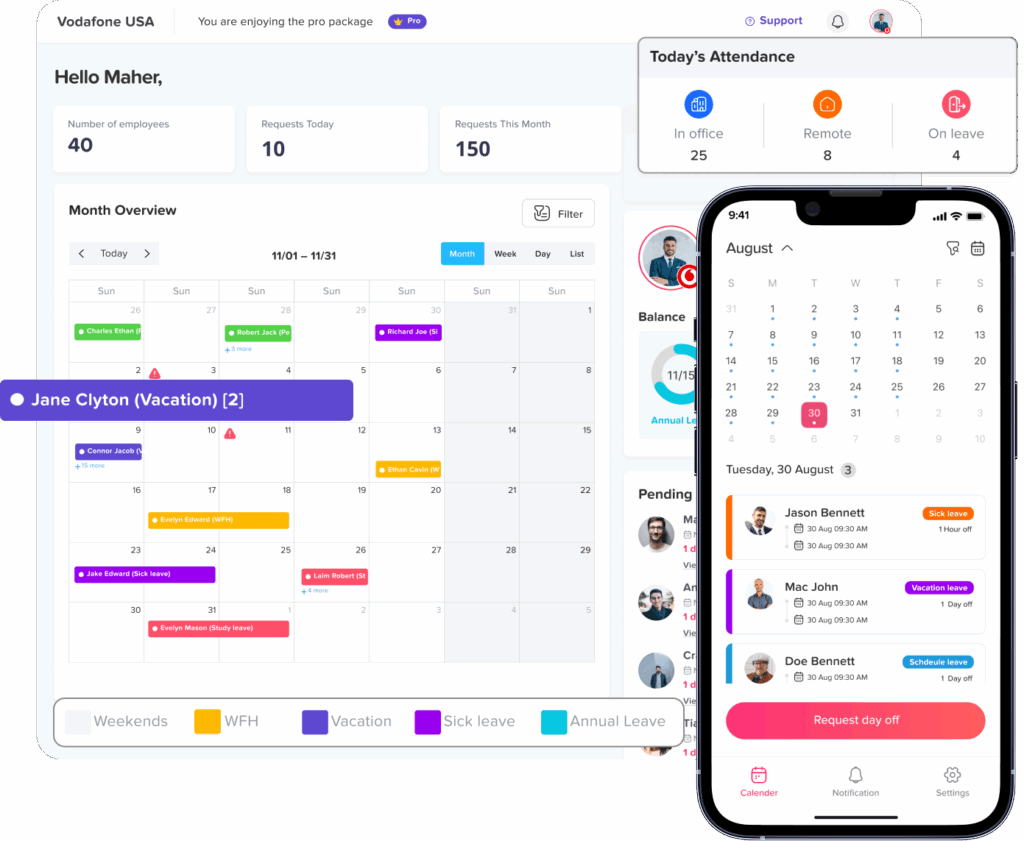
With Day Off, businesses can use a shared calendar that shows:
- Accepted leave requests
- Company holidays
- Blockout dates
- Team availability
- Upcoming employee absences
This gives managers a clear view of who is available and who is off. It also helps employees plan their leave better because they can see when other team members are already away.
For example, if two employees from the same department already have approved vacation during a certain week, a manager can review new requests more carefully before approving additional time off.
A shared leave calendar is especially useful for:
- Remote teams
- Hybrid teams
- Customer support teams
- Sales teams
- Shift based teams
- Small businesses with limited staff
- Companies with multiple locations
When everyone can see approved time off clearly, planning becomes easier and last-minute staffing problems become less common.
It Helps Prevent Overlapping Absences
Overlapping leave requests can create serious problems for business operations.
If too many employees are away at the same time, customer service may slow down, projects may be delayed, and remaining employees may become overloaded.
Leave tracking software helps managers spot conflicts before approving requests.
With Day Off, approved requests appear on a shared calendar, making it easier to see team availability before making a decision. Managers do not have to search through emails or update a spreadsheet manually. They can check the calendar and decide based on real availability.
This is especially helpful during:
- Holiday seasons
- End of year vacations
- School breaks
- Busy sales periods
- Product launches
- Payroll periods
- High demand business seasons
Better visibility leads to better workforce planning.
It Supports Unlimited Leave Types
Every company has different leave policies. Some businesses only track vacation and sick leave, while others need to manage many types of absence.
A flexible leave tracking software should allow businesses to create different leave types based on their needs.
With Day Off, companies can create unlimited leave types, such as:
- Annual leave
- Vacation leave
- Sick leave
- Personal leave
- Unpaid leave
- Maternity leave
- Paternity leave
- Bereavement leave
- Study leave
- Work from home days
- Compensatory leave
- Half day leave
- Hourly leave
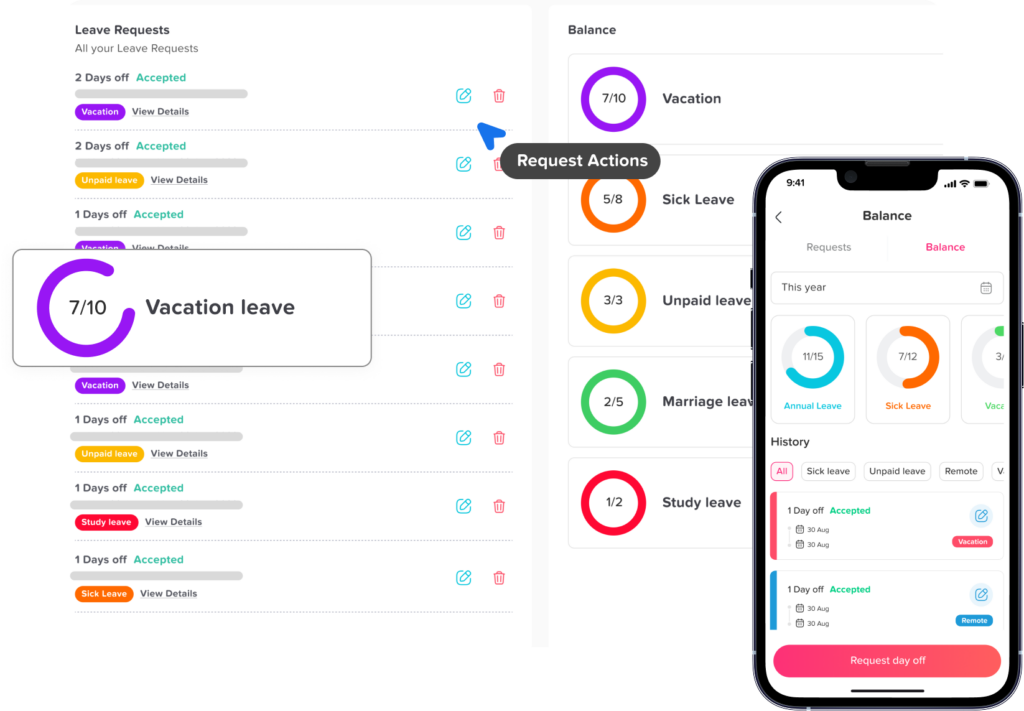
Day Off also supports leave balances in days or hours, giving businesses more flexibility.
This is important because not all leave is taken in full days. Some employees may need to take two hours for an appointment, half a day for personal reasons, or several hours for family responsibilities.
By allowing balance units in days or hours, Day Off helps businesses track leave more accurately and fairly.
It Makes Leave Policies Easier to Manage
Leave policies can become complicated as a company grows.
Different employees may have different rules depending on their location, role, contract, seniority, or department. Some employees may receive a fixed number of vacation days per year, while others may accrue leave over time. Some leave types may allow carryover, while others may expire at the end of the year.
That is why businesses need leave tracking software that supports flexible policies.
With Day Off, companies can create unlimited leave policies and customize them based on how the business works.
Day Off supports:
Limited Balance Policies
A limited balance policy gives employees a specific number of leave days or hours.
For example, a company may provide:
- 15 vacation days per year
- 10 sick days per year
- 3 personal days per year
This works well for companies that want clear annual limits.
Unlimited Balance Policies
Some companies offer unlimited leave for certain leave types, such as unpaid leave or flexible time off. In this case, employees can request leave without being limited by a fixed balance, while managers still review and approve requests.
Day Off allows businesses to manage both limited and unlimited leave types, making the system flexible for different company policies.
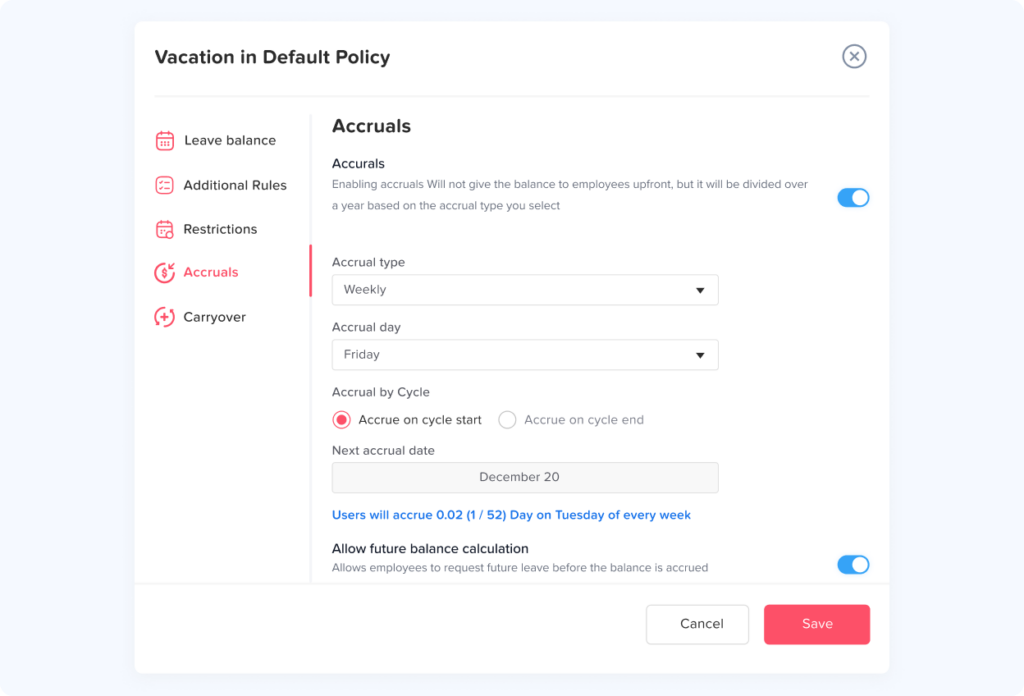
Accruals
Accruals allow employees to earn leave over time instead of receiving the full balance at once.
For example, an employee may earn a certain number of hours or days every month. This is useful for companies that want PTO to build gradually during the year.
Leave tracking software helps calculate accruals automatically, reducing manual work for HR.
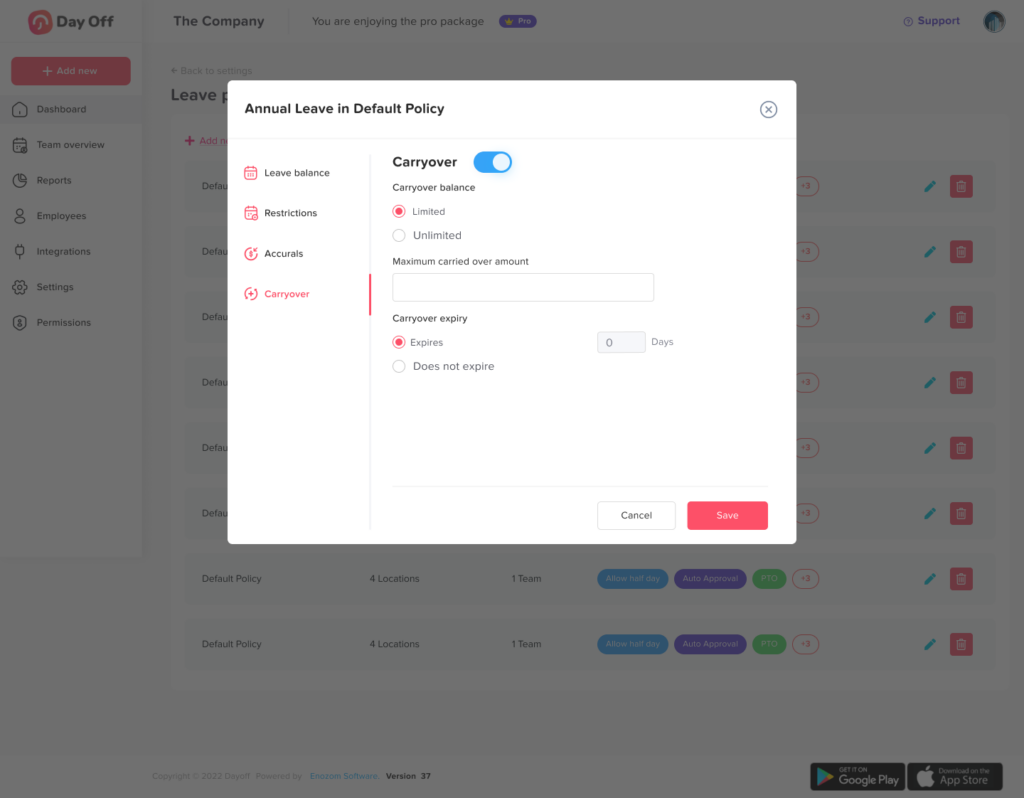
Carryover
Carryover allows unused leave to move from one period to another.
For example, an employee may be allowed to carry over up to five unused vacation days into the next year.
With Day Off, businesses can manage carryover rules more clearly instead of calculating them manually in spreadsheets.
It Helps Manage Multiple Locations
Businesses with employees in different locations often face extra leave management challenges.
Different offices may have different:
- Public holidays
- Workweeks
- weekends
- Local policies
- Time zones
- Regional leave rules
- Office closures
A single spreadsheet is usually not enough to manage this properly.
With Day Off, companies can manage multiple locations and assign employees to the correct location. This helps ensure that each employee follows the right holiday calendar, schedule, and leave setup.
For example, a company with employees in the United States, Egypt, Germany, and the United Arab Emirates may need different public holidays for each location. Day Off helps keep these differences organized.
This is valuable for global teams, remote companies, distributed teams, and businesses with multiple branches.
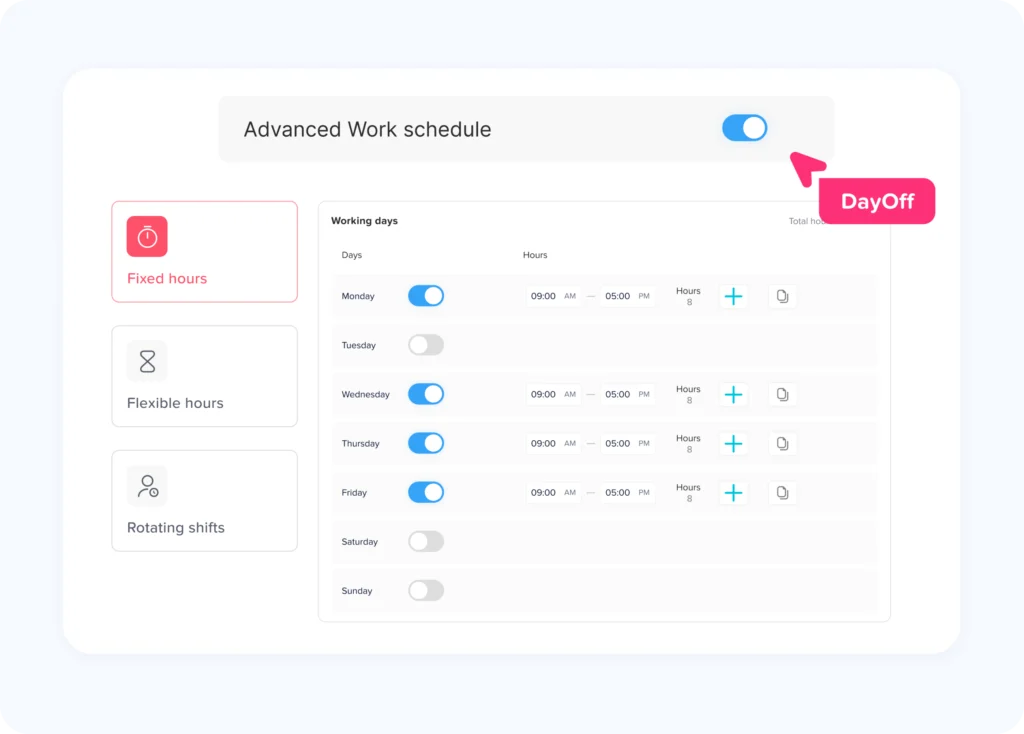
It Supports Different Work Schedules
Not every employee works the same schedule.
Some employees work fixed hours, others have flexible schedules, and some teams work rotating shifts. Without proper tracking, leave calculations can become inaccurate.
Day Off supports different work schedules, including:
Fixed Schedules
A fixed schedule is used when employees work the same days and hours every week.
For example:
- Monday to Friday
- 9:00 AM to 5:00 PM
- Saturday and Sunday off
This is common for office teams and many standard business roles.
Flexible Schedules
A flexible schedule gives employees more freedom in how they manage their working hours, while still following company expectations.
This is useful for remote teams, hybrid teams, creative teams, and companies that focus more on output than strict office hours.
Rotating Schedules
A rotating schedule is used when employees work different shifts based on a planned rotation.
This is common in industries such as:
- Retail
- Healthcare
- Hospitality
- Customer support
- Security
- Restaurants
- Operations teams
By supporting fixed, flexible, and rotating schedules, Day Off helps companies track leave more accurately based on how employees actually work.
It Improves Team Based Leave Management
In many companies, leave approval is not only an HR responsibility. Team leaders, department managers, project managers, and direct supervisors may all be involved.
A strong leave tracking software should support team-based management.
With Day Off, businesses can organize employees into teams and manage leave based on team structure. This helps managers see who is off within their own teams and make better approval decisions.
For example, a marketing manager can review requests from the marketing team, while a customer support manager can monitor support team availability.
This keeps responsibility clear and makes approvals faster.
It Supports Multiple Approvers and Watchers
Some leave requests need more than one person involved.
For example, a request may need approval from:
- A direct manager
- HR
- A department head
- A project manager
- A branch manager
Day Off supports multi-approver workflows, allowing businesses to assign more than one approver when needed.
This is useful when companies want more control over approvals or when certain leave types require additional review.
Day Off also supports watchers. Watchers are people who need to stay informed about leave requests without necessarily being the person approving them.
For example, HR may want to watch all requests, or a project manager may need visibility when a key employee is away.
This improves communication and keeps the right people informed.
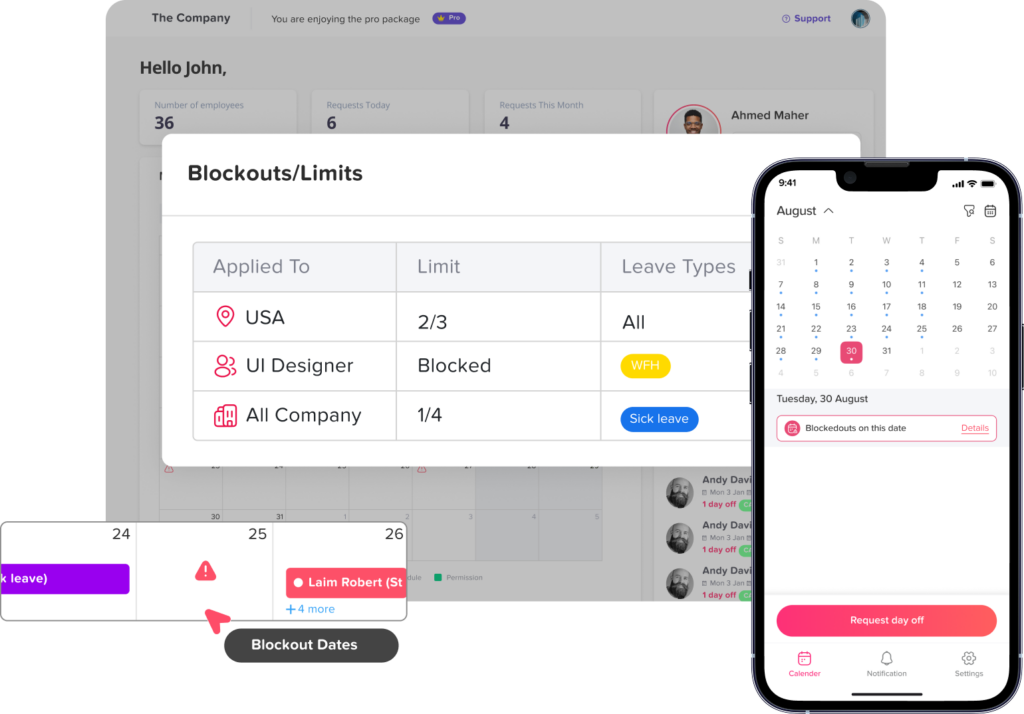
It Helps Control Leave During Busy Periods with Blockouts
Some business periods are too important to allow many employees to take time off.
For example:
- Retail businesses may need full staffing during holiday sales.
- Accounting teams may need availability during month-end closing.
- Customer support teams may need coverage during product launches.
- Restaurants may need full teams during weekends or peak seasons.
- HR teams may need availability during payroll processing.
The blockout feature in Day Off helps businesses manage these periods.
A blockout date or period can be added to the calendar to show when leave requests should be restricted or carefully reviewed. This helps prevent staffing issues during critical times.
Blockouts are especially useful because they make company expectations visible. Employees can see when certain dates are not ideal for leave, and managers can make more consistent decisions.
It Connects Leave Tracking with Holidays
Holidays are an important part of leave management. If holidays are not tracked properly, employee balances may be calculated incorrectly.
For example, if an employee takes vacation during a week that includes a public holiday, the holiday may not need to count as a vacation day.
Day Off’s shared calendar helps show holidays clearly alongside approved leave requests and blockouts. This makes it easier for employees and managers to understand actual working days and time off.
For companies with multiple locations, this becomes even more important because each location may follow a different holiday calendar.
It Improves Employee Experience
Employees want a simple way to request time off and understand their available balance.
When the process is unclear, employees may feel frustrated. They may not know who to ask, whether their request was approved, or how many days they have left.
Leave tracking software improves the employee experience by making the process clear.
With Day Off, employees can:
- Submit leave requests easily
- View their leave balances
- Check approved time off
- See holidays and blockout dates
- Understand request status
- Plan vacations with better visibility
A clear process builds trust between employees, managers, and HR.
It Integrates with the Tools Your Team Already Uses
A leave tracking system becomes more useful when it connects with the tools employees already use every day.
Day Off offers integrations with:
- Google Calendar
- Outlook Calendar
- Microsoft Teams
- Slack
These integrations help teams stay updated without switching between too many tools.
For example, approved leave can be connected with calendar tools so managers and employees can see absences in their daily planning. Slack and Microsoft Teams integrations can also make leave management easier by bringing notifications and updates into the communication platforms teams already use.
This helps leave tracking become part of the normal workflow instead of a separate task employees forget to check.
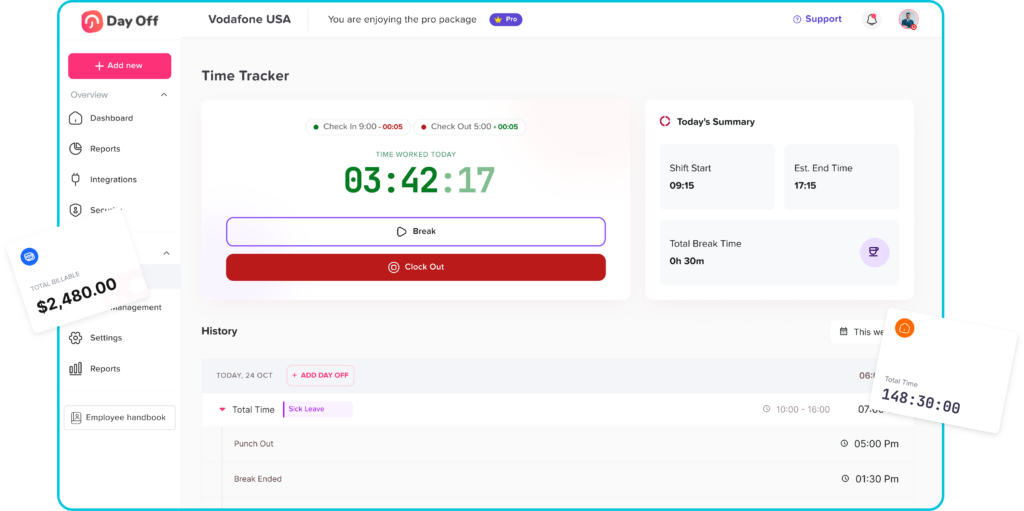
It Adds Time Tracking with Punch In and Punch Out
Leave tracking becomes even more powerful when it connects with attendance and time tracking.
Day Off includes a Time Tracker feature with punch in and punch out, helping businesses track when employees start and end their workday.
This is useful for companies that need to monitor:
- Attendance
- Working hours
- Late arrivals
- Early departures
- Overtime visibility
- Daily work presence
- Shift attendance
Punch in and punch out tracking helps businesses connect leave management with actual attendance records.
For example, if an employee is not on leave but does not punch in, managers can quickly notice the attendance gap. If an employee takes hourly leave, time tracking can also help create better visibility around working hours.
This is especially useful for teams with shifts, hourly employees, field workers, remote employees, or flexible schedules.
It Creates Better Records for Reporting
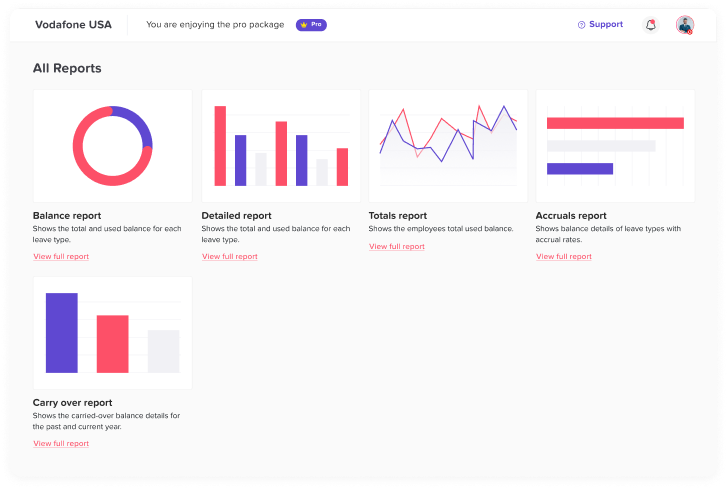
Accurate leave records help businesses understand absence trends.
Managers and HR teams can use leave data to answer questions such as:
- Which leave types are used most often?
- Are certain teams taking more sick leave?
- Are employees using their vacation days?
- Are there recurring absence patterns?
- Are certain months harder for staffing?
- Is carryover becoming too high?
- Do policies need to be adjusted?
Without leave tracking software, this kind of reporting can take hours of manual work.
With a system like Day Off, leave data is more organized, making it easier to review employee time off and make better decisions.
Who Can Benefit from Leave Tracking Software?
Leave tracking software is useful for many types of businesses.
Small Businesses
Small businesses often do not have large HR teams. Leave tracking software helps owners and managers stay organized without spending too much time on manual admin work.
Growing Companies
As headcount increases, manual tracking becomes harder. A system like Day Off helps growing businesses keep policies, balances, and approvals under control.
Remote and Hybrid Teams
Distributed teams need shared visibility. Leave tracking software helps everyone stay aligned even when employees work from different places.
Shift Based Teams
Businesses with rotating schedules or hourly workers need accurate leave and attendance tracking. Day Off’s work schedules and time tracker features can support this need.
Multi Location Companies
Companies with employees in different cities or countries need location based leave and holiday management.
HR Teams
HR teams can reduce repetitive tasks and focus on higher value work by using automated leave tracking software.
Managers
Managers can make faster and better decisions when they can see team availability, balances, blockouts, and approved leave in one place.
Leave Tracking Software vs Spreadsheets
Many businesses wonder whether they really need leave tracking software or if spreadsheets are enough.
Here is the difference:
| Manual Spreadsheets | Leave Tracking Software |
|---|---|
| Requests come from different channels | Requests are submitted in one system |
| Balances are updated manually | Balances are tracked more accurately |
| Holidays may be missed | Holidays are visible on the calendar |
| Overlaps are harder to notice | Team availability is easier to review |
| Policies are difficult to apply | Policies can be customized |
| Approvals may be unclear | Approval history is stored |
| HR answers repeated questions | Employees can check information themselves |
| Hard to scale with growth | Easier to manage growing teams |
Common Signs Your Business Needs Leave Tracking Software
Your business may need leave tracking software if:
- Employees ask HR about leave balances often
- Managers approve requests without checking team availability
- Leave requests are sent through email or chat
- PTO balances are updated manually
- Holidays are tracked separately
- You have employees in multiple locations
- You use different leave policies
- You need approval from more than one manager
- You have busy periods when leave should be restricted
- You manage fixed, flexible, or rotating schedules
- You want to track attendance and working hours
- Your current spreadsheet is becoming messy
If several of these signs apply to your company, it may be time to move to a dedicated leave tracking software like Day Off.
FAQ
What is leave tracking software?
Leave tracking software is a digital tool that helps businesses manage employee time off, PTO balances, leave requests, approvals, holidays, and absence records in one system.
Why is leave tracking software better than spreadsheets?
Leave tracking software is easier to manage, more accurate, and more scalable than spreadsheets. It helps reduce manual work, prevent lost requests, track balances, and improve visibility into employee availability.
Can leave tracking software manage different types of leave?
Yes. A tool like Day Off allows businesses to create unlimited leave types, including vacation, sick leave, unpaid leave, personal leave, maternity leave, paternity leave, and hourly leave.
Does Day Off support different work schedules?
Yes. Day Off supports fixed, flexible, and rotating work schedules, helping businesses track leave based on how employees actually work.
Can Day Off track time and attendance?
Yes. Day Off includes a Time Tracker feature with punch in and punch out, helping businesses track attendance, working hours, and employee presence.
Does Day Off integrate with calendar and communication tools?
Yes. Day Off integrates with Google Calendar, Outlook Calendar, Slack, and Microsoft Teams, helping teams stay updated through the tools they already use.
Can Day Off support companies with multiple locations?
Yes. Day Off supports multiple locations, making it easier to manage different holidays, schedules, and employee groups across offices, branches, or countries.
Conclusion
Leave tracking software is no longer just a helpful HR tool. It is an important part of running an organized, efficient, and employee friendly business.
Manual leave tracking can lead to missed requests, incorrect balances, overlapping absences, unclear approvals, and too much administrative work. As teams grow, these problems become harder to manage.
With the right leave tracking software, businesses can centralize requests, automate balance tracking, improve calendar visibility, manage policies, support multiple locations, organize teams, set blockouts, integrate with daily tools, and track attendance through punch in and punch out.
Day Off helps businesses manage all of this in one simple system. From shared calendars and unlimited leave types to flexible policies, work schedules, integrations, multi-approver workflows, and time tracking, Day Off gives HR teams, managers, and employees the clarity they need to manage time off better.
For any business that wants to save time, reduce errors, improve planning, and create a smoother leave management process, leave tracking software is a smart investment.