







Managing employee attendance is no longer as simple as checking whether employees arrived at 9 AM and left at 5 PM. Modern businesses now work with different attendance models, including flexible hours, fixed hours, rotating shifts, hybrid schedules, remote teams, part time employees, and location based teams. Because of this, companies need Attendance Management Software that can adapt to different work styles instead of forcing every employee into the same schedule.

The best attendance management software for flexible hours, fixed hours, and rotating shifts should help businesses track work hours accurately, manage employee availability, reduce manual errors, support PTO tracking, and give managers a clear view of who is working, who is absent, and who is scheduled for each shift.
Without the right system, attendance tracking can also quickly become messy. HR teams may depend on spreadsheets, emails, paper timesheets, chat messages, or manual updates from managers. This can also lead to incorrect working-hour records, missed absences, payroll mistakes, overlapping leave requests, and confusion around employee schedules.
A strong attendance management system solves these problems by bringing schedules, attendance records, time tracking, leave requests, PTO balances, and reports into one organized place. This is especially important for companies that use more than one type of work schedule.
In this article, we will also explain what attendance management software is, why different attendance types need different tracking methods, what features to look for, and how tools like Day Off, Clockify, Deputy, and other attendance solutions can help businesses manage flexible hours, fixed hours, and rotating shifts more efficiently.
What Is Attendance Management Software?
Attendance management software is a digital system that helps companies track when employees are working, when they are absent, and how their working hours match their assigned schedules. It replaces manual attendance records with a more accurate and organized process.
Instead of asking employees to submit timesheets manually or asking managers to update spreadsheets, attendance software allows teams to record, review, and manage attendance data in one system.
Depending on the tool, attendance management software may include:
- Employee clock in and clock out tracking
- Work schedules
- Flexible hour tracking
- Fixed working hour tracking
- Rotating shift planning
- PTO and leave management
- Absence tracking
- Overtime tracking
- Late arrival and early departure records
- Break tracking
- Timesheets
- Attendance reports
- Calendar views
- Payroll preparation support
- Manager approvals
Furthermore, the main goal is to help businesses understand employee availability and working time more clearly.
For example, if an employee is scheduled to work from 8 AM to 4 PM, the system should show whether they arrived on time, worked the full shift, left early, or were absent. If another employee works flexible hours, the system should track whether they completed the required number of hours rather than judging them by a fixed start time. If a team works rotating shifts, the system should also show who is assigned to each shift and whether the shift was covered properly.
That flexibility is what separates basic attendance tools from modern attendance management software.
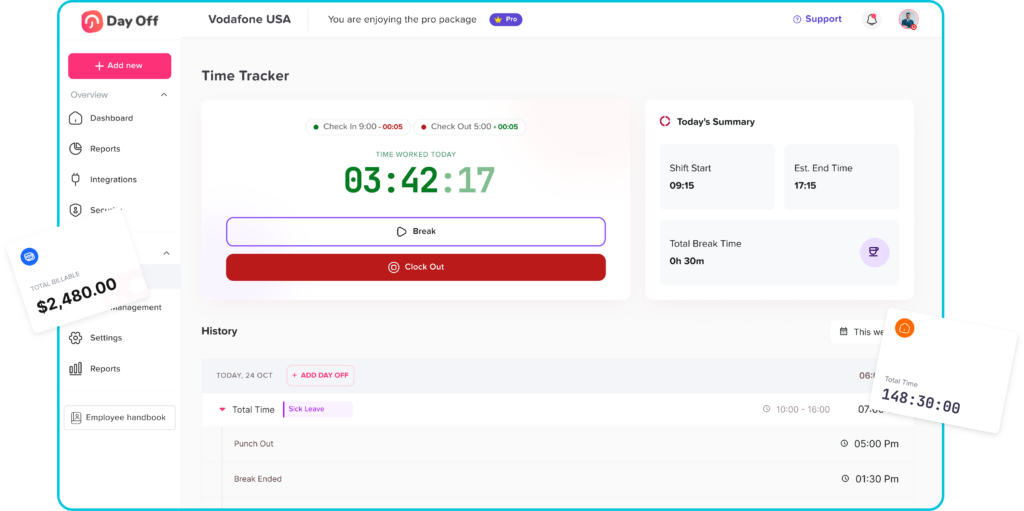
Why Businesses Need Software That Supports Different Attendance Types
Not every company follows the same work schedule. Even inside the same company, different teams may also follow different attendance rules.
An office team may also work fixed hours from Monday to Friday. A support team may work rotating shifts to cover customers across different time zones. A remote team may also use flexible hours as long as employees complete their daily or weekly workload. A retail or hospitality business may need changing schedules every week. A healthcare, security, logistics, or customer service team may also require day shifts, night shifts, and weekend coverage.
When businesses try to manage all these schedules manually, problems appear quickly.
Additionally, managers may not know who is supposed to work today. HR may struggle to calculate attendance records. Employees may also be confused about their assigned hours. Payroll teams may receive incomplete or inaccurate data. Leave requests may also be approved without checking whether the team has enough coverage.
This is why attendance management software should support different types of attendance, including flexible hours, fixed hours, and rotating shifts.
A good system should not only track time. It should also understand how time is supposed to be worked.
Fixed Hours Attendance: Simple but Still Needs Accuracy
Fixed hours are the traditional work schedule many businesses use. Furthermore, employees have a set start time, end time, and working days. For example, an employee may work Monday to Friday from 9 AM to 5 PM.
This type of schedule is usually easier to manage because expectations are clear. Employees know when they should start and finish. Managers can also easily identify late arrivals, early departures, missed shifts, and absences.
However, fixed hours still need accurate attendance tracking.
When fixed schedules are managed manually, companies may face several issues:
- Employees forget to report attendance
- Managers miss late arrivals
- HR has to calculate hours manually
- Absences are not updated quickly
- PTO records are separated from attendance records
- Overtime is difficult to verify
- Payroll data may include mistakes
Attendance management software helps solve these problems by giving companies a clear record of expected hours versus actual hours.
For fixed hours, the best attendance software should allow businesses to:
- Set standard working days
- Define fixed start and end times
- Track clock in and clock out records
- Identify late arrivals
- Record early departures
- Track missed workdays
- Connect approved leave with attendance
- Generate attendance reports
- Support payroll preparation
For example, if an employee works fixed hours but does not clock in, the system should help managers know whether the employee is absent, on approved PTO, working remotely, or missing a time entry. This prevents confusion and makes attendance records more reliable.
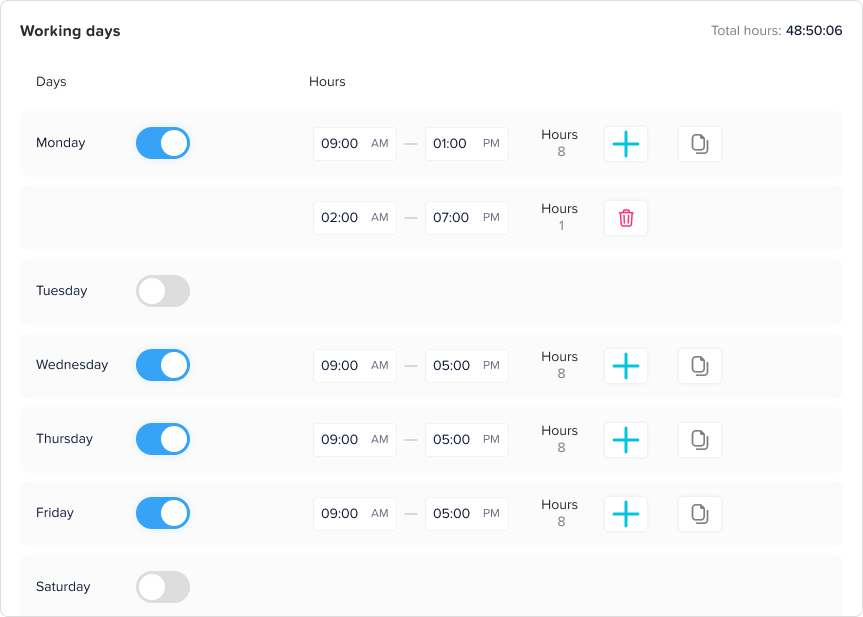
Flexible Hours Attendance: Tracking Results Without Forcing a Fixed Schedule
Flexible hours are becoming more common, especially for remote teams, hybrid teams, creative teams, software companies, agencies, and businesses that focus more on output than strict start and end times.
In a flexible hours model, employees may not need to start at the exact same time every day. Instead, they may be required to complete a specific number of working hours per day or per week.
For example, an employee may need to work 8 hours per day but can start anytime between 7 AM and 10 AM. Another company may also allow employees to complete 40 hours per week as long as meetings, deadlines, and team responsibilities are covered.
Flexible hours can also improve employee satisfaction, reduce stress, and support better work-life balance. However, they can also make attendance tracking more complex.
Managers may ask:
- Did the employee complete the required hours?
- Was the employee available during core working hours?
- Did the employee miss important meetings?
- Were working hours spread across the week properly?
- Was overtime approved?
- Was a missing day actually leave, absence, or flexible work?
Without proper software, flexible schedules can also become unclear. Employees may feel trusted, but managers may lack visibility. HR may have difficulty calculating attendance. Payroll teams may not know which hours should also be counted.
Attendance management software for flexible hours should focus on total hours, availability, and clear records rather than only clock-in time.
The best software should help businesses:
- Define required daily or weekly hours
- Track actual working time
- Allow flexible start and end times
- Support manual time entries when needed
- Track incomplete hours
- Show attendance summaries
- Connect leave and absence records
- Help managers review timesheets
- Support different rules for different teams
For example, if an employee works from 7 AM to 3 PM one day and 10 AM to 6 PM the next day, the system should still recognize whether the required work hours were completed. This gives companies flexibility without losing control.
Rotating Shifts Attendance: Managing Complex Work Patterns
Rotating shifts are common in industries that require continuous coverage, extended operating hours, or changing staff schedules. This includes healthcare, retail, hospitality, manufacturing, security, logistics, call centers, customer support, and operations teams.
In a rotating shift schedule, employees do not always work the same hours every day or every week. One employee may work a morning shift this week and an evening shift next week. Another may also rotate between day shifts, night shifts, and weekend shifts.
Rotating shifts are useful for covering business needs, but they are more difficult to manage than fixed hours.
Common challenges include:
- Shift overlap confusion
- Missed shifts
- Last minute changes
- Uneven workload distribution
- Overtime mistakes
- Employee fatigue
- Lack of visibility into team coverage
- Difficulty tracking PTO during scheduled shifts
- Payroll calculation errors
- Employees not knowing their upcoming schedules
Attendance management software for rotating shifts needs more than basic time tracking. It should also support shift planning, schedule visibility, team availability, and accurate attendance comparison.
The best software should allow businesses to:
- Create multiple shift patterns
- Assign employees to different shifts
- Plan weekly or multi week rotations
- Track clock in and clock out by shift
- Compare scheduled shifts with actual attendance
- Manage shift changes
- Track missed shifts
- Monitor overtime
- Show who is available
- Connect leave requests with shift coverage
- Generate reports for managers and HR
For example, if an employee is assigned to a night shift from 10 PM to 6 AM, the system should understand that the shift crosses two calendar days. If the employee requests PTO during a scheduled shift, the system should help managers see how that absence affects coverage.
This is why rotating shift attendance requires software that can handle schedule complexity.
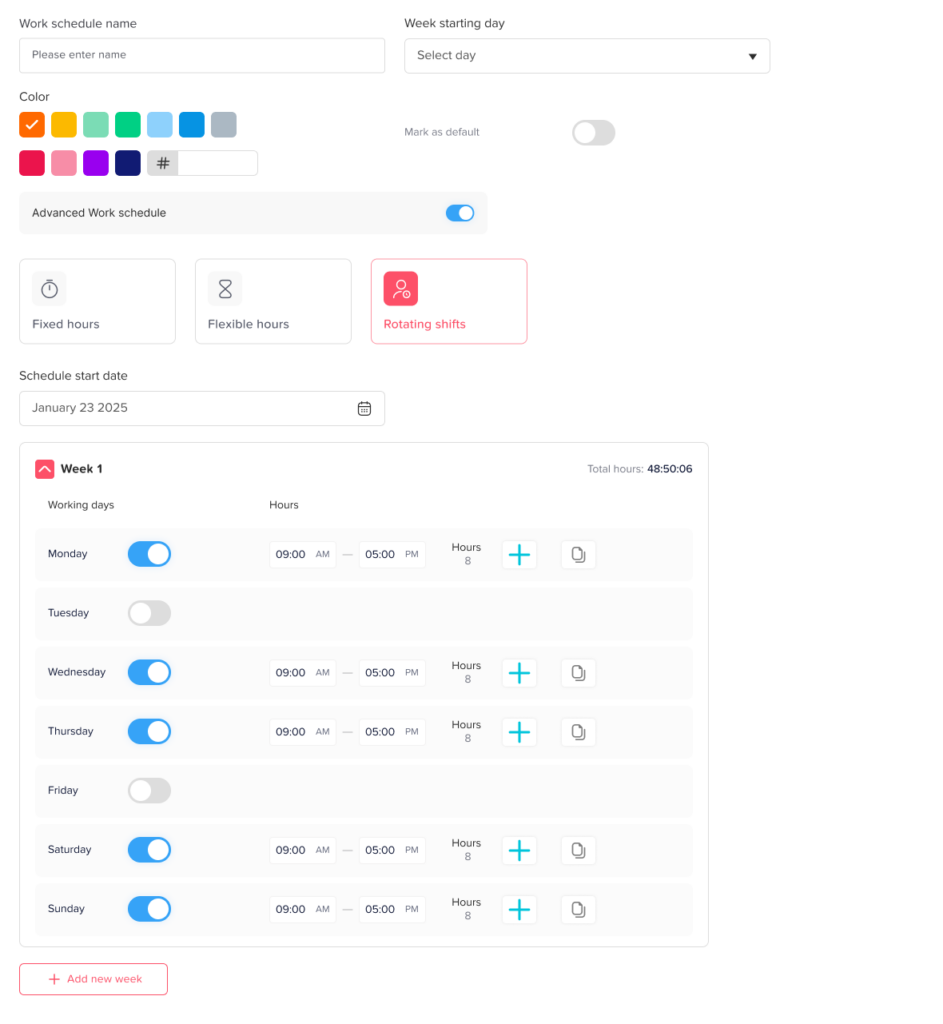
Why PTO Tracking Should Be Connected With Attendance Tracking
Attendance and PTO are closely connected. If an employee does not work on a certain day, the reason matters.
They may be:
- On approved vacation
- On sick leave
- On unpaid leave
- Taking a personal day
- Absent without approval
- Working flexible hours
- Scheduled for a different shift
- Not assigned to work that day
If attendance tracking and PTO tracking are handled in separate systems, HR and managers may not have the full picture.
For example, an attendance system may show that an employee did not clock in. But if the PTO system shows that the employee is on approved leave, then this is not an attendance issue. It is a planned absence.
On the other hand, if there is no approved leave request and no time entry, managers may need to follow up.
This is where software like Day Off becomes especially useful. Day Off helps companies manage employee leave, PTO, work schedules, approvals, balances, shared calendars, and team availability in one place. When businesses connect attendance planning with PTO management, they can make better decisions about staffing, scheduling, and workload distribution.
A strong attendance management process should always answer three questions:
- Was the employee expected to work?
- Did the employee actually work?
- If not, was the absence approved?
When these answers are available in one system, businesses reduce confusion and improve workforce planning.
Key Features of the Best Attendance Management Software
Choosing the best attendance management software depends on the type of schedules your company uses. However, there are several features every business should look for.
Support for Multiple Work Schedules
The software should also support fixed hours, flexible hours, and rotating shifts. This is important because businesses often have different teams working under different rules.
For example, the finance team may work fixed office hours, the development team may use flexible hours, and the customer support team may work rotating shifts. A good system should also support all three without forcing the company to use separate tools.
Employee Clock In and Clock Out
Clock in and clock out features help businesses record actual working time. Employees can also start and end their workday digitally, giving managers a reliable record of attendance.
For fixed hours, this helps identify late arrivals and early departures. For flexible hours, it helps calculate total working time. For rotating shifts, it helps compare actual attendance with assigned shift times.
Work Schedule Management
Attendance software should also allow companies to create and assign work schedules. This includes working days, expected hours, start and end times, shifts, and break rules.
Without schedule management, attendance data can also be incomplete. A clock in record only shows when someone worked. A schedule shows when they were expected to work.
PTO and Leave Management
PTO tracking is essential for accurate attendance management. Approved leave should also automatically explain why an employee is not working on a specific day.
The software should also allow employees to request time off, managers to approve or reject requests, and HR to track balances and leave history.
Shared Team Calendar
A shared calendar helps managers and employees see who is working, who is away, and who has upcoming leave. This is valuable for team planning, especially when several employees request time off during the same period.
For rotating shifts, a shared calendar also helps managers avoid coverage gaps.
Attendance Reports
Furthermore, reports help HR and managers understand attendance trends. Useful reports may include:
- Total working hours
- Absence records
- Late arrivals
- Early departures
- Overtime
- PTO usage
- Remaining leave balances
- Shift attendance
- Missed shifts
- Team availability
These reports help businesses make better decisions and prepare payroll more accurately.
Mobile Access
Employees and managers should also be able to access the system from mobile devices. This is important for remote workers, field employees, shift workers, and managers who need to approve requests quickly.
Mobile access makes attendance management easier because employees do not need to be at a desk to view schedules, submit leave requests, or check balances.
Manager Approval Workflows
Approval workflows help businesses control attendance and leave decisions. Managers should also be able to review PTO requests, approve timesheets, check schedule conflicts, and confirm attendance records.
This creates accountability and reduces manual follow up.
Integration With Calendars and Communication Tools
Attendance and leave information should also be easy to share with the tools employees already use. Integrations with calendars and communication platforms help teams stay informed without constantly checking separate systems.
For example, approved leave can appear on shared calendars, and managers can receive notifications about requests or schedule changes.
Easy Setup and Simple User Experience
The best attendance management software should also be easy for employees, managers, and HR teams to use. If the system is too complicated, employees may avoid using it, managers may forget to update it, and HR may still rely on spreadsheets.
A simple interface improves adoption and makes attendance tracking more consistent.
Best Attendance Management Software Options to Consider
There are many attendance management tools available, but the best option depends on your company’s needs. Furthermore, some tools focus on PTO and employee availability. Some focus on project time tracking. Others focus on shift scheduling and workforce management.
Here are some common types of tools businesses may consider.
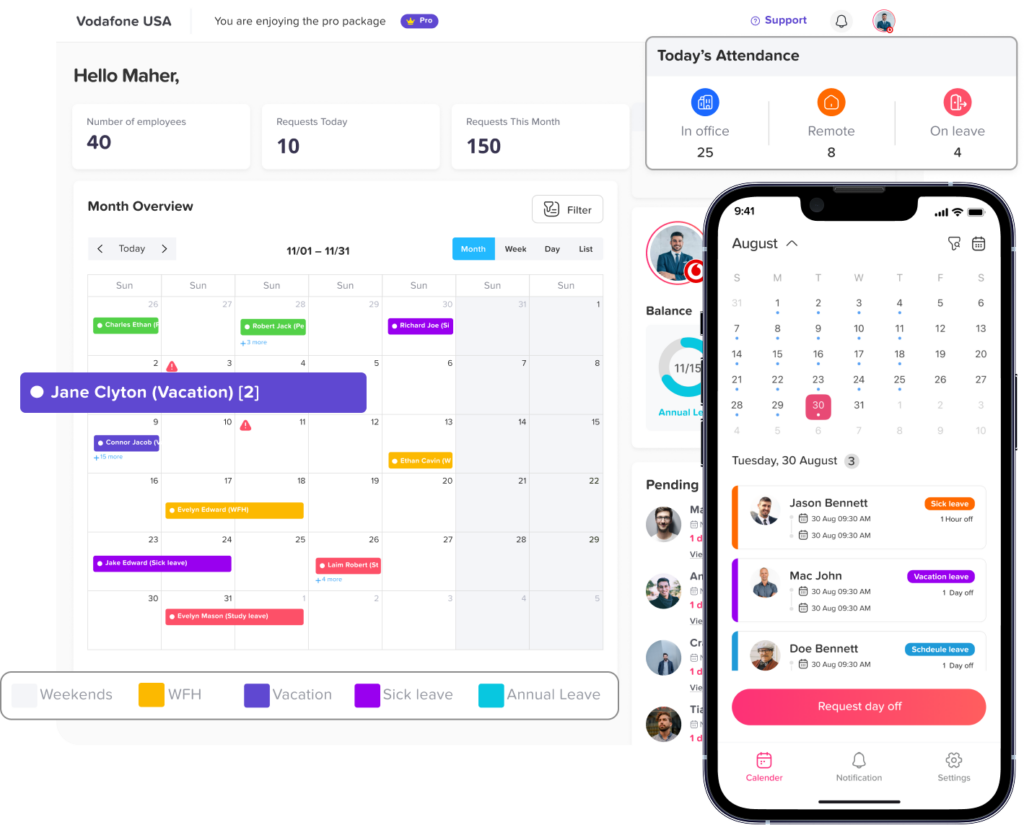
Day Off
Day Off is a strong option for companies that want to manage employee leave, PTO, work schedules, and team availability in one place. It is especially useful for businesses that want attendance planning to be connected with leave management.
Day Off helps companies track vacations, sick leave, personal days, unpaid leave, custom leave types, leave balances, approvals, and shared calendars. It also supports work schedules, making it easier for companies to organize employee availability across different teams and working patterns.
For companies with flexible hours, fixed hours, and rotating shifts, Day Off can also help managers understand who is available, who is away, and how leave affects team coverage.
Day Off is useful for:
- PTO tracking
- Leave request approvals
- Work schedule management
- Shared leave calendars
- Employee availability
- Custom leave types
- Leave balances
- Reports
- Mobile access
- Team planning
Day Off is a good fit for businesses that want a simple and organized way to connect attendance visibility with PTO and leave management.
Clockify
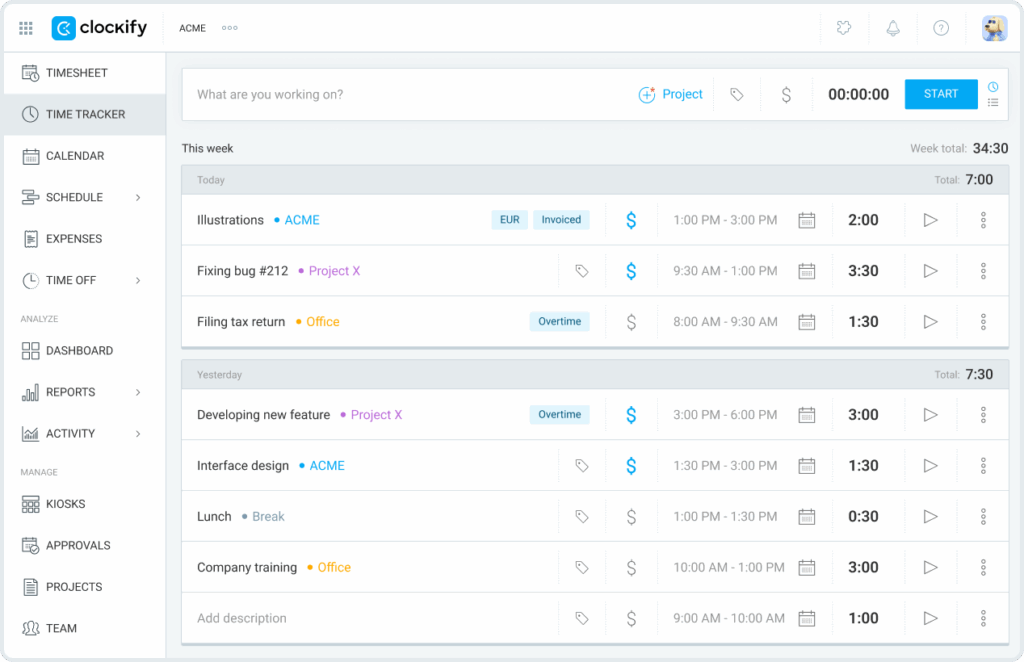
Clockify is a popular time tracking tool that helps teams track work hours, timesheets, projects, billable hours, and attendance. It is often used by companies that need detailed time records for productivity, project costing, or payroll preparation.
Clockify can also be useful for businesses that want employees to track the exact time they spend working. It supports timers, timesheets, attendance tracking, and reporting.
Clockify is a good fit for:
- Time tracking
- Timesheets
- Project-based work
- Billable hours
- Attendance records
- Productivity tracking
- Reports
It may be especially helpful for agencies, consultants, freelancers, software teams, and businesses that need to understand where employee time is spent.
Deputy
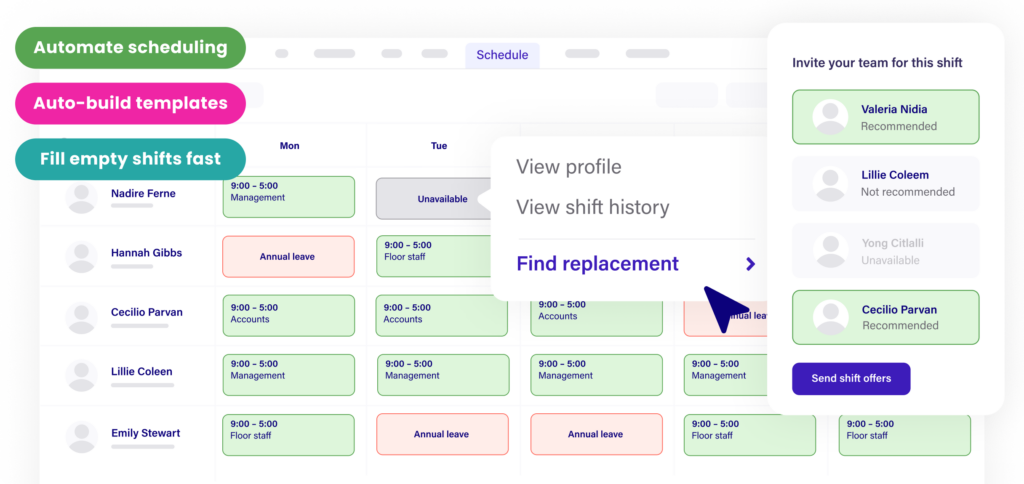
Deputy is a workforce management and scheduling tool designed for businesses that need shift planning, time clock features, attendance tracking, leave management, and team communication.
It is often useful for industries with hourly workers, changing schedules, and shift-based teams. Companies with restaurants, retail stores, healthcare teams, hospitality teams, and customer support teams may also find this type of tool useful for managing rotating shifts.
Deputy is a good fit for:
- Shift scheduling
- Time clock tracking
- Attendance tracking
- Rotating shifts
- Team communication
- Leave management
- Payroll preparation
It can be a good option for companies that need advanced shift scheduling and attendance tracking together.
Other Attendance and Workforce Management Tools
Other tools may also support attendance tracking, depending on company size, industry, and workflow. Some focus on HR management. Some focus on payroll. Some are designed for remote teams. Others are built for shift-heavy industries.
When comparing tools, businesses should not only ask, “Can this software track time?” They should ask:
- Can it support our actual attendance types?
- Can it manage fixed hours?
- Can it handle flexible hours?
- Can it support rotating shifts?
- Can it connect attendance with leave?
- Can employees use it easily?
- Can managers review attendance quickly?
- Can HR generate accurate reports?
- Can it scale as the company grows?
Moreover, the best tool is the one that matches the way your team actually works.
How to Choose the Right Attendance Management Software
Before choosing attendance software, businesses should review their current attendance process and identify where mistakes happen.
Start by asking these questions:
What types of schedules do we use?
If your company only uses fixed hours, your needs may also be simple. If you use flexible hours, rotating shifts, or a mix of different schedules, you need software that can handle more complex rules.
Do we need PTO tracking?
If employee absences affect your attendance records, PTO tracking should also be part of the system. This helps managers understand whether an absence is approved or unplanned.
Do we need shift planning?
If your business depends on shift coverage, choose software that supports scheduling and shift visibility.
Do we need detailed time tracking?
If you bill clients by the hour, track projects, or calculate exact working time, choose software with strong time tracking and reporting features.
Do employees work remotely or on-site?
Remote teams may also need flexible time tracking, mobile access, and calendar integrations. On-site teams may need clock-in kiosks, location-based tracking, or shift schedules.
How easy is the system to use?
A powerful system is not helpful if employees do not use it. Choose software that is simple enough for daily use.
Can the software grow with the company?
Your attendance needs may also become more complex as your company grows. Choose a system that can support more employees, more teams, more schedules, and more reporting needs over time.
Common Mistakes to Avoid When Managing Attendance
Even with software, companies should avoid common attendance management mistakes.
Using One Schedule Rule for Everyone
Not all employees work the same way. Applying one attendance rule to every team can also create confusion and unfairness. Flexible teams, fixed-hour teams, and shift-based teams need different rules.
Separating PTO From Attendance
When leave tracking is separate from attendance tracking, managers may not know whether an employee is absent or on approved leave. This leads to unnecessary follow-up and inaccurate records.
Ignoring Employee Visibility
Employees should also be able to see their schedules, PTO balances, requests, and attendance records. When employees lack visibility, HR receives more questions and corrections.
Relying on Spreadsheets Too Long
Spreadsheets may work for very small teams, but they become risky as the company grows. Manual files are easy to forget, duplicate, delete, or update incorrectly.
Not Reviewing Reports
Attendance reports help companies spot patterns such as frequent lateness, high overtime, understaffed shifts, or repeated absences. Without reports, problems may continue unnoticed.
Benefits of Attendance Management Software
Using attendance management software gives businesses several important benefits.
Better Accuracy
Digital records reduce manual mistakes and make it easier to track attendance consistently.
Less HR Work
Additionally, hR teams spend less time updating spreadsheets, answering balance questions, and collecting attendance records from managers.
Clearer Team Availability
Managers can also quickly see who is working, who is away, and who is scheduled for each shift.
Improved PTO Planning
When PTO is connected with attendance, businesses can avoid approving too many overlapping leave requests.
Easier Payroll Preparation
Accurate attendance records help payroll teams calculate work hours, overtime, absences, and leave more confidently.
Better Employee Experience
Employees can also check schedules, request leave, track balances, and understand attendance expectations without constant back-and-forth communication.
Stronger Workforce Planning
Managers can plan coverage more effectively, especially for teams with rotating shifts or flexible schedules.
Why Day Off Is a Strong Choice for Attendance and PTO Visibility
Day Off is especially valuable for businesses that want attendance management to work together with leave management. Moreover, many attendance issues are connected to time off. If an employee is not working, managers need to know whether the employee is scheduled, absent, on PTO, or working different hours.
Day Off helps businesses organize this information by giving teams a clear way to manage PTO requests, leave balances, approvals, work schedules, and shared calendars.
For flexible hours, Day Off helps companies support different working patterns while keeping employee availability clear.
For fixed hours, Day Off helps businesses manage standard schedules and connect absences with approved leave.
For rotating shifts, Day Off helps managers understand how time off affects team coverage and schedule planning.
This makes Day Off a useful solution for companies that want to reduce confusion, improve visibility, and manage employee time more efficiently.
Final Thoughts
The best attendance management software for flexible hours, fixed hours, and rotating shifts is not just a tool for recording clock-in and clock-out times. It is a system that helps businesses understand employee availability, working hours, schedules, absences, PTO, and team coverage.
Fixed hours need clear start and end time tracking. Flexible hours need total hour tracking and visibility. Rotating shifts need strong scheduling and coverage management. All three attendance types benefit from accurate PTO tracking, shared calendars, approval workflows, reports, and mobile access.
Tools like Day Off, Clockify, and Deputy each support different parts of attendance management. Day Off is a strong choice for businesses that want to connect attendance visibility with PTO tracking, work schedules, leave requests, and team availability. Clockify is useful for detailed time tracking and timesheets. Deputy is useful for shift scheduling and workforce management.
Furthermore, the right choice depends on how your team works. But one thing is clear: as businesses become more flexible, attendance management software must also become more flexible.
Companies that still rely on spreadsheets, emails, and manual attendance updates risk confusion, errors, and poor workforce planning. By using modern attendance management software, businesses can also track employee time more accurately, support different work schedules, improve planning, and create a smoother experience for both employees and managers.
Related reading: Work Hours Tracker: How To Record Time Accurately, Geofenced Time Attendance App, Daily Work Logs: How to Track Tasks and Hours Clearly, Hours Tracker App for Accurate Work Time and Attendance, Time Tracking for Salaried Employees, Employee Time Tracking Software To Track Hours, Attendance, And PTO, Work Timer Software For Remote And Hybrid Teams, Work Timer Software For Employee Time Tracking And Attendance, Hours Tracker App To Track Work Hours, Attendance, And PTO.