





-
Billing
- Can I cancel my subscription anytime?
- Can I Try the Pro + Time Tracker Plan for Free?
- How can I update my billing information?
- How can I upgrade or downgrade my subscription?
- How Do I Upgrade to the Pro + Time Tracker Plan?
- How do I view or download my invoices?
- How does billing work in Day Off?
- How Much Does the Pro + Time Tracker Plan Cost?
- What Is the Pro + Time Tracker Plan and What Does It Include?
- What's the Difference Between the Pro Plan and the Pro + Time Tracker Plan?
Admins can update payment methods and company billing details at any time. The information provided here will automatically be included on all of your future invoices. Below, you will learn how to update your card and your billing information.
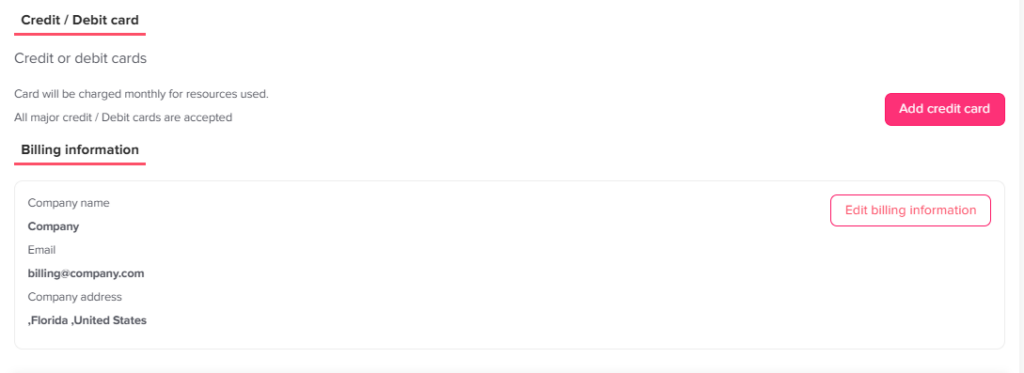
Update/Add a New Payment Method
Click your profile picture in the top-right corner and select Billing.
Scroll down to the Credit/Debit cards section.
Click Add credit card to enter your new payment details.
Update Your Billing Information
Admins can update their company’s billing details at any time. The information provided here will automatically be included on all of your future invoices.
Click your profile picture in the top-right corner and select Billing.
Scroll down past the payment methods to the billing information section.
Edit your specific billing details, which include your:
Company name
Billing email
Country
Billing address
Tax ID
Why Keep Your Billing Information Up to Date?
Your invoices are only as accurate as the details behind them. For example, your finance team may need the correct company name, address, and tax ID on every invoice. Also, a valid card helps keep your subscription running without interruption.
So, review your details whenever your company moves, changes its name, or gets a new card.
Frequently Asked Questions
Who can change these details?
Admins can update payment methods and company billing details from the Billing page.
Where will my new details appear?
Once you save them, the new details are automatically included on all of your future invoices.
Which details can I edit?
You can edit your company name, billing email, country, billing address, and tax ID. In addition, you can add a new credit or debit card.