







Paid time off is often one of the most valuable benefits an employer provides, but calculating how much PTO an employee earns with every paycheck can become complicated surprisingly quickly.
The basic idea is simple: an employee receives a certain amount of PTO each year, and that entitlement is divided across the pay periods used by the company. However, the amount earned per paycheck changes depending on whether employees are paid weekly, biweekly, semi-monthly, or monthly.

For example, an employee receiving 20 PTO days per year would not earn the same amount each pay period under every payroll schedule. A weekly employee has around 52 pay periods per year, while a biweekly employee normally has 26. Semi-monthly payroll has 24 pay periods, and monthly payroll has 12.
A PTO accrual calculator by pay period makes this calculation easier by converting an annual PTO entitlement into the amount an employee earns during each payroll period.
The basic formula is:
PTO per pay period = Annual PTO entitlement ÷ Number of pay periods per year
For example, an employee who receives 20 PTO days per year and is paid biweekly would accrue:
20 ÷ 26 = 0.77 PTO days per pay period
If the organisation tracks PTO in hours and the employee works 8 hours per day:
20 × 8 = 160 PTO hours per year
Then:
160 ÷ 26 = 6.15 PTO hours per pay period
So the employee would earn approximately 6.15 hours of PTO every two weeks under this simple accrual method.
The calculation itself is easy. The challenge for HR teams is keeping those balances accurate when employees have different schedules, start dates, accrual policies, carryover limits, holidays, and time-off requests.
What Is PTO Accrual?
PTO accrual is the process of earning paid time off gradually over time.
Instead of giving an employee their entire annual PTO allowance on their first day of work or at the beginning of the leave year, an employer can allow the employee to build up PTO as they work.
For example, an employee might receive 20 days of PTO per year but earn that entitlement throughout the year:
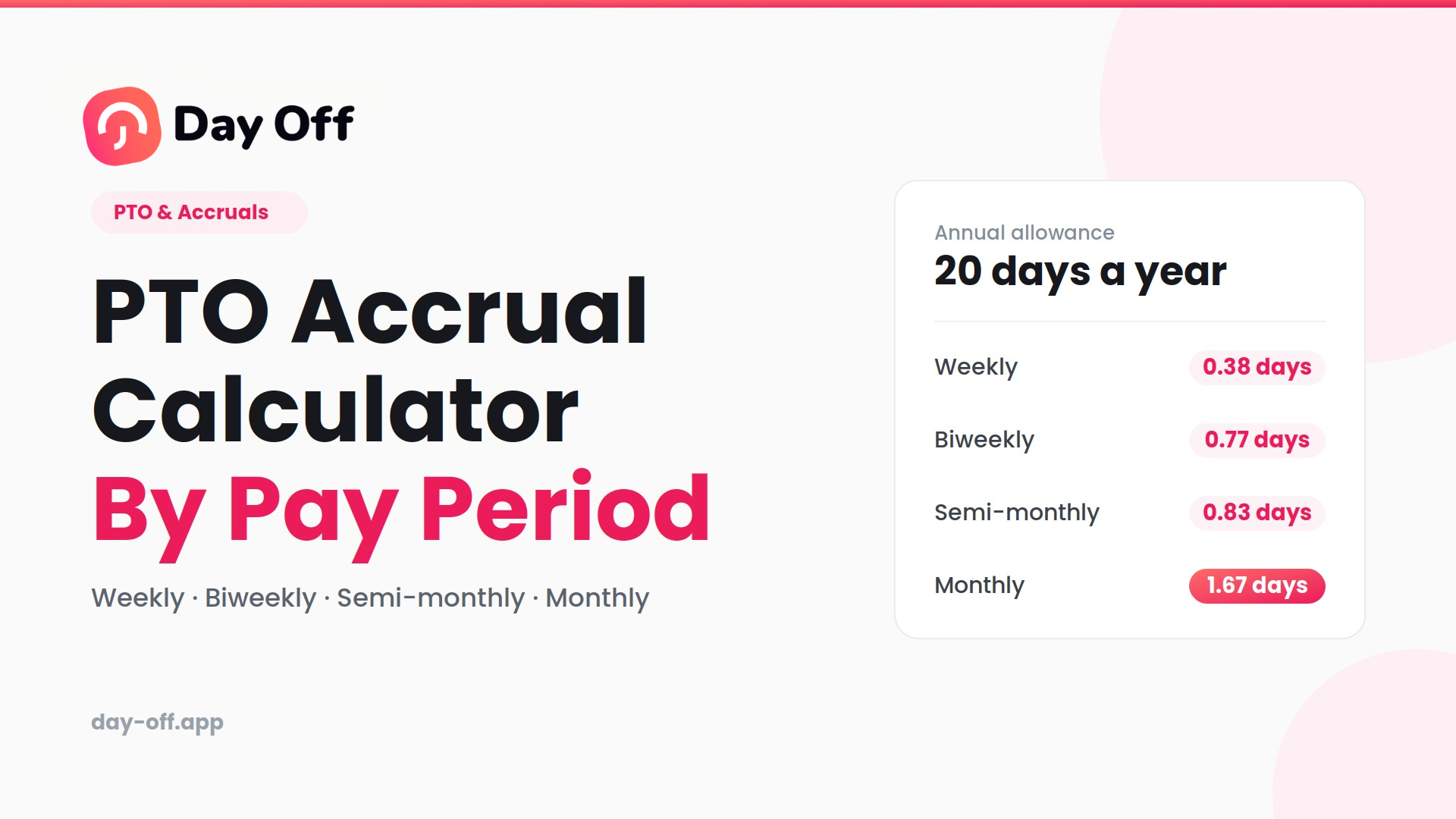
- Weekly: approximately 0.38 days per week
- Biweekly: approximately 0.77 days every two weeks
- Semi-monthly: approximately 0.83 days twice per month
- Monthly: approximately 1.67 days per month
The exact accrual amount depends on the employer’s policy.
Some organisations accrue PTO based on pay periods, while others calculate it according to hours worked. Employers may also use front-loaded PTO, where the employee receives their annual allowance at the beginning of a defined period instead of accumulating it gradually.
There is no single PTO accrual method that applies to every employer. In the United States, federal law generally does not require private employers to provide paid vacation, so PTO policies are typically determined by the employer, employment agreement, and applicable state or local requirements.
This makes the wording of a PTO policy particularly important. Employees should be able to understand how much PTO they earn, when it becomes available, whether unused time carries over, and what happens when employment ends.
How Does PTO Accrual by Pay Period Work?
A pay-period accrual system divides an employee’s annual PTO entitlement across the number of payroll periods in the year.
The first step is to identify the employee’s annual PTO entitlement.
For example:
Annual entitlement = 20 PTO days
Next, identify the company’s payroll schedule.
If employees are paid every two weeks, there are normally:
26 pay periods per year
The annual entitlement is then divided by 26:
20 ÷ 26 = 0.7692 days
The employee earns approximately 0.77 PTO days per pay period.
If the company tracks PTO in hours, you can convert the annual entitlement into hours first. Assuming an 8-hour workday:
20 days × 8 hours = 160 hours
Then:
160 ÷ 26 = 6.15 hours
The employee earns approximately 6.15 PTO hours every two weeks.
This method is particularly useful because it creates a predictable accrual amount. Each completed pay period adds the calculated amount to the employee’s PTO balance, subject to the organisation’s rules around eligibility, waiting periods, caps, carryover, and rounding.
PTO Accrual Formula by Pay Period
The standard formula for an evenly distributed PTO accrual system is:
PTO per pay period
Annual PTO entitlement ÷ Number of pay periods per year
You can perform the calculation using either days or hours.
Example using days
An employee receives 24 PTO days per year and is paid weekly.
There are approximately 52 weekly pay periods:
24 ÷ 52 = 0.4615
The employee earns approximately 0.46 PTO days per week.
Example using hours
Suppose the same employee works 8 hours per day.
24 × 8 = 192 PTO hours per year
Now divide by 52:
192 ÷ 52 = 3.69 hours
The employee earns approximately 3.69 PTO hours per weekly pay period.
Using hours can be more accurate for organisations where employees have different working schedules because a “day” may not represent the same number of working hours for every employee.
PTO Accrual by Pay Frequency
Your payroll frequency directly affects how much PTO is earned during each pay period.
| Pay frequency | Typical pay periods per year | Example with 20 PTO days |
|---|---|---|
| Weekly | 52 | 0.38 days |
| Biweekly | 26 | 0.77 days |
| Semi-monthly | 24 | 0.83 days |
| Monthly | 12 | 1.67 days |
These calculations assume that the entire annual PTO entitlement is divided equally across the relevant pay periods.
Weekly
Weekly payroll generally means one paycheck every week, producing approximately 52 pay periods in a year.
An employee with 20 PTO days would accrue:
20 ÷ 52 = 0.38 days per pay period
Biweekly
Biweekly payroll generally means employees are paid every two weeks, resulting in 26 pay periods in most years.
With 20 annual PTO days:
20 ÷ 26 = 0.77 days per pay period
Semi-monthly
Semi-monthly payroll means employees are paid twice each month, normally resulting in 24 pay periods.
With 20 annual PTO days:
20 ÷ 24 = 0.83 days per pay period
Monthly
Monthly payroll produces 12 pay periods per year.
With 20 annual PTO days:
20 ÷ 12 = 1.67 days per pay period
One important distinction is that biweekly and semi-monthly are not the same thing. Biweekly payroll follows a two-week cycle, while semi-monthly payroll occurs twice per month. This difference changes the number of accrual periods and therefore changes the amount earned during each period.
Weekly PTO Accrual Example
Imagine an employee receives 20 PTO days per year and is paid every Friday.
Assuming the company uses 52 weekly accrual periods:
20 ÷ 52 = 0.3846 days
The employee earns approximately 0.38 PTO days every week.
If the employee works an 8-hour day, the annual entitlement is:
20 × 8 = 160 hours
The weekly accrual is:
160 ÷ 52 = 3.08 hours
Therefore, the employee earns approximately 3.08 PTO hours per weekly pay period.
Over time, these accruals build the employee’s available PTO balance. However, the actual balance will also depend on how much PTO the employee uses and whether the company has carryover or accrual-cap rules.
Biweekly PTO Accrual Example
Biweekly PTO accrual is common because many employers pay employees every two weeks.
Suppose an employee receives 20 PTO days per year and works 8 hours per day.
First, convert the annual entitlement into hours:
20 × 8 = 160 hours
Then divide the annual entitlement by 26 pay periods:
160 ÷ 26 = 6.1538 hours
The employee earns approximately 6.15 PTO hours per biweekly paycheck.
Alternatively, if the organisation tracks PTO in days:
20 ÷ 26 = 0.7692 days
So the employee earns approximately 0.77 PTO days per pay period.
If the employee takes 8 hours of PTO after several pay periods, those 8 hours are deducted from the available balance according to the employer’s leave policy.
Semi-Monthly PTO Accrual Example
Semi-monthly payroll has 24 pay periods per year because employees receive two paychecks during each month.
Suppose an employee receives 18 PTO days annually.
The calculation is:
18 ÷ 24 = 0.75 days
The employee earns 0.75 PTO days per pay period.
For an employee working 8 hours per day:
18 × 8 = 144 hours
Then:
144 ÷ 24 = 6 hours
The employee therefore accrues 6 PTO hours during each semi-monthly pay period.
This is different from a biweekly schedule. An employee receiving the same annual PTO allowance will accrue a slightly different amount per paycheck because the number of pay periods is different.
Monthly PTO Accrual Example
Monthly PTO accrual is one of the simplest systems to calculate because there are 12 monthly periods in a year.
Suppose an employee receives 24 PTO days per year.
24 ÷ 12 = 2 days
The employee earns 2 PTO days per month.
If the organisation measures PTO in hours:
24 × 8 = 192 hours
192 ÷ 12 = 16 hours
The employee earns 16 PTO hours per month.
Monthly accrual can be easy for employees to understand, but it may not align with the employer’s payroll schedule if employees are paid more frequently.
PTO Accrual Calculator Table
Here is a quick reference using an annual entitlement of 20 PTO days:
| Pay frequency | Pay periods | Annual PTO | PTO earned per period |
|---|---|---|---|
| Weekly | 52 | 20 days | 0.38 days |
| Biweekly | 26 | 20 days | 0.77 days |
| Semi-monthly | 24 | 20 days | 0.83 days |
| Monthly | 12 | 20 days | 1.67 days |
If you prefer to track PTO in hours and assume an 8-hour working day, the 20-day annual entitlement equals 160 hours.
| Pay frequency | Annual PTO | PTO hours per period |
|---|---|---|
| Weekly | 160 hours | 3.08 |
| Biweekly | 160 hours | 6.15 |
| Semi-monthly | 160 hours | 6.67 |
| Monthly | 160 hours | 13.33 |
These are mathematical examples rather than universal employment rules. Employers should use the accrual method and rounding rules defined in their own PTO policy.
How to Calculate PTO Accrual Per Paycheck
Calculating PTO earned per paycheck requires just a few pieces of information.
Determine the annual PTO entitlement
Start with the number of PTO days or hours the employee is entitled to receive during the applicable year.
Example:
20 PTO days
Convert days to hours if required
If an employee works 8 hours per day:
20 × 8 = 160 PTO hours
Determine the number of pay periods
For example:
- Weekly = 52
- Biweekly = 26
- Semi-monthly = 24
- Monthly = 12
Divide the annual entitlement
For a biweekly employee:
160 ÷ 26 = 6.15 hours
The employee therefore earns approximately 6.15 PTO hours per paycheck.
Apply your company’s rules
The mathematical result may not be the final balance in every situation. You may also need to consider eligibility dates, waiting periods, unpaid leave, accrual caps, carryover, rounding, part-time schedules, and changes in employment status.
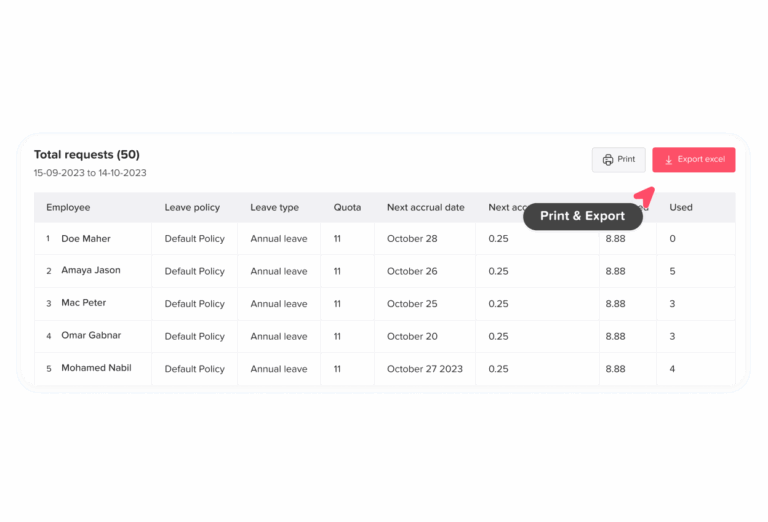
This is one reason automated PTO tracking becomes valuable for larger teams.
How Much PTO Do You Accrue Per Month?
If your employer distributes PTO evenly throughout the year, divide the annual entitlement by 12.
For example, an employee receiving 24 PTO days annually would accrue:
24 ÷ 12 = 2 PTO days per month
An employee receiving 15 days would accrue:
15 ÷ 12 = 1.25 days per month
An employee receiving 10 days would accrue:
10 ÷ 12 = 0.83 days per month
However, this calculation should not be assumed to apply to every company.
Some employers accrue PTO every paycheck instead of monthly. Others calculate PTO based on hours worked, provide the full annual allowance upfront, or use different rules for new employees and employees who work part-time.
How Do You Calculate PTO Accrual for Part-Time Employees?
Part-time PTO calculations depend on the organisation’s policy and applicable employment laws.
One common approach is to prorate the full-time entitlement based on scheduled hours.
For example, suppose a full-time employee works 40 hours per week and receives 20 PTO days per year.
A part-time employee works 20 hours per week.
Using a simple proportional calculation:
20 × (20 ÷ 40) = 10 PTO days
The part-time employee would receive 10 PTO days per year under this example.
However, simply reducing the number of days is not always the best approach when employees work different-length shifts. An employer may instead track PTO in hours.
For example, if an employee normally works four-hour shifts, 8 PTO hours represents two of their scheduled working days.
This is why PTO policies should clearly define whether entitlement is measured in days, hours, scheduled shifts, or another unit.
How Do You Calculate PTO for a New Employee?
Employees who start partway through a leave year may need a prorated PTO entitlement.
Suppose an employee receives 24 PTO days per year and starts halfway through the year.
A simple monthly proration would be:
24 × 6 ÷ 12 = 12 days
Under this method, the employee would receive 12 days for six months of employment.
Another employer might accrue PTO every pay period instead. In that case, the employee would begin earning the applicable amount after becoming eligible under the company’s policy.
New-hire rules can also include waiting periods, eligibility dates, anniversary-based accrual, or front-loaded entitlement.
Because these rules vary, the calculation should always follow the employer’s written PTO policy rather than assuming that every new employee receives a simple six-month prorated amount.
What Happens to PTO When an Employee Uses Time Off?
PTO accrual increases an employee’s available balance, while approved PTO requests reduce it.
For example:
- Opening PTO balance: 32 hours
- New accrual: +6.15 hours
- PTO used: −8 hours
- Closing balance: 30.15 hours
Over multiple pay periods, this creates a running balance.
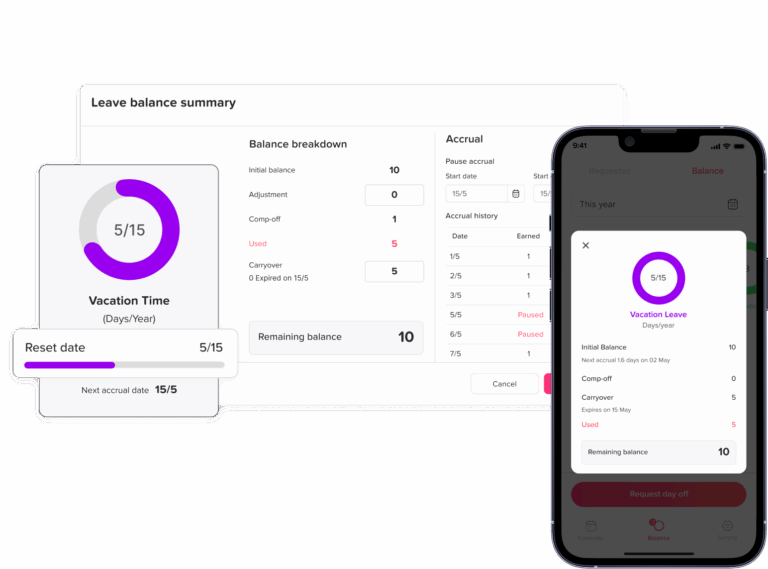
A reliable PTO system therefore needs to track more than just annual entitlement. It needs to account for earned PTO, used PTO, carried-over PTO, adjustments, and the current available balance.
This becomes especially important when several employees have different accrual rates or when PTO policies change during employment.
What Is a PTO Accrual Cap?
A PTO accrual cap is a limit on the amount of PTO an employee can accumulate.
For example, an employer might allow an employee to accumulate up to 240 hours of PTO.
If the employee reaches that limit, the employer’s policy may pause further accrual until some PTO is used.
For example:
Current balance = 238 hours
New accrual = 6 hours
If the policy has a 240-hour cap, the employee cannot simply accumulate 244 hours unless the policy permits that result. The organisation’s rules determine what happens to the excess.
Accrual caps are different from PTO carryover limits.
A carryover rule determines how much unused PTO moves from one leave year into another.
An accrual cap determines how much PTO an employee can accumulate at one time.
Employers should document both rules clearly so employees understand how their balances work.
What Is PTO Carryover?
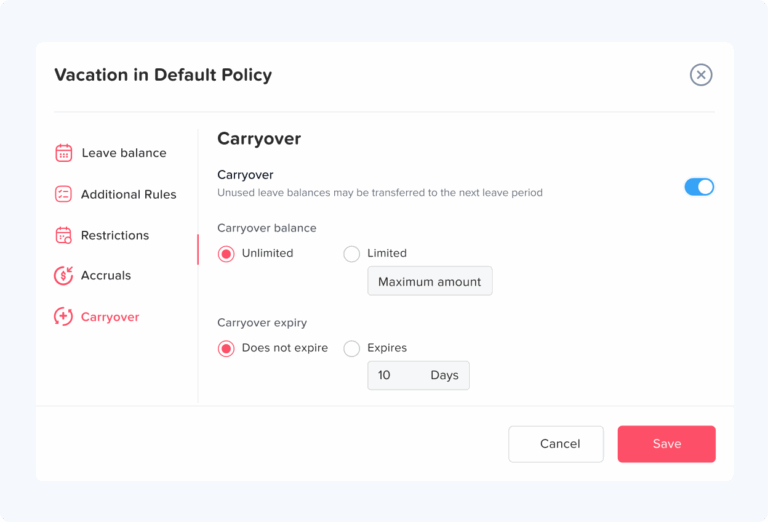
PTO carryover refers to unused paid time off that moves from one leave year or accrual period into the next.
For example, an employee might finish the year with 12 unused PTO days. If the employer allows employees to carry over up to 5 days, only 5 days would move into the next leave year under that policy.
A company could instead allow:
- Unlimited carryover
- A fixed number of days
- A fixed number of hours
- Carryover with an expiration date
- No carryover, where legally permitted
Carryover rules can be affected by applicable state or local law, employment agreements, and the employer’s policy. In the US, federal law generally does not establish a universal paid-vacation entitlement.
For this reason, employers should not copy a generic carryover rule without checking the requirements that apply to their workforce.
PTO Accrual vs PTO Balance: What’s the Difference?
PTO accrual and PTO balance are related but describe different things.
PTO accrual is the amount of leave an employee earns during a particular period.
PTO balance is the amount currently available after considering previous balances, new accruals, PTO used, carryover, and any adjustments.
For example:
Starting balance: 24 hours
New accrual: +6 hours
PTO used: −8 hours
Current balance: 22 hours
This distinction is important because an employee’s annual entitlement is not necessarily the same as the amount they can take today.
Someone might be entitled to 160 hours per year but have only 40 hours currently available because they have not yet accrued the remaining hours.
Common PTO Accrual Mistakes
PTO calculations can look simple on paper, but errors become more likely when an organisation manages multiple employees and different leave policies.
Using the wrong number of pay periods
Dividing annual PTO by 24 instead of 26, for example, produces the wrong accrual amount for a biweekly payroll.
Confusing biweekly and semi-monthly payroll
These schedules are different. Biweekly means every two weeks, while semi-monthly means twice per month.
Forgetting employee start dates
A new employee who joins partway through the year may need prorated entitlement or a specific accrual start date.
Ignoring different working schedules
A person working 4-hour shifts does not necessarily have the same practical PTO requirements as someone working 8-hour shifts.
Applying inconsistent rounding
Rounding every accrual to the nearest whole hour can produce a different annual total than retaining decimal values and rounding only when displaying the balance.
Forgetting carryover
An employee’s opening balance may include PTO from a previous leave year.
Manually changing balances
Manual adjustments can make it difficult to determine why a balance changed unless every adjustment is properly recorded.
Relying entirely on spreadsheets
Spreadsheets can be useful for simple calculations, but they become harder to maintain when HR needs to manage multiple accrual schedules, teams, locations, policies, work schedules, and approvals.
How Day Off Makes PTO Accrual Easier

Calculating PTO for one employee is easy. Managing PTO accurately for an entire organisation is a different challenge.
Day Off is a leave-management platform that helps companies centralise employee time off policies, PTO requests, balances, approvals, calendars, and reporting.
Instead of maintaining separate spreadsheets for each team, HR can configure leave policies and let the system handle recurring calculations and balances.
Automate PTO accruals
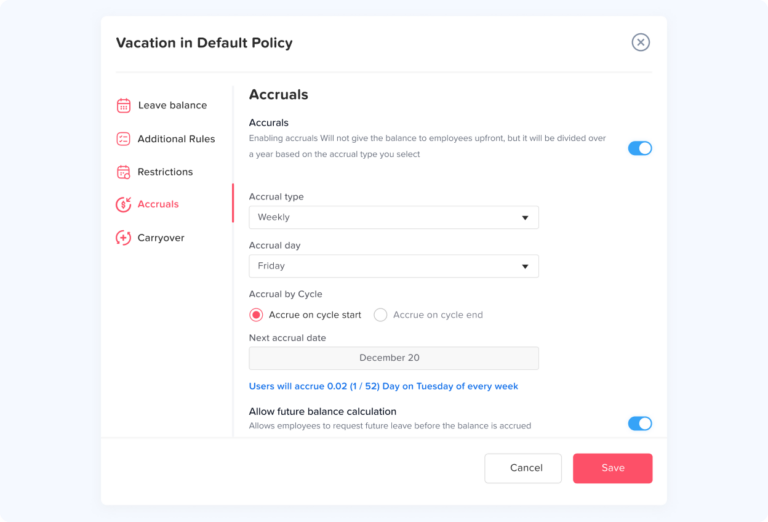
Day Off supports configurable accrual schedules, including weekly, biweekly, semi-monthly, and monthly accruals, along with other policy configurations.
This means HR teams can set up the rules once instead of repeatedly calculating how much PTO every employee should receive.
Create different leave policies
Employees do not always have identical benefits.
A company may have different PTO allowances for full-time and part-time employees, different locations, seniority levels, or employment categories.
Day Off allows organisations to create and manage different leave policies rather than forcing every employee into one universal PTO rule.
Manage PTO carryover
Carryover rules can be difficult to track manually, especially when employees have different limits or expiration rules.
Day Off provides tools for managing leave balances and carryover policies so HR teams have a clearer record of how unused time moves between periods.
Support different work schedules
Not every employee works the same number of hours or follows the same weekly pattern.
Day Off supports different work schedules, helping organisations manage leave according to employees’ actual working arrangements rather than relying on one generic schedule.
Simplify PTO requests and approvals
Employees can submit time-off requests while managers review and approve them within the same system.
This creates a clearer process than asking employees to send requests by email or maintain a shared spreadsheet.
Managers can also see existing time off when reviewing requests, making it easier to identify potential scheduling conflicts.
Give employees visibility into their balances
One of the most common PTO questions HR receives is:
“How much PTO do I have left?”
Giving employees direct access to their current balance reduces repetitive questions and gives employees more control over planning their time off.
See team availability
A central leave calendar helps managers understand who is away and when.
This is particularly useful for teams where several employees share responsibilities or where too many people being absent at the same time could create operational problems.
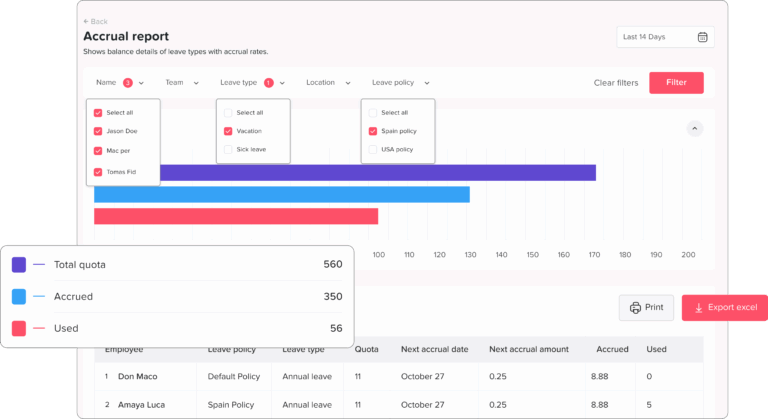
Generate PTO and absence reports
HR teams may need to review PTO usage, balances, accruals, or employee leave history.
Day Off provides reporting capabilities that can help HR and managers review leave data without manually combining multiple spreadsheets.
PTO Accrual Calculator: Quick Reference
If your company distributes PTO evenly across each payroll period, use:
PTO per pay period = Annual PTO entitlement ÷ Number of pay periods per year
For PTO measured in hours:
PTO hours per pay period = Annual PTO hours ÷ Number of pay periods per year
Example
An employee receives:
160 PTO hours per year
They are paid:
Biweekly
Number of pay periods:
26
Calculation:
160 ÷ 26 = 6.15 hours
Therefore:
PTO earned per paycheck = approximately 6.15 hours
For weekly payroll, divide by 52.
For semi-monthly payroll, divide by 24.
For monthly payroll, divide by 12.
Remember that these calculations assume an even accrual schedule. Your organisation’s actual policy may use a different method.
Frequently Asked Questions
How do I calculate PTO accrual per pay period?
To calculate PTO earned during each pay period, divide the employee’s annual PTO entitlement by the number of pay periods in the year.
For example, an employee who receives 120 hours of PTO per year and is paid biweekly has 26 pay periods:
120 ÷ 26 = 4.62 hours of PTO per paycheck
This calculation assumes PTO is accrued evenly throughout the year. Your company’s policy may use a different accrual method.
How much PTO do I accrue per paycheck?
The amount of PTO you accrue per paycheck depends on your annual PTO allowance and how often you are paid.
For example, if you receive 160 PTO hours per year:
Weekly: 160 ÷ 52 = 3.08 hours
Biweekly: 160 ÷ 26 = 6.15 hours
Semi-monthly: 160 ÷ 24 = 6.67 hours
Monthly: 160 ÷ 12 = 13.33 hours
The more frequently you are paid, the smaller each individual accrual will be, assuming the same annual entitlement.
How do you calculate PTO accrual for biweekly pay?
For an employee who earns PTO evenly over 26 biweekly pay periods, divide the annual PTO entitlement by 26.
For example, 20 PTO days per year divided by 26 pay periods equals:
20 ÷ 26 = 0.77 PTO days per paycheck
If the employee works 8 hours per day, 20 days equals 160 hours:
160 ÷ 26 = 6.15 PTO hours per paycheck
How much PTO do you accrue per week?
If PTO is accrued weekly, divide the employee’s annual PTO entitlement by 52.
For example, an employee with 15 PTO days per year would accrue:
15 ÷ 52 = 0.29 days per week
If the annual entitlement is 120 hours:
120 ÷ 52 = 2.31 hours per week
Some employers use a different number of accrual periods or calculate PTO based on hours worked, so employees should check their company’s PTO policy.

How do you calculate PTO accrual for part-time employees?
Part-time PTO can be calculated in several ways depending on the employer’s policy. One common method is to prorate the full-time entitlement based on the employee’s scheduled hours.
For example, if a full-time employee working 40 hours per week receives 20 PTO days and a part-time employee works 20 hours per week:
20 × (20 ÷ 40) = 10 PTO days
Some employers instead accrue PTO based directly on hours worked. State and local requirements may also affect how PTO must be provided, so the employer’s policy should be checked before calculating an entitlement.
How do I calculate PTO for a new employee?
A new employee who starts partway through a PTO year may receive a prorated entitlement, depending on the employer’s policy.
For example, if an employee receives 20 PTO days annually and starts halfway through the year, a simple six-month proration would be:
20 × 6 ÷ 12 = 10 days
However, companies may instead use per-pay-period accruals, waiting periods, anniversary dates, or other rules. The correct calculation therefore depends on how the company’s PTO policy defines eligibility and accrual.
What is the difference between biweekly and semi-monthly PTO accrual?
Biweekly and semi-monthly payroll schedules are different.
Biweekly means employees are generally paid every two weeks, resulting in 26 pay periods in most years.
Semi-monthly means employees are paid twice each month, resulting in 24 pay periods.
For example, an employee with 120 annual PTO hours would accrue approximately:
Biweekly: 120 ÷ 26 = 4.62 hours
Semi-monthly: 120 ÷ 24 = 5 hours
Using the wrong payroll frequency can therefore produce an incorrect PTO accrual rate.
Does PTO accrue during unpaid leave?
Not always. Whether an employee continues to accrue PTO while on unpaid leave depends on the employer’s policy and applicable employment laws.
Some policies pause accrual during unpaid leave, while others allow accrual to continue under certain circumstances.
Because the rules can vary, an employee should check the company’s PTO or leave policy to determine whether unpaid time affects future PTO accrual.
How do PTO accrual caps and carryover affect my PTO balance?
A PTO accrual cap limits how much PTO an employee can accumulate, while a carryover rule determines how much unused PTO can move into a new leave year.
For example, a company might allow employees to carry over up to 40 hours but limit the total PTO balance to 240 hours.
These rules can affect how much PTO an employee actually has available, even when their normal accrual rate remains unchanged. Employers should clearly explain caps, carryover limits, expiration dates, and any rules that pause accrual.
How can I track PTO accrual automatically?
PTO accrual can be tracked automatically using leave-management software instead of calculating each employee’s balance manually in a spreadsheet.
Day Off allows organisations to configure leave policies and accrual schedules, manage PTO requests and approvals, track employee balances, apply carryover rules, and view team availability from a central system.
This can be particularly useful for companies with multiple employees, different work schedules, or different PTO policies because accruals and balances do not have to be recalculated manually after every request or payroll period.
Conclusion
Calculating PTO by pay period is simple when you know the employee’s annual PTO entitlement and payroll frequency. Whether employees are paid weekly, biweekly, semi-monthly, or monthly, dividing the annual entitlement by the number of accrual periods provides a straightforward starting point.
However, managing PTO across an entire team can become more complicated when you add part-time schedules, new hires, carryover rules, accrual caps, different leave policies, and changing employee balances. That’s where automated PTO tracking can save HR teams time and reduce calculation errors.
With Day Off, businesses can manage PTO accruals, leave requests, approvals, employee balances, work schedules, and time-off policies in one place. Instead of relying on spreadsheets to keep track of every change, HR teams can give employees and managers a clearer, more reliable way to manage time off.