





You can export reports in Day Off to extract and analyze leave data. These reporting tools help HR teams and managers with tracking and decision making.
Using the Web Version
Report exporting is available on the web platform, where you have full access to reporting features.
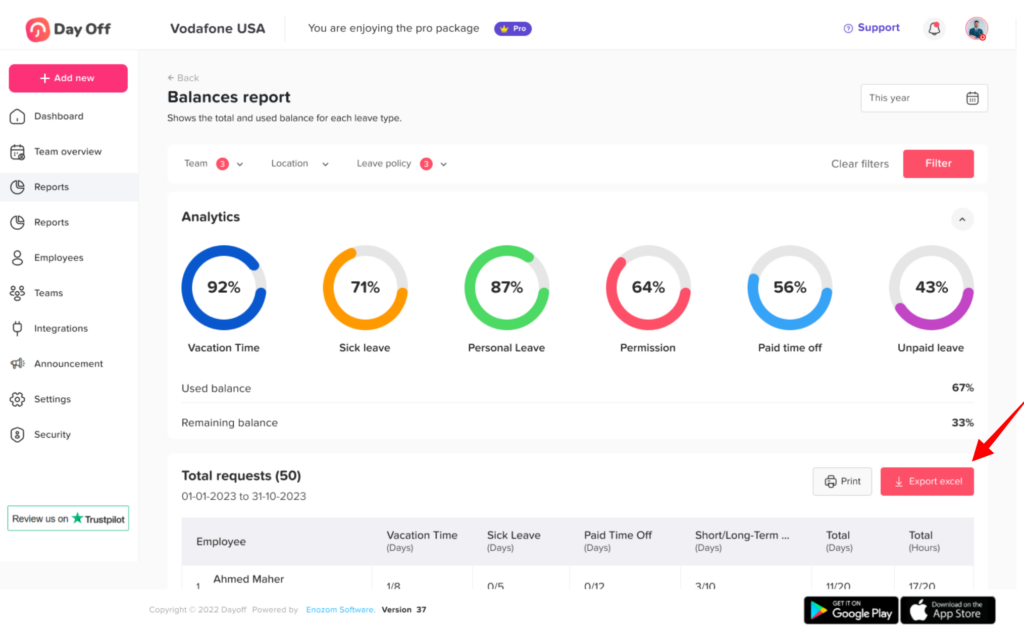
To export a report:
- In the left-hand menu, go to Absence → Reports
- Select the type of report you need (e.g., balances, detailed, or total report)
- Apply filters (e.g., team, date range, or leave type)
- Click Export
- Download the report (typically in Excel)
This allows you to customize reports based on your needs before exporting.
Why Export Reports
Exporting gives you a copy of your leave data that you can share, archive, or analyze further. For example, HR teams often use exported files to:
- Prepare payroll and check unpaid leave.
- Share balance summaries with finance or leadership.
- Spot trends, such as busy months or frequent sick days.
- Keep records for audits.
Because the file usually opens in a spreadsheet tool like Microsoft Excel, you can sort, chart, or combine the data as you like.
Tips Before You Export Reports
- Pick the report type first. Learn more about the types of reports available.
- Apply filters so the file only contains what you need. For example, you can filter reports by date.
- Check that the person exporting has the right access. Not every role can view or export reports.
Finally, remember that exported files contain employee data. So, store and share them with care.
Who Can Export Reports
Access to reports depends on role permissions. Admins have full access, while custom roles need reporting permissions enabled. As a result, a manager may not see the Export option until their role is updated. For details, see who has permission to view and export reports.