





-
Permissions
- Can a manager add requests for their team?
- Can a manager view the balances of their team?
- Can I create a "View-Only" role for our external accountant or auditor?
- How Do I Give a Manager Access to Attendance Review for Their Team Only?
- How Do I Give Someone Access to Time Tracker Reports Without Making Them an Admin?
- How Do I Let an Employee Track Time and Use Timesheets?
- How to change a user's role/permissions?
- How to create different roles and access levels in Day Off?
- What Time Tracker Permissions Can I Give in Day Off?
- What's the Difference Between the Projects and Tasks and Manage Projects Permissions?
- Who Can Change the Time Tracker Settings and Clients?
As your team evolves, you may need to change role permissions for some users. Updating roles allows you to adjust what each user can see and do.
Using the Web Version
Role and permission changes are managed through the web platform.
To update a user’s role:
- Go to People → Employees
- Open the employee’s profile you want to update
- Change their assigned role (e.g., Admin, Employee, or a custom role such as Manager)
- Save the changes
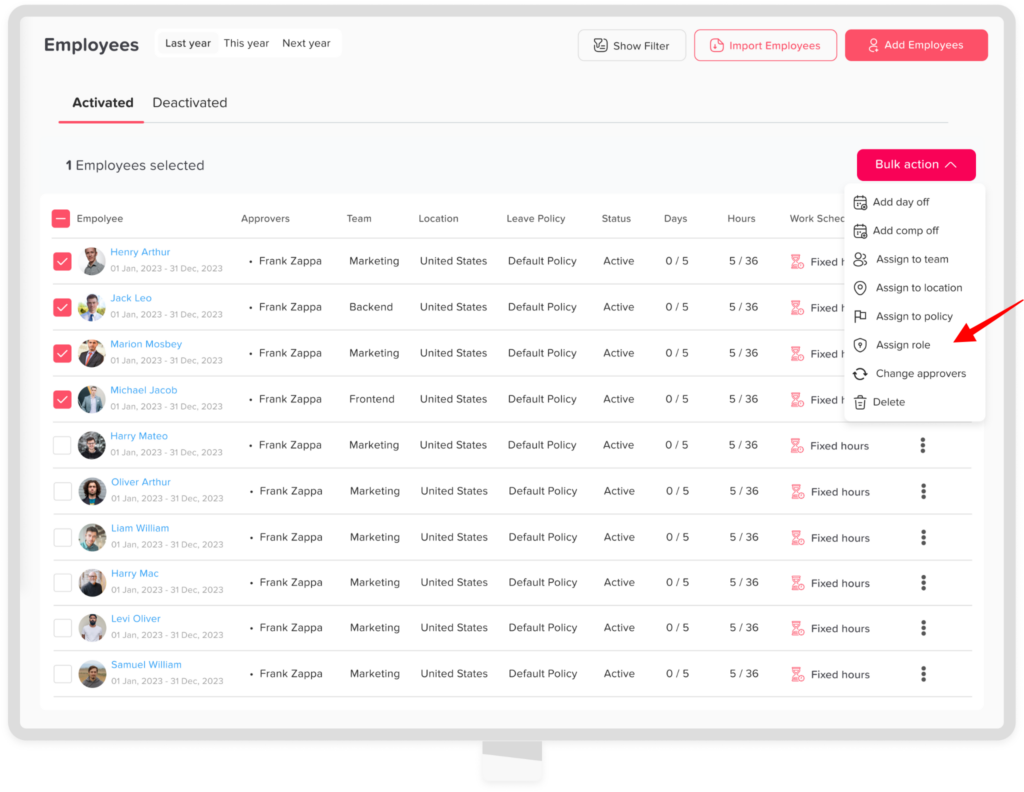
To update multiple users’ roles:
- Go to People → Employees
- Select the required employees
- Click on Bulk action
- Choose assign to role
- Choose the role
- Click confirm
When to Change Role Permissions
Roles should always reflect what people actually do. For example, you may want to update a role when:
- An employee is promoted to a manager position.
- Someone joins HR and needs access to policies and balances.
- A person moves to another team or takes on fewer duties.
- An external accountant or auditor needs temporary, view-only access.
Edit the Permissions of an Existing Role
Sometimes the user’s role is right, but the role itself needs different access. In that case, go to Settings & integrations → Security → Permissions and edit the permission group. Every user with that role then gets the updated access at once.
To build a new role from scratch, follow our guide on creating roles and access levels.
Tips for Managing Roles
- Give each person only the access they need, following the principle of least privilege.
- Use bulk actions when several people need the same role.
- Review roles regularly, especially after team changes.
Keep in mind that role and permission changes happen in the web platform. So, when an employee asks for different access, an admin can sign in on the web and update it in a few clicks. It also helps to tell the user what changed, so they know what to expect the next time they log in.