





-
Permissions
- Can a manager add requests for their team?
- Can a manager view the balances of their team?
- Can I create a "View-Only" role for our external accountant or auditor?
- How Do I Give a Manager Access to Attendance Review for Their Team Only?
- How Do I Give Someone Access to Time Tracker Reports Without Making Them an Admin?
- How Do I Let an Employee Track Time and Use Timesheets?
- How to change a user's role/permissions?
- How to create different roles and access levels in Day Off?
- What Time Tracker Permissions Can I Give in Day Off?
- What's the Difference Between the Projects and Tasks and Manage Projects Permissions?
- Who Can Change the Time Tracker Settings and Clients?
Yes, Day Off allows managers to add requests for their team. By submitting requests on their behalf, managers can support employees who are unavailable or need assistance.
How Managers Add a Request
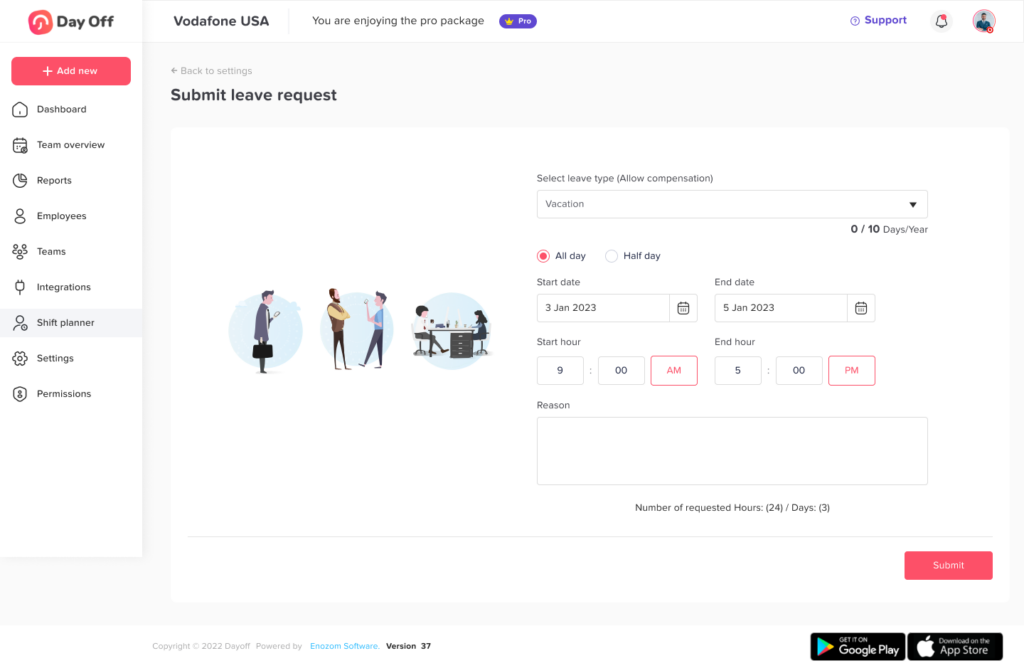
Managers can easily submit a request for any team member from their profile:
- Go to People → Employees
- Click on the employee’s name to open their profile
- Click on “Add day off”
- Choose the leave type
- Select the start and end date
- Click Submit Request
How the Request is Processed
Once submitted:
- The request is automatically recorded in the system
- It is added as an accepted request (not pending)
This makes it faster for managers to handle requests without extra approval steps.
Permission Based Control
This feature depends on role permissions. Admins can enable or restrict whether managers can add requests for their team.
When Managers Add Requests for Their Team
Most of the time, employees submit their own requests. However, there are moments when a manager needs to step in. For example:
- An employee calls in sick and cannot open the app.
- A team member is new and has not logged in yet.
- An employee is traveling and asks the manager to record the absence.
In these cases, a manager can record the leave right away. As a result, the team calendar stays accurate and everyone knows who is off.
Good Practices for Managers
- Let the employee know when you add a request for them.
- Choose the correct leave type so balances stay accurate.
- Check the employee’s remaining balance first. See how managers can view team balances.
Because these requests are added as accepted, take a moment to double-check the dates before you submit.
Finally, if a manager cannot see the “Add day off” option, an admin may need to update their permissions. Learn how to set up roles and access levels.