







Related reading: PTO When an Employee Changes From Full-Time to Part-Time, PTO Accrual Effective Dates, Attendance Point System, PTO Tracker For 24/7 Teams, How To Manage Emergency Leave Requests, PTO for Project-Based Teams, How To Track Leave For Employees With Multiple Work Schedules, Leave Coverage Planning, Employee Self-Service PTO, Floating Holidays vs PTO, Digital Vacation Tracker To Replace Spreadsheets, How To Manage PTO Requests In Microsoft Teams, How To Build A PTO Workflow For A Company With No HR Team, and PTO For Customer Support Teams.

For small businesses, startups, nonprofit organizations, and growing teams, a free PTO tracker app can introduce a structured leave management process without adding another major software expense. Instead of manually calculating vacation days or searching through old messages, the company can maintain a central record of employee time off.
However, not every free app provides the same level of value. Some tools only record basic requests, while others support leave policies, approval workflows, calendars, balance calculations, reports, and mobile access.
This guide explains how a free PTO tracker works, which features matter most, how to choose the right system, and how to manage employee time off more accurately.
What Is a Free PTO Tracker App?
A free PTO tracker app is a digital system that helps businesses manage paid time off and other employee absences without paying a monthly subscription for the basic plan.
Employees can usually use the app to:
- Check their available PTO balance
- Submit vacation or leave requests
- Choose the correct leave type
- Add relevant notes
- Review the status of a request
- View previously approved time off
Managers and HR administrators can use the same system to:
- Review incoming leave requests
- Approve or decline requests
- Check employee availability
- Monitor PTO balances
- View upcoming absences
- Maintain a leave history
- Generate basic reports
The exact features depend on the provider. Many free plans are designed for small teams and may limit the number of employees, approval levels, integrations, reports, or advanced policy settings.
A good free plan should still cover the essential time off workflow, from the employee’s initial request to the final balance update.
Why Employee Time Off Tracking Becomes Difficult
Time off management may appear simple when a business has only a few employees. A manager might approve a vacation request through email and update a spreadsheet afterward.
As the team grows, this informal process becomes harder to control.
Common problems include:
- Managers forgetting to update PTO balances
- Employees receiving different answers about available leave
- Requests remaining unanswered in email inboxes
- Overlapping vacations creating staffing shortages
- Public holidays being deducted incorrectly
- Part time employees receiving the wrong entitlement
- Former employees remaining in active reports
- Payroll receiving incomplete absence information
- Employees requesting more time than they have available
- Changes being made without a clear history
The problem is not always the company’s leave policy. The problem is often how the policy is recorded and applied.
A PTO tracker app creates a repeatable process so that every request follows the same steps.
Manual PTO Tracking vs a PTO Tracker App
| Area | Manual PTO Tracking | PTO Tracker App |
|---|---|---|
| Leave requests | Submitted through email, paper, or chat | Submitted through a central employee account |
| PTO balances | Calculated manually in a spreadsheet | Updated according to configured rules |
| Approvals | May be delayed or forgotten | Sent directly to the assigned approver |
| Team availability | Checked across calendars and messages | Displayed in a shared leave calendar |
| Records | Stored in separate files or inboxes | Maintained in one organized system |
| Reporting | Requires manual spreadsheet preparation | Generated from recorded leave data |
| Remote access | Depends on access to company files | Usually available through web or mobile apps |
| Policy consistency | Depends heavily on each manager | Supported by shared leave settings and workflows |
Spreadsheets can still be useful for temporary planning or very small teams. However, they do not normally provide employee self service requests, automated notifications, approval routing, real-time balance visibility, or controlled permissions.
A spreadsheet stores information. A PTO tracker manages a process.
What Types of Employee Time Off Can Be Managed?
Although PTO often refers to a combined bank of paid leave, companies may manage several separate absence categories.
A PTO tracker app may be used for:
- Annual vacation
- Paid time off
- Sick leave
- Personal leave
- Parental leave
- Bereavement leave
- Floating holidays
- Volunteer leave
- Study leave
- Unpaid leave
- Compensatory time off
- Jury duty
- Military leave
- Emergency leave
- Half day absences
- Hourly leave
- Remote work days
- Custom company leave types
Separating leave types helps the company apply the correct entitlement, approval rules, documentation requirements, carryover limits, and reporting categories.
For example, a vacation request may reduce the employee’s annual PTO balance, while jury duty may be recorded without reducing that balance. Unpaid leave may require approval but should be reported separately for payroll.
Essential Features of a Free PTO Tracker App
A free tool does not need to include every advanced HR feature. It should, however, provide enough functionality to replace the most unreliable parts of a manual process.
Employee Self Service Requests
Employees should be able to submit requests without contacting HR each time they need leave.
A clear request form should allow them to select:
- Start and end dates
- Full day, half day, or hourly leave
- Leave type
- Relevant notes
- Supporting information, where appropriate
Self service requests reduce repetitive administrative work and create a consistent record.
Visible PTO Balances
Employees should be able to see how much time they have available before requesting leave.
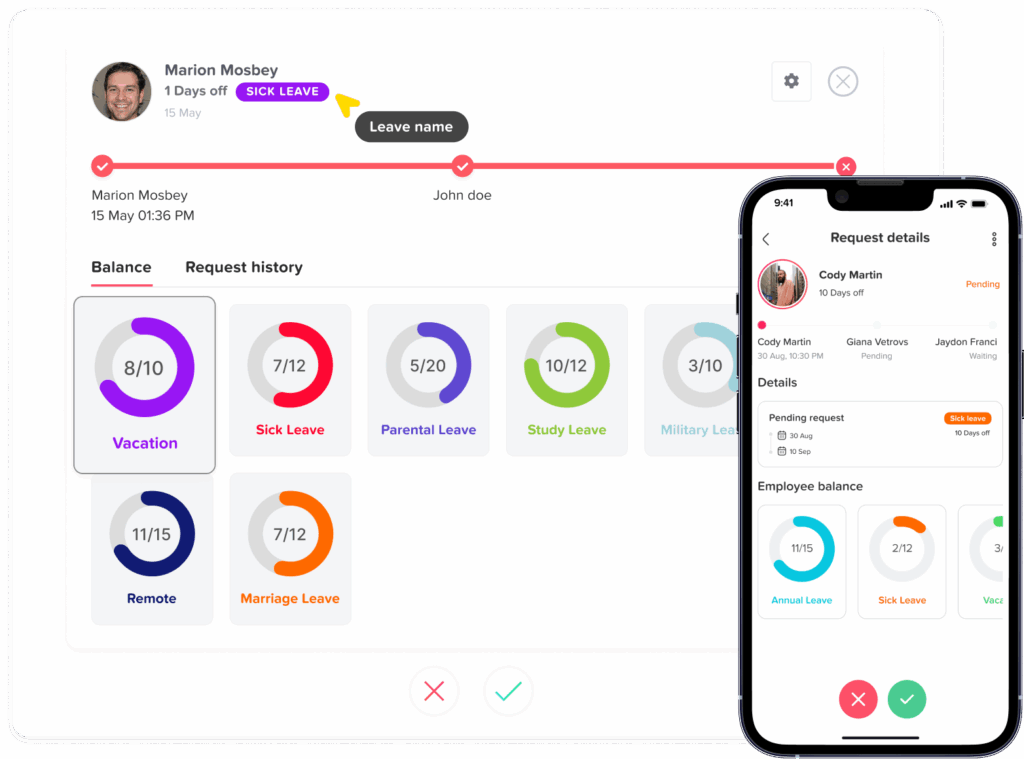
A useful balance view may show:
- Current available balance
- Time already used
- Approved future leave
- Pending requests
- Accrued time
- Carryover from a previous period
- Manual adjustments
Visible balances can reduce questions such as “How many vacation days do I have left?” and help employees plan leave more responsibly.
Approval Workflows
When an employee submits a request, it should be routed to the correct manager or administrator.
The approver should be able to review:
- The requested dates
- The number of leave days or hours
- The employee’s available balance
- Other employees already away
- Notes connected to the request
- Possible scheduling conflicts
Even a basic one-step approval process is more reliable than approvals scattered across email and messaging platforms.
Custom Leave Types
Companies rarely use the same leave categories.
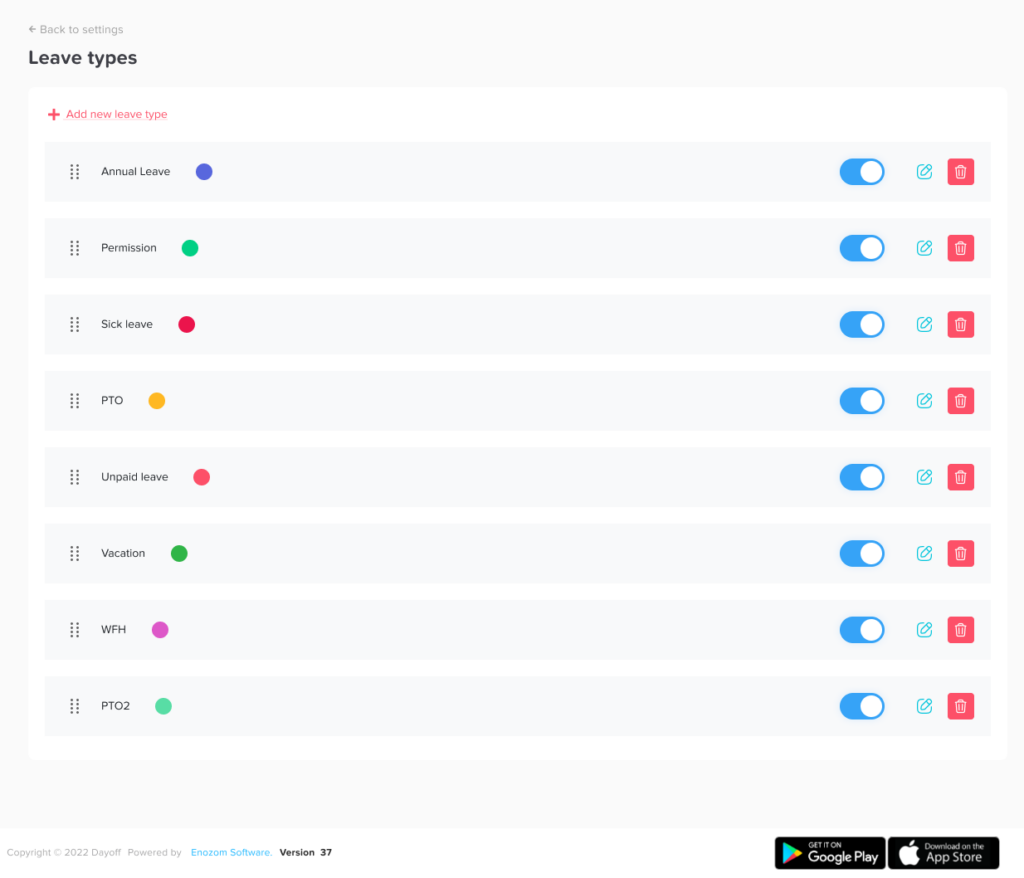
The app should allow administrators to create leave types that reflect the actual policy. Each leave type may need its own:
- Name
- Annual entitlement
- Color
- Unit of measurement
- Approval requirement
- Carryover rule
- Accrual method
- Visibility setting
A flexible structure is especially important for companies operating across multiple locations or employing different categories of workers.
Shared Leave Calendar
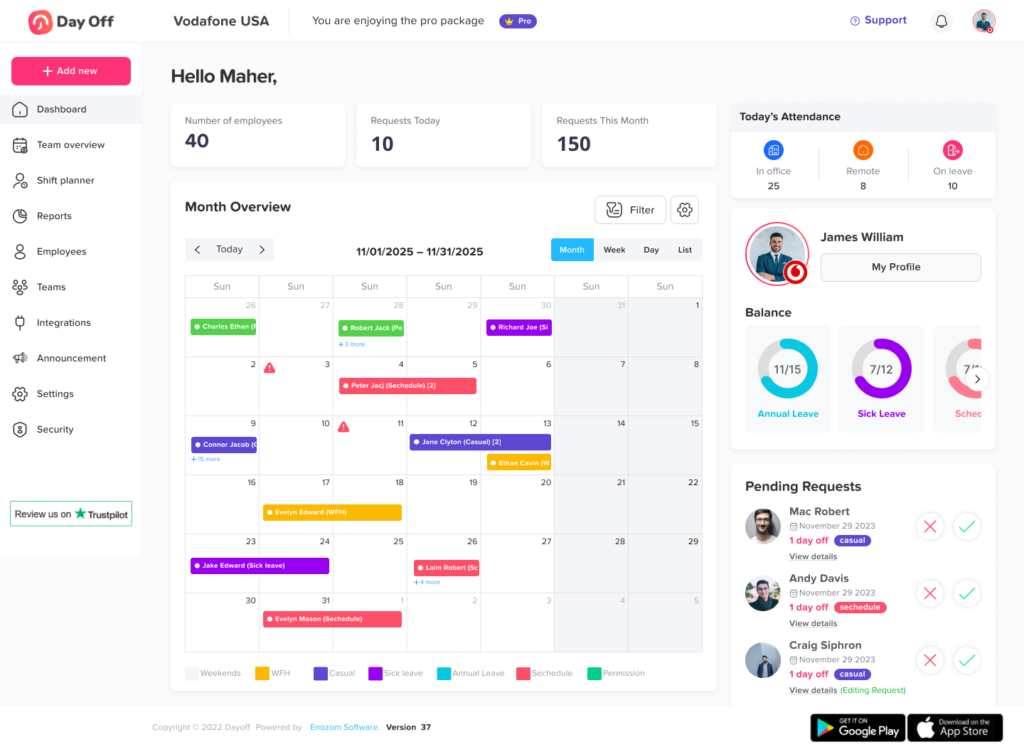
A shared calendar provides a visual overview of upcoming absences.
Depending on permissions, employees and managers may be able to see:
- Who is away
- Which department is affected
- The duration of the absence
- Public holidays
- Approved leave
- Pending requests
- Team coverage
The calendar should also protect employee privacy. Not every user needs to see the reason for an absence or the exact leave category.
Notifications
Notifications help prevent requests from being forgotten.
The system may send notifications when:
- A new request is submitted
- A request is approved
- A request is declined
- A request is changed
- A request is canceled
- An employee’s balance is adjusted
- An upcoming absence is approaching
Notifications may be delivered through email, mobile push notifications, workplace communication tools, or the app itself.
Reports and Exportable Records
Basic reports can help HR and managers review leave activity without rebuilding the data manually.
Useful reports include:
- Current balance report
- Leave request history
- Time-off usage by employee
- Absence totals by leave type
- Upcoming leave report
- Carryover report
- Accrual report
- Department absence report
Export options may also be important when information must be shared with payroll, finance, management, or external advisers.
Features to Evaluate Before Choosing an App
| Feature | Why It Matters | What to Check |
|---|---|---|
| Employee limit | Free plans may only support small teams | Confirm how many active users are included |
| Leave types | Policies may include more than vacation and sick leave | Check whether custom leave types are supported |
| Balance tracking | Incorrect balances create disputes | Review how usage, adjustments, and accruals are calculated |
| Approval workflow | Requests must reach the correct decision-maker | Check the number of approvers and approval levels |
| Shared calendar | Managers need visibility before approving leave | Review filters, privacy controls, and team views |
| Mobile access | Deskless and remote employees may not use a computer | Confirm iOS, Android, or mobile-browser availability |
| Reports | HR and payroll need reliable records | Check available reports and export formats |
| Public holidays | Holidays should not always reduce PTO | Confirm whether holidays can be assigned by location |
| Work schedules | Not every employee works Monday through Friday | Check support for part-time or custom schedules |
| Upgrade path | The company may outgrow the free plan | Compare paid features, limits, and future pricing |
How PTO Balance Calculations Work
A PTO balance usually starts with an opening entitlement and changes when time is earned, used, carried forward, or manually adjusted.
A simple balance formula is:
Available PTO = Opening balance + PTO earned + carryover + positive adjustments − approved PTO used − negative adjustments
Consider an employee who begins the year with 80 hours of PTO.
During the first quarter:
- The employee earns 30 additional hours
- Uses 16 hours
- Receives a 4-hour correction
- Has 8 hours of future leave approved
Depending on the company’s reporting method, the system may display:
- Current balance before future leave: 98 hours
- Available balance after approved future leave: 90 hours
The company should decide whether approved future requests are immediately deducted from the available balance or displayed separately.
Pending requests should also be handled consistently. Some systems reserve the requested hours while approval is pending. Others only deduct the time after approval.
Accrued PTO vs Upfront PTO
A PTO tracker should reflect how the company provides leave.
Upfront PTO
Under an upfront method, the employee receives the full entitlement at the start of the leave year.
For example:
- Annual entitlement: 120 hours
- Leave year begins: January 1
- Opening balance on January 1: 120 hours
This method is easy for employees to understand, but the employer may need rules for new hires, departing employees, and employees who use more time than they have earned.
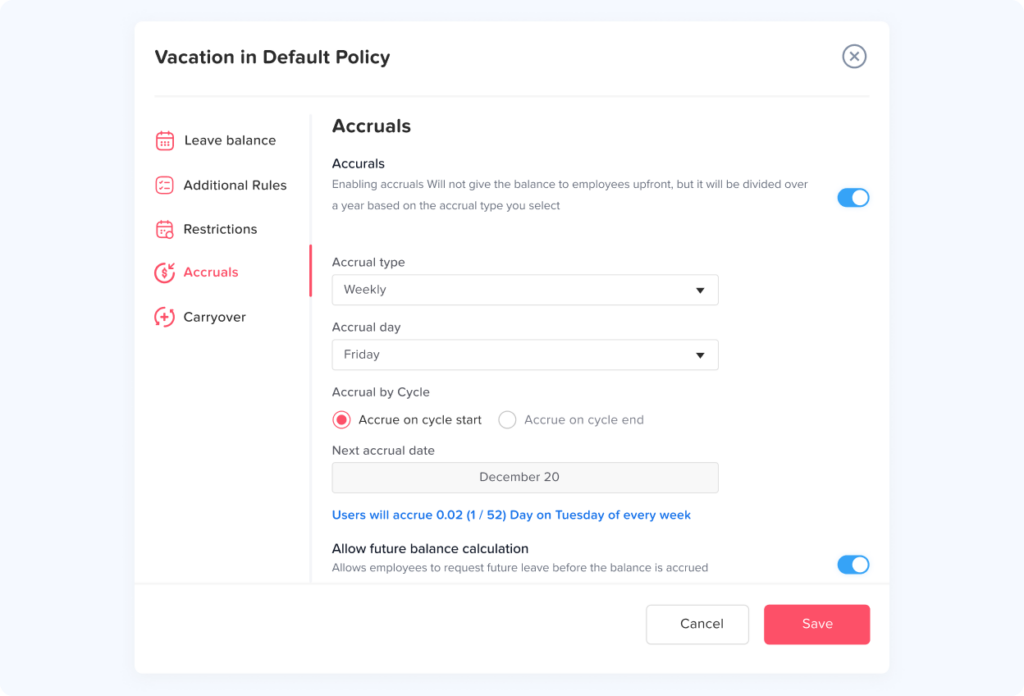
Accrued PTO
Under an accrual method, employees earn PTO gradually.
For example, an employee entitled to 120 hours annually may earn:
- 10 hours per month
- Approximately 4.62 hours per biweekly pay period
- Approximately 2.31 hours per week
Actual calculations depend on the policy, payroll frequency, rounding method, eligibility date, and applicable law.
A PTO tracker app can apply the configured accrual rule consistently instead of requiring HR to update every employee’s balance manually.
Anniversary Based PTO
Some companies reset or grant PTO on each employee’s work anniversary rather than using one company-wide calendar year.
This requires the system to track a separate leave cycle for every employee. A spreadsheet can manage this, but the process becomes more complicated as the number of employees increases.
Benefits for Employees
A PTO tracking app is not only an HR tool. It also gives employees a clearer and more predictable experience.
Greater Balance Transparency
Employees can review their available time without waiting for HR to respond.
Easier Requests
A structured form is faster than writing an email and remembering which manager to include.
Clear Request Status
Employees can see whether a request is pending, approved, declined, or canceled.
Better Vacation Planning
A shared calendar helps employees avoid requesting dates when too many colleagues are already away.
Consistent Treatment
When policies are configured correctly, employees in the same policy group are less likely to receive different balance calculations or approval treatment.
Benefits for Managers
Managers need enough information to make timely decisions without spending hours reviewing records.
A PTO tracker helps managers:
- Receive requests in one place
- Check team coverage
- Review overlapping absences
- Approve or decline requests promptly
- Avoid scheduling work for unavailable employees
- Plan temporary coverage
- Review attendance patterns
- Maintain a clear decision history
The system should support good management decisions, not replace them. Managers still need to consider workload, staffing requirements, employee wellbeing, fairness, and company policy.
Benefits for HR and Payroll
HR teams often become the central point for every leave related question.
A PTO tracker reduces repetitive administrative work by allowing employees and managers to complete routine steps themselves.
HR can focus on:
- Designing leave policies
- Reviewing unusual cases
- Correcting data errors
- Monitoring policy consistency
- Supporting managers
- Preparing reports
- Coordinating with payroll
- Maintaining reliable employee records
Payroll teams also benefit when approved unpaid leave, paid leave, and balance adjustments are clearly documented.
The PTO tracker should not automatically be treated as the final payroll authority unless it is integrated and reconciled with the payroll system.
What Does “Free” Really Mean?
Free PTO tracker apps usually follow one of several models.
Free Forever Plan
The provider offers a permanent free plan with defined limits. The business may continue using it as long as it remains within those limits.
Free Plan With Employee Limits
The main features are available at no cost, but only for a certain number of employees.
Feature Limited Free Plan
The tool supports basic requests and balances, while advanced approvals, reports, integrations, security controls, or policy settings require a paid plan.
Free Trial
A trial gives temporary access to paid features. It is not the same as a permanent free plan.
Open Source or Self Hosted Tool
The software may be free to download, but the company may still pay for hosting, implementation, maintenance, updates, security, and technical support.
Before selecting a tool, businesses should confirm:
- Whether the plan expires
- Whether a credit card is required
- The maximum number of employees
- Which features are included
- Whether support is available
- Whether data can be exported
- What happens when the employee limit is reached
- Whether the company can downgrade later
- Whether historical records remain accessible
Free PTO Tracker App vs a Free Spreadsheet
A spreadsheet may appear to be the simplest free option, but its indirect costs can grow over time.
Someone must create the spreadsheet, update formulas, manage access, review requests, adjust balances, prepare reports, correct errors, and protect historical records.
The cost is not necessarily a software invoice. It can be the staff time spent maintaining the process.
A free PTO tracker app provides more value when it can automate routine actions, including:
- Routing requests
- Updating approved leave
- Recording decisions
- Showing balances
- Sending notifications
- Updating calendars
- Generating reports
For a team with only one or two employees, a spreadsheet may be sufficient. For a growing team, a dedicated app usually creates a clearer process.
PTO Tracking and Legal Compliance
A PTO tracker can help document how a leave policy is applied, but software does not make a policy legally compliant by itself.
In the United States, the Fair Labor Standards Act does not generally require employers to provide paid vacation, sick leave, or holiday leave. These benefits are commonly determined by employer policy, employment agreements, collective bargaining agreements, and applicable state or local requirements.
Other laws may still affect employee leave. For example, eligible employees may receive unpaid, job-protected leave under the Family and Medical Leave Act. In some situations, an employee may use accrued paid leave at the same time as FMLA leave, subject to applicable rules and the employer’s normal leave procedures.
State and local rules may address areas such as:
- Paid sick leave
- PTO payout at termination
- Carryover requirements
- Accrual caps
- Frontloading rules
- Permitted uses of sick leave
- Employee notice requirements
- Record retention
- Waiting periods
- Leave documentation
International employers may also need to manage statutory annual leave, public holidays, parental leave, sick leave, and employee entitlements that differ by country.
Businesses should have their policies reviewed by qualified HR or legal professionals in the jurisdictions where employees work.
Information a PTO Record Should Preserve
A reliable PTO record should show more than the employee’s current balance.
It may need to preserve:
- Employee name or identification number
- Employment status
- Assigned leave policy
- Work schedule
- Leave type
- Request submission date
- Requested absence dates
- Number of days or hours
- Approval status
- Approver
- Decision date
- Employee notes
- Manager notes
- Balance before the request
- Balance after approval
- Manual adjustments
- Reason for each adjustment
- Carryover
- Accrual history
- Cancellation history
Historical records should not be silently overwritten. When possible, corrections should preserve the original entry, the updated information, who made the change, and why it was changed.
How to Implement a PTO Tracker
| Implementation Stage | Recommended Action | Desired Result |
|---|---|---|
| Policy review | Confirm leave types, balances, accruals, carryover, schedules, and approvers | Clear rules before configuration |
| Data preparation | Clean the employee list and verify current balances | Accurate opening data |
| System setup | Add leave policies, employees, holidays, schedules, and approval workflows | A system matching the real policy |
| Testing | Submit sample requests and review calculations | Errors found before launch |
| Employee communication | Explain how to log in, request leave, and check balances | Better adoption |
| Launch | Set a clear date for using the new process | One official request channel |
| First review | Audit balances, requests, notifications, and reports | Early issues corrected |
| Ongoing review | Check policy settings and records regularly | Reliable long-term operation |
Using Day Off as a Free PTO Tracker App
Day Off is a PTO and leave management application available through web, iOS, and Android. It helps employees submit leave requests, managers review approvals, and teams monitor absences from a central system.
According to the official Day Off pricing page, the Free plan is available for up to 10 users. It includes a calendar view, customizable leave types, one-step approval, and management reports. Organizations can upgrade as their employee count or feature requirements grow.
Day Off can help small teams move away from manually updated spreadsheets by providing:
- Employee leave requests
- Manager approvals
- PTO balance visibility
- Custom leave types
- Shared calendar access
- Management reports
- Web and mobile availability
The broader Day Off platform also supports integrations and additional leave management capabilities, although businesses should confirm which features are included in their selected plan before implementation.
Frequently Asked Questions
What is the best free PTO tracker app?
The best free PTO tracker app depends on the size of the team and the complexity of its leave policies. A useful free app should support employee requests, manager approvals, balance tracking, leave types, a shared calendar, and basic reports. Businesses should also evaluate employee limits, mobile access, data exports, security, and upgrade options.
Can I track PTO for free?
Yes. Some providers offer permanent free plans for small teams. However, businesses should distinguish between a free-forever plan and a limited-time free trial. They should also review user limits and feature restrictions.
Is a PTO tracker better than Excel?
A PTO tracker is generally more suitable when employees need self-service requests, automatic notifications, manager approvals, shared calendars, controlled access, and continuously updated balances. Excel may still work for a very small team with simple policies, but it requires more manual administration.
Can a PTO tracker calculate accruals?
Some PTO tracker apps support automatic accrual calculations. The administrator may be able to choose weekly, biweekly, semimonthly, monthly, annual, or hours-worked accruals. Accrual support may be limited to paid plans, so the included features should be checked carefully.
Can employees see each other’s PTO?
That depends on the company’s visibility settings. Employees may be allowed to see who is away without seeing private notes, leave reasons, or balances. The company should configure calendar visibility according to operational needs and privacy requirements.
Can a PTO tracker manage unpaid leave?
Yes. Unpaid leave can usually be created as a separate leave type. It may follow its own approval workflow and should be reported clearly so payroll can determine whether a pay adjustment is required.
Does a PTO tracker replace payroll software?
No. A PTO tracker manages leave requests, balances, approvals, calendars, and records. Payroll software calculates wages, deductions, taxes, and payments. The two systems may exchange data, but the company should reconcile leave records before payroll is finalized.
Can a PTO tracker manage part-time employees?
Yes, provided that the app supports custom policies or employee groups. Part-time employees may receive prorated entitlements, use different work schedules, or accrue leave based on hours worked.
Should pending PTO be deducted from the available balance?
There is no single method used by every employer. Some businesses reserve requested time while approval is pending, while others only deduct leave after approval. The method should be documented in the policy and displayed clearly in the system.
Is PTO tracking required by law?
Requirements vary by location. U.S. federal law does not generally require private employers to provide paid vacation, but state and local laws may regulate paid sick leave, PTO payout, carryover, notices, and recordkeeping. Employers should review the rules applying to every location where employees work.
Conclusion
A free PTO tracker app can give a small business a more organized way to manage employee time off without immediately investing in a large HR system.
The right app should help employees understand their balances, submit requests easily, and review their leave history. It should help managers make informed approval decisions and give HR a reliable record of policies, balances, adjustments, and absences.
Before choosing a system, review the employee limit, leave policy options, approval workflow, calendar visibility, reports, mobile access, data exports, and future upgrade costs. The goal is not simply to replace a spreadsheet. It is to create a consistent and transparent process that can continue working as the team grows.
With Day Off, small teams can start tracking PTO, vacation, sick leave, and other employee absences through a centralized web and mobile experience. Set up your leave policies, invite employees, and begin managing time off with greater accuracy and less administrative work.